Stacks Docklet

Hi Matonga,

I'm quite satisfied with this last version now. To me all the main issues have been solved

What remains to be done is the problem with two stacks, clicking on one after the other the first one closes, the second opens but the dock zooms out.

Concerning the long filenames problem, maybe you could at least allow more horizontal space for the filenames.

see that page : http://www.tech-recipes.com/rx/2630/leopar...folder_grid_fan

Apparently, filenames with at about 16 characters should be able to display normally on one line.

BTW, just for the sake of aesthetics, I seems grid mode has small a arrow pointing to the

docklet icons ?
#484093

@matonga: I don't know if your aware but i think you may have a bandwidth issue with your hosting site. I tried to head over to your page to grab the update but couldn't be found.

Also i don't know if this is your account or not but i'd take a look at this if you weren't aware:

http://anarchj.deviantart.com/art/Leopard-Stacks-72627319

Anyway that you can upload the current build to DockEx.com

#484096

Matonga, thak you for answer.

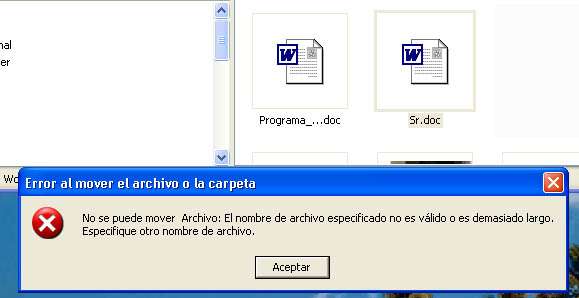
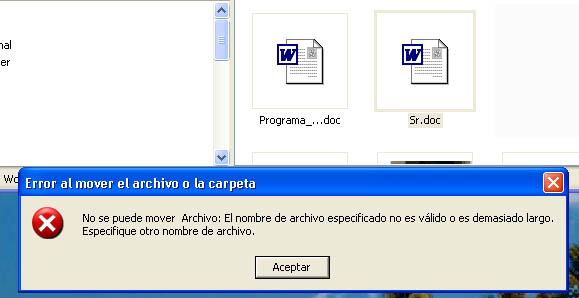
This is the message that i get every time. I use ObjectDock version 1.0, build 285 (freeware). The name of the file is Sr.doc

post-27037-1198268731_thumb.jpg

message.jpg
message.jpg

#484097

@chatpristi:

Yes, small arrow didn't appear in Leopard tour so that's why Stack Docklet doesn't have one :)

Icons in Mac are much bigger, even the font is bigger, but I want to keep it in some way that it will fit fine in a PC.

@sei-aidyn:

It says 404 page not found? Or it says something else?

If it says 404 page not found then it's not a bandwidth issue.

(anyway I should check number of downloads, because I don't know how many downloads the file has).

That's not my account. Mine is matonga (http://matonga.deviantart.com/) (nothing worth to see in my personal page)

Even though the one who posted it didn't ask for my permission, he left the "Developed by Matías Moreno" and ";http://www.matiasmoreno.com.ar/" intact in the settings dialog, so I will not take it much seriously (the _by_Anarchj is appended automatically by deviantART).

@af14:

Error de nombre demasiado largo... mmm... tendría que ver.

Sólo por casualidad... la carpeta en el dock la tenés configurada como X:AlgunaCarpeta o X:AlgunaCarpeta con barra al final? (podés tener problemas si tiene barra al final)

(translation: trying to solve a "Name too large" error).

#484105

I´ve tried with and without and it doesn´t work. I have only this problem with drag and drop, the rest works perfectly.

#484116

@all:

New version with more options: customize 'Open folder' and 'xx more...' texts, and text font/size.

@af14:

Was Sr.doc open in Word or any other program while you where trying to move it?

#484119

Any chance for win2k support? :)

#484120

Any chance for win2k support? :)

Let's see... for the GDI+ part:

Win2K: upgrade to Service Pack 4

Win2K3: has GDI+ afaik.

Now, for the 48x48 icons part:

Win2K: have no idea, should check...

Win2K3: should work.

#484121

@ matonga: Something strange happened after I logged in on Windows [Vista]:

My second Stack Docklet disappeared. Well, it actually did not disappeared, but it looked like I've just added it to the Dock with no link to a folder nor a custom icon.

I linked the Docklet to "G:[My Username]". Maybe it's because of the last backslash...

#484123

In win2k when right-clicking rocketdock a dialogbox with a white X in a red circle pops up saying:

The ordinal 727 could not be located in the dynamic link library shell32.dll

#484124

Hi,

When I change the name of the open folder dialog, it only changes in Grid mode, not in the fan.

I´d suggest to allow some more letters in grid mode, the gap is wide enough between the texts.

#484125

@ matonga: I've found another bug: Global settings for text just works in "Grid"-Mode, not with "Fan". I renamed "Open Folder" in the change only appears in my Docklet with Grid-Mode. Restarting RocketDock didn't help either.

But hey: I really love your nice little app :).

Btw: Will you add the little arrow for the Docklet soon?

#484126

No man. And I´ve tried with different kind of files: jpg, doc, mp3.

#484127

Hi, I've downloaded and installed the last version on rocketdock and rk launcher.

it works fine in rocketdock, but not in rk launcher...if i try to add docklet, i've only the recyclebin in the list, stacks docklet is not present.

How can i resolve this problem?

#484128

@szekelya:

Is Service Pack 4 installed in your Win2K? Just to confirm. In such case, I can't give support for 48x48 icons in Windows 2000 :(

Can you actually set Explorer in Windows 2000 to show 48x48 icons?

@DZGH_Operator:

Fan mode uses the "%d more..." text, not the "Open folder" text.

I won't be adding the little arrow any soon, or may be I'll do it optional, as it seems I didn't leave enough space in the borders and will have to adapt some code (hard stuff to do at this point, scheduled for later, sorry).

@af14:

Mmm... no idea. I don't know how to reproduce the error. May I PM you a test version of Stack Docklet to get a closer look to the problem?

@nickdc:

Is the docklet in the right folder? It should be under the docklets folder under it's own folder. BTW take into account I have never installed RKLauncher... ^-^;;

Edit: I just installed RK Launcher to test:

1. Extract the StackDocklet folder into the RKLauncher's Docklets folder (extract the folder itself, not it's contents).

2. In RK Launcher, right click and select Add Docklet...

3. In the right pane "Docklet Information", for Type choose ObjectDock Docklet.

4. Now StackDocklet appears in the Docklets list (with a horrible Delphi default icon!!! Oh f**ck hahahaahaha).

5. Select the icon and click on Add to Dock.

6. Now close the dialog, right click the docklet icon, and set the settings to your wish.

Note: if you open and close the stack twice, RK Launcher goes crazy trying to drag & drop the docklet icon or something like that. (???) I would contact the author but... last release is from about July 2005?

#484131

@nickdc:

Is the docklet in the right folder? It should be under the docklets folder under it's own folder. BTW take into account I have never installed RKLauncher... ^-^;;

Edit: I just installed RK Launcher to test:

1. Extract the StackDocklet folder into the RKLauncher's Docklets folder (extract the folder itself, not it's contents).

2. In RK Launcher, right click and select Add Docklet...

3. In the right pane "Docklet Information", for Type choose ObjectDock Docklet.

4. Now StackDocklet appears in the Docklets list (with a horrible Delphi default icon!!! Oh f**ck hahahaahaha).

5. Select the icon and click on Add to Dock.

6. Now close the dialog, right click the docklet icon, and set the settings to your wish.

Note: if you open and close the stack twice, RK Launcher goes crazy trying to drag & drop the docklet icon or something like that. (???) I would contact the author but... last release is from about July 2005?

Thanks bro, it works very good right now! Awesome app! ;)

#484163

@ matonga: Well, Fan-Mode uses "%d more", but only if there are too much elements in the folder. Please take a look at the screenshot below:

stacksdockletfanqg2.png

If you don't have many elements inside the stack [i have 7 folders in this one], then it shows "Open folder"

#484168

How can I change the "Open Folder" to read what I want. I notice you say above that you can. I cant seem to find a way?

#484172

Matonga,

THANK YOU for this awesome app. I am using it with Object Dock and so far it is working the way it should.

One thing: is it possible to add drag and drop functionality? I mean, drag a folder onto the stacks icon (instead of going through the dialog box) to add it.

Again, thanks so so much.

#484174

en el modo ventilador, el texto de OPEN FOLDER no se puede personalizar, osea de dejar, deja, pero no aplica los cambios. En modo grilla no hay problema, saludos. Genial docklet, el mejor de todos, el mas lindo, y el mas util.

#484175

Hi, I've a question...how can i change the folder icon that appears in the menu?

I've the default win icon right now

immaginegk1.jpg

but in iconpackager i've selected a leopard folder icon for default folder in win.

#484179

@ nickdc: I think that the Docklet uses the folder icons from your shell32.dll. If you want other icons, then you need to patch you shell32.dll, I guess...

#484182

@nickDC : Go into "my computer" and right click on the folder you want the icon to change. Select "properties" and then click the "customise" tab. Go to Change icon and select an icon you want to use. It has to be an icon tho' not a png. Once youve done that you need to restart your dock for it to be recognised. :)

#484185

Yea, but in this way i need to change folder icon type one by one for my folders...

#484187

Its a dirty job....

#484189