 Aqua-Soft Forums
I just wanted to ask again about the Y'z Dock port?! After having tried ObjectDock recently I did discover that it doesn't do everything I am used to with Y'z Dock... So if at all possible - please port it to Y'z or at least let me know if there is any development to this end! Thx!
Stacks Docklet
Hi,
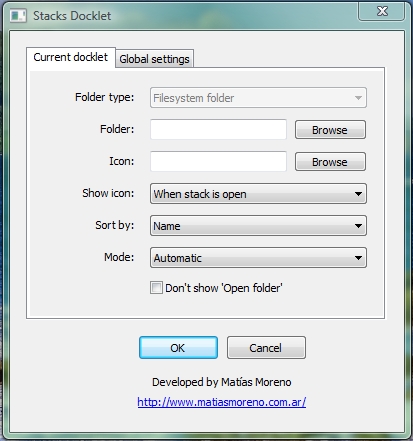
This is an awesome docklet, thanks to the makers! One thing I can't get working is the "Folder type" drop down menu. The only selection I get is "Filesystem folder". Is there a reason I can't select anything else?
Thanks,
b

@burnside:
Yes, there is a reason:
You have downloaded FileSystemFoldersOnly version.
This is considered a mostly stable version. There is an alternative download link with support for Control Panel, My PC, and other places, but it is pretty unstable and crashes the dock badly.
Ahhh, good to know. I'll stick with this one for now then and see if the other version becomes more stable in the future. Great code dude, best docklet I have used. What do you script it with?
It is not a script. I wrote it with Delphi. Though sometimes I wish I had written it in C++.
nice release dude... better animation than previous one... i like it... this new release is very stable for now..
I love this Docklet, but I would like to make a suggestion...
I saw that from time to time the first link for download (in the first post) gets an update... But not always people notice that... So, it's possible to add the most updated version, I mean, next to the link, put the number of the version corresponding to the DLL...
That would make al ot easier knowing when a new version or an updated one comes out...
Spanish:
Matonga, si no me equivoco eres de Argentina, de ser asi el caso, somos vecinos pues yo soy de Chile...
Lo que decia es si puedes poner el numero de version del ultimo DLL subido (ultima version del docklet). De ves en cuando paso a revisar si hay alguna nueva version, pero no siempre se si la hay o no, por lo que tengo que descargar siempre el archivo y revisarlo... Bueno, muchas gracias por esta pequeña pero util aplicacion ^^ y porsupuesto por todo el trabajo que le das ^^...
@matonga:
Count me in... I have been using StacksDocklet for more than 6 months under vista... and since a few days ago under Windows 7 too.
Wanted:
Testers for Windows Vista.
Testers for Object Dock.
I also run OD+ under Vista so I'm in too! 
just in case...are you aware of the fact that the ram occupation grows exponentially everytime you click on one of those docklets?
Mmm... had not noticed that, thanks.
However it increases by about 200k, and not exponentially. But yes, there must be a memory leak around.
Hi Matonga,
first of all my greatest respect for the work you've done so far. But I do have one question: Everybody buzzin about your StackDocklet possibly crashing when using Special Folders. You even removed them in the current version. My question is: What the hell happened to your program?
I am using version 1.0.0.134 and everything, I mean EVERYTHING works absolutely fine. Special Folders, File Folders, no memory leaks, no crashes. Everythings fine. So, what the hell happened? What do I miss?
Hello Matonga,
Thank you for your wonderful application. Personally, I use your dll with the StandaloneStack exe. The standard StandaloneStack download includes version 1.0.0.28, but I thought it would be neat to play with your more recent releases 1.0.0.88 works well and even shows a couple additional icons! 1.0.0.372 however launches well but immediately shrinks back, with no time to click any icon.
It would be great if you could look into this. I will definitely understand though if StandaloneStack and the latest dll's are not supported together.
Cheers
Jim
Seems StandaloneStack and latest versions of Stacks are incompatible. And yes, I'm developing a better solution, though it will take time (which is the thing I lack most now). Also I'm with other projects at the same time, such as some bug-fixes on Focusin XP, and drag & drop and other stuff in Finger XP... and a new project... Cookie Bar.
Mmm... had not noticed that, thanks.However it increases by about 200k, and not exponentially. But yes, there must be a memory leak around.
Just trying out this applet. Really nice. However, I found the memory leak to be much larger than that. On my system it seems to be around 500K. After a while RocketDock went from 6MB to 23MB memory usage. Ouch. Will have to remove it for now till the leak is fixed.
one more thing ... when you click on a stack you get the items to pop up and then the icon change to the one you select to be for the stack (when the option: "Show icon" is When stack is open)
i wonder if you make the icon to change when you click on the stack and then the animation for the stack begins ...
it`s just an option i have noticed
in rest everything is fantastic ... i`m using this program for like 8 mounts and i can imagine my day without it, thanks a lot man
ps: can you give us some more details on what you are working? "Cookie bar"? searched the net but found nothing, REALLY CURIOUS about it
sorry for my English, good day to all
***EDIT: sorry, i had an old version, now it`s going so smooth, big thanks
hello to mr.matonga!!!! just wanna ask if this new release has new animations like "fireworks " , "wind" ,etc. in XWD? .............
It´s not for XWD
Hi Matonga,first of all my greatest respect for the work you've done so far. But I do have one question: Everybody buzzin about your StackDocklet possibly crashing when using Special Folders. You even removed them in the current version. My question is: What the hell happened to your program?
I am using version 1.0.0.134 and everything, I mean EVERYTHING works absolutely fine. Special Folders, File Folders, no memory leaks, no crashes. Everythings fine. So, what the hell happened? What do I miss?
Is it possible to get version 1.0.0.134? I would like to try this version.
Many thanks in advance,
Daniel
I have ObjectDock, but I don't have a docklet folder in there, so how can I get stacks docklet into it?
Hi Mantoga,
thanks for the great docklet. However, I recently notice there is a memory leak problem (?). The situation appears with both ObjectDock and RK Launcher.
To see this, open TaskManager > process and then open/close the same stackdocklet repeatedly. Every time I do this, the memory increase by ~ 1M so after about 20 times, the memory increase by ~20M. After using it for a while, the memory balloons to 50M.
ObjectDock push some of that memory to swap so after each use, OD only show about 3M in memory but the portion of OD in swap does increase by ~1M each (you can see it by sysinternal process explorer). RK launcher doesn't use swap so task manager shows ever increasing memory.
Now, this is the bug with OD or RK launcher itself for not clearing the memory after closing the dock
or is it the bug in Stackdocklet not clearing the memory (for images etc...) in the close function after each popup ?
Thanks.
@jeffz:
Mmm... I suspect about another thing... (Stack Docklet's fault probably). Let me see...
que acelga, matonga?
first of all, congratulations on Stacks, it's the best OD docklet around!
However I have a problem:
I get a folder called "shaders" which appears inside one of my stacks. It's not in the original folder which the stack refers to, and when I click on it Vista says the folder does not exist.
I tried creating the stack again, with new shortcuts, but the "shaders" folder appears again after a couple of days...
how do I fix that?
thanks
my only problem with the newest versions I'm using what is listed as the "old safe version" on the first post mainly because of icon quality under the stacks all of my icons on the newest versions are blurry
I'm unsure why I'd like to use the newer version but I'd prefer to have better quality on the icons also the dock icon for it flashes when clicked