Stacks Docklet

How do I add it to RK launcher because you can't use the Add Item bit.

Please explain further?

Have you made sure the dock isn't locked?

Have you put the stacks.dll into the docklet folder?

Once these thing have been done right clicking at the separator, and choosing add docklet should add the stacks to the dock?

After the docklet has been added, you can right click the stack, from there a bunch of options are open.

#526481

Well with RKLauncher, apprantly they haven't put in the feature for the Add Item bit to work, so what I'm saying is, is there another way to add this.

#526487

@Spoor

If you follow the instructions I detailed for you, this will work.

#526488

But I cannot use the Add Item part, it's like it locked.

Ok I got to the Adding part but it says it couldn't load one of them .dlls :(

#526492

hi~how do you change the icons of the applications under the stacks dock?(RK launcher)or you can only change the stacks dock icon?~thx

#526800

@Victorng

Your windows taskbar is aligned on the bottom of your screen. Simply unhide your taskbar, unlock it, drag it to the top of the screen, relock it, hide it again. Now try your stacks.

#526804

Is there a way to make video thumbnails appear instead of the default AVI or MPG .etc icons? I figure thumbnails of pictures appear so why not the videos too. Or is this an issue only i am facing?

Here is an image of a folder containing videos and another containing pictures to illustrate what i mean:

3453219379_efcc18ddbf.jpg3454060068_15e98f25aa.jpg

sorry if this has been mentioned. it is a fairly large topic.

#526810

You could simply do this:

1. Make a shortcut to the desired videos

2. Take a screenshot of your video clip that you want to appear as a thumbnail

3. Go into paint and paste, crop as necessary.

4. Save as... a .PNG image

5. Download aveiconifier

6. Drag the png image into the png slot

7. Drag out the .ico

8. Put all the video .ico files into a folder

9. Open the folder with the shortcuts

10. Right click the shortcut

11. Select change icon

12. Go to your .ico folder

13. Select the appropriate icon.

Repeat as necessary/desired for the video shortcuts

14. Re-route the stack to the shortcut folder

Stack docklet 1.0 is currently not under development anymore as matonga is working very hard on stackdocklet 2.0 and the thread is right next to this one.

#526816

You could simply do this:

1. Make a shortcut to the desired videos

2. Take a screenshot of your video clip that you want to appear as a thumbnail

3. Go into paint and paste, crop as necessary.

4. Save as... a .PNG image

5. Download aveiconifier

6. Drag the png image into the png slot

7. Drag out the .ico

8. Put all the video .ico files into a folder

9. Open the folder with the shortcuts

10. Right click the shortcut

11. Select change icon

12. Go to your .ico folder

13. Select the appropriate icon.

Repeat as necessary/desired for the video shortcuts

14. Re-route the stack to the shortcut folder

Stack docklet 1.0 is currently not under development anymore as matonga is working very hard on stackdocklet 2.0 and the thread is right next to this one.

:D First, thank you very much. i tried that for one video and it worked, but i think a simple shortcut opening my videos folder will do for now.

i only downloaded the stable version because version 2.0 didn't work for me at all. i could give it another try i guess.

I hope version 2.0 will display the video thumbnails automatically. that would look great.

#526834

Is there any solution for RocketDock crashing when trying to add Stacks 2.0? Sorry, I thought I was in the 2.0 thread.

#526845

I figured why not. I used the thumbnails that windows already created though. looks pretty neat :) i still hope version 2.0 takes care of this.

3457437362_dfbaa17dbc.jpg

#526848

2 problems:

- When the bar is docked to the top of the desktop, Stacks still open upwards in "fan" mode instead of opening downwards, where they actually can be seen and accessed.

- It doesn't open special folders/apps, such as the msc extension file of Computer Management from "C:\WINDOWS\system32\compmgmt.msc"

Otherwise it's gorgeous. Oh, could it be made so that when you hover over an extended "fan" icon it glows/lights up?

#527098

@Stevekain:

Are you sure you're using version 1.0 of SD?

If you're using 2.0, go to 2.0 thread.

If you're using 1.0, this happens with ObjectDock's floating docks (or something like that, I don't have OD so I dunno). This is a bug from Stardock's side but it seems they're not prompt to fix it. You can overcome this bug by using StandaloneStack by Chris'nSoft.

#527102

thanks you very much! I love your this idea! Actually, it is perfect realizing.

Cheeful!

#527537

my objectdock is positioned on the top and then i use your docklet with fan view - it never appears because it open itself to the top

#527545

Hi, I have RKLauncher and StackDocklet almost work ;) Almost because the only shotcut I can add to dock is "My Computer" I've Vista and the Add Item on RKLauncher doesn't work for me.

So - how can I add for eg. Documents or Pictures to my Dock? I'm pretty new on all of this so please be patience ;)

________

Solved :) thx

#527991

How can I change the icon of say Photoshop if I have this in Stacks? I made a folder called Applications, put it in C:\ then linked Stacks with it but how can I change the icon because if I right click the icon it just starts the program.

#528095

Open C:\Applications with Explorer, right click the shortcut, choose Properties and change icon from there.

If the icon you want is in PNG format, you'll need to convert it to an .ico file. For that purpose you can use IcoFX (http://icofx.ro/) which is free.

#528238

good job matonga!

i'm not bored in my rocketdock now...

but the problem is,the stack docklet icon is gone and it's not functioning anymore during startup.

so,i need to setup the docklet again,choose a folder and icon to activate my stack docklet..what will i do?

#528611

question....dis stackdocklet2 updating nw?like when i put files in d folder will be attach there without restarting d stack or d dock???

#528614

So... developments.

I'm working with RK Launcher and I never could get the "latest version" to work. However, the "older, stable version" did.

The only problems that I'm seeing is that whenever you want to move your stack around, it will disappear as if you had dragged it out of the dock. It's quite irritating, especially if one has a couple of stacks next to each other and one wants them in a specific order.

Any ideas?

Thanks ahead of time.

#528696

Well, I just installed it on my system (Vista 32bit) using the installer version, deleted my previous Stacks docklets, but whenever I try to create Stacks 2.0 docklets it just crashes ObjectDock. I'm not sure what could be going on and I've only had a cursory look at previous troubleshooting posts but I'm hoping it will work after a reboot.

Any ideas or directions would be greatly appreciated. :)

#528887

Hello,

I don't understand this option.

What is this for?

Example how to use, please :)

screenshot2009062100.th.gif

Thanks for this nice tool!

#528985

Hello,

I don't understand this option.

What is this for?

Example how to use, please :)

screenshot2009062100.th.gif

Thanks for this nice tool!

If there is not enough space to show things in the folder, there is a button says "that".

"%d" indicates the number of things can't show so don't touch this; the "more" part is editable for your own wish.

#528986

Hello,

I`m Rilley and I use StackDocklet for a long time, on ObjectDock 1.90 Free edition, on Windows XP x32 BIT and than Windows 7 x64 BIT.

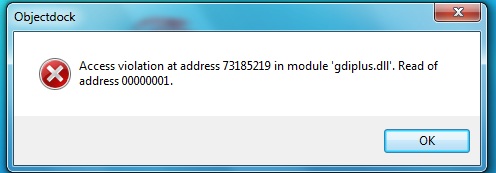
So my problem is now I want to update my dll (StackDocklet) to Latest version: ........StackDocklet-preview-FileSystemFoldersOnly.zip (version 1.0.0.374) and my problem is I get ObjectDock crash on windows 7 64 bit edition, with the latest version, when I try to open an program the secound time from the same meniu, but the interval between the first time runing and secound time is at most 3 secounds..

PS: If you don`t understand me please say...

Here is the crash report..

ObjectDock_Crash_Report__6_30_2009_46bc235_.zip

And another error...

post-103388-1246354540_thumb.jpg

EDIT:

I see in Windows xp sp2 32 Bit works but under Windows 7 64 Bit doesn`t work.

Attachment: ObjectDock_Crash_Report__6_30_2009_46bc235_.zip

problem.jpg
problem.jpg

#529196