Stacks Docklet

hi Mat,

this is great.

i learned that if i use the FAN, it shows only a maximum of 12 items and the next will be "MORE". i think its even more efficient if the stack isnt limited. I put my stack icon to the right giving me enough space, showing the stacks at horizontal curve, yet i want my 15 items shown in the stack.

#491571

@NetOperator Wibby:

Good idea. I think I can do this:

Monitor the folder, so whenever a new file appears the dock icon will jump.

So, once I implement that, is just a matter of pointing a stacks docklet to the folder you use to download files.

What do you think?

heh, sorry for the late reply, but that sounds great!

#491573

still hoping for anyone telling me how to change the fan out folder icon

Ruben

#491605

Updated! (done with the exam by yesterday, also)

Now when sorting by kind, it will subsort by name (untested).

Edit:

@tosbsas: That's not implemented (by now).

#491611

Hi, Matonga. As always, great job. Found this: web.mac.com/oddysseey/A_Hard_Days_Programming/A_Hard_Days_Programming/Entries/2008/1/19_Stacks_done_right!.html

Is it possible implement that in your docklet?

#491619

Hi, Matonga. As always, great job. Found this: web.mac.com/oddysseey/A_Hard_Days_Programming/A_Hard_Days_Programming/Entries/2008/1/19_Stacks_done_right!.html

Is it possible implement that in your docklet?

:o Ohh great info aff14, Stacks is the perfect innovation for docks *0*
#491627

works on right side now! thx ;)

rk launcher... vista home premium

EDIT: aswell in fan as in grid mode ;)

#491648

I´ve tried. Works correctly, except with the folders that have "punto" (sorry my english) in their names.

#491649

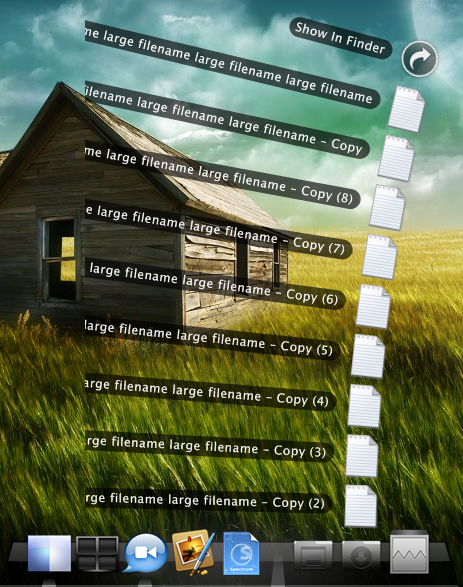
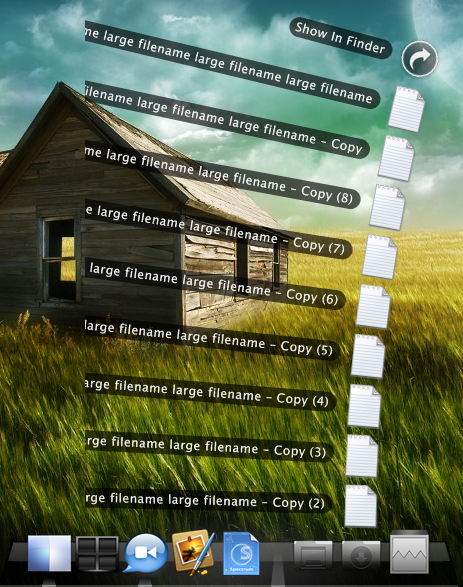
as you see in the picture the fan mode has some problems with very large filenames. can you fix it so there are dots when the name is too long... "large filename large filename la..."

post-71062-1203147443_thumb.png

large filaname.png
large filaname.png

#491680

Hi, Matonga. As always, great job. Found this: web.mac.com/oddysseey/A_Hard_Days_Programming/A_Hard_Days_Programming/Entries/2008/1/19_Stacks_done_right!.html

Is it possible implement that in your docklet?

Wow, that was damn cool. That is how stacks should work...Maybe this can be implemeneted here along with keyboard support to imitate the one above? :D

Thanks very much, matonga, for fixing the subsorting issue when sorting by kind! It's working fine now. You also fixed the "rename files in folder -> haywire stacks" issue. I'll let you know if something's wrong (though I highly doubt this).

#491681

@Fyton5:

where did you get those icons? specifically, the first two on the left?

also, this site (web.mac.com/oddysseey/A_Hard_Days_Programming/A_Hard_Days_Programming/Entries/2008/1/19_Stacks_done_right!.html) wouldn't work with Opera, but it worked with Safari. weird.

#491698

Update! Fan stack will trim too large names "Long filename long filename long filename" will show as "Long filename long fil..." instead.

#491705

@Fyton5:

where did you get those icons? specifically, the first two on the left?

also, this site (web.mac.com/oddysseey/A_Hard_Days_Programming/A_Hard_Days_Programming/Entries/2008/1/19_Stacks_done_right!.html) wouldn't work with Opera, but it worked with Safari. weird.

made them by myself! ;)

#491710

Update! Fan stack will trim too large names "Long filename long filename long filename" will show as "Long filename long fil..." instead.

great! thx again!

#491711

hi, just signed up for the board. first I'd like to thank you for this great docklet, it's very cool.

I have been using it in the last three versions with Stardock ObjectDock Pro. Under my Vista Ultimate the most recent dll is listed as v. 1.0.0.0, with file version 1.0.0.20.

When I add the folder into the Stardock ObjectDock folder it's listed as v0.9 under my docklets and I don't think that has changed much recently. Does this make sense or am I running an older ghost copy?

Stardock is notorious for having their files all over the place and I am not always sure that copying it to the folder under Program Files is sufficient. Is it possible to display the file version or date of release in the small docklet window? That would help making sure that I always know I have the most recent version and not some oder ghost copy. An About button would be nice too but not necessary I think.

Your list of changes on the first page is chronological from top to bottom I assume? It would be nice to at least separate the new changes from old ones. Maybe this is working already. At least my browser shows them all in one chunk and I never know which ones are new or old.

not sure if I understand this function correctly:

- now you can drop files to the stack dock icon (they will be moved to the stack's configured folder)

when I drop a link icon onto the docket icon, nothing happens in ObjectDock. Maybe I am misinterpreting this and I have to drop the actual executable onto the docklet icon? Would be nice if I can just drag and drop any link onto the dock as well.

- added dock icon animation when clicking on stack item

I thought the dock icon is the one I click in your docklet. Nothin is animating in ObjectDock. The dock icon for the docklet in the main dock is animated though. Am I missing something? Has probably been mentioned, but it would be nice to have the icon that the mouse hovers over is highlighted. Often I click between two icons and nothing happens and the docklet closes in fan mode or anything underneath the docklet responds instead.

sorry if this is repeating what others already said. Main point is that it would be nice to have version number in docklet window.

thank you!

#491736

nice post derausgewanderte, and welcome to AS.

I agree with everything he says~ I've just been too busy/lazy to write it up :D

#491738

yeah! make a nice about box ;) with an icon and the version number! (i can make an icon ;) )

#491740

Hi!

First of all, sorry for my bad english.

Now to my problem. i´ve installed rocketdock and the program from here to get this stacks. unfortunaly it doesn´t work.

always when i choose a ordner with this programm then i cannot open the files in this ordner. in this ordner are the most important programs from me. when i choose now for example google earth, does always appears the message:

"There is no application associated with the given filename extension."

know anyone of you what is wrong? :-D

#491770

Hi all,

The stacks are working fine on my Vista Ultimate with Rocket Dock. Hope the naming feature for the 'Drives' stacks will be available soon.

#491780

kindly remind

Motonga:

Could you get the gray background of tabs in fan mode ajusted automaticly according to the size of fonts?

#491812

is there anyway to stack docklets? like clock and calender?

#491830

is there anyway to stack docklets? like clock and calender?

That would be kind of cool to have a calendar stack, it could switch over to grid view and show the whole calendar of the month.

#491864

yes,great idea,clock and/or with calendar and could view the whole month

#491872

Why don't we have it make toast while we are at it.

#491873

Still problems in gridmode:

18.02.2008_20:07:50_neu-1.jpg

#491878