 Aqua-Soft Forums
And oh ya, it worked perfectly on Vista and Linux, tested both.
Stacks Docklet
bug report :
when i open a stack(keep open) , and i try to open another stack.
BUG CAUSE!!!!
the original stack's folder name doesn't disappear !
great man I realized today only that freezing problem with rest of the dock when u open stack has been fixed. Thanks great going program, huge appreciation.
I still get the problem with the newest docklet. What are your font settings and text size for the labels set at in Rocket Dock?
Sorry I didn't get back to your posts 2 days ago for someone reason I completely missed it.
The Font Settings I use for RocketDock
Font: Segoe UI
Style: Bold
Size: 10
Colour: White
Shadow: Black
Outline: Black
Opacity for both: 50%
Great Docklet... really magnificient!But there is only one problemn bugging me... the shadow of one of my folders in this app is pixellet (black white) and looks a bit messy... but a other folder there isnt.
How can I repair this? edit: It is helped if I restart Objectdock, problemn is also with Rocketdock.
Also I want to know if it is possible to make the icons larger^^.
Thank you very much btw!
Uhm.. Shadows? I don't have shadows. Can you provide us with a screen shot.
bug report :when i open a stack(keep open) , and i try to open another stack.
BUG CAUSE!!!!
the original stack's folder name doesn't disappear !
Can you tell us which dock application your using and the version of your stacks and your OS.
To find the version.
1.Navigate to the Stacks folder within the Docklets folder of your program.
2. Select "StackDocklet.dll"
3. [right-click > properties]
4. Go to the version tab.
It should be the first line underneath.
Can you tell us which dock application your using and the version of your stacks and your OS.To find the version.
1.Navigate to the Stacks folder within the Docklets folder of your program.
2. Select "StackDocklet.dll"
3. [right-click > properties]
4. Go to the version tab.
It should be the first line underneath.
Vista Ultimate SP1
Object Dock 1.9
StackDocklet DLL version: 1.0.0.42
Thanks...
Uhm.. Shadows? I don't have shadows. Can you provide us with a screen shot.Can you tell us which dock application your using and the version of your stacks and your OS.
To find the version.
1.Navigate to the Stacks folder within the Docklets folder of your program.
2. Select "StackDocklet.dll"
3. [right-click > properties]
4. Go to the version tab.
It should be the first line underneath.
I attach the screenshot and the version I got is: 1.0.0.42
Also it is repaired if I restart Objectdock... got the same problemn if I use Rocketdock.
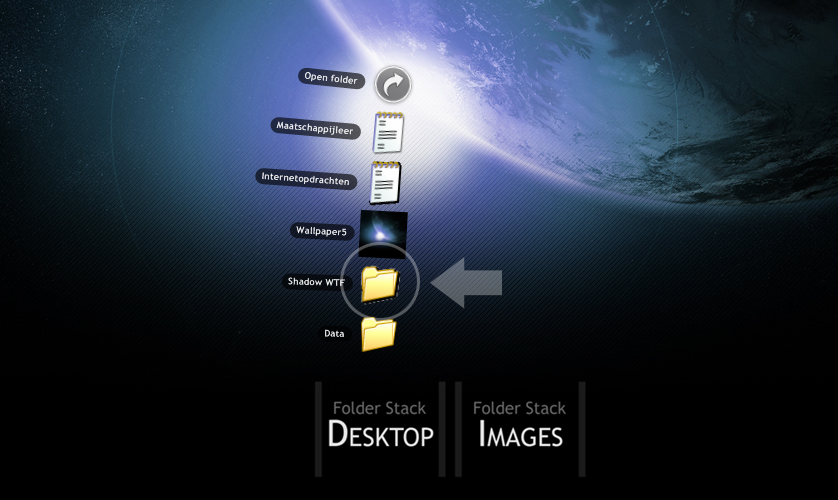
icetrix
I notice the same thing seems to be happening to the text file icon, second from the top.
Is the wallpaper5 an image file or a folder with that image as the icon? Also, does it happen if you add more or remove shortcuts?
I wan't to try and reproduce it.
NVM I've done it.
icetrixI notice the same thing seems to be happening to the text file icon, second from the top.
Is the wallpaper5 an image file or a folder with that image as the icon? Also, does it happen if you add more or remove shortcuts?
I wan't to try and reproduce it.
CyberStrike
Wha? Reproduce?
Wallpaper5 is a image. and it only happens when I make a new folder/shortcut (some shortcut with Transparency support). Only if it added when the application is already running.
If you change the filename while it's running causes the icon data to pixelate.
I guess this is the 1st verified bug we've found since Matonga has gone AWOL.
If you change the filename while it's running causes the icon data to pixelate.I guess this is the 1st verified bug we've found since Matonga has gone AWOL.
I see, never found that out aswell...
So the bug that is bugging me is that new or modified folders/shortcuts with transparency. The transparency being messed up into black and white... logic, a good transparency support is hard to make.
Uhmm.. no transperancy or anything just change the filename and the icon will pixelate in the Stacks.
The shadows are just part of the system icons.
I have also confirmed it happens to all icons system and custom.
Or did I not understand you correctly..?
Uhmm.. no transperancy or anything just change the filename and the icon will pixelate in the Stacks.The shadows are just part of the system icons.
I have also confirmed it happens to all icons system and custom.
Or did I not understand you correctly..?
Wow... again!
The transparency of the preview icons will be messed up if you modify the icon or image (name, or made a new one). A restart of the whole dock will cure it.
Also, I made a transparant image, the preview will NOT mess up like above... so I will conclude that the only thing is being messed up are the icons itself. NOT previews of images.
Vista Ultimate SP1Object Dock 1.9
StackDocklet DLL version: 1.0.0.42
Thanks...
Are you using individual stack.dll's? or One with multiple stacks?
icetrix
I believe that is because Image Previews are done with GDI and uses the the Thumb.db of the folder.
Where the icons are copied into memory like RocketDock and OD.
The bug probably happens when the filename is updated but the icons are not so when Stacks attempts to display; it forgets the Icon Size scaling somewhere.
icetrixI believe that is because Image Previews are done with GDI and uses the the Thumb.db of the folder.
Where the icons are copied into memory like RocketDock and OD.
The bug probably happens when the filename is updated but the icons are not so when Stacks attempts to display; it forgets the Icon Size scaling somewhere.
I see... unfortunality I don't know how it works precisly but I see what you mean.
bug report :when i open a stack(keep open) , and i try to open another stack.
BUG CAUSE!!!!
the original stack's folder name doesn't disappear !
Yes, at least in RocketDock... it's a RocketDock bug.
I tell the dock to hide the folder's name when you just click the icon, however it doesn't disappear until you start moving the mouse 
I haven't reported this bug to Punk Software.
I don't know if this works fine on ObjectDock.
If you change the filename of a shortcut within stacks while it is running the icons pixelate.
http://matias.securityconsultant.com.ar/bu...pha_channel.png

It's not pixelated, at least as far as I know... it isn't getting the alpha channel, that's why it looks pixelated (but I should test with a translucent icon to be 100% sure). It is a problem with icons only, images will preview fine.
But yes, it is a Stack Docklet bug
The code to extract the icons is the same for first time and after renamed icons, so I don't understand why it doesn't work (maybe a hwnd handle, who knows)
Edit: solved... this is really strange, I knew it was a handle, and fixed it, in less than five minutes, !?!? whatever, now new icons work fine.
Im new to this forum only because of this wonderful add-on. I downloaded it earlier this morning and i have thing i would like to ask.
When i do a large folder with several items in it it doesnt show all items in either layout (Fan or Grid). With the fan i get about 10 images/icons and then a button that says open folder. With the grid i see alot more but it gets cut off on the side of my screen.
Basically i guess what im asking is, can you make like a slider on these so i can see/acess all the documents in my folders without having to open them? Thanks and good work.
Yes, at least in RocketDock... it's a RocketDock bug.I tell the dock to hide the folder's name when you just click the icon, however it doesn't disappear until you start moving the mouse
I haven't reported this bug to Punk Software.
I don't know if this works fine on ObjectDock.
http://matias.securityconsultant.com.ar/bu...pha_channel.png
It's not pixelated, at least as far as I know... it isn't getting the alpha channel, that's why it looks pixelated (but I should test with a translucent icon to be 100% sure). It is a problem with icons only, images will preview fine.
But yes, it is a Stack Docklet bug
The code to extract the icons is the same for first time and after renamed icons, so I don't understand why it doesn't work (maybe a hwnd handle, who knows)
Edit: solved... this is really strange, I knew it was a handle, and fixed it, in less than five minutes, !?!? whatever, now new icons work fine.
Kewl, thanks for the quick repare^^... now it is perfect.
Im new to this forum only because of this wonderful add-on. I downloaded it earlier this morning and i have thing i would like to ask.When i do a large folder with several items in it it doesnt show all items in either layout (Fan or Grid). With the fan i get about 10 images/icons and then a button that says open folder. With the grid i see alot more but it gets cut off on the side of my screen.
Basically i guess what im asking is, can you make like a slider on these so i can see/acess all the documents in my folders without having to open them? Thanks and good work.
Kewl idea to be honest...
If this is going to happen, Matonga... should I make the arrow/slider in about the same style?
Also the cutting off part is kinda frustrating ya...
But only if the third view of the stack is made (from 10.5.2 on), like the tiger stacks.
Will it be possible to add the triangle of the tooltip-look, like leopard?
Mmm How possible is to add an option that allows to show or not to show hidden icons and folders???
Hello! I love this Docklet, it's exactly what I was looking for, and it works wonderfully.
...except when I run Blackbox. The contents of the folder will fan out, and stay, as long as my mouse is over the folder I've clicked, but as soon as I mouse up to choose one, they contract down again. Is there something I can do to fix this?
What is Blackbox?
feature request:
1)support drop files in objectodock
2)monitor folder,new file get in,the dock icon jump.
3)third display mode,just list items, no "open folder"...
:-)