 Aqua-Soft Forums
Andreas doesn't seem to work on Avedesk at the moment. After releasing a beta of Version 2.0 developement stopped. So I guess it would be useless to ask him to implement d'n'd
Stacks Docklet
Very nice! works great on my rk... but i have a question
is there a way that you can adjust how many items you want to show up in grid?
i mean if i choose "grid mode" i want like only 10(or depends) items on the window?
thanks. 
Yeah, the AveDesk author should add drag n' drop so anyone can use it with the docklets (should I contact him?)
AveDesk does support drag-'n-drop; It actually supports OLE drag-'n-drop.
Btw, if you need a good 'draw shadowed text' routine, just drop me a note.
@AndreasV:
Does AveDesk support ObjectDock's OnAcceptDropFiles( ) / OnDropFiles( ) ?
(maybe I'm missing something)
Really nice docklet, I also started to develope such a docklet, but I had to stop because of some problems at school. Anyway tested it under Vista Ultimate with RocketDock and it is working perfect.
But I have a few suggestions:
- Could you make it Bumping when for example in the Downloads-Folder, theres a new file incoming?
- Add the possibility to choose a own icon for expanded and non-expanded view?
Yeah if i find a bug or something else I am going to tell you. (Or if I have another idea)
I recently had a small problem: I am using StackDocklets for a week now and sometimes it happens that one of some already configured stack gets lost - instead the default icon (with the arrow) shows up. Other configured are still there. I am using Vista and I installed RockedDock somewhere else than C: (as Vista did not remember the config of the stacks at all when it was sitting at C: due to the security restrictions). Anyway, I hope you continue to develope this - I love this application!
@AndreasV:
Does AveDesk support ObjectDock's OnAcceptDropFiles( ) / OnDropFiles( ) ?
(maybe I'm missing something)
It does support that - the codepath, however, is completely untested because previous versions of ObjectDock had a bug that prevented these callback functions to work.
You could go down the route to support avedesk's drag-'n-drop by using:
DeskletActivateExtendedDragDrop(hwnd);
and implementing:
BOOL CALLBACK OnDrop(DESKLET_DATA* lpData ,IDataObject* obj, DWORD keys, POINTL pnt, DWORD* effect);
Querying the IDataObject for CF_HDROP and you're set.
I have two requests.
one is that, unicode support
another one is that, when font size is set large than 10, let me say, 20. the font is out of the "gray tray"(sorry I donot know how to name it). The "tray" is expected to be ajusted automaticlly according to the font size.
@narr:
I don't have Vista but I've heard you can solve some issues in RocketDock by "owning" it's folder (don't know exactly what that means, try right click the folder and find something about owners).
@tengshj:
You mean in Fan mode? If I understood well, you mean the text exceeds the gray background it has. Yeah... kill me, I did it the quick-n-dirty way, I had forgot it. Added to the to-do list.
I can't give support for Unicode easily as Delphi (what I use to make Stacks Docklet) doesn't support it :'(. I'm trying to find a work-around.
@AndreasV:
Ok, I'll try implementing with those, thanks
Ok, this is more like a list of likely stuff to implement:
- fix problem with text overflowing from "gray tray" in Fan mode with big fonts.
- support for drag'n'drop a la AveDesk.
- make the icon bounce when a new file is added to the folder (use File Alteration Monitor?)
- do not scale icons to 48x48 in Windows NT.
- add option to hide "Open folder" icon (per docklet instance).
- add option to limit the number of icons the fan/grid shows (per docklet instance).
Edit: sorry to give this notice but Stacks Docklet will become less maintained soon, as I'm trying to write a Finder clone (I think it'll be called "Fine There", but don't know yet).
make the icon bounce when a new file is added to the folder (use File Alteration Monitor?)
Take a look at ShRegisterChangeNotification()
Delphi does support UNICODE: WideString. 
wow! No problems at all! Runs smooth and it launches programs and folders fast! 
This puts stardock's flyout menu to shame lol
Okay, I've found something else, if the icon has a shadow, the shadow is not alpha-blending, but showing up just fully black, as seen in my screenshot. This appears in fan and grid view.


@ narr: I had the following issue because I was using a folder path like this:
"C:Program Files"
Try to remove the last backslash, if it's the same issue.
@ Shmrom: On my computer, the shadow showing isn't a big nuisance, but sometimes (on folder icons) the shadow has a white lining which is quite ugly.
@AndreasV:
Yes, I expressed myself in wrong way. I mean it doesn't have a VCL for native code (yet... however CodeGear has planned porting the VCL to Unicode as of 2008).
This means the user won't be able to put a Unicode folder name 
The "work-around" I'm thinking about is to use widestrings to display captions in fan/grid mode, but keep the VCL in ansi without workarounds
a request.
how about make a executable file. then just transfer folder as a parameter to the program.
in this way, it will be easy added to the desktop, quick launcher bar, any docks, anywhere .
another question.
stacks are still go out of screen. when it is placed at the edge.


another question.stacks are still go out of screen. when it is placed at the edge.
Easy,dont place it in the edge =)
I suppose is hard for matonga let the docklet recognise the screen limit and add another animation for this case....
@chatpristi: Maybe it depends on the OS? What are you using? I am using Win Vista
another small issue,
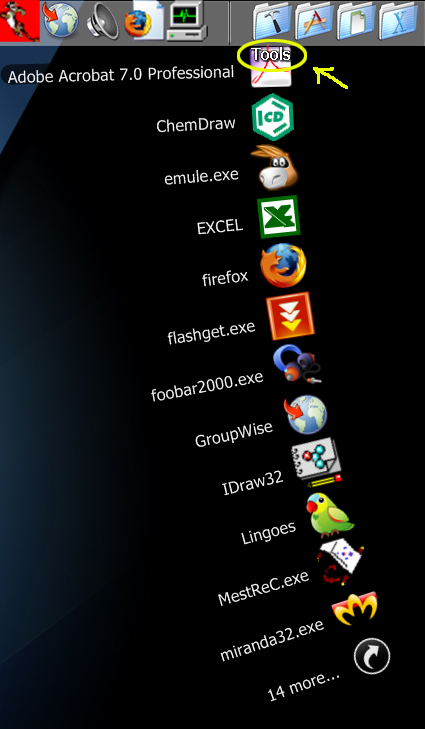
some time the "fan" will be covered by tab of docklet. (yellow circle)

@Shmrom : I'm on XP, that's probably why.
@Tengshj : yes, it might be interesting (yet, maybe slower) to have an executable instead of a docklet. Personally before Matonga made this wonderful docklet I used KKmenu executable ( the old version)
Bear in mind, however, that an exe would not be as tightly integrated into the dock as a docklet. Moreover, making an exe would certainly imply rewriting the program, because I'm sure many commands in the docklet rely on ObjectDock docklet SDK.
another small issue,some time the "fan" will be covered by tab of docklet. (yellow circle)
Its every time on Rocketdock... Maybe to hide this label?
Edit: sorry to give this notice but Stacks Docklet will become less maintained soon, as I'm trying to write a Finder clone (I think it'll be called "Fine There", but don't know yet).
I'm looking forward to this application! Sounds nice!
Great docklet!
Im running on vista and objectdock, and the only problem is when trying to select the icon in objectdock i click the ok button to apply changes but the path does not appear , i tried this on my xp computer and it worked perfectly.