 Aqua-Soft Forums
I kind of don't vote for mouse scroll. Although I'm a laptop. but the idea just seems funky to me lol (funky as in bad) But thats MO.
Stacks Docklet
@mushu13:
I just tried with RK Launcher version 0.4 Beta build 169 and noticed no problems, even with the dock on right side of screen.
(the only problem I notice is when dragging the icon, but I suppose this is RK Launcher's problem, maybe fixed in later version).
Which version are you using?
it works with objecdock. unfortunately, when i turn on my computer, i have to recustomize it. also, i would like to know how to make it only show a mixture of the programs that i want, not just one folder. my email is mattbrat92@gmail.com.
i would like to know how to make it only show a mixture of the programs that i want
Create a folder in my documents or where ever and put shortcuts to the app's you want in that folder.
I kind of don't vote for mouse scroll. Although I'm a laptop. but the idea just seems funky to me lol (funky as in bad) But thats MO.
Was sort of thinking if going for true emulation then why bother but, that's up to matonga.
Hmm...I guess I'll vote for Leopard default (scalable icons) for my first suggestion earlier instead of scrollable with mouse wheel.
Hello, Somebody speak spanish? I Have an "idea" but i can't explain in english... (my english is very very very bad X_x)
Uhm I have a problem with Rocketdock, whenever I restart my notebook, when rocketdock starts up again, all my stack's icons are missing and it needs me to re-pick the destination. Im using Rocketdock 1.3.5 and Windows Vista.
Uhm I have a problem with Rocketdock, whenever I restart my notebook, when rocketdock starts up again, all my stack's icons are missing and it needs me to re-pick the destination. Im using Rocketdock 1.3.5 and Windows Vista.
I had the same problem. Close Rockedock, then move the Rocketdock folder in ur program files to My Documents. Relaunch Rocketdock, then is should remember.
Working great here in Vista!
I had the same problem. Close Rockedock, then move the Rocketdock folder in ur program files to My Documents. Relaunch Rocketdock, then is should remember.Working great here in Vista!
It erased my stacks again...
hmmmm have u checked in ur dock settings if "save settings in a portable INI" is unchecked?
no its unchecked, if that is unchecked can I move my rocketdock files back to Program files or should I keep it in Documents once that is checked?
Also try uninstalling Rocketdock then install it again but don't install it in ur program files, install it in My documents.
Leave it unchecked.
Maybe it is just me, but I can't seem to get shortcuts to work with it. What I mean is if I have setup a folder (ie. c:/applications) and have a bunch of shortcuts to programs, if I set the stack to point to the folder, none of the shortcuts work when clicking on them in the stack. I'm using ObjectDock.
Hello, Somebody speak spanish? I Have an "idea" but i can't explain in english... (my english is very very very bad X_x)
Just send a Private Message to me. También hablo español.
Re scrolling, etc I want it to emulate leopard so scalable icons would be my choice.
@Matonga
I think that you should do the mouse scroll thing but also
add a option for it... ....just for the pplz that dont want the
scrolling option....and the hover indicator sounds pretty kool...
the kkmenu thing i dont really think its neccessary only b/c pplz
should already know whats in their folders...wouldnt you think???
and also if you have to do a complete rewrite i think you should
do what is best or you...my opinion iz dont do it if you dont
want to........the x2 clicking to open the folder...yes....stack w/in
a stack...sounds pretty kool...i think wat they're tryin to say iz
like a stack opening within a stack...like kkmenu except itz a
stack...you know what i mean???...
@ Anyone that can answer my question
and Multi-line display for file names in Grid mode
...IDK what that means?? someone explain??
but yea....also does anyone know where i can get a skin that
looks like the Mac Leopard Dock...You know how the dock has
a Glossy setting and it reflects the icons that on it???
Where can i get a Dock skin like that???
This is supposed to be a stacks docklet, a scrollbar would not look right at all.
1. I vote for the icon reduction thing.
2. A hovering indicator might be nice although not vital to me
3. No need of virtual folders
4. Opening the folder on doubleclick, yes good idea
5. Substacks would be nice too, but I can't visualize how.
6. I can survive withou CLSID folders
7. Multiline filenames... It's ok as it is.
I think Mathias probably has a precise idea of what he wants his docklet to be like, I trust his choices.
{{EDIT}}
An idea I've just had :
Instead of a scrollbar or icon resize, imagine scrolling horizontally or/ and vertically by hovering/clicking on the border of the stack window. The stack window would be like hole to peep on a larger grid behind. (Not sure I'm being clear!)
That way it would be scrollable but there would be no ugly scrollbar visible.
I vote for icon reducing, but you could add an option for scrolling, if possible.
Also an option about how many items there are, when stack changes view from fan to grid.
Added multi-monitor support.
Won't work with docks between two or more monitors, but it will work if the entire dock is inside one monitor.
I'm using v0.41 Beta build 282, the Latest Nightly@mushu13:I just tried with RK Launcher version 0.4 Beta build 169 and noticed no problems, even with the dock on right side of screen.
(the only problem I notice is when dragging the icon, but I suppose this is RK Launcher's problem, maybe fixed in later version).
Which version are you using?
really works great in object dock. still haven't test it in rk launcher and rocket dock. still, its great. thanks for this.
Hi matonga.
It's me again.
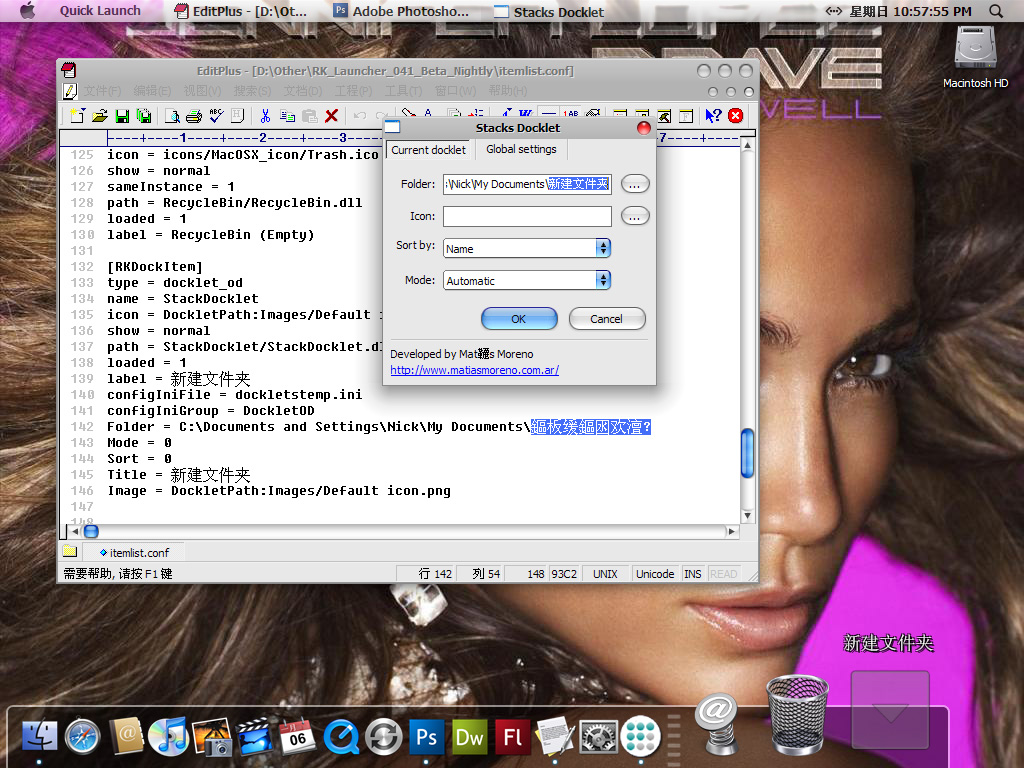
I download new version docklet,I sow Chinese support improvements,This is very good, Thank you very much.
However, there are still a small problem in "itemlist.conf"
Please see my screenshot.

Experiencing major problems with the newest update and RK Launcher build 282. It doesn't seem to want to unfreeze so magnification and auto-hide don't work anymore.