 Aqua-Soft Forums
This was probably tested forever ago.. but, it works very well with vista.
Tested with RKLauncher and Rocketdock. I didn't have any problems..
This was probably tested forever ago.. but, it works very well with vista.
Tested with RKLauncher and Rocketdock. I didn't have any problems..
SirSmiley you have answered my query and helped me no end. I apologise again for not checking the forum thoroughly or exploring the options myself.
I thank you once again.
RocketDock on Vista
Using version 1.0.0.11
Issues:
If using a drive, instead of a folder, no caption appears over the icon. For example, I have a partitioned drive (M:) labelled "Media". It would be nice if the label appeared as the caption for the icon.
This other issue is extremely minor ... Personally, I don't like the tab style being used in the settings. I keep thinking the opposite tab is selected because it is in the forefront. That's typically how a user would expect tabs to work.
I really like this. Thank you very much for creating it!
I have a feature request, if I may be so bold.
When you click on the folder/icon/file or whatever inside the stack or grid using Stacks Docklet, it might be nice to have the item bounce, like the main entries on Rocket Dock. Maybe just have it bounce once and then the stack dissappears.
Many thanks again for this awesome docklet.
I have a feature request, if I may be so bold.When you click on the folder/icon/file or whatever inside the stack or grid using Stacks Docklet, it might be nice to have the item bounce, like the main entries on Rocket Dock. Maybe just have it bounce once and then the stack dissappears.
Many thanks again for this awesome docklet.
I think a bounce effect would look odd, highlighting the icon on mouseover would suffice for me. (but that's just my point of view)
Is there a way of getting bigger icons (256X256) or customized icons in the docklet view, very nice docklet even than, thanks a lot to the forum
This is stunning. What an app!
Few quick things though...please help me out:
- any way so far to change the folder/files icons in fan/grid view?
- File names aren't shown fully.. for longer filenames i understand they cant be shown fully...but in the 'Open Folder' text field...even the default "open folder" is shown in my dock as just "Open fo...". Now ive seen some screenshots and this is odd. (for the grid view)
Oh...and scrolling option in FAN mode would be a good idea IMO
Hello there, many thanks for developing this excellent add-on - it is working very well here on RocketDock.
Currently, I use the docklet to quickly show the contents of removable USB drives, which are mounted on my system as G:
If the drive is connected when RocketDock starts, the docklet appears as normal. However, if the drive is not connected when RocketDock starts, the alpha blending appears to be broken, with visible black outlines around the icons.
The same thing also happens if I disconnect, then reconnect the drive, or connect a different drive - even though in the later example, the directory contents are refreshed correctly.
I have attached a couple of screenshots to illustrate this issue - I do hope you are able to fix things.
On a separate note, would it be possible to select 'My Computer' as the folder to use for the Stack, thus showing the drives mounted on the system?
Cheers, keep up the great work!
James
x
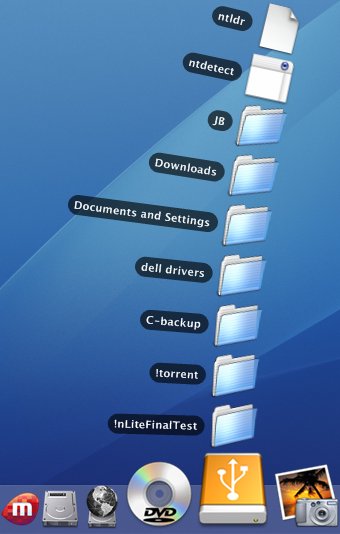
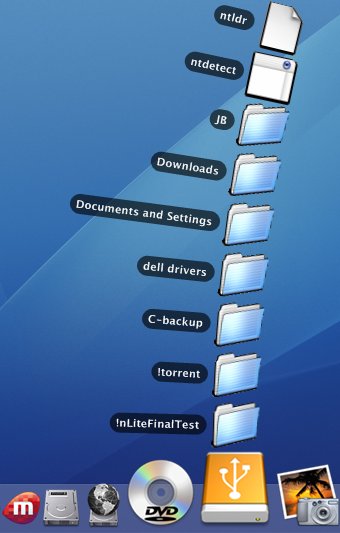
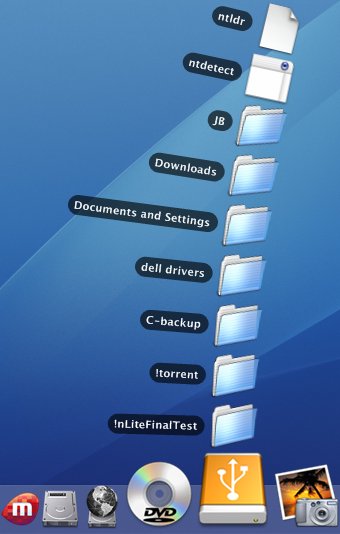

^^How did you change the folder icons?
Does the slow down trick still work or has it been disabled..?
Confirmed, it no longer works.. 
Works great with rocketdock but heres some suggestions and a bug i found:
Suggestions:
Make the dock go back down when a menu is open (from the bubble animation) the zoomed icons get in the way (also, hide the icon name after you click it to open the flyout)
Allow mousewheel and maybe an up and down arrow for scrolling of folder contents
Bugs:
If a folder has a "." in it's name (ie Frank G. and the Blowers) it will stop displaying that folders name after the "."
Feature Request:
Would it be possible to make folders browsable within a flyout menu? For example I have My Music on flyout, and it opens up to all my ripped albums, I would love if I could then select an album, and in the same flyout menu select a file
ps: does anyone know a way to add the vista "games" folder, i actually have no idea where the folder is browsably located
RocketDock on VistaUsing version 1.0.0.11
Issues:
If using a drive, instead of a folder, no caption appears over the icon. For example, I have a partitioned drive (M:) labelled "Media". It would be nice if the label appeared as the caption for the icon.
i have the same request as you, but i'm using object dock. normal folders within a drive show caption/title when you mouseover but if you set an entire drive to the docklet it just shows nothing.
is this to be expected? any way to make the drive labels function like a normal folder would when you hover over the docklet?
ps: does anyone know a way to add the vista "games" folder, i actually have no idea where the folder is browsably located
have you tried C:ProgramDataMicrosoftWindowsStart MenuProgramsGames
ps: does anyone know a way to add the vista "games" folder, i actually have no idea where the folder is browsably located
I just made a folder called "Games" in my documents and put shortcuts of my games in there. Then just set the path in the docklet for it.

Wow, your desktop is pretty:) Nice and simple.
I love this docklet. My only suggestion is that it would benefit from:
-Hiding the dock icon's title after you click it - currently, it overlaps with the stack.
-Provide mouseover response. It would just feel more natural, in my opinion.
To elaborate on the last suggestion, I am referring to a possible highlight effect on the filenames in the stack.
Again, absolutely excellent work. Well done!
have you tried C:ProgramDataMicrosoftWindowsStart MenuProgramsGames
that's just the built in microsoft games from the start menu such as freecell and solitaire, i'm looking for the game menu with the game ratings, etc.
I just made a folder called "Games" in my documents and put shortcuts of my games in there. Then just set the path in the docklet for it.
yeah, i've done that temporarily for now, but the main reason i still want the vista games folder is because it automatically adds new games i install
yeah i've been searching for ways to do it, but the games explorer is not a folder so it wont work.
This thread is obviously growing out of hand, but I just wanted to make an observation in the event that it already hasn't been made: When using ObjectDock Plus tabbed docks it appears that the stacks docklet, which otherwise works fine, doesn't permit files to be 'dropped' into it.
i dont think it never did...
Yes, I have Rocketdock on my desktop and I used to have Objectdock on my laptop and it is possible to drop files into the stack.
Yes, I have Rocketdock on my desktop and I used to have Objectdock on my laptop and it is possible to drop files into the stack.
Did dropping files into a stack work when you used ObjectDock? 'Cause it doesn't with me; it only works when using Rocketdock.