 Aqua-Soft Forums
Being able to change the icon in a stack would be great cause all my icons are PNG's, not .ico files.
Stacks Docklet
In Spanish:
cuando el dock no tiene el efecto de zoom, el stak queda por detrás del background, uso rocketdock V1.3.5.
In Bad English 
When the dock does not have the effect zoom, the stack is behind of the background, I use Rocketdock V1.3.5.
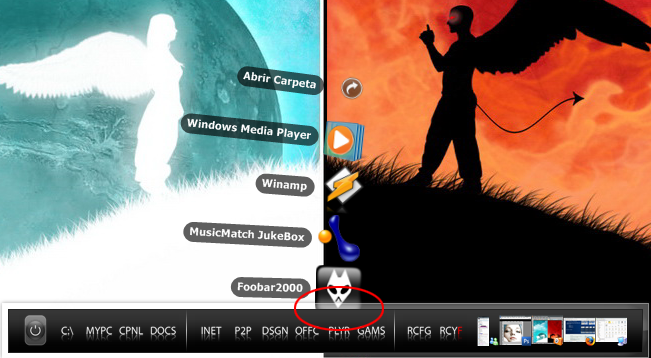
Im trying to do a games stack and a control panel stack, i create a folder w/ the shortcuts. But when i try it some icons come out blank. On the games stack the blank ones are all ms games that came w/ vista. On the control panel stack i get some showing up and some other dont.

@nick8204:
That's not the original chinese text, but UTF-8 encoded. But this is not visible by the user, so, why bother?
@Sranshaft:
I happened to have the same problem but it was temporal and didn't have it anymore (in RocketDock).
RK Launcher Build 282 is nightly build 3? (I have an older version afaik)
Hi, one thing I noticed: when you uncheck follow the dock, If you open a stack and without closing it open another one elswhere on the dock the remains magnified on the first icon : the dock icon of the second stack doesn't zoom.
I have another suggestion: Would it be possible to add a shadow when the Stack is in Fan-Mode, just like in Leopard? I'm talking about something like this: http://media.arstechnica.com/reviews/os/ma.../dock-stack.jpg
And how goes Development goes on with Mouse-Over effects?
Works great in Objectdock
Anything for Y'zDock?
Hi there again.
I started to arrange shortcuts in folders to start them in a stacks docklet, and they are shown, but when i click on the icons of the shortcuts, nothing happens.
the main icon just starts bumping and thats all....
tried it with RKLauncher and RocketDock
help anyone?^^
EDIT: there are no problems opening folders or pictures in the stack, just shortcuts doesn't work
Anything for Y'zDock?
I should think Matonga is silently working on it, but before he releases anything I believe he wants this first version to be complete. Justa guess though, I may be completly wrong:slant:
so, kind of update to my problem:
have been trying all kinds of file endings, all work, just shortcuts don't.
neither in rklaucnher nor in rocketdock, well, am i the only person here with this problem?
Are you using IconFactory or similar to hide the shorcut arrow?
Firstly just need to say what a fantastic docklet thus far. I have been actively using it on Vista/Objectdock since this thread started.
My question is how can I confirm which build I'm on. I want to ensure I'm on the latest build to benefit from each of the changes/enhancements as they happen.
I have generally used the link in the first post but the update log no longer seems to reflect the changes which Matonga refers to in the various postings along the way.
Once again thanks for a great piece of software and the efforts you are making in bringing it to us and keeping this thread active and informative.
Updated Stack Docklet to show the error if ShellExecute fails.
I mean, if it can't execute some program by some reason, it will show a message box telling what the error is about.
So Matonga
when you say I have updated based on the readers issue then do you go back to the first post or do you post a link in a recent post to update the stack docklet ? I am confused and then how do you update it -do you delete the previous version from the dock and replace it with the new version ?
Kirk
Yeah man, everything's working fine now, thanks so much!
So Matongawhen you say I have updated based on the readers issue then do you go back to the first post or do you post a link in a recent post to update the stack docklet ? I am confused and then how do you update it -do you delete the previous version from the dock and replace it with the new version ?
Kirk
The first post contain the last build.
Copy-paste-overwrite
Thanks BabboNatale...that's what I've been doing. It's not always obvious as to which build I have when additions are made. I guess I'm really asking for a version number to be included in the options dialog so I can ensure I have the latest build.
Ok, I told my compiler to automatically generate a build number.
In the next release you will see something like: 1.0.0.1, 1.0.0.2, etc... (last number is build number). You will be able to see this by right clicking on StackDocklet.dll, choosing Properties, then Version tab, then File Version in the list.
I luv this docklet but every time i shut down or restart my notebook it just goes back to a blank stack docklet icon with the name of the program i set it to be and wen i click on it it doesnt open... so its just a blank stack docklet...


I'm using rocketdock in Windows Vista.TKS
ok well the same thing happined to me...i have Vista too
ok well someone, forgot who but they know who they is, told me to install
rocketdock, but not in programs somewhere else like in your Downloads Folder is
were i installed mines...and it should work...
