
Stacks Docklet

Hello!

I use the Stacks Docklet in combination with RocketDock and so far im quite pleased.

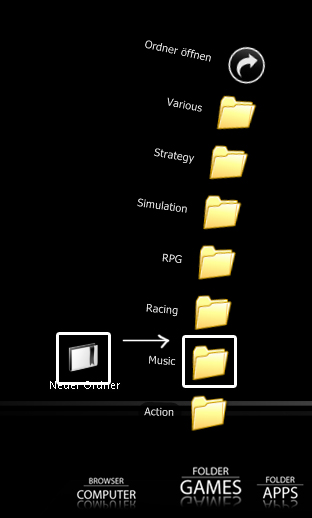
BUT: How can I change the default Folder Icon in the Fan-Menu?

I still have this yellow default image, but I have installed a black/white Icon Pack with StarDock IconPackager. When I open up my Stacks Docklet, it somehow doesnt fit the whole Design of my Windows XP at all and is kinda disturbing...

Image is attached.
post-77920-1205858764_thumb.jpg

folders.jpg
folders.jpg

#494981

Reshacking your Shell32.dll file?

#494987

And how do I do that?

#494989

@Try4Ce

This software,Reshack and this site should help you shell32.dll.

#495003

Hi all,

i made a small program which allow you to use stack docklet in the taskbar or even on the desktop ( without any dock),

i just wait for Matonga to know if i can distribute it with stack docklet.

So, see you later on w w w.chrisnsoft.com

#495086

Hello!

I use the Stacks Docklet in combination with RocketDock and so far im quite pleased.

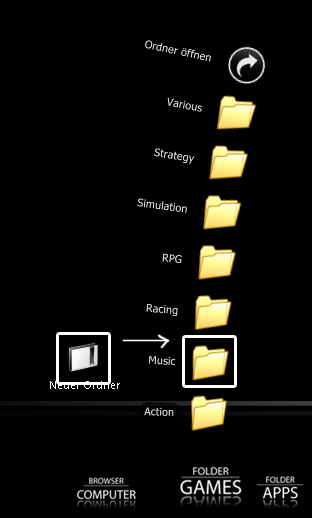
BUT: How can I change the default Folder Icon in the Fan-Menu?

I still have this yellow default image, but I have installed a black/white Icon Pack with StarDock IconPackager. When I open up my Stacks Docklet, it somehow doesnt fit the whole Design of my Windows XP at all and is kinda disturbing...

Image is attached.
you could try Icon Packager also. ;)

#495087

NetOperator Wibby:

I have IconPackager from Stardock already, but just applying a Theme doesnt do the trick.

Or does IconPackager has an option to replace the default icons in the shell32.dll ?

#495090

No.

#495102

I have IconPackager as well. It works for me. In my case, I changed each icon I had in the folder manually. They changed just fine.

#495118

How can I get my stack docklet to be in a semicircle type formation like here: pariah07.deviantart.com/art/Docks-For-Windows-Taskbar-51263482 with arrows at the side. Mine is just a big arc that goes off the screen.

#495124

How can I get my stack docklet to be in a semicircle type formation like here: pariah07.deviantart.com/art/Docks-For-Windows-Taskbar-51263482 with arrows at the side. Mine is just a big arc that goes off the screen.

That is a function of object dock plus called "flyout mode"

;)

I have it, but I don't use it too much, I def. prefer these stacks, or even kkmenu.

#495131

Stardock's flyout menu stinks. It takes a big gash out of your cpu and it really isnt that useful.

#495160

I have IconPackager as well. It works for me. In my case, I changed each icon I had in the folder manually. They changed just fine.

I use the WinStyler from TuneUp Utilities and it works fine, same folders everywere...

IconPackager doesnt chance the icons in shell32.dll i think :P, may be wrong though...

Try4Ce

Try IconTweaker, ITS FREE and has a lot of cool features and can change the default icons of windows... get it here crystalxp.net/galerie/en.id.83-icontweaker-joost-verburg-explorer-tools.htm

and maybe Folderico for changing some individual folders, you can find it in the same page.

#495163

@ChristianS

Interesting with a stack in the Taskbar

#495198

ok, i need to wait for Matonga before release it...

#495207

@ChristianS

I can't wait to see that. I see no reason why Matonga would be against your releasing your app, yet I undestand it's more correct to ask for permission.

I hope Mathias will reappear soon

#495222

@ChristianS

Maybe post a link to those screen shots you showed me so people have an idea of how it looks!

Mathias has created a monster following...his apps are awesome. :)

#495223

there nothing to see appart of the stack :

chrisnsoft.com/wp-content/uploads/pictures/standalonestack/screenshot1.jpg

chrisnsoft.com/wp-content/uploads/pictures/standalonestack/screenshot2.jpg

chrisnsoft.com/wp-content/uploads/pictures/standalonestack/screenshot3.jpg

( sorry for the bad links, it says "You can not post links or images at this time. Please edit your post." i don't know why... )

#495277

ok, i release just the exe, without the stack docklet, for the forum :

( change to www in the link )

w ww.chrisnsoft.com/wp-content/uploads/standalonestack.zip

So, you must copy the directory "StackDocklet" in the same directory of StandaloneStack.exe ( extract StadaloneStack.zip in a real directory, for example C:standalonestack )

Create a shortcut on StandaloneStack.exe (right click->Create shortcut).Right-click on this shortcut, choose properties.At the end of "Target" field, enter the name of your stack, for example "desktop" (without quote "").

( change the name for each stack you do)

You should have in the target field of the shortcut : C:standalonestackStandaloneStack.exe desktop

Double-click on the shortcut, the stack docklet properties should appears, and then, choose the "stacked" folder you want. Click OK.

Now, double-click on the shortcut to show the stack.

You can now move the shortcut in the taskbar toolbar or in the desktop.

If you want to change the properties of the stack, hold SHIFT or CTRL key and double-click on the shortcut.

Shortcut parameters :

: the name of the stack, each stacks must have a different name.

/notaskbar : the stack will not follow the taskbar orientation.

/top or /bottom or /left or /right : force the orientation of the stack

#495278

@ChristianS

Thanks, your program and Matongas stack works great in the Taskbar, and I can also add it to my stack in the Dock (ObjectDock), and use it to open a new sub stack/folder in grid or fan mode.

You two should start a co-operation ;)

My system:

Intel QX6700 OC to 3.2 GHz

Intel BAD AXE2

2 Raptor 150 GB in RAID 0

ATI X1950XT

4 GB Kinston RAM

24 Dell display

OS Windows Vista SP1 64 bit

Regards Torben

#495282

Whoa, ChristianS, that app you just made is mighty helpful in making stacks within stacks, just as NighthawkF117 said so! Thanks a million! :D

But there's something I noticed: If there are two stack names that have the same ending number (example: abcd 5 and efgh 5) they are treated as the same and when clicked, both will show the same folder. To escape this, it is necessary to enclose each stack name with quotation marks (so that "abcd 5" and "efgh 5" won't be recognized as the same anymore).

Because of this new flexibility, the demand for the long-awaited multi-line filename in Grid mode is greater... I sure hope that it would be implemented soon.

By the way, I noticed another subsorting bug: Let's say we have two folders named Folder and Folder 2 in a stack. When I sort that stack according to name or kind, Folder 2 goes before Folder. Can this be fixed, matonga? Thanks :D.

#495288

But there's something I noticed: If there are two stack names that have the same ending number (example: abcd 5 and efgh 5) they are treated as the same and when clicked, both will show the same folder. To escape this, it is necessary to enclose each stack name with quotation marks (so that "abcd 5" and "efgh 5" won't be recognized as the same anymore).

Yes, you're right.

as the name is given in parameter, if you put a space in the name, this make 2 parameters, and i take only the last...( so 5 in your case).

In fact, the name is use to save the docklet settings in the .ini file. If you look at settings.ini, you'll see a line [5] with the settings under it.

So don't add space in the name...;)

I've updated standalonestack.zip , there was a bug... the program didn't close if you open too many stacks... it's fixed.

#495290

i really like the standalone stacks, but i have a question about stacks-in-stacks - is it possible to have a second stack open without the first closing? 'cos it looks a but silly having a stack floating in the middle of nowhere.

#495294

@ChristianS

When I placed a shortcut in Dock. every click makes program popup the stack.

could you change it a little.

one click open, another click close.

#495300

i really like the standalone stacks, but i have a question about stacks-in-stacks - is it possible to have a second stack open without the first closing? 'cos it looks a but silly having a stack floating in the middle of nowhere.

you're right, but i can't do anything, it's for Matonga...

But how close the stack then ?

Ok tengshj, i changed it, download it again... ;)

#495308