 Aqua-Soft Forums
Using RK Launcher, having the dock on the right of the screen messes up the stacks :S
Stacks Docklet
^^ well, when I press shift and hold it in RKLauncher the animation of the stacklet goes in slow motion, looks quite funnybut i think it's not the thing you wanted
Please check you have version 1.0.0.9.
Oh I forgot: in new version, to get the slow motion thing, just left click and then rapidly press the key shift.
But to open the folder, press shift key before, then click the docklet, and then release shift key.
Experiencing some big problems with the 'Follow the Dock' feature. With it off, the dock becomes frozen and magnification is out. Switched it on and it continued to freeze the dock. I know this is a 'feature' of Leopard's stack but it seems that it's been a cause for many bugs since it was introduced. I never had the kind of problems I'm getting with the newer versions.
RK Launcher build 282 - it's the one available for download at the website under newest Nightly Build.
hi, i've been using this docklet for rocket dock and it's sooooo convenient while still looking nice.
however, as i am more centered on functionality/convenience and not so much emulation, i would very much appreciate it if i didn't have to make a new file every time i make a new stack. like if i press "add stack docklet" and it would automatically create a "stack file" in a pre-set directory so creating a new stack would be as easy as:
-right click
-add stack docklet
-drag files directly onto the stack icon on the dock
i understand this could take a long time to put together but i'm sure it would make the docklet a lot more user-friendly. after that, everything should just flow like a charm:)
(besides the title almost completely covering the first icon in fan mode)
other than that, this piece of software is very very nice!
Would it be too much to ask for an option to change the keyboard+mouse combination to open the folder of a stack? In my opinion, it would be better if Ctrl+Left Click was for opening stacks' folders. Any way to change?
Also, would it be possible to hide the Open Folder (or whatever) option in the stack?
Anyhow, this docklet just rocks.
hey guys i have realy big problam with the stockdockt plugin on my rockt dock when i turn off the computer all the stock setting gone and i see only blank icon without noting someone know what i can do to fix it
have a good day
Please check you have version 1.0.0.9.Oh I forgot: in new version, to get the slow motion thing, just left click and then rapidly press the key shift.
But to open the folder, press shift key before, then click the docklet, and then release shift key.
ah, thanks, just updated ONE of all .dll's...
ab bit annoying for I'm using 11 stacks
but now everything's working fine, even the folder-open-thing^^
Soo, I just wanted to show my Problem with RKLauncher and the animation.
In the zip file is a video showing how the stack is freezing until i stop moving my mouse on the docklet.
-.-
attachment doesn't work -.-
well, I'll try again later
Upload the file with some service such as rapidshare (don't remember other services now, which are better than it).
Or PM me and I give you a temporal ftp account, or try mailing it to me (PM to know my mail).
Mmm... now I understand. I think I will do animations with a thread instead of a timer, that worked for Flying Cow.
glad i could help
Please can you make that the icon when the stack is open is alway the empty stacks icon?
And add that the stacks closed icon is putted together from the icons of the files?
plz would be nice  and more leo like
I love this docklet. t is by far the best I've seen so far. just can' fix one thing...the fan mode shows the old tiger folders instead of the leopard folders. (I use ifoldercolor to change the look of my XP folders) any suggestions?
thanks!!
hey guys i have realy big problam with the stockdockt plugin on my rockt dock when i turn off the computer all the stock setting gone and i see only blank icon without noting someone know what i can do to fix ithave a good day
Yea i had the same prob.
just install RocketDock into My Documents
and it should work.......

Amazing Docklet
I use it for 7 of 9 Icons in my Dock!
But i have some Feature requests:
- A option to hide the "Open Folder" Icon for the current docklet
- A Stacks RecycleBin Docklet
Founded Bugs on RocketDock:
- When "Follow the Dock" aktivated and the Stack open, the dock freezed temporarily when the cursor goes over the dock.
(Sorry for my broken English^^)
@eveyone
Hey do yall know where i can find a RocketDock Skin that look like
the Mac OS X Leopard?
You know like a Dock that reflects the icon that are on it...like a mirror..
Thankz....
@ iBeaner: Here: http://yanouk34.deviantart.com/art/Leopard...etdock-73753532

so i must admit i didnt have time to go through the 20+ pages and read to see if this happens, but i'll post it and hopefully someone can comment.
i can create a new stack and add just a regular folder and all is well, when i mouse over it in objectdock a title will appear above it. but if i add an entire drive, for instance my mp3 drive which looks like... MP3s (G: ) it will not display above the stack when i mouse over it in the dock.
folders work fine but drives seem to not show the titles...any chance there is a way to make that work and if it's already implemented am i missing something?
thanks and this is probably the most useful and coolest docklet i've ever encountered.
Hey guys ,
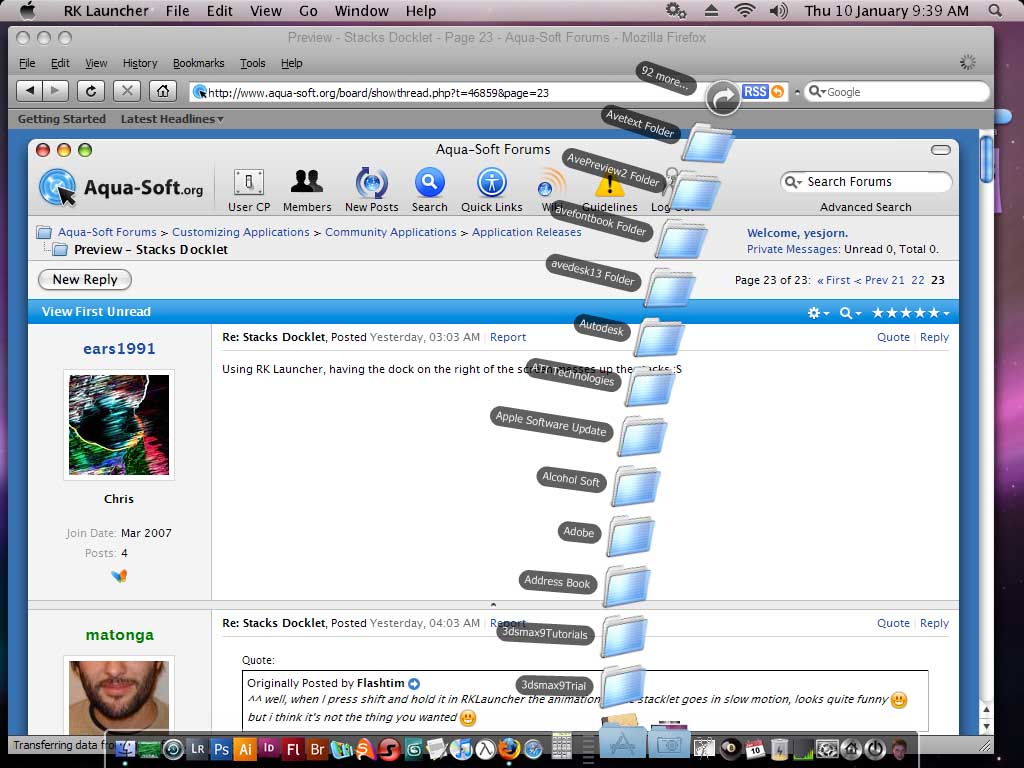
I use RK launcher and this wonderful docklet , but the docklet shows Tiger folders instead of leopard folders. I've used icolorfolder to change the appearance of my windows xp folders. I don't know what to do next...please help me
I've included a screenshot to show you what I mean.
Thanx
@DarkNeo:
Did you customize any of those icons?
Are those shortcuts?
@yesjorn:
I don't know why, but whenever you customize your icons with anything else than folder.ini, it won't work with my docklet.
I suppose those apps intercept explorer.exe and common dialogs, or something like that, as I'm using the system icon list.
However I do have tiger folders after installing Flyakite, so if you're using it you can try replacing C:WindowsFlyakiteOSXResourcesshell32.dll4.ico
I don't know how to apply the changes then... maybe reboot?
You can convert a .png to .ico using IcoFX, which is free.
@DarkNeo:Did you customize any of those icons?
Are those shortcuts?
@yesjorn:
I don't know why, but whenever you customize your icons with anything else than folder.ini, it won't work with my docklet.
I suppose those apps intercept explorer.exe and common dialogs, or something like that, as I'm using the system icon list.
However I do have tiger folders after installing Flyakite, so if you're using it you can try replacing C:WindowsFlyakiteOSXResourcesshell32.dll4.ico
I don't know how to apply the changes then... maybe reboot?
You can convert a .png to .ico using IcoFX, which is free.
Run "Force System File Update",and then reboot