 Aqua-Soft Forums
This application is great. I am using Objectdock 1.9 plus and have stacks running on 4 different folders. When i click on a folder that is using stacks and then click on a different folder running stacks while the other one is stacked out, ObjectDock wil freeze. I have magnifying on on the dock and the dock will just freeze staying magnified at the area where I clicked to see the first folder with stacks. The dock is still usable but the magnifying is frozen and won't go back. I post a picture if my description is too horrible lol.
Stacks Docklet
This application is great. I am using Objectdock 1.9 plus and have stacks running on 4 different folders. When i click on a folder that is using stacks and then click on a different folder running stacks while the other one is stacked out, ObjectDock wil freeze. I have magnifying on on the dock and the dock will just freeze staying magnified at the area where I clicked to see the first folder with stacks. The dock is still usable but the magnifying is frozen and won't go back. I post a picture if my description is too horrible lol.
I have the same issue...until the bug is worked out, the best way to fix it, is to "drag" and item in the dock from side to side and it "unsticks"
good luck!
I am having a silly problem on rocketdock
the stacks expand and immediately contract
it actually looks very funny but is renderring this docklet useless
and I may also add that this is not all of the times that i do it but most times it just goes the way it came up
has this already been reported i dont know
am i doing something wrong 
any suggestions don Matias ?!
Hello! Your plugin is great!
But the anoying freez-ups are making this module unusable. I'm using Objeckt Dock plus 1.9 and i get freez-ups all the time, with or without "follow the dock". Even if i turn of the magnifying option. It seems that the freez-up error is a very common error occuring rather frequently. Can't you figure out what causes this issue? This should be the first bug to be fixed. Moving objects within the dock isn't realy a solution.....
Hi, I got a suggestion that I think everyone will agree in with me.
Try to make it like the recycle bin docklet, when it's empty, it shows one icon, and when it's full, it displays another, can this be done, but to have another icon when it's clicked??
Also, in the release notes it's says you can drag things to it and they'll move to the folder, but that doesn't work for me.
BTW, it works excellent withshorcuts.
Yeah!!!, very nice and good dock, just gotta love it!!!
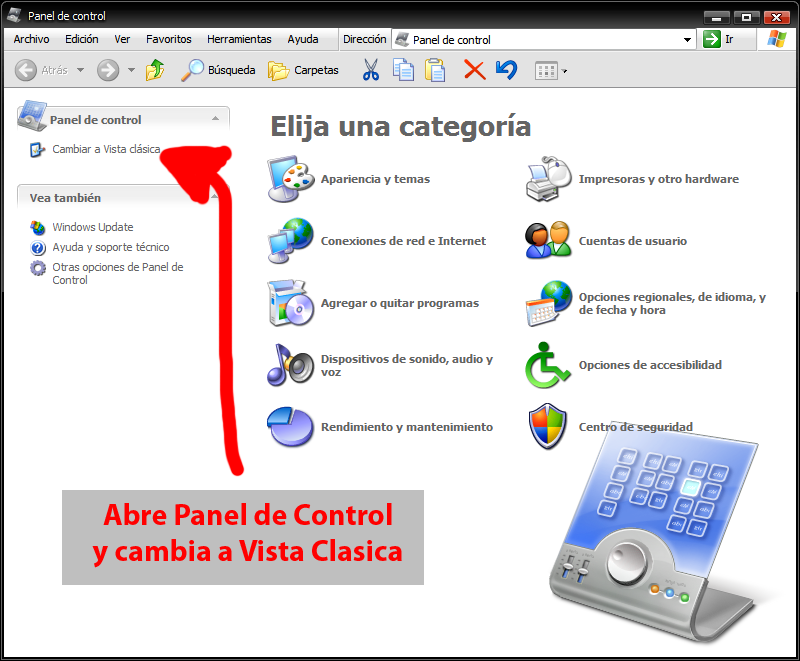
BTW i found a way for the Control Panel to work on Stack Docklet... very easy, just:
1.- Open Control Panel (you have to DISABLE the CATEGORY VIEW and see the classic view)
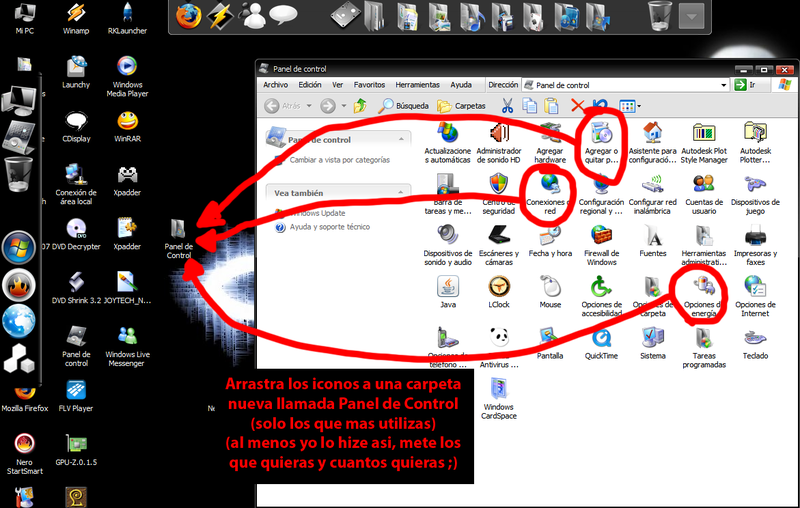
2.- Drag and drop any icon on a folder on the desktop or any folder you want just to have on quick and fast reach (like add and remove programs, sound, accounts, screen, mouse, energy options etc. and there is no need to put all, just a few for quick acces the ones you use most AND just shortcuts of the control panel must be on that folder)
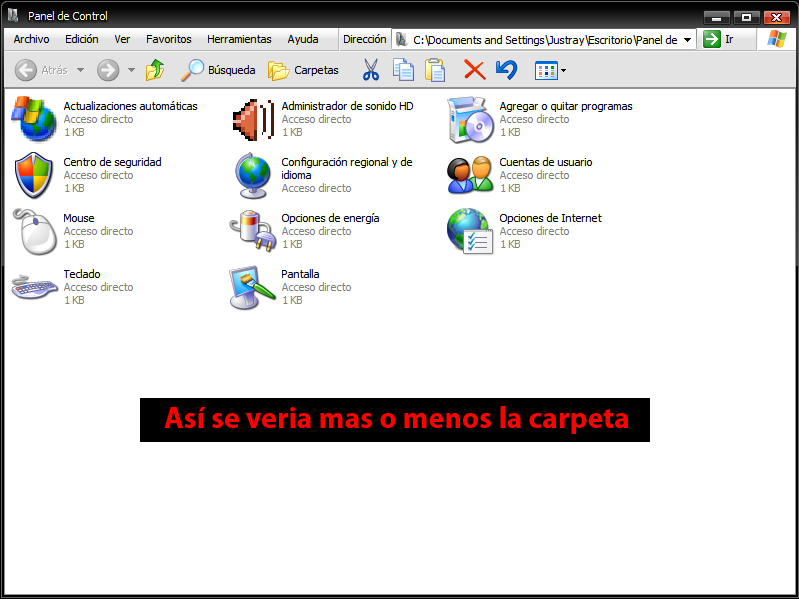
3.- Create a Stack Dockled and add the folder with all the shortcuts of the control panel and DONE
If you select any it opens (and you wonder what about of ALL the items on control panel, easy, select OPEN FOLDER, the arrow you know  , and done, it opens control panel, no the folder on my desktop).
Well, n.n it works for me, at least WONDERFULLY GREAT.
Only tested with ObjectDock and Windows XP pro (who knows if it works with vista O.o? please test it on vista if you can n.nu)
and sorry for my bad english (corrections are very much appreciated ;P)
OK, va de nuevo pero ahora en ESPAÑOL >.) de usar el panel de control con el Stack dockled, es simple y facil.
1.- Abre el panel de control (desactiva la vista por categorias para ver la vista clasica)
2.- Selecciona y arrastra los iconos que quieras de acceso rapido en una carpeta nueva (solo los que mas usas, agregar quitar programas, sonido, cuentas de usuario, etc. solo debe de haber esos iconos del panel de control en esa carpeta)
3.- Crea o agrega un Stack Dockled y apunta a la carpeta que recien acabas de hacer con los accesos directos del panel de control y listo-
Ya puedes seleccionar y abrir los iconos de Agregar quitar programas etc., y si te preguntas "Y el panel de control o los demas accesos directos QUE?" pues simple, dale Open Folder (abir carpeta) y te abre el Panel de Control no la carpeta que apunta (nu she por que O.o llamenlo un bug o algo pero es a algo que le saco provecho XD jejeje.)
Cualquier duda o comentario hacermelo saber, por cierto esto fue probado en ObjectDock y Windows XP, por favor si alguien tiene vista favor de probarlo.
Hello! Your plugin is great!But the anoying freez-ups are making this module unusable. I'm using Objeckt Dock plus 1.9 and i get freez-ups all the time, with or without "follow the dock". Even if i turn of the magnifying option. It seems that the freez-up error is a very common error occuring rather frequently. Can't you figure out what causes this issue? This should be the first bug to be fixed. Moving objects within the dock isn't realy a solution.....
Sorry but i have the same ObjeckDock plus 1.9 and NO PROBLEMS here, try on a fresh new install of OD or try to disable all other docks and see if the problem persist.
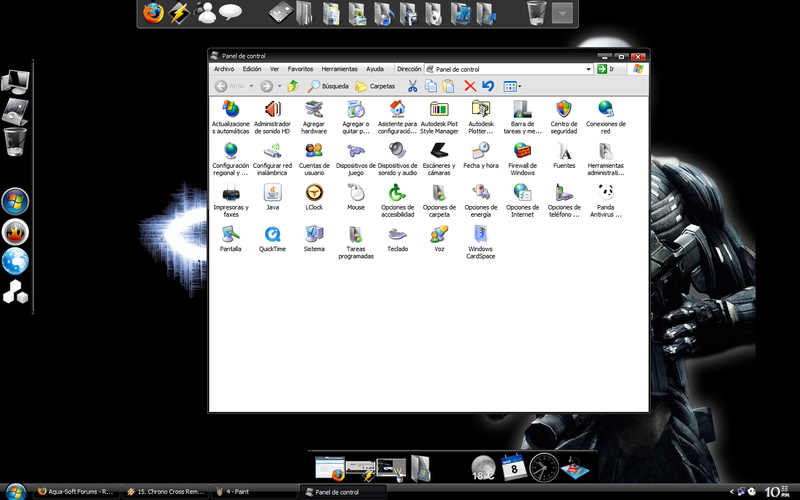
Del manual que hice para ponel el Panel de Control en el Stack Dock lo hice con imagenes para facil comprension (aunque es muy facil hacerlo X.x )






I've had the stacks docklet installed for a few days now. I put a number of my internet links into a folder. Each of the shortcuts had an icon, but when the stack exposes the folder, the shortcuts are there but the icons are not. Any ideas how to resolve this?
I have been using this for a while and i have a few problems, for 1 when i click the stack it opens up and the folders shown are the old windows folders and they dont show the OS X folder icons i have put in. and also just a way to make it replicate the actual stack dock more, when u click the stack the icon should become the "empty box" icon instead of just keeping the icon that you select for the stack.
Cheers
Aydin
ok ok, so u have managed to copy Apple's technology pretty well, now do u think you can improve, for example makings stacks inside stacks fanniong out to the left or right, or customizing icons
ok ok, so u have managed to copy Apple's technology pretty well, now do u think you can improve, for example makings stacks inside stacks fanniong out to the left or right, or customizing icons
01. you can customize the icons yourself
02. the primary focus right now is to ensure that the docklet is operational on all the major ones out there. be patient.
Ugh, sorry but I hate the stacks inside of a stack idea period. Use kkmenu for that. I kind of hope people would stop suggesting it.
Ugh, sorry but I hate the stacks inside of a stack idea period. Use kkmenu for that. I kind of hope people would stop suggesting it.
I quite agree, what's the point anyway ?
where the heck has mat been? any updates?
I've never seen this "stack inside of a stack" thing. does anyone have any screenshots?
This was added to stacks (as it was in tiger) in 10.5.2.

But I think he means stack inside stack on the parabolic version. This is indeed not in leopard.
This was added to stacks (as it was in tiger) in 10.5.2.
Don't know if Matonga could do it but that would be great.
People have personal lives...
He told you this, or did you come up with it on your own?
Just checking on updates on the project my friend
no need to take it personal 
Doesn't really work in RKlauncher. When I quit, the stock becomes blank. Also, I keep getting an error that says "Can't Save Configuration to .ini file. File .DockletSettings.ini Group: Docklet26 Access is denied."
It works on RKlauncher, in fact I think it is more responsive or RK than in Objectdock.
Works fine here RKlauncher (Built 275 for multiple stacks).
as suggested by TomTomx, KK Menu does this thing as stacks after stacks or stacks within stacks. This kind of feature is a needless redundancy...
and for those who use objectdock with freezing stacks docklet, i suggest you shift to ROCKETDOCK...
and for those who use objectdock with freezing stacks docklet, i suggest you shift to ROCKETDOCK...
rocketdock FTW i love it, its the best lol thats cause object dock takes too much CPU and RKLauncher is retarded for me