Stacks Docklet

Hi,

Very nice stack software, works very well with RK launcher.

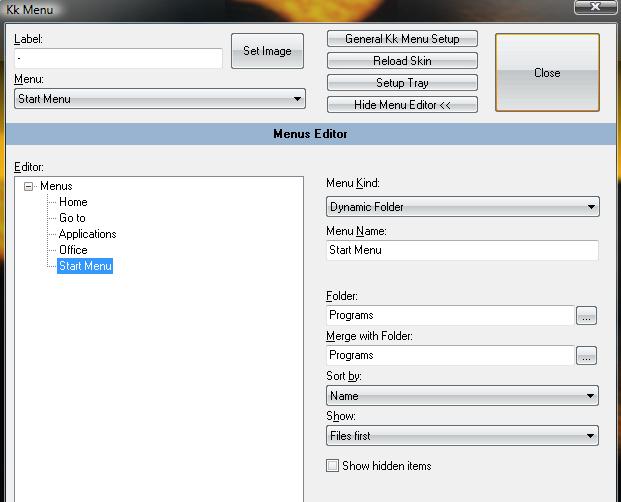
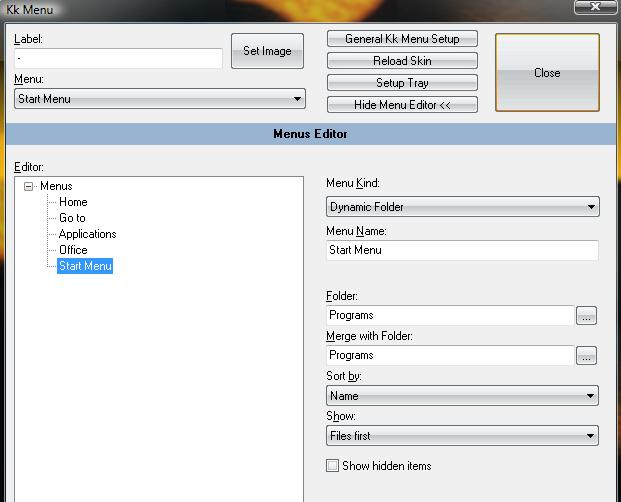
Just one thing, with KKMenu you can get it to merge and display 2 folders in the one stack, for example if i wanted to use your stacks docklet to emulate my start menu i would need the stack dock to look into the following 2 folders to get the full start menu:

C:UsersUser NameAppDataRoamingMicrosoftWindowsStart MenuPrograms

and

C:UsersDefaultAppDataRoamingMicrosoftWindowsStart Menu

See screenshot for the KKMenu options showing this feature. Is it possible for the stacks software to do this sort of thing?

also is it possible to run more than one instance of the stack on RKLauncher?

Many Thans for your work

bennec83
post-74297-1199982336_thumb.jpg

KKMenu.jpg
KKMenu.jpg

#487170

YES IT IS POSSIBLE TO HAVE 2 INSTANCES RUNNING ON ONE DOCK, IF YOU WANT THIS FEATURE DO THE FOLLOWING:

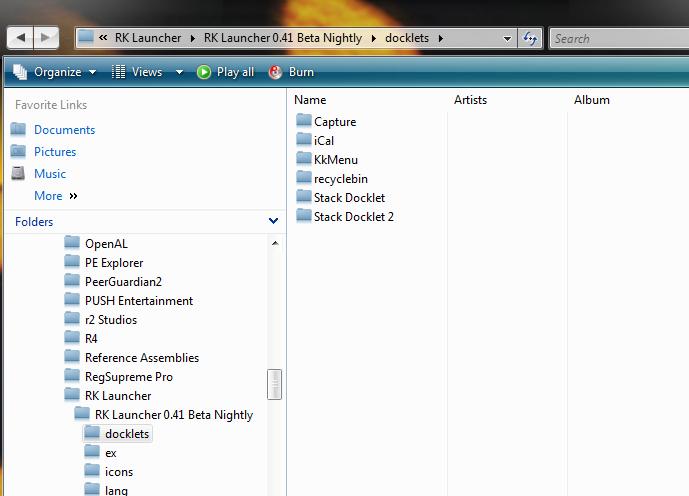
1: GO TO THE SAME DIRECTORY AS THE FIRST STACK DOCKET

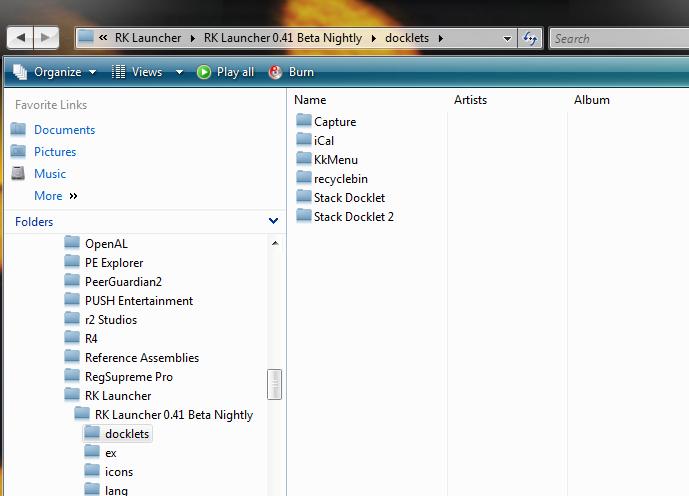
2: MAKE A COPY OF THE WHOLE FOLDER AND ITS CONTENTS (SEE SCREENSHOT 1)

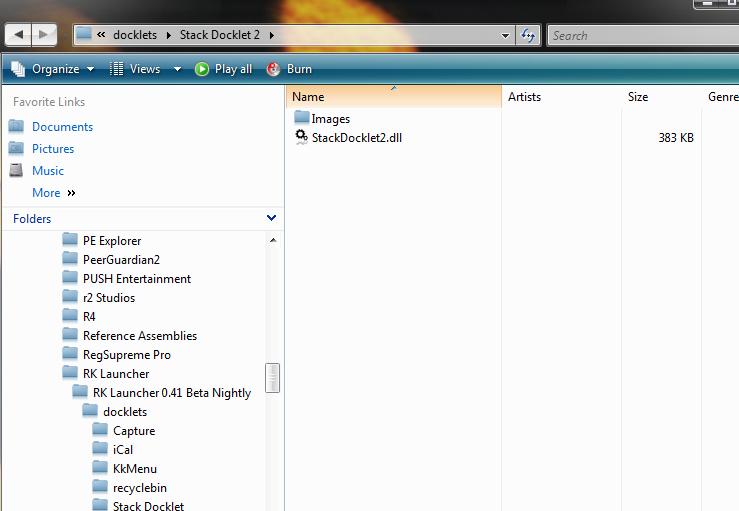
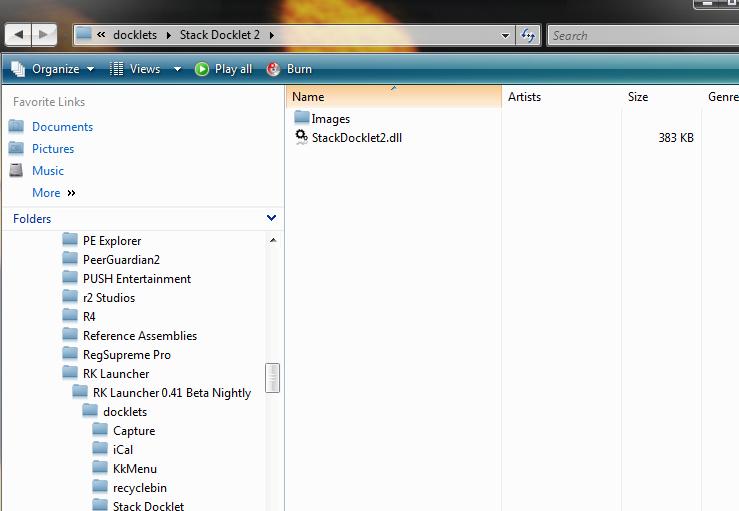
3: GO INTO YOUR COPY AND RENAME THE "StackDocklet.dll" TO SOMETHING DIFFERENT (SEE SCREENSHOT 2)

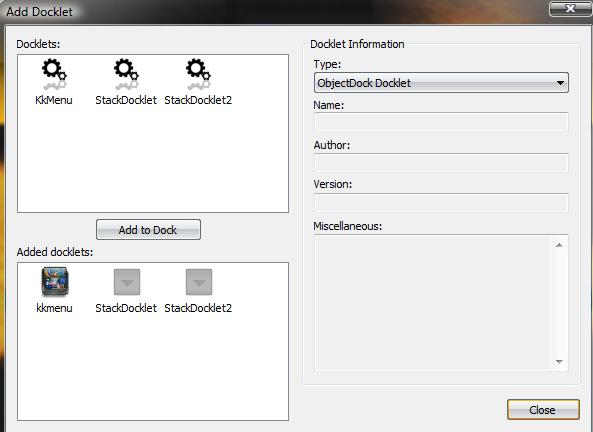
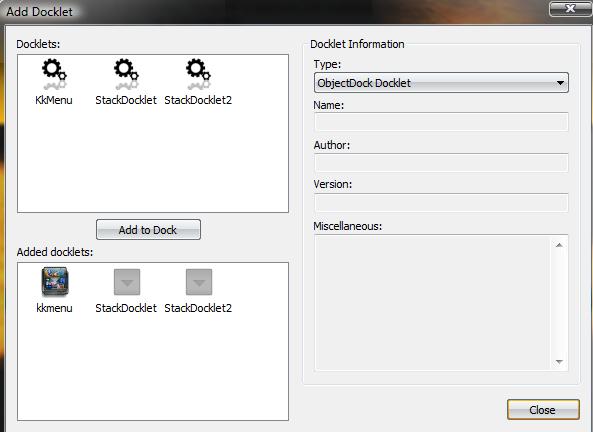
4: ADD THE DOCKLET WITH THE NAME YOU ASSIGNED IN STEP 3 (SEE SCREENSHOT 3)

NOTE: you can have as many as you like without errors!!!

I hope this is useful, only reason is you cannot have 2 instances of KKMenu running with out errors

post-74297-1199983282_thumb.jpg

post-39-1199983282_thumb.jpg

post-39-1199983283_thumb.jpg

2 STACKS.jpg
2 STACKS.jpg
2 STACKS 2.jpg
2 STACKS 2.jpg
2 STACKS 3.jpg
2 STACKS 3.jpg

#487172

OR USE RKLAUNCHER 275...oh - no need to shout...

#487183

Hi there, I'm still closely following developement of this wonderful little app.

I've noticed a problem which I think hasn't been reported yet:

in fan mode, very long filenames are not shortened, they are cut , an so is their background label.

Good luck.

#487201

This is from the RocketDock page, worked for me. Credit goes to below user for figuring it out. Not sure why I didn't think of it X) It fixes the "Can't Save .ini configuration" error in Vista.

Leerlaufprozess 2008-01-09 09:46:50

It doesn't save the setting due to Vista's UAC. Here's what you do: (I'm using a German Windows so my translation of the commands might not be completly right): Rightclick on you RocketDock Folder and choose "properties". Click on the "security" tab and edit/change (the first button). In the upcomming dialog clikc on "add" and in the enxt dialog click on the button in the lower left corner ("advanced" i guess?). Then click on "search now". In the list of the results choose your normal user account name, the one u log in with. Then click on OK and again on OK. Now just check "allow" for the very first item in the list ("full access"?). Simply click OK two more times to accept the changes and it should work.

#487205

@DarkNeo:

Did you customize any of those icons?

Are those shortcuts?

Yeah those all the shortcuts from my control panel, all the icons havent been customized

#487211

@Everyone

does anyone know any other kool apps for RocketDock?

like these StackDocklets which are of great use...

like wat im lookin for is a thing that shows how much

ram is being used and the memory stuff...

#487213

@Everyone

does anyone know any other kool apps for RocketDock?

like these StackDocklets which are of great use...

like wat im lookin for is a thing that shows how much

ram is being used and the memory stuff...

Have you checked http://www.dockex.com/ ?

#487220

i'd like to see this thread stay on topic. if you have other questions, there are other places to ask them. but here, the topic is stacks docklet.

i'd also appreciate it if matonga would at least acknowledge my post:) i'm not demanding anything....

http://www.aqua-soft.org/board/showpost.ph...0&postcount=554

emulation, not functionality. that's what the mac does, right?

#487242

Hey. I love this program and all but im experiencing a problem. When i assign the stack to a folder, and when i try to open up a program(like Microsoft Word) nothing happens when clicked. How do i fix this?

Thanks in Advance...

#487263

I wanted to say thanks for the awesome program. For my setup, I have the setup in many areas that you ask for testing:

OS: Windows Vista Home Premium Service Pack 1 Beta

OS Build: 6001.668

Dock Program Used: RK Launcher

RK Launcher Version: 0.4 Beta Nightly Build 282

So Far:

No problems. This is a absolutely great docklet for any Dock program. Attached are the "working" shots, to show what this program can do, all of this folder is just more folders, but it allows me to access stuff in the stuff folder a lot quicker than opening a new explorer window.

Screenshots:

Fan:

Fan.png

Grid:

Grid.png

(If I need to make them into just links, ask. Thanks!)

Things I would like to see:

- Maybe have the options tie in with RK Launcher options?

- Have it to where there is the option of having the stack collapse when a windows wants to take focus.

#487276

i see people are having trouble with more than one instance of kkmenu on their dock ... meh, i use RocketDock and am currently running 4 instances of it no problem. but anyhoo, onto topic:

i have found that the Stacks docklet only allows you to point to executables or folders to open. i put a bunch of shortcuts in separate folders as to have "Core Audio, Core Image, and Core Video" docklets (looks pretty cool :P). i would like to use your Stacks docklet to do that but for now i'll use kkmenu (that explains the other 3 instances of it). also, i read that someone on the previous pages saw that the tutle of the docklet got in the way when trying to click on something. i just disabled the titles. there's a minor slowdown but i feel it compensates for just being cool :D seeing as this is still in development, i say that this is great progress so far!

#487284

NetOperator Wibby

Rocket Dock sucks cause it doesn't have 1 bounce (like in real Mac dock) and its labels are not accurate. RK beats it at these point.

In order to solve the problem with the same class docklet you need to install RK 275 build. RK is the best dock for Windows and the closest to mac dock.

#487288

LMAO! wow, easy buddy. everybody has their preferences but to just say that something sucks sounds downright rude. i've tried RK before and didn't like it. if i wanted my RocketDock to have one bounce i would make a new .dll or copy RK's and rename (no idea if that would work though). like i said, it's just a matter of preference.

on another note, it looks like to me that Mac's dock makes one big bounce and then a couple mini-bounces as it settles.

#487289

this is absolutley a wonderfull docklet !!

2 request for the upcomming release

1. show a preview of the link instead of the icon for vista users

2. be able to customize a stack menu to contain links of my choice, not just a folder

thank you, you are the best!!!

#487310

sera que podria hacerse un stack dentro de stack? osea, que se puedan desplegar subdirectorios.

ejemplo, tenemos el stack llamado documentos, dentro estan imagenes. musica, etc.. si clickeas musica con alt, te aparece el subdirectorio, pop, rock, techno, etc. y mas si se pudiera incluir drag&drop, por ejemplo si en el escritorio tuviera un archivo que deberia ir en la carpeta imagenes, arrastro al stack, se despliega documentos, despues imagenes y ahi lo suelto, wow estoy sonando jaja..

saludos, es solo una locura mia..

#487313

Anglais, s'il vous plait

#487314

Engles, por favor.

#487317

sera que podria hacerse un stack dentro de stack? osea, que se puedan desplegar subdirectorios.

ejemplo, tenemos el stack llamado documentos, dentro estan imagenes. musica, etc.. si cliakeas musica con alt, te aparece el subdirectorio, pop, rock, techno, etc. y mas si se pudiera incluir drag&drop, por ejemplo si en el escritorio tuviera un archivo que deberia ir en la carpeta imagenes, arrastro al stack, se despliega documentos, despues imagenes y ahi lo suelo, wow estoy sonando jaja..

saludos, es solo una locura mia..

Translation:

Doing stack inside stack, to unfold subfolders.

(an example) ...by clicking the folder in the stack with Alt key pressed...

#487339

this would be great!

#487345

it seems like i can open exe files but not the shortcuts of them. Is is suppose to be like this or is it just me..?

#487349

i'd like to see this thread stay on topic. if you have other questions, there are other places to ask them. but here, the topic is stacks docklet.

i'd also appreciate it if matonga would at least acknowledge my post:) i'm not demanding anything....

http://www.aqua-soft.org/board/showpost.ph...0&postcount=554

emulation, not functionality. that's what the mac does, right?

I already asked this question earlier in the thread

#487353

also being able to open shortcuts of exe programs would be alot more convienent instead of just opening up the file that the shortcutts are in...

#487357

thanks matonga for the translation :P.. it's that possible?

#487358

I don't understand...

I tested C:Documents and SettingsAll UsersMenú InicioProgramasJuegos and shortcuts work just fine.

(it would be something like C:Documents and SettingsAll UsersStart menuProgramsGames in an english windows).

Check that you are using version 1.0.0.9 or newer (of Stacks Docklet) (if it doesn't have version info then it is too old) (right click, properties on StackDocklet.dll).

Then hide all windows and test no error message appears when clicking the shortcut. If an error message appears post it here.

I checked my HKEY_CLASSES_ROOTlnkfile registry key, but I have no open action in shell/shellex so don't know what to check with users...

I'm investigating about PIDLs (if it works you'll be able to add Control Panel, Desktop and other places as a stack).

I have a question: is there a "Virtual folders" shell extensions? As for .zip files in Windows XP you can browse them with Explorer, and digital cameras, it would be interesting to me to know if there is such a thing for windows (such thing plus PIDL support for Stacks Docklet would do the trick for those wanting virtual stacks).

#487366