 Aqua-Soft Forums
How do you make a thumbnail of your desktop???
so I can show you what it looks like when I restart/ shut down my laptop
How do you make a thumbnail of your desktop???
so I can show you what it looks like when I restart/ shut down my laptop
@iBeaner, configure your docklet, close your dock, dont close the process, just close properly, and now restart the dock, that is for save the .ini
theres no Settings.ini file in that file...
all i see are these folders:
Docklets
RocketClock
StackDocklets
Sysstats
and a file that says "Defaults" which is a "Configuration Settings" file type
and then a DDL File that is "SysStatsCOM"
How can i configure my Dock???
and what do you mean by
" close your dock, dont close the process, just close properly, and now restart the dock, that is for save the .ini "
Setup some stack dock icon, then right click any part of the dock, a popup menu appears, and choose quit from it. The dock will not be available anymore as you just closed it (till next bootup, don't worry). Then check if there is a Settings.ini file in the Docklets folder.
Edit:
Try this: open Notepad, don't write anything just leave it blank and save as "C:Program FilesRocketDockDockletsSettings.ini" (WITH the " ", else it will save as Settings.ini.txt) and try again.
It says
"C:Program FilesRocketDockDockletsSettings.ini
You don't have permission to save in this location.
Contact the administrator to obtain permission."
but the thing is that im the only person who has a profile on my laptop so what do i do now cuz it wont let me save it...
@iBeaner: You are using Vista, aren't you? On my computer it is working, just install the dock not to C:Program FIles
ok well i gotta go so i try to catch up later
thanxz eveyone for their help...

See you all laterz...
@iBeaner:
Oh oh oh oh... I see... well, as long as you can't write into the folder, I suppose Stacks Docklet won't too
Try this as a last resource:
1. Close RocketDock (right click the dock, then choose Quit).
2. Copy the RocketDock folder to your "My documents" folder (or some subfolder inside your My documents folder).
3. Run My documentsRocketDockRocketDock.exe (or wherever it went to in step 2) and try to setup a stack. Close RocketDock (as in step 1), and open it again (as in this step) and see if the stack is now configured or not.
If it is configured, and want to use the My documents copy of RocketDock and don't know how, post here.
If it remains unconfigured, post here.
Edit:
Better yet, follow schmrom instructions and see if it works. Try choosing a location inside your My documents folder when installing.
iBeaner, you have Rocketdock set to be portable right? (You've checked "Store settings in a Portable INI, Single User" under options)
Working now?
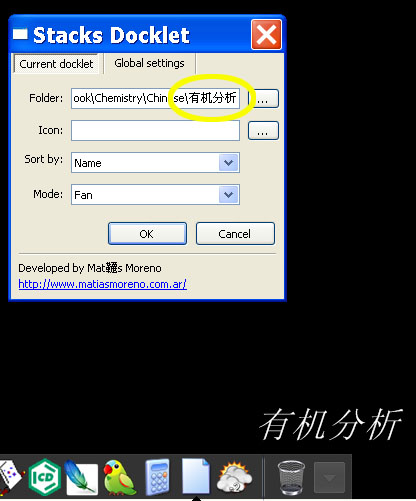
Chinese folder still not working.
maybe it's RK launcher bug. I don't know, I hope you can check it out.
please see the picture.
Sorry my terrible english.


Sweet docklet. I'm currently using the latest Rocket Dock and i am not sure if this was already posted. But when rocket dock is on a secondary monitor, and you use the grid formation, the grid opens up on the primary monitor, and not directly above the dock. However Fan works perfectly. Great job
Matonga~ sorry, I dug around and I cannot find the files. AndreasV's still our best bet.
I'm surprised Nightcrawler doesn't have a copy though; he usually comes through in situations such as these
@nick8204:
Try this: use the "..." button next to the folder textbox, choose the folder, then click Ok. A folder name will probably appear, which has nothing to do with the folder name... don't fix it, don't pay attention to it. Then click the stack and tell me if it works (this is the best I have achieved up to now, indeed it shows me wrong accents in my spanish folders).
@bolero:
Known issue, but didn't fix up to now as nobody had reported it.
@nick8204:
docklet works perfect on my chinese system no matter it is RK or RD or OD.
I suspect it is a rk bug.
do you use the latest night build of RK?
@nick8204:Try this: use the "..." button next to the folder textbox, choose the folder, then click Ok. A folder name will probably appear, which has nothing to do with the folder name... don't fix it, don't pay attention to it. Then click the stack and tell me if it works (this is the best I have achieved up to now, indeed it shows me wrong accents in my spanish folders).
I was doing like that,but doesn't work.
@nick8204:docklet works perfect on my chinese system no matter it is RK or RD or OD.
I suspect it is a rk bug.
do you use the latest night build of RK?
I use the latest night build of RK.
English folder works perfect.
Only Chinese folder problem.
Just found out that in RKlauncher the icons of the stacks have to be in the main icon folder.
Than you can change the icons with the docklets dialog and they will change.
Don´t know if that´s new, it was at least to me.
@Björn:
I'll have to double-check that. Also as far as I can recall, when I tested RK Launcher, it did put forward slashes in icons path ('path/to/icon', a la Unix way).
@nick8204, @tengshj:
Do you have simplified chinese or traditional chinese configured?
Yes, tried that, but didn´t work, and you haven´t to do even that (open the itemlist.conf), when you have the icons in the main folder.
XP, RKlauncher 275, latest stacks.
@nick8204
I am running stack-docklet on RK now. everything is right.
I checked chinese windows xp and english version. everything is just fine.
see attachment.
@matonga
I have simplified chinese configured. and it is ok.

@matonga - this just gets better and better....one feature request (or maybe I'm to dense to see how to do it if it's already possible) would be to allow the user to change the name of the docklet that shows up when you hover the mouse over the docklet.
For instance, say I have a folder full of installation programs and in Windows the folder name is "installation_programs", but I don't want that long name to show when I hover my mouse over the docklet, I'd like it to just say "installs". I know, I can rename the folder, but if I have other stuff pointing to that folder name it's a pain.
Hope you understand what I'm trying to explain....and thanks for a great docklet!