 Aqua-Soft Forums
Sorry Panta, You were right, I now have adjusted Comodo OOps !! my error
and yor right its free and very Beautiful. I have stopped using Rocket dock for now.
Sorry Panta, You were right, I now have adjusted Comodo OOps !! my error
and yor right its free and very Beautiful. I have stopped using Rocket dock for now.
smth is wrong with download page oof Xwdock? or is just my connection....?!cannot dl version 5.2 from Bobah's link..plz...someone has a mirror?
it works fine here, you do know that you have to click on the link to the file in the page bobah's link opens, right?
Hm... that's strange. I now use the same function as Bobah, who close his stacks on focus-lost, too. Yeah, I definitely need the close on focus-lost feature. Its much better than a close button...I made 2 Testing Version for you (backup your .dll and overwrite it with the new ones)
Panta v1: I disabled the close on focus-lost here. => Does MiniCal disappear again?
Panta v2: I added some Debug-Messages on Focus-lost and on Window-Deactivated => If you click the docklet, which messages do appear?
Thx for testing.
My pleasure!
Test Report:
v1: after left-clicking calendar shows up and works! (but the dock stops responding for right-clicks - it still animates tho - so... task manager to the rescue!)
v2: after left-clicking, after about 5sec 100% CPU usage, then a blank dialog (see below) pops up for about 15sec (still 100% CPU usage) then the dock closes.
.


Sorry Panta, You were right, I now have adjusted Comodo OOps !! my errorand yor right its free and very Beautiful. I have stopped using Rocket dock for now.
No worries. I'm glad you appreciate it! 
My pleasure!Test Report:
v1: after left-clicking calendar shows up and works! (but the dock stops responding for right-clicks - it still animates tho - so... task manager to the rescue!)
v2: after left-clicking, after about 5sec 100% CPU usage, then a blank dialog (see below) pops up for about 15sec (still 100% CPU usage) then the dock closes.
.
Damn it. That means: it actually IS my focus-lost function... Could you try this version? It displays the count of focus-lost messages in the mini-calendar-window itself... You should see the count rising, i guess. I'm interested, in who many events you receive... Anyway, start your taskmanager, before you execute the docklet. you might need it....
Damn it. That means: it actually IS my focus-lost function... Could you try this version? It displays the count of focus-lost messages in the mini-calendar-window itself... You should see the count rising, i guess. I'm interested, in who many events you receive... Anyway, start your taskmanager, before you execute the docklet. you might need it....
lol TaskManager is always on while I test anything... I'll be right back *sagt Swatzenegger*
...It displays the count of focus-lost messages in the mini-calendar-window itself... You should see the count rising, i guess. I'm interested, in who many events you receive...
Now it opens the calendar and, unless it's a big coincidence, it's still showing the current day; but look at the calendar's month!
btw, now I could right-click to exit...
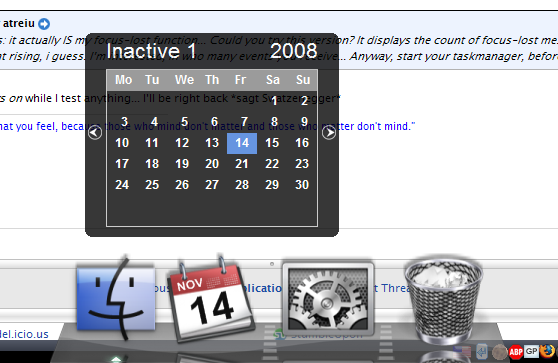
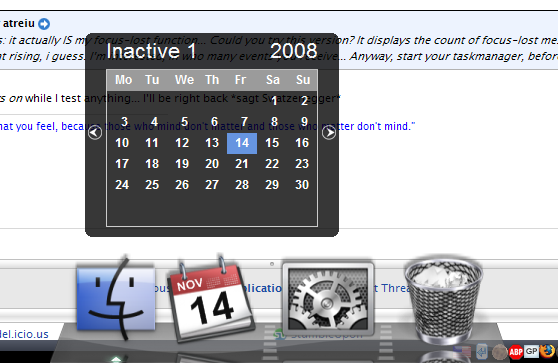
Count is incremented by one every time focus changes...
so wait, why are we having beta testing with Xcal?
it looks pretty good right now... i like it very much right now!
read previous posts... but: why are you asking this afterall?
@atreiu: ... and if I click the XCal icon again, the calendar hides itself!
Any more tests that I can do for you?
Edit:
Waaaaait a minute!! I didn't know XCal could support all those features yet; just take a look!!!
.

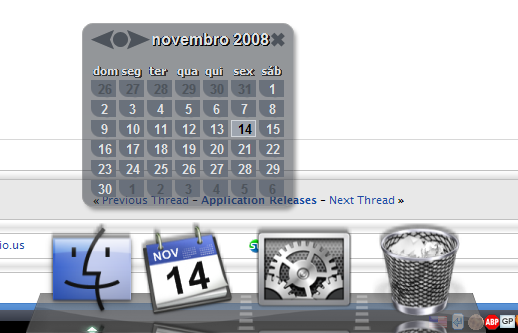
@atreiu: ... and if I click the XCal icon again, the calendar hides itself!Any more tests that I can do for you?
Edit:
Waaaaait a minute!! I didn't know XCal could support all those features yet; just take a look!!!
.
LOL.
I need one important info: on Panta v3, if you do one click the XCal-docklet, and do nothing else! Does the month still say Inactive 1? That would mean, that the focus is lost for 1 time on form-show, only... I could do a workaround for that, then...
@siik: Do you use WindowBlinds, too? Because i guess that is the problem for Panta...
LOL.I need one important info: on Panta v3, if you do one click the XCal-docklet, and do nothing else! Does the month still say Inactive 1? That would mean, that the focus is lost for 1 time on form-show, only... I could do a workaround for that, then...
@siik: Do you use WindowBlinds, too? Because i guess that is the problem for Panta...
Yes, that's exactly what happens.
ps: I posted that image 'cause I have some comments about it; later tho...
Yes, that's exactly what happens.ps: I posted that image 'cause I have some comments about it; later tho...
Ok, I hope this version should fix all problems now. Please give it a last try.
the Calendar above is Rainlendar?
Ok, I hope this version should fix all problems now. Please give it a last try.the Calendar above is Rainlendar?
Well, I'm really flattered that you've called it XCal-Panta-v4 but don't you think you should start calling it XCal-v0XX (XX = your next planned number)? Because... "it's alive! it's alive!!" it works!!! *w00t* and besides, people could become jealous... *rofl*
Dude, you da man!! Congratullations!
Thanks a lot!! 
No, it's not Railendar; it's from an app called Atomic Alarm Clock.
ps: I'll post this now, as you're waiting for my feedback; we can talk about the comments I have afterwards, whenever you want... 
Edit:
Comments (using that image as a reference):
- note those 3 buttons at its top-left corner; the middle one is for jumping directly to the current month, from any other month - it's a time saver...
- the grouping of the buttons at the top produces a nice visual effect (imho).
- note the small visual elements at each day but the current one; aren't they just beautiful? *not joking *
- what about skinning it? o_O
- what do you think about using your .ini files for localization of the docklets? *ducks then runs*
ps: if you wanted suggestions for working, here they are, you, Master of the Docklets!!...
.
@ Panta, I'm asking because I didn't know there were bugs found on ver.30? i think that was the version number
but yeah, it was pretty good
I tried the Xcal-Panta Ver.4
it's pretty sweet!,
@atreiu
*Mail Checker *
You made lots of great contribution bro!!
thanks!
Thanks vladimir for the updates, my dock works now smooth and clean and the problems mentioned yesterday got fixed by simply cleaning my system with CCleaner. Great application, congratulations
Also thanks to everyone for making skins/docklets.
cool job! thx
I'm not using more RK Launcher after XWindows Dock version 5! Only XWindows Dock!!! Congrats, Bobah and everybody else involved in this amazing project!
But, still without 1px to activate the dock? Here when the cursor it's around, let's say, 100 px above the bottom of the screen the dock activates... and this kind of thing is not so good when using photoshop or other software that requires almost all the screen.
I saw that somebody reported it... but I can't find the answer...
Is there a way to fix this? Maybe something in the options?
Ah, somebody working in a Brazilian Portuguese language?
Once again, Congrats to Bobah, Matonga and everybody else!
I'm not using more RK Launcher after XWindows Dock version 5! Only XWindows Dock!!! Congrats, Bobah and everybody else involved in this amazing project!But, still without 1px to activate the dock? Here when the cursor it's around, let's say, 100 px above the bottom of the screen the dock activates... and this kind of thing is not so good when using photoshop or other software that requires almost all the screen.
I saw that somebody reported it... but I can't find the answer...
Is there a way to fix this? Maybe something in the options?
Ah, somebody working in a Brazilian Portuguese language?
Once again, Congrats to Bobah, Matonga and everybody else!
@all: sorry guys, but I'll write in Portuguese as we're both Brazilians.
Oi prcmelo, eu havia traduzido a versão 5.0, só esqueci de fazer o upload; como agora saiu a versão 5.2, eu vou atualizar e publicar provavelmente ainda neste fim de semana, só não sei em que dia... fique ligado!
Sobre este "problema", fui eu quem mais reclamei, apontei até como corrigir, mas depende do desenvolvedor; ainda hoje, em particular, eu pedi novamente e ele ficou de ver, numa futura versão. Agora é só torcer...
Saudações Cariocas (e Rubro-negras!)...
.
Can the docks magnification be more smoother and less choppy, it should feel like a mac too not just look like it. Hope the magnification algorithm can be changed into a much smoother feeling.
Hope you take my criticism the right way, good work on the amazing progress.
I can't understand what do you mean ? How can I make it much smoother ?
@bobah:
- Could you please explain (with details ) the meaning of the new attributes at the 'Stack' tab of the settings window (steps to show grid and fan, and start alpha value to show)? I'm preparing the translation to Brazilian Portuguese and couldn't find a good translation without understanding their meaning;
- At 'Panel' tab, the list of skins is not showing the currently selected one after exiting the dock and restarting it; the first one is shown instead;
- After selecting the skin, if I press 'Update' nothing happens and the selection returns to the first item; if the intention is updating the list, a more understandable label for the button would be 'Refresh';
- The button below the skin preview has 'Install' as its label; it should be 'Apply' as it's not installing a new skin but instead applying the selected one to the dock.
@bobah: could you explain (with details
you will know most of the meanings i guess but here's a little help i hope:
hide stack when it's deactivated: hides a grid or fan stack when you click on a window
preview whole text: shows whole name of a grid stack item if you hover over it long enough
grid icon's size: the size of the icons in a grid
fan icon's size: same as above
max grid items count: maximum amount of items a grid stack will display
steps to show fan: (the amount of frames rendered when opening or closing a fan stack resulting in)?? slower or faster opening speed
steps to show grid: same as above
start alpha value to show: the starting opacity of items when they pop out of the stack
transparency of stack's grid: the opacity of the background of a grid stack.
@bobah
as you can see i used opacity instead of transparency above, in your settings if you give something more transparency it gets less transparent, so maybe you should use opacity instead of tranparency, another option is to "flip" the slider horizontally
Thanks geepee!
These are the ones I'm interested in; good explanation!...steps to show fan: (the amount of frames rendered when opening or closing a fan stack resulting in)?? slower or faster opening speed
steps to show grid: same as above
start alpha value to show: the starting opacity of items when they pop out of the stack
Yes, it would better reflect the reality.transparency of stack's grid: the opacity of the background of a grid stack.@bobah
as you can see i used opacity instead of transparency above, in your settings if you give something more transparency it gets less transparent, so maybe you should use opacity instead of tranparency, another option is to "flip" the slider horizontally
I think it'd be really helpful if someone who has English as his/her native language could revise the contents of the English.xml language file, as all the rest of us, citizens of the rest of the world, have some degree of difficulty expressing our thoughts in plain English. *hint* *hint* *hint*