XWindows Dock v5.2.3

Hi BOBAH13.

First, thank you very much for implementing the "File name complete" bubble on hover feature. This really does make your dock very useful :)

I have another request, hopefully, which could be implemented *crosses fingers*

Please see the screenshot:

20081111problemwithstacxd9.jpg

Please notice how the stack's item "edit" menu greys out the name and path/arguments of the item.

The problem is, clicking on a stack menu item does nothing when those stack menu items were added from certain start menu shortcuts.

This seems to happen with start menu shortcut item's with properties as such:

20081111officepropertieiu0.jpg

(you can recreate this by dragging a start menu "All programs" folder, specifically, Microsoft Office Folder, to the dock.)

My request is as follows; could you either:

1. Allow us to Edit the Stack Menu Item's Properties

or

2. fix the translation of a shortcut's target as implemented by windows, to the dock's.

This would be a great usability enhancement as adding items to the dock would be much easier with your help :)

EDIT: Clarification

#514268

Hi BOBAH13.

First, thank you very much for implementing the "File name complete" bubble on hover feature. This really does make your dock very useful :)

I have another request, hopefully, which could be implemented *crosses fingers*

Please see the screenshot:

20081111problemwithstacoa4.jpg

Please notice how the stack's item "edit" menu greys out the name and path/arguments of the item.

This seems to happen when an item's shortcut's properties are thus:

20081111officepropertieiu0.jpg

(you can recreate this by dragging a start menu "All programs" folder, specifically, Microsoft Office Folder, to the dock.)

My request is as follows:

Could you either:

1. Allow us to Edit the Stack Menu Item's Properties

or

2. fix the translation of a shortcut's target as implemented by windows, to the dock's.

This would be a great usability enhancement as adding items to the dock would be much easier with your help :)

You can change the name and all of that. You just have to make sure that you are adding the file/shortcut from the actual folder in Program Files. This works the most, from my understanding.

#514278

You can change the name and all of that. You just have to make sure that you are adding the file/shortcut from the actual folder in Program Files. This works the most, from my understanding.

yes, just adding the start menu shortcuts won't work because those are special paths. You need to goto program files/microsoft office and look for all the apps. I don't have time to list them off right now.

#514283

Depleted battery bunny (rofl):

.

post-58609-1226465325.png

bunny xkaws mod.png
bunny xkaws mod.png

#514290

yes, just adding the start menu shortcuts won't work because those are special paths. You need to goto program files/microsoft office and look for all the apps. I don't have time to list them off right now.

yea, that's what I currently do.

Having special path shortcuts be resolved correctly when added to the dock, or allowing the user access to those fields in the edit window to 'fix' shortcuts with spacial paths, was my request.

#514292

Big Update on the XDesktoplet

It's now useful, even for people who want to use an Icon, and not a screenshot, because:

* Drag & Drop Support: Move Files to the Desktop. Hold Ctrl during Drag&Drop to copy the files.

Besides this new Feature, some bugfixes:

* Half-Automatic mode supports Vista, now (I hope so, even i couldn't try. Feedback pls! ;))

* Screenshots are working better

* minor tweaks & fixes.

I need support by designers, again: I want to overlay the captured screenshots with a dummy-taskbar and a dummy-dock (optional, of course). Thats because both of them are too small to be seen in the Screenshot-Icon.

Could someone please create a 2 transparent pngs, one with a dummy-taskbar, one with the Dummy dock? 512x512px please.

After i used them as an overlay for the screenshot, it should look like the attachment, but without round screen-edges... The second attachment is like it looks at the moment (with dock-icon-size 90px!)

@The Bunny-Hunters:

These Pictures are nice (well, some of them ^^), but it making no sense to post them, if you don't make an icon-theme out of it :P. PS: Nice & normal Icon-themes are welcome, too. ;)

post-90085-1226497929.png

post-89-1226497929_thumb.png

default.png
default.png
Screenshot-20081112-1.png

#514304

Sorry all for the incongruous question but...

@ Firecracker6 : What is the name of the visual style you're using ? thanks

apart from that here is the latest French tanslation

French.zip

Attachment: French.zip

#514306

Small Update on the Grab-Docklet.

I added some Keyboard-functions.

These should help, if you try to capture a really small screen-area (so the grab-area-controls are hidden).

#514308

Small Update on the Grab-Docklet.

I added some Keyboard-functions.

These should help, if you try to capture a really small screen-area (so the grab-area-controls are hidden).

nice, thanks

#514310

Hi BOBAH13.

First, thank you very much for implementing the "File name complete" bubble on hover feature. This really does make your dock very useful :)

I have another request, hopefully, which could be implemented *crosses fingers*

Please see the screenshot:

20081111problemwithstacoa4.jpg

Please notice how the stack's item "edit" menu greys out the name and path/arguments of the item.

The problem is, clicking on a stack menu item does nothing when those stack menu items were added from certain start menu shortcuts.

This seems to happen with start menu shortcut item's with properties as such:

20081111officepropertieiu0.jpg

(you can recreate this by dragging a start menu "All programs" folder, specifically, Microsoft Office Folder, to the dock.)

My request is as follows; could you either:

1. Allow us to Edit the Stack Menu Item's Properties

or

2. fix the translation of a shortcut's target as implemented by windows, to the dock's.

This would be a great usability enhancement as adding items to the dock would be much easier with your help :)

EDIT: Clarification

You can do this by first creating a stack, then DRAG the shortcuts into that stack - it will not work if you try to add a folder as a stack

#514311

is it just me, or when you open a stack, the frame rate of it openeing just seems to low, and therfore a bit jerky. Not much, just no where near as smooth as object dock.

#514312

Okay... I'm on line again, so I made minimization likes the old one and it's fast now also I added new options such as set speed for show and hide stack and transparent value of the stack's background. Also changed algorithms to showing stack's fan and grid. I think they are much better than before and fixed problem with menu's text. So I think it'll be update version 5.2 soon ;)

#514314

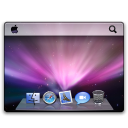
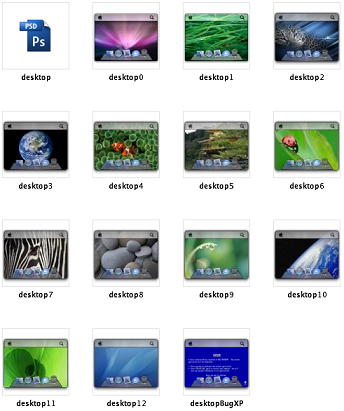
xDesktoplet custom image

wallpapers of the leopard

includes PSD file.

wallpaper image size of 120 x 90 px, replaces , clears corners

post-77028-1226513185_thumb.png

custom image.zip

Preview.png
Preview.png

Attachment: custom image.zip

#514317

You can do this by first creating a stack, then DRAG the shortcuts into that stack - it will not work if you try to add a folder as a stack

Again, I am aware of the different ways with which you can work around my issue. This is what I do currently. I was just hoping to have those 'special' path shortcuts correctly add themselves to the dock, or, if that is not possible, have the ability to 'fix' the path and shortcut name, after they have been added. (By enabling access to the grey'ed out fields.)

Thanks for the suggestion Fzang, tho :)

Here's a bunny to add to Pantas:

miffyiz7.png

and @ chatpristi, the WB skin is called: SL by Q.Z. Chen

#514318

Okay... I'm on line again, so I made minimization likes the old one and it's fast now also I added new options such as set speed for show and hide stack and transparent value of the stack's background. Also changed algorithms to showing stack's fan and grid. I think they are much better than before and fixed problem with menu's text. So I think it'll be update version 5.2 soon ;)

Please set the border activation when in background ;)

#514323

Bobah! I was worried for a second, there :P

Thanks for fixing the minimisation, that's all that's stopping me using it now :)

#514324

With the help of janux designer-foo i could update the Desktoplet again:

With v0.80 you now can Overlay a dummy Taskbar & Dock over your own Desktop-Screenshot-Icon.

I think it looks good :) Thanks, Janux!

PS: I'm afraid my Settings-Windows etc. include MANY mistakes. It would be VERY nice, if a native speaker could take a look over all of my docklets and correct or rephrase my bad english.

post-90085-1226521497_thumb.png

Screenshot-20081112-1.png

#514327

Give away day! *w00t*

After receiving permission from it's creator, I can finally publish for your delight "MrStylo's" Battery Icon Set. It's been just slightly modded to fit XBattery's specs (1 new icon, 1 modded icon).

Thanks to MrStylo for allowing me porting this beautiful set!

Enjoy!

@atreiu: please feel free for including this set into XBattery's pack! :D

Go see it's preview and get it at: http://www.aqua-soft.org/board/showthread....4326#post514326

.

#514328

Give away day! *w00t*

After receiving permission from it's creator, I can finally publish for your delight "MrStylo's" Battery Icon Set. It's been just slightly modded to fit XBattery's specs (1 new icon, 1 modded icon).

Thanks to MrStylo for allowing me porting this beautiful set!

Enjoy!

@atreiu: please feel free for including this set into XBattery's pack! :D

Go see it's preview and get it at: http://www.aqua-soft.org/board/showthread....4326#post514326

.

It's great! You can bet I include this in the next update!

#514332

It's great! You can bet I include this in the next update!

Thanks! I'm glad I can contribute, but you do know that I only 'discovered' it (ok, did a little mod too... lol).

There's more in the oven! If only everyone doing mods would care asking the original creator's permission first... ;)

#514333

@Bobah: I'm noticed, that if the "Icon size if mouse is over" is set to very high, the Icons are looking a lot better! Nothing else changed... It would be cool, if you could reach the quality from the higher setting in a lower setting, too.

See the screenshots to see the difference (if possible, download them to switch through them in full size, then you will see what I mean.)

post-90085-1226523490_thumb.png

post-89-1226523490_thumb.png

bad.png
bad.png
good.png
good.png

#514335

@Bobah: I'm noticed, that if the "Icon size if mouse is over" is set to very high, the Icons are looking a lot better! Nothing else changed... It would be cool, if you could reach the quality from the higher setting in a lower setting, too.

See the screenshots to see the difference (if possible, download them to switch through them in full size, then you will see what I mean.)

Dude, you're damn right! It's all in the algorithm...

Meanwhile, the dock insists in obstructing other app's way... damn too! *lol*

#514336

I can't wait for the ver 5.2!!

it'll be sooo sweet!!

thanks for the news bobah!

#514342

@Bobah: I'm noticed, that if the "Icon size if mouse is over" is set to very high, the Icons are looking a lot better! Nothing else changed... It would be cool, if you could reach the quality from the higher setting in a lower setting, too.

See the screenshots to see the difference (if possible, download them to switch through them in full size, then you will see what I mean.)

Very nice catch atreiu. It looks like the icons are scrunched down by a few pixels when the dock is set not to magnify. I hope this will be fixed ;)

#514343

How do I go about extracting the contents off an SMXD file?

#514344