XWindows Dock v5.2.3

Hm, I missed a Bug somewhere. Serious exceptions... don't try it. I will reupload soon...

Ok, I've seen your post there (unfortunately after downloading and... failing to start! lol); no worries, I'll wait. Anyway, thanks for the heads up! :D

p.s.: after fixing this one you'll receive some info about a bug with XBattery,,,
#514093

Ok... two things

1- How to capture a snapshot? When I saw delay, I thought "after closing dialog"; nope! Then I remembered "- Take Screenshots with one click" aha! click on the icon!... nope!! :confused: How?

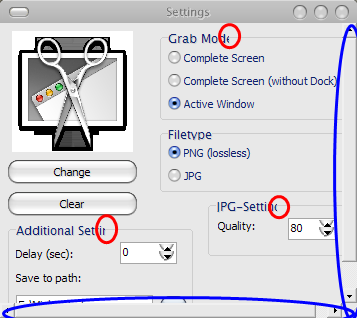
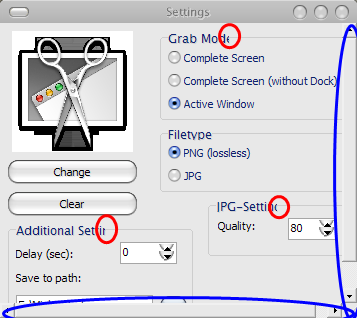
2- See picture below:

-red: text problems

-blue: scroll bars!?!?

.

post-58609-1226337053_thumb.png

Bug.png
Bug.png

#514094

One more suggestion for the Grab docklet: You could implement the option to save the screen as a png if you do a left-click and to save it as compressed .jpg with a (double) right-click, so you can get to the context menu anyway.

#514102

Ok... two things

1- How to capture a snapshot? When I saw delay, I thought "after closing dialog"; nope! Then I remembered "- Take Screenshots with one click" aha! click on the icon!... nope!! :confused: How?

2- See picture below:

-red: text problems

-blue: scroll bars!?!?

.

1: You have to left-click on the Docklet to take a shot or activate the timer! Settings are just Settings here... :D

2: Please download my new Version, should be fixed. (Seems to be a Theme-Problem, it looks ok on my Computer) BTW: Whats your VisualStyle?

Do you have problems with the Desktoplet-Settings, too?

Grab-Docklet v0.31 released

*New Feature: Capture Region! I found a workaround to do this. Looks pretty ugly, but it works. Perhaps I make more eye-pleasing later.

@BlaZeOSX: Sorry, that's impossible to implement, because of limitations in the API.

Thanks for you reports and suggestions!

#514108

I'm afraid I must request a version of the dock with the old window-minimising routines, however you're doing it now returns no window image at all under vista, which is quite unfortunate :)

#514110

I'm afraid I must request a version of the dock with the old window-minimising routines, however you're doing it now returns no window image at all under vista, which is quite unfortunate :)

I have this problem with many windows on xp, but not all. An option would be nice.

#514111

Or are you talking about the Grab-Docklet? Have you got problem with this, too?

#514112

I'm having a problem, I downloaded v5 of the Dock for my Vista Notebook but heres some of my problems:

1: When minimizing Explorer windows they disappear from the taskbar, the animation is VERY slow, and no image is shown at the dock, space is taken up on the dock and when I hover over it it shows the label but noting happens when clicked.

I realized that Misc. App will minimize fine onto the dock w/the preview and everything but they still disappear from the taskbar and theres a delay when minizing instead of it being Instantly like that of OS X.

2: The indicator it came with was a really ugly triangle, I replaced it with the Leopard indicator but even after I restarted the dock its still the same.

3: Added ControlPanel to the dock, when clicked nothing happens

4: Added MyComputer to the dock, works fine till I restart the dock then it turns into an empty stack

5: I cant drag&drop shortcuts to the dock, like the personalization shortcut for Vista (in order to place it into docks I have to drag+drop the icon from the Addressbar to the dock and it'll work, apparently it doesn't)

The rest are requests:

1: the ability to change the icon of the App badge for minimized windows and their reflections and effects, etc.

2: The ability to add up to 256x icon size ranges

3: better quality for the stacks and ability to change their settings

EX: change the open badge text to "Open in Finder" and the ability to change icon text sizes + font, and the ability to not follow the dock.

4: Last one is this, to add Video+Photo thumbnails, currently when a pic is added to the dock a Gray border surrounds it (including in stacks), OS X's dock doesn't do that, it just makes a thumbnail of the file in both the dock and the stacks.

I may sound like ranting but so far this dock is on the path to being the best port of the OS X dock yet.

#514117

Great upgrade BOBAH13, Fantastic!

Finally a dock with the option to change the space between icons, which has no other dock, thanks bobah.

to be almost perfect visually, only an option to separate the icons from the bottom of the screen, leaving the dock highest, stretching it, as the leopard dock.

I hope that does not stop updating the dock because it is a great job. thanks for your effort.

New skin to the dock: 2D Dock

Enjoy!

sweet any tuts on how to make 2d docks

#514120

Grab-Docklet v0.33 released

Many Bugs fixed. Screenshots should work fine now. Please call back, if you are having problems.

#514122

I think the invisible windows being unclickable is because there's nothing to click :)

For example, the ones that have the app icon on will unminimise if you click that :D

#514124

I'm having a problem, I downloaded v5 of the Dock for my Vista Notebook but heres some of my problems:

1: When minimizing Explorer windows they disappear from the taskbar, the animation is VERY slow, and no image is shown at the dock, space is taken up on the dock and when I hover over it it shows the label but noting happens when clicked.

I realized that Misc. App will minimize fine onto the dock w/the preview and everything but they still disappear from the taskbar and theres a delay when minizing instead of it being Instantly like that of OS X.

2: The indicator it came with was a really ugly triangle, I replaced it with the Leopard indicator but even after I restarted the dock its still the same.

3: Added ControlPanel to the dock, when clicked nothing happens

4: Added MyComputer to the dock, works fine till I restart the dock then it turns into an empty stack

5: I cant drag&drop shortcuts to the dock, like the personalization shortcut for Vista (in order to place it into docks I have to drag+drop the icon from the Addressbar to the dock and it'll work, apparently it doesn't)

The rest are requests:

1: the ability to change the icon of the App badge for minimized windows and their reflections and effects, etc.

2: The ability to add up to 256x icon size ranges

3: better quality for the stacks and ability to change their settings

EX: change the open badge text to "Open in Finder" and the ability to change icon text sizes + font, and the ability to not follow the dock.

4: Last one is this, to add Video+Photo thumbnails, currently when a pic is added to the dock a Gray border surrounds it (including in stacks), OS X's dock doesn't do that, it just makes a thumbnail of the file in both the dock and the stacks.

I may sound like ranting but so far this dock is on the path to being the best port of the OS X dock yet.

Problems:

1: I agree, the latest update kills usability.

2: Read the first few pages of the thread. You can't change the images

3: Doesn't work in vista. Not sure how to fix. Ask someone who's using vista here.

4: Delete and re-add?

5: what?

Requests:

1:meh...

2: Ridiculously huge :P

3: OK...

4: Not quite true from the screenshots I've seen. It can be customized :)

#514128

By the way, to you people who minimize to dock in 5.0 and the icon disappears, just delete the empty space for the window to come back ;)

#514129

@atreiu

I get some errors Idk what it says i forgot to take screenshot but i just deleted grab docklet

it says error some letter and kernel32.dll error thing

idk what to do some i just deleted it

#514141

@atreiu

I get some errors Idk what it says i forgot to take screenshot but i just deleted grab docklet

it says error some letter and kernel32.dll error thing

idk what to do some i just deleted it

1. Which Version did you try? v0.31 had a lot of bugs, i updated it just some hours ago.

2. Do the errors appear, after add to the dock, or when you try to make a screenshot?

3. Did you try different Grab-Modes? The Message you tell me about can only appear in the first mode, i think.

4. XP, right?

#514146

1. Which Version did you try? v0.31 had a lot of bugs, i updated it just some hours ago.

2. Do the errors appear, after add to the dock, or when you try to make a screenshot?

3. Did you try different Grab-Modes? The Message you tell me about can only appear in the first mode, i think.

4. XP, right?

Alright

1. I downloaded .33 latest one i know for sure

2. It appears when i right click and try to go on add, it just appears, no other menu's pop out...

3... I can't even put it on dock

4 XP, Home, SP2

* i Have objectbar, Windowblinds... but that's about it, take a look at my new video on youtube...

you'll see my desktop

www.youtube.com/markcooz

#514149

can some one make a leopard inspired skin for Ver 5.0 i would do it but i dont know how lol :P and if some one could make a rainbow dock like this one http://moorec.deviantart.com/art/Rainbow-dock-79101672

please if some one can make them please i would be like so happy lol

#514151

can some one make a leopard inspired skin for Ver 5.0 i would do it but i dont know how lol :P and if some one could make a rainbow dock like this one http://moorec.deviantart.com/art/Rainbow-dock-79101672

please if some one can make them please i would be like so happy lol

#514152

Sorry for the delayed feedback; was away for a while...

1: You have to left-click on the Docklet to take a shot or activate the timer! Settings are just Settings here... :D
Ok, it's kind of working now with v0.33, under certain conditions...

If you used some trick for inhibiting the capture of the settings dialog, make sure you dismiss it with both 'cancel' and 'ok'; right now everything works fine up to the moment I click 'ok', then no more screenshots are taken! If I open settings but click 'cancel', then I can still take screenshots... o_O

The scenario is as follows (selected screen via clipboard):

- start the dock;

- take a screenshot (left-click): works;

- right-click icon and select 'edit';

- click 'cancel';

- take a screenshot (left-click): still works;

- right-click icon and select 'edit';

- click 'ok';

- take a screenshot (left-click): nothing happens until you restart the dock!

BTW: Whats your VisualStyle?

Do you have problems with the Desktoplet-Settings, too?

...

...

Thanks for you reports and suggestions!

I use WindowBlinds with a slightly modded theme from the amazing original by kinsemon (eamon) called 'Leopard-inspired XP WB theme' (just modded right-sided caption buttons, some texts widths, a few minor glitches...).

No, no problems with Desktoplet that I've noticed so far!

You're most welcome! It's nice seeing our feedback being actually considered; thanks for that!! ;)

Edit:

- The problem after accepting settings dialog happens at all capture modes;

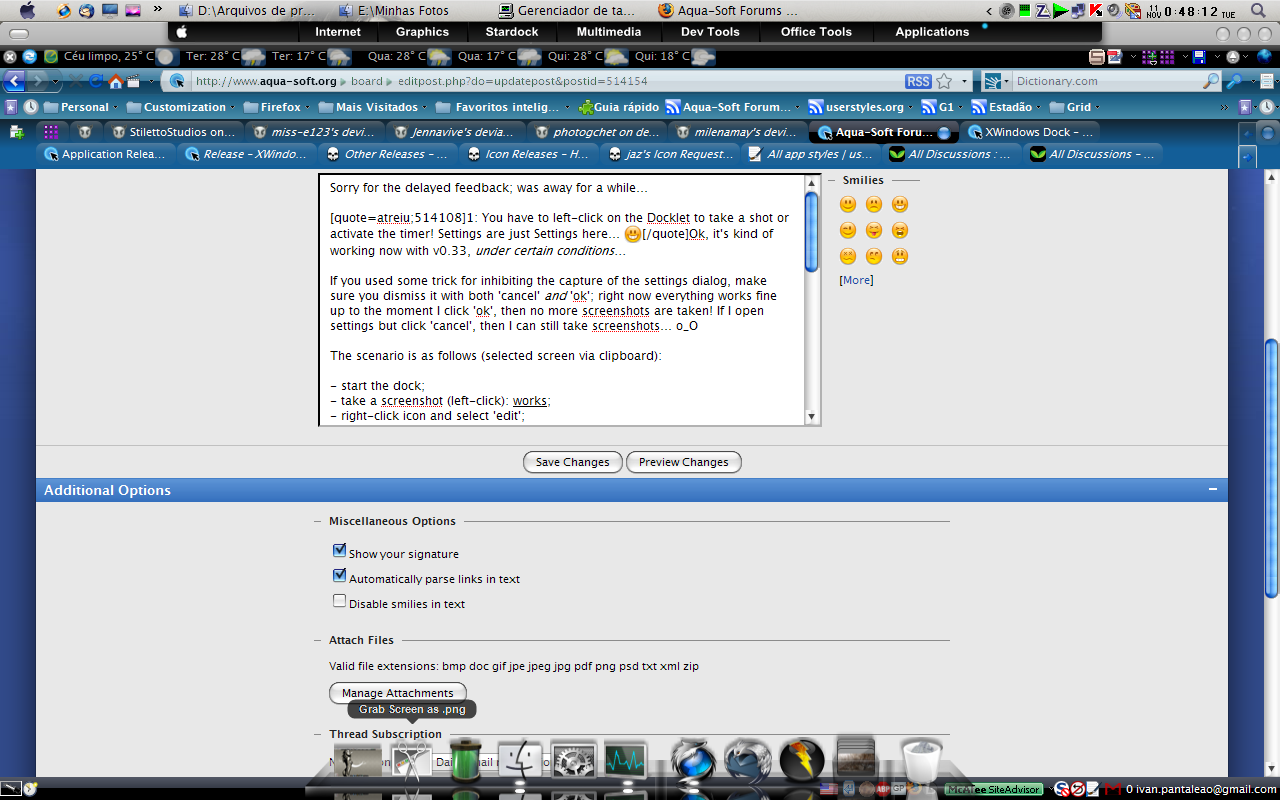
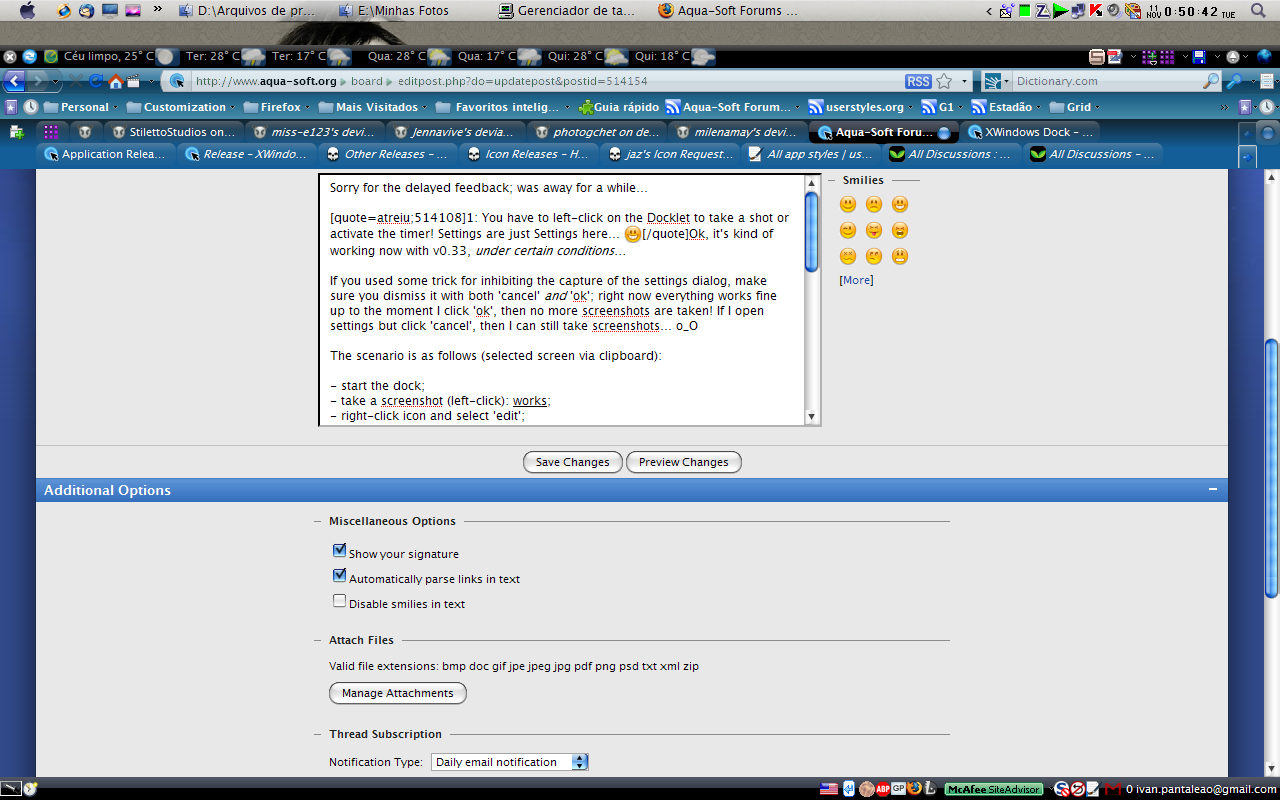
- When using WindowBlinds, captured windows show no titlebars, borders, etc. (see attached screenshots: first one is with first option (through Clipboard), second one is with second option (without Dock); note diferrent captions - FF is maximized);

- Capturing 'Foreground Window', having either a maximized or a minimized one, produces what can be seen at third and forth screenshots, respectively;

- 'Region', when using WindowBlinds, also gets no title, borders, etc. (see fifth screenshot);

Hope this helps! :D

.

post-58609-1226363662_thumb.png

post-89-1226363662_thumb.png

post-89-1226363663_thumb.png

post-89-1226363664_thumb.png

post-89-1226363665_thumb.png

Screenshot-20081111-1.png
Screenshot-20081111-2.png
Screenshot-20081111-3.png
Screenshot-20081111-4.png
Screenshot-20081111-5.png

#514154

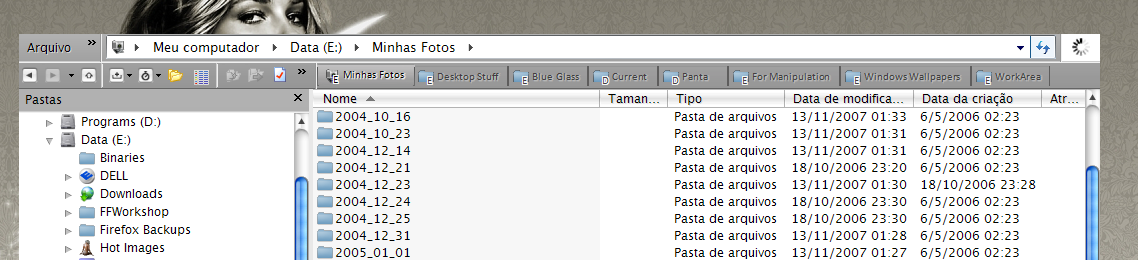
take a look at this...

post-86397-1226363832_thumb.jpg

Untitled-1.jpg
Untitled-1.jpg

#514155

take a look at this...

Hi siik,

I have XP Pro SP3 pt-BR, so let me see if I can reproduce your problem... as I didn't remove this docklet from it's version 0.22, when I updated it to v0.33 it was already at the dock. I'll do some tests and be back soon...

@Kittierocker: as the dude didn't upload his conversions at the right thread, try looking for posts by iGod (or eGod?? can't remember...) at this thread; I think you'll find what you want. Hope this helps.

#514157

Hi siik,

I have XP Pro SP3 pt-BR, so let me see if I can reproduce your problem... as I didn't remove this docklet from it's version 0.22, when I updated it to v0.33 it was already at the dock. I'll do some tests and be back soon...

@Kittierocker: as the dude didn't upload his conversions at the right thread, try looking for posts by iGod (or eGod?? can't remember...) at this thread; I think you'll find what you want. Hope this helps.

I think I know why....

I solved it!

#514159

I think I know why....

I solved it!

,,, and??

#514160

,,, and??

I am a tester, and I had a previous one, which was the pre ver 5

and now I have the new ver 5, and it works

it's pretty good, but do you know if you could somehow include the cursor in with screenshot?

it will look exactly like grab from Rk Launcher

#514161

I am a tester, and I had a previous one, which was the pre ver 5

and now I have the new ver 5, and it works

it's pretty good, but do you know if you could somehow include the cursor in with screenshot?

it will look exactly like grab from Rk Launcher

No way that I'm aware of... (and I found some more bugs and problems too; I'll update my previous post...).

Btw, this new (old version) has something worthwhile? Mind sharing info? *lol* ;)

.

#514162