XWindows Dock v5.2.3

head01.jpghead02.jpg

Options

  1. Support languages ("Languages*.xml")
  2. Support skins ("ToolsXSkinMaker.exe and Config.txt") also you can get images from "SkinsCurrent*.png"
  3. Start with windows
  4. Can edit file's types for sort them, such as: Video, Audio, Picture, Text
  5. Transparency of icon's reflection 0..100%
  6. Icon's size 32..100 pixels
  7. Icon's size when mouse is over 32..100 pixels
  8. Maximum icons in stack 8..18
  9. Space between reflection and icon -5..5
  10. Transparency of panel 0..100%
  11. Panel will hide in 0..3600 seconds
  12. Space between panel and screen 0..100 pixels
  13. Space between icons 0..10
  14. Show indicators of applications in system
  15. Hide stack when it's deactivated
  16. Minimize windows into the dock. It supports 2 effects: Default and Genie. Also you can change speed for minimize them
  17. Reaction to change directory. So when directory'll be changed dock's item jump or not. You can set options, such as: Added, Removed, Modified, Renamed
  18. Option to change position of dock. Above all windows or not
  19. Change icon's size of stack's grid ( 70-150 pixels )
  20. Option to show item's shadow
  21. Option to change position of dock on top when mouse is over
  22. 2 methods what do when icon was droped out. You can use: create link or poof.

Cans

  1. Add

    1. File. Select some file(s) in dialog from you PC and then it'll be added into the dock.
    2. Directory. It sames File.
    3. Separator. It's a break among dock's items.
    4. Stack. You can create private stack or publish. In private you can add everything what you want. Publish stack, you can't change, because it joins Explorer direcotry.
    5. Can add speacially directories, such as: My computer, Control panel and Trash. You can work at trash as when you work at original one.
    6. If you have docklets created for this dock, you can add them too.


    7. Add into stack. This option looks like the Add.

    8. Edit. You can change item's icon, caption, command line, work directory, parameters.
    9. Delete. This is a simple option.

    10. Stack
      1. Sort. You can select method for sort stack's items. Name, Date (Changed, Created, Accessed) and Kind. It sorts by kind using option "File Types", where you wrote your file types extensions.
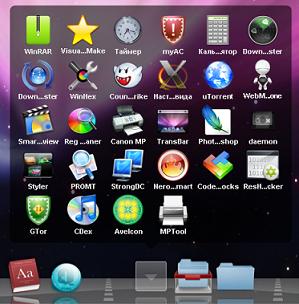
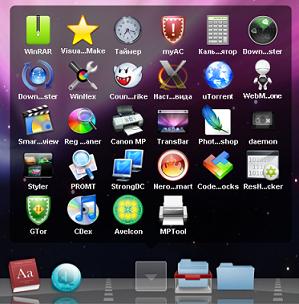
      2. View. It shows how you would like to view stack. When you select Auto, the dock select Fan or Grid alone or you also can use Menu method.
      3. Stack's icon. It's a very interesting option. Here you can set some icon which will be showed over the stacks, onto the dock. You can see some icons in "SkinsBox*.png"

[*]Drag & Drop into the dock and out.

[*]Move items among them.

[*]Preview of item which is moving over the dock

[*]Support hover item for stack's grid

[*]About. This option shows about developers and people who helped with this dock.

So when you decided make skin for XWindows Dock, you should know it:

XSkinMaker version 2.5

name; size ( Width x Height pixels ) ; Can use transparency ( ALPHA - channel );

  • Break 14x40 Yes
  • Close 48x48 No
  • Left ?x40 No
  • Middle ?x40 No
  • Right ?x40 No
  • ControlPanel ?x? ?
  • MyComputer ?x? ?
  • Recycler ?x? ?
  • RecyclerFull ?x? ?
  • StackOn ?x? ?
  • StackOff ?x? ?
  • Poof ?x? ?

Where you can see "?" it's mean that you can use what you want.

Futures news won't be publish here because the site to support this dock will be started as soon as it's done

post-89-1221973163_thumb.jpg

post-87061-1221973163_thumb.jpg

post-89-1221973164_thumb.jpg

ScreenStackFan.JPG
ScreenStackFan.JPG
ScreenStackGrid.JPG
ScreenStackGrid.JPG
ScreenShot.JPG
ScreenShot.JPG

#509879

When will the Mirror effect be available?

#509880

I don't know yet. It's working, but not so well and I have got some bugs, it's about windows. For the icons, I did mirror effect. :)

Sorry for mt english, it's not easy for me to talk ;)

#509882

So the mirror effect works on the icons, but not the windows?

#509884

I did mirror effect. Nice!

#509885

2 KAWSquared: yes, you are right. I'll do mirror effect for windows soon ;)

#509886

I like it, works very beautiful, congratulations! :D

I would like to see in the next version the poof effect when dragging out an icon from the dock, It would be great to add a file path for png icons to change the item's icons to be smoother, I can't wait for the window reflection :D and some other minor fixes would be great..

good work buddy, keep going forward

#509887

dloading ;)

edit: WHOA!! it's mirror effect is working for icons and it has a native stacks. i think i wll switch rklauncher with that when it's little bit mature

thank you very much for all your efforts:)

#509890

Thanks :) here it is language's source ( .dll ). It must be in a new version. I use pascal and I ask you translate it into other languages. It's already translated into english and russian. If you translated it, please send me new pas file, my mail bobah_uk@mail.ru :) thanks

I'll publish a new file of language with a new strings there. Because I have got new ideas, thanks for you :)

#509893

It is a very nice start but will it be able to use docklets? Objectdock Docklets/YZ Docklets? I do like the built in stacks and the mirror effect but this dock has a long way to go to replicate the mac dock. Thank you for your effort I know building a dock is very difficult, will be watching the development of this.

#509895

Why do you want to use docklets of other docks ? What can they do ? :) I'll think about it.

#509896

Why do you want to use docklets of other docks ?

1. The trash docklet made for YZ Dock (used in RKLauncher) has a context menu that has access to Norton.

2. MSN Messenger

3. Network Bandwith Docklet

4. Volume Docklet

5. Printer Docklet

6.Mail Docklet.

I could go on and on but what it comes down to is for me the thing I find the most useful from the dock is the docklets. Also there has been a lot of work put into docklets by developers. I dont think you would want to code all of the things you could get from docklets into your dock by yourself. There will come a day when you no longer wish to develope for this dock when that day comes others might still want to develope docklets for it.

That I believe is what keeps docks moving right along.

#509897

This is pretty great, for such an early beta :)

Icon reflection, imo, should be a bit more obvious, but the stacks are great!

Pretty fast, too :P

#509900

dude this is pretty awesome

#509901

Ok :) I agree with you. I'm doing a new version with a lot of interesting things in my dock. I think. you will like it ;) p.s. I started programming this dock only at begin of september :)

I uploaded only a screen without a porgram about new version 3.0. You can see it here http://nemecsx.narod.ru/Images/ExmapleNewDock.png

#509902

@BOBAH13

Just thought you should know the site you posted your screenshot at has been rated Dangerous by WOT.

http://www.mywot.com/

#509912

WOW.. really nice. I'm excited for the future of your program!

#509929

Okay, I made a skin for it. It looks exactly like the Mac OS X Leopard Dock. If someone wants the 2D Version, just tell me :D Download here: http://www.file2go.net/view/7fdf1a4248

#509943

@schmrom

How do you make the skins...

i put the SkinCompiler.exe in the command prompt but i don't know how to edit it

#509948

whoa! This dock is cool!

edit: Great skin schrom! how did you make it?

edit2: the icons look funky. They need some work. I would also like if you could add a right click menu to the recycling bin, and finally... make the icons poof instead of creating a shortcut, or at least add an option.

#509951

whoa! This dock is cool!

edit: Great skin schrom! how did you make it?

Theres a skincompiler in the first post and then I just used Photoshop and created the graphics ;)

#509954

I dont get how to use it.

#509957

I dont get how to use it.

lol, me either i double clicked on the .exe file but nothing happened

#509960

the skincompiler is a commandline tool

you need to do your graphics in photoshop and then start the tool with "SkinCompiler.exe Config.txt"

#509961