XWindows Dock v5.2.3

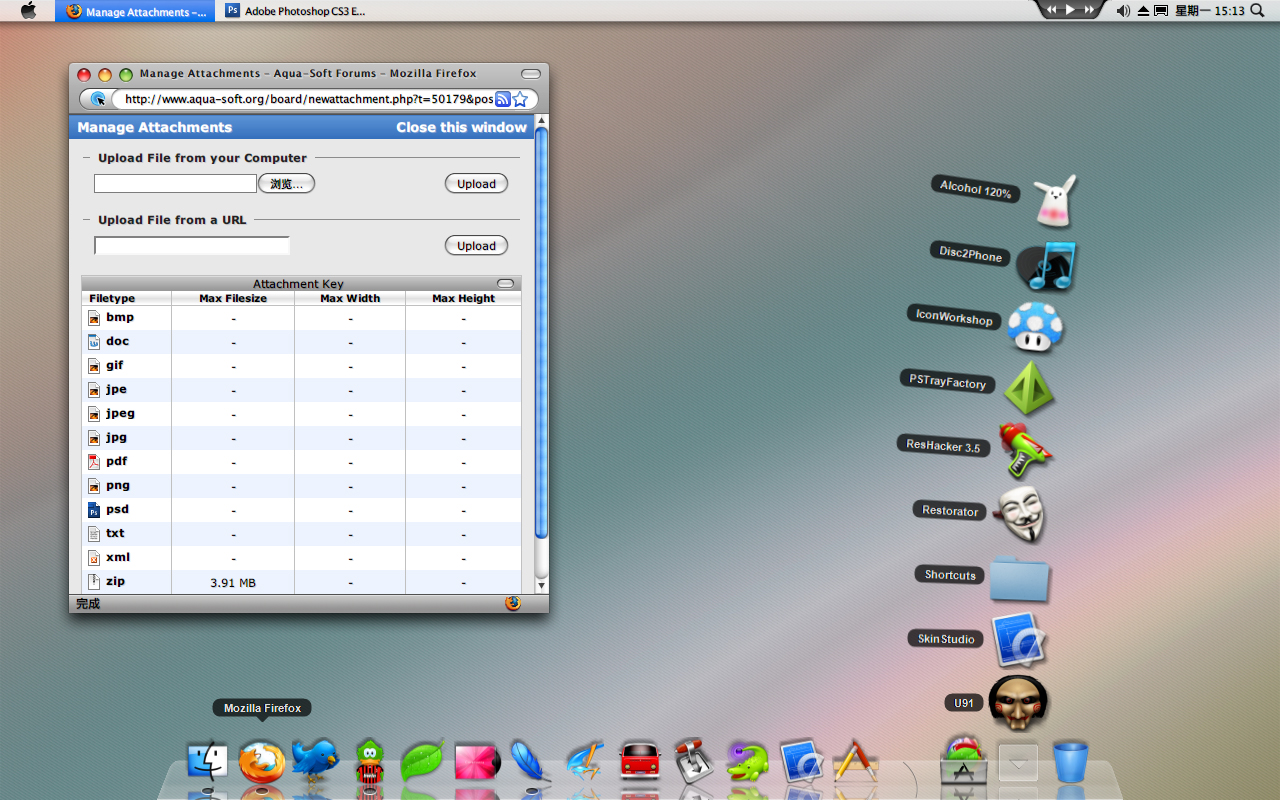
The shadow of the icons on the panel is a bit too thick and I want this dock can be autoactive when it is not on the top of all windows because when it was covered by other windows or applications I couldn't click on it!

Can you make this happen in your next version: When the cursor stay at the bottom of my screen, the Dock will be actived and be on the top of others, just like ObjectDock or RocketDock.

my two little suggestions!

Thanks very much for your hard working, BOBAH13!.

Okay. I added it too :)

#511438

sorry if i wasn't very clear about my problem on my earlier post. This is the screen shot. as you can see the icons have this ugly shadow around it and it is pretty ugly. I don't know what is wrong with my dock.dock.jpg

#511441

sorry if i wasn't very clear about my problem on my earlier post. This is the screen shot. as you can see the icons have this ugly shadow around it and it is pretty ugly. I don't know what is wrong with my dock.dock.jpg

yeah we don't see a screenshot bro

#511444

sorry if i wasn't very clear about my problem on my earlier post. This is the screen shot. as you can see the icons have this ugly shadow around it and it is pretty ugly. I don't know what is wrong with my dock.dock.jpg

If you have seen the Dock in real Leopard, you will see the same shadow of icons too!

I love this kind of shadow very much, because it makes the dock in Windows be more like the dock in Mac OSX, but the shadow seems to be a little thick...

That is not your dock's problem!!!

See my Screen Shot, I have the same shadow too, but I love it !!!

post-55961-1223882070_thumb.jpg

show.jpg
show.jpg

#511454

Where did you get the VW Bus icon?

#511461

Where did you download this dock ? what version is it ? Look at the first post of this thread!

I got 4.5 from the first post of the thread and checked all possible options that relate to the problem. Anything before version 4 works though...

Funny thing is that if I run it as Administrator, all the currently running apps freeze over, forcing me to log off and on to my account.

But manufn619, you're right. I should stop being pessimistic. At least I could run the older versions, right?

#511462

I think my download of the latest release of this dock just conformed to the patent that Apple signed for-

I can't see the names of the icons nor zoom in on them.

Obviously, that would have not been intended, so what's wrong with my machine?

The old version(with the old name) of the dock still seems to work though...

Thanks anyway to whatever reply I get, be it harsh or otherwise.

I've been having the exact same issues. Cannot see names, no zoom, freezes up computer during install, have to reboot machine. Anything before release 4.0 worked great. I'm using Vista Home Premium, may be a Vista problem. Oh well, it is a nice dock. I will wait for more stable release. Thanks for your hard work Vladimir.

#511464

i've been having the exact same issues. Freezes up computer during install v.4.5. I have Vista Ultimate.

PS. This is the best dock. I love it !!!

#511466

I can't understand. What are names and zoom during installation ? Or it's not working when you already use the dock ? Please will explain it to me

#511470

Magnification of the icons won't work...

Running the dock on admin mode freezes all programs... People say install because they run the program automatically after exiting the installation-but it's still in admin mode.

The hot text won't show at all...

Minimizing won't work also...

Vista Home Premium has some issues on this one... I'll just go ahead and use the older versions first, because it is still awesome! Still thanks, BOBAH13, for this great dock.

#511472

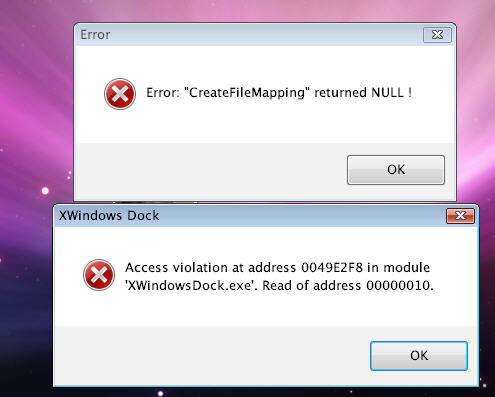
By zoom I meant the Icon size does not change at mouse over and name of icon does not display. Sorry for confusion. Yes, the program freezes if launched directly from install. Also am getting these error messages when launching program.

P.S. This is an excellent app. Just want to explain my problems experiencing. Again, thanks to Vladimir for his great work.

post-13938-1223904146_thumb.jpg

01.jpg
01.jpg

#511475

I can't understand. What are names and zoom during installation ? Or it's not working when you already use the dock ? Please will explain it to me

Please in next update make possibility to change icon for folder, the support for library icons .dll and .ico image and the possibility to add default icon: Computer, Trash, Control Panel from desktop to bar with drag & drop, thanks!

#511476

Magnification of the icons won't work...

Running the dock on admin mode freezes all programs... People say install because they run the program automatically after exiting the installation-but it's still in admin mode.

The hot text won't show at all...

Minimizing won't work also...

Vista Home Premium has some issues on this one... I'll just go ahead and use the older versions first, because it is still awesome! Still thanks, BOBAH13, for this great dock.

I have the same issues. Using Vista Ultimate. The attached image show the error messages I get when starting the dock.

post-27149-1223905847_thumb.jpg

error.jpg
error.jpg

#511477

but version 3.5 or earler worked in vista ? I think I know what is problem. I'm trying fix it...

#511487

but version 3.5 or earler worked in vista ? I think I know what is problem. I'm trying fix it...

Yes, even 4.3 worked for me. Thanks!

#511490

4.5 is working for me on vista ultimate

#511491

4.5 works great here!

I found a problem, though, with docklets:

Let's suppose I write a weather docklet. Then let's suppose the user decides to add two instances of the docklet, because he wants the weather of New York, USA and the weather of Düsseldorf, Germany. Now there are two docklets. Of course they can still identify themselves from each other because of the Index, however the ID remains the same for both. So the docket can just save separate settings for Index=0 (New York) and Index=1 (Düsseldorf). Now, let's suppose the user removes New York (Index = 0), the docklet is not notified of this, it is just called to finalize Index = 0. Now the user closes the dock, and reopens it again (i.e. when restarting windows for some reason), the docklet will be loaded for Index = 0, even though the user removed New York, not Düsseldorf :(.

What I mean, either add a unique id to each docklet icon instance, or add an X_Delete (Index) event so docklet writers can support multiple icon docklet instance load/save settings. ;)

I want to write an Object Dock wrapper for your dock but I'm stuck with this.

#511492

thanx BOBAH13 for this dock :) but could you please make the suck effect

#511493

If I understand you, I can't understand why will it be ? Why do you want to use shortcuts in the dock ? Why cann't you click to file or directory at once ?

because I want to have several application launchers in one place, if i keep one-by-one it will occupy whole space on dock (say 12 launchers),what is ur opinion. But never mind, I very much happy whatever it is at the moment(still awesome), this is just a report/bug I wanted to tell.

#511495

but version 3.5 or earler worked in vista ? I think I know what is problem. I'm trying fix it...

Yes, version 3.5 worked in vista

#511497

c'mon guys one at a time... lol :P

this guy is pretty busy already with one problem, try to make it easy for him

he already brought you a great dock, but you know that it's not final version yet...

#511503

thanx BOBAH13 for this dock :) but could you please make the suck effect

it has already added

#511512

If you have seen the Dock in real Leopard, you will see the same shadow of icons too!

I love this kind of shadow very much, because it makes the dock in Windows be more like the dock in Mac OSX, but the shadow seems to be a little thick...

That is not your dock's problem!!!

See my Screen Shot, I have the same shadow too, but I love it !!!

how did u cahnge the icons in the stack cause i have app like word and stuff and the original icons look terrible in stacks

EDIT: I think i got it

#511513

it has already added

YOU ADDED SUCK EFFECT FOR ver 5??

amazing!

#511518

YOU ADDED SUCK EFFECT FOR ver 5??

amazing!

erm, it is already in version 4.5

#511522