RK Launcher v0.4 - BUG REPORTS

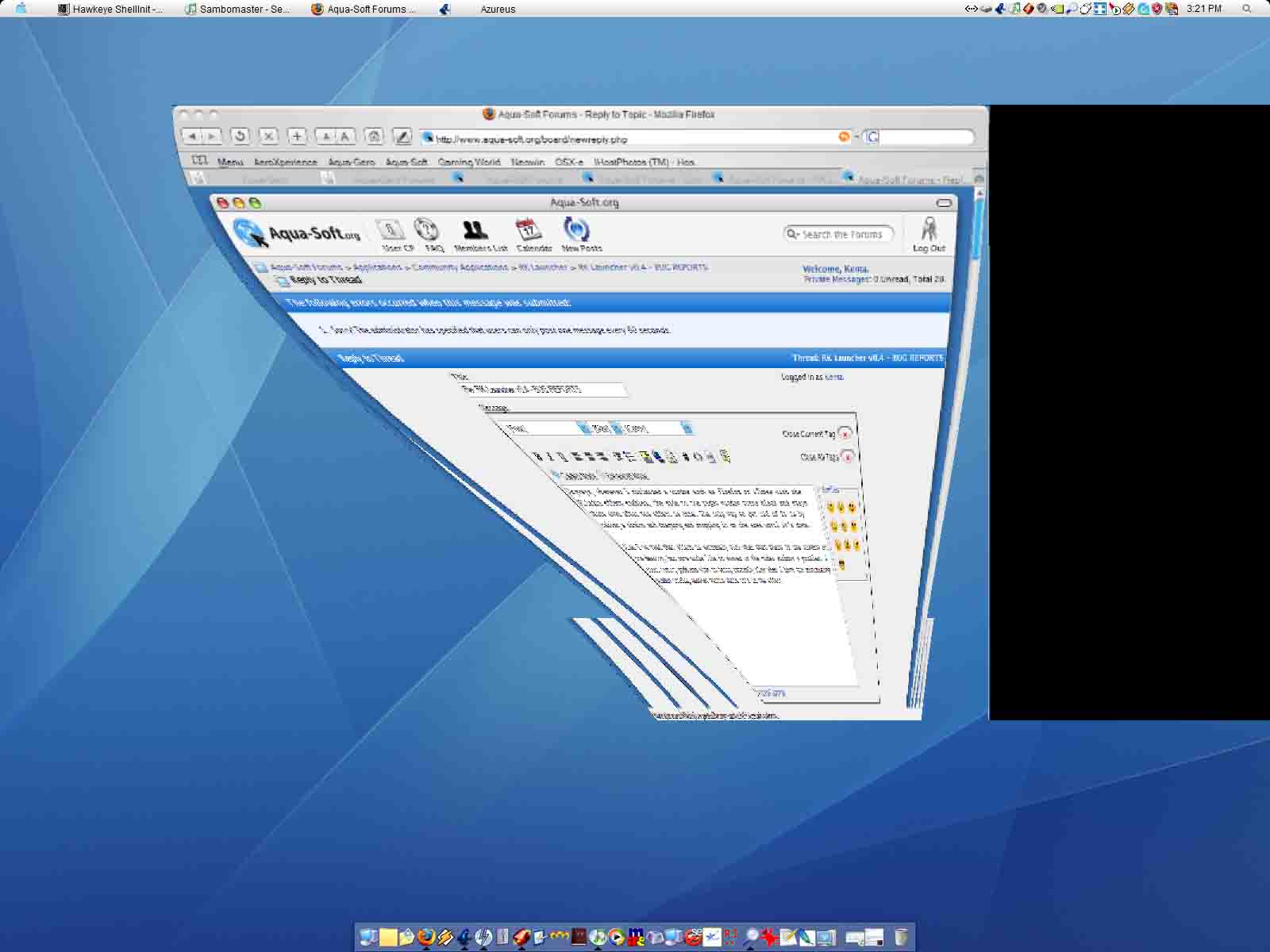
Anyways, whenever I minimized a window such as Firefox or iTunes with the Alladin effect enabled, the side to the right window turns black and stays there even after the effect is done. The only way to get rid of it is by taking a window and dragging and dropping it on the area until it's done.

Also I've read that effect is extremely slow when that there is one window on the desktop, but mine works like it showed in the video without a problem. I start having problems with it being extremly slow when I have the minimizing window overlap another window while it's in the effect.

BTW, my specs are in my sig.
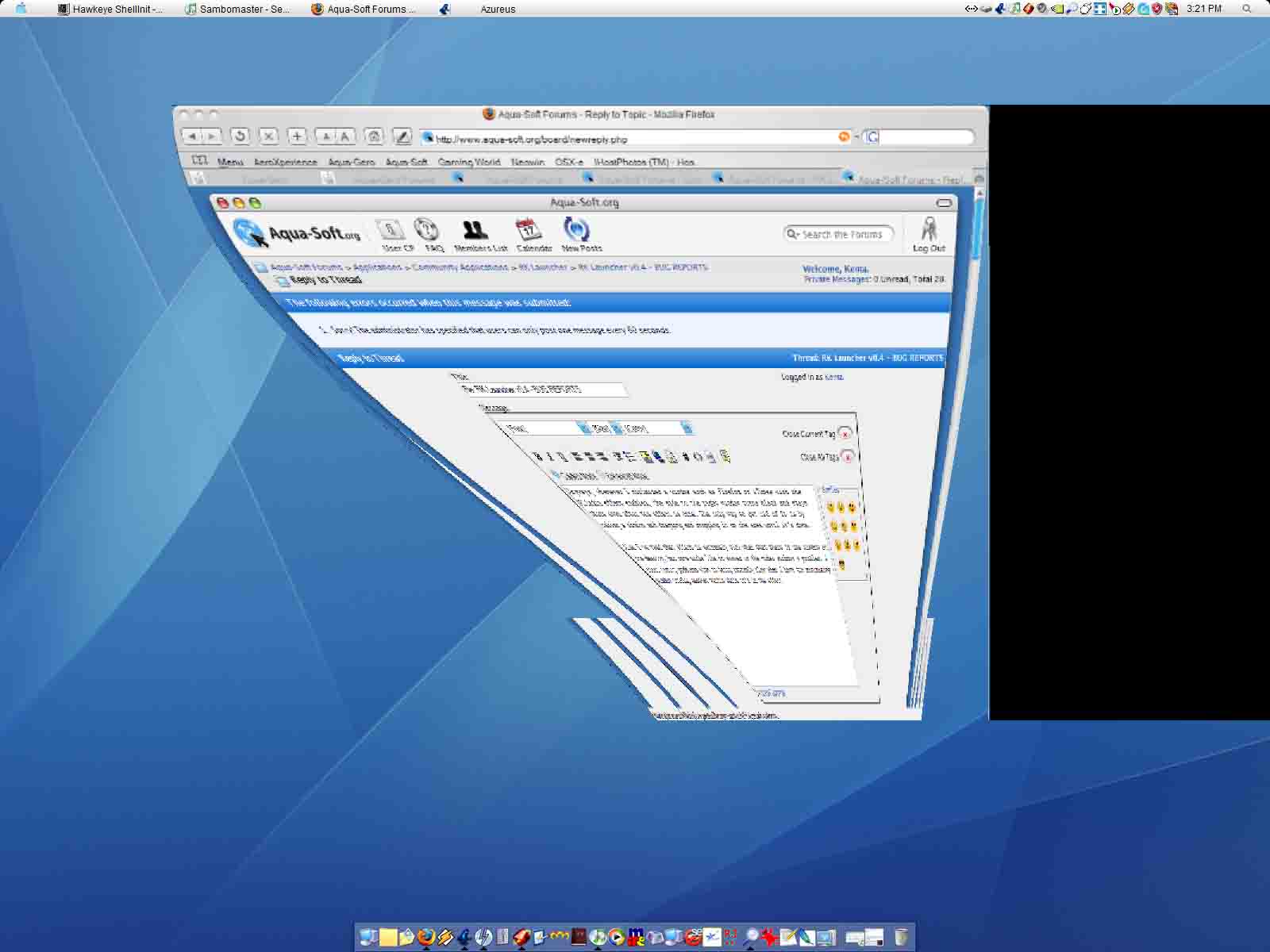
post-25899-1130618039_thumb.jpg

alladinefectgonebad.jpg

#327178

The more windows with alpha transparency you add to your desktop, the slower it will get.

Also, Windows XP seems to run into synchrinizing issues if more than one app draws these kind of windows at the same time.

IMHO, You have the following options:

1- Add more GHz.

2- Code or wait for a dock emulator konfab widget.

3- Use less active and smaller konfab widgets.

4- Turn off magnification.

I am sorry but adding more ghz its a ludricous suggestion. While a lovely effect aladdin is, are you telling my my Athon 64 3500+ , 2GB ram and a 6800GT that can run all the latest and greatest games with all the effects on, plus anisoptric filtering, HDR and anti aliasing is incapable of rendering this fast enough?

Not at all, the code just needs cleaning up and improving thats all. I have the upmost confidence in Raduking and Andreas finding a solution to running both these apps at the same time with no slowdown. But your suggestion borderlines on the rediculous.

Also FYI you only have to have a single basic widget on the desktop for this slowdown to occur.

#327180

Windows XP SP1

RK Launcher 0.4

Pentium 4 at 2.4Ghz

640mb of DDR RAM

ATI Radeon 7200 w/ 32mb of RAM

Dell Dimension 4550

Everything is awesome, works great & less RAM used. The only problem I have is that I have no labels. When I first installed it (10 minutes ago), they were fine. I exited and re-started and now they are gone. I have tried different fonts, none work. I have "Use Margin Hotspot" un-checked & performance at "Normal" if it matters. Also I am not using Magnification. If I do use Magnification, the labels are there.

#327205

Windows XP SP1

RK Launcher 0.4

Pentium 4 at 2.4Ghz

640mb of DDR RAM

ATI Radeon 7200 w/ 32mb of RAM

Dell Dimension 4550

Everything is awesome, works great & less RAM used. The only problem I have is that I have no labels. When I first installed it (10 minutes ago), they were fine. I exited and re-started and now they are gone. I have tried different fonts, none work. I have "Use Margin Hotspot" un-checked & performance at "Normal" if it matters. Also I am not using Magnification. If I do use Magnification, the labels are there.

I had the same problem, also with magnification off. The other factor for me was having Autohide on. I could get the labels to reappear by pulling an icon off the dock and then sliding it back onto the dock. However, after the dock hid the labels disappeared again.

My specs:

WinXP SP2

RK Launcher 0.4

Athlon XP 2200+

512mb DDR SDRAM

NVidia GeForce4 Ti 4400 (128mb RAM)

DirectX 9.0c

#327212

i have AutoHide on as well

#327286

I noticed something with the aladin effect.

You wrote this on the "known bugs thread":

- Aladdin Lamp effect runs very slow on Nvidia cards and especially when the window that is minimizing is the only one on the desktop.

This is true, but using Windowblind 5, it's the opposite >_>

One window on the screen -> it runs smooth, very smooth (nvidia card with beta drivers)

Two or more windows -> it's slower, much slower with big windows.

Only a notice for you, radu ;)

#327375

Windows XP SP1

(Running Litestep as my shell in case that matters)

RKlauncher 0.4

There seems to be a memory leak when changing between backgrounds.

I was testing a bg and after switching between bgs for a while the memory used by RKLauncher was past 100mb O_o

#327452

First Off, I must congratulate you on an excellent piece of software. Elegant and minimalistic.... :).

Now for the Bug:

Yes the 1st bug by Catalyst happened for me too and I think it is a bug that needs resolving.

I don't use any of the effects( neither zooming nor the genie...because they all seem to pixellated to me).

And the black icon doesn't just dissappear.

This is what happens:

1)I minimize a program(or folder) to the doc and I open the program(or folder) again from the start menu(or a shortcut in the dock)and minimise this one too, a second icon (all black) appears in the dock.

2)If I click on the black icon in the dock, it shows an active tab in the windows taskbar. But there is no relevant window seen on the screen...its just the tab on the task bar.

3)I click on this tab and it dissapears from the taskbar and comes back as a black icon in the dock. And this will go on till I rightclick on the tab(or icon) and say exit.

4)At a particurlar time I had a huge list of black icons on the Dock.

There is a screenshot of the dock with the black Icon attached to thsi post.

My lamp effect works fine. :) But I do have 2 bugs.

Thr first is this: when the Lamp effect is enabled and I minimize a program, if I try to maximize the program from the start bar, a second icon (all black) appears in the dock. It's not that big a deal - if you click the black icon, it simply disappears.

The second bug (is this a bug?) is that the dock isn't as... efficient? It zooms fine and everything, but if other programs are churning away, the dock can be sluggish or even unresponsive. This NEVER happened in the .04 build 152. In the previous releases, I could burn a cd and install programs and surf the net all at the same time, and the dock acted like it was the only thing running... smooth as silk.

Windows XP SP2

Toshiba M40 Laptop

1.73GHz Pentium M

1 GB DDR RAM

64MB Radeon X600 Video card

post-37560-1130741462_thumb.jpg

dock.jpg
dock.jpg

#327564

Did anyone here experienced problem when creating a shortcut to a folder whose name is non-English?

I have a problem with that when using RK Launcher.

#327694

I also experienced the "black disappearing icon" bug Wynwar talked about yesterday...and my machine is using a Matrox card so it's not only happening with Catalyst drivers.

#327890

I found out a new condition for me.

When I use the lamp effect, and iTunes is minized, the effects work fine and fast(except for the windows leaving trails for a bit and Firefox and some other applications leaving huge black area's to the right of the windows) even with windows overlapping. But if iTunes is open and not minizied, the effect works like crap.

#328073

this is not a bug report... just a question.

is there any chance to change the "itemdistance"? if i change it in the rklauncher conf file to 1 (0 is normal)

nothing happend...

thx

#328165

bug 1: when I have magnification off and auto-hide on, the dock enters the screen really slowly... compared to if i turn on magnification on, it enters the screen MUCH faster

bug 2: (exists in rk 0.3 as well) with auto-hide on, oftentimes the text label does not appear when my mouse is over the dock... about 50% of the time

Thanks for such a great program!

#328376

I upgraded to the new version because I thought the exclusions list would work but for me it does not. I added all of my antivirus .exe files to both the exclusions lists and it still happens

Thanks

Amber

sorry!! forgot my system specs

winxp pro sp2

NVIDIA GForceTI 4600

1 gig sdram

2.7 gig Intel P4

#328413

I installed the RKGenieEffectFX plugin which does nothing, except disable the minimise effect that RKLauncher does WITHOUT the plugin!

WinXP SP2, ATI FireGL V3100 card, DirectX 9.0c installed, with RKLauncher 0.4

#328438

Your videocard may not support directx 9.

#328439

Effect is working fine for me.

AMD Athlon 2000+ XP (1.68GHz)

512mb RAM

ATI Radeon 9700 Pro

Quick question - is there any posibility of reversing the genie effect? So that apps pop out of the dock as well as zoom into it?

#328511

got a little news about this symantec antivirus tamper-attack thing in corp. v10. problem is present even in older rklaucher versions like v0.3. maybe that helps.

this tamper-attack thing is quite annoying, must be an false alarm, but sadly makes rklaucher un-usable because of permanent symantec av tamper-attack counts.

#328531

I'm really diging this thing. Nice Job! I'm so excited about it that I taught myself how to build new icons to replace the original ones from some of the programs I use that don't look good when enlarged in the dock.

The bug I've noticed is that when you try and close a program in the dock by right clicking on it, it does nothing. You actually need to enlarge the progam to the desktop to close it.

Thanks for such a cool toy,

Devin

#328780

Forgot to mention my system config.

XP Pro

2 gig processor

gig of ram

MTI mother

500 gig of hard drives

#328781

not sure if this is a bug..

problem: left clicking items on dock sometimes freezes RK Launcher, item doesn't bounce just freeze, then have to pull task manager to close.

not sure why.

xp pro sp1

p4 2.8

radeon 9800 po

1gb ram

#328908

One other thing. I can't get it to lauch my Office XP programs. They launch when on the desktop but not in Rk Launcher.

#329005

Try dragging the executable into the dock instead of the desktop shortcut ;)

#329007

I forget if someone's reported this or not - a quick search for margins/magnification didn't bring up any similar results.

The screenshot below was taken with the magnification off and autohide on. Bringing the cursor to the margin would make the dock pop-up, but if I leave the cursor at the margin, the dock would jump up to the position shown on the screenshot.

With magnification on, if I do the same (leaving the cursor at the margin - magnification on/off) the dock would jump up and down from the edge of the screen to the position shown - creating a stutter effect.

(I'm on AMD 3200+, XPsp2, 512MB DDR RAM, using bbLean shell)

rkdockmargin7ue.png

#329015

Yep, that works great! Thanks.

I'm having trouble finding a section that desribes what the features and settings do. Is there such a place?

Thanks again,

Devin

#329293