 Aqua-Soft Forums
Firefox 2.0 does not minimize into dock.This is old problem so I hope that solution will be quick.
currently FF 2.0 - XP home and Vista RC2 = it DOES minimize to dock
RKL build 275
cheers ...
Firefox 2.0 does not minimize into dock.This is old problem so I hope that solution will be quick.
currently FF 2.0 - XP home and Vista RC2 = it DOES minimize to dock
RKL build 275
cheers ...
Hi Raduking, gread work, and you know it. Thanks for share.
i´m using 0.41 Build 275
i guess that "atoHideDelay = " does not woks right at RKLauncher.conf; at behavior in RK Launcher settings i set Autohide delay up to 500 msec and then i got a delay but is to show, and works. But i close rklauncher this values expires, Until check the "Saves changes on exit" and until with the command "atoHideDelay = 500" at "RKLauncher.conf".
Otherway I think that "atoHideDelay = " and "hotspotDelay =" are changed between it, Can it be.¿.?
Can be a easy fix?
thank for this great work. thanks a lot.
Click and hold on a dock item that points to a folder - IF the popup menu item is another folder and you select it, RKL will open the folder. HOWEVER, if the item on the menu is a shortcut to an executable file, it doesn't run the executable (like Yz Dock or Objectdock do), RKL says it can't find the application - even though the shortcut has the proper path in it.
Click and hold on a dock item that points to a folder - IF the popup menu item is another folder and you select it, RKL will open the folder. HOWEVER, if the item on the menu is a shortcut to an executable file, it doesn't run the executable (like Yz Dock or Objectdock do), RKL says it can't find the application - even though the shortcut has the proper path in it.
I appoligize if i don't understand exactly what you mean, but it works here. I have a dock item that points to a folder full of shortcuts. Click + hold, menu with all shortcuts, click one item =>app start!
RK Launcher 0.41. build 275.
There is something with positioning on the screen with 275 build. It is always Top Left after restart or closing the RK ?! Was using 265 before.
i love th minimize effect, but when i start my pc and when my nod32 av starts up, it minimizes to rk launcher build 275 right a way...it is very anouying.
does any one has a solution for this problem? thank you all and i just wanted to thank the creator of rk launcher for his hard work.
i love th minimize effect, but when i start my pc and when my nod32 av starts up, it minimizes to rk launcher build 275 right a way....
have u added this app in the exclusion list ?
RKL-> Settings -> Exclusions (never show in RKL bar)
cheers ...
The genie effect works nicely for me:WinXP SP2
Pentium 4 2.5ghz
1024mb DDR
Radeon 9600pro (256mb)
...it's just that it takes too long of a time to minimize. I feel that it needs to be quicker and less resourcefull. That's just my 2c.
From experience, through out or get a refund on the card, Trust me from my own experience Radeon 9600... not worth the trouble, its the Black sheep of the ATi family.
RK .04
WinXP sp2
Pent 4 2.8 GHz
1GB ram
100Gb HD
Radion X1300 series
Adobe CS2 Crashes after restore
What doesn Genee and aladin do?
I appoligize if i don't understand exactly what you mean, but it works here. I have a dock item that points to a folder full of shortcuts. Click + hold, menu with all shortcuts, click one item =>app start!RK Launcher 0.41. build 275.
Same here with a program called clipper,
I have a few shortcuts and they all work apart from clipper
Clipper is a program designed to take screen shots
As far as I can say from a few "try and error" tries I conclued that if the shortcut has another name than the executable that points to it, it will not work. This is my homble rapidly conclusion.
PS: some sort of the same problem I had with KKmenu: if I was to remove the ink extension from shortcuts, KKmenu didn't know what to do anymore.Hmm...
got it. thank you. actually was under setting, exclusions and drop down list, never minimize in rk launcher. thank you again and you guys are the best.
There is something with positioning on the screen with 275 build. It is always Top Left after restart or closing the RK ?! Was using 265 before.
Forget to update the RKLauncher.conf, problem solved.
What i want is to disable ALL minimisations automatically,
Why? i want to use the doc as an alternative menu but not replace the task bar so programs minimise there and i access my games and apps through the dock.
i have the build 275 and download the aladin effekt but i can not select. how can i use it ?
I've found an annoying one  . Whenever i restart objectbar, my apps stop minimizing to the dock.
As for the Aladdin effect, included in the zip u downloaded is a folder named RKGenieEffectDX. Unzip it inside the plugins directory of rk launcher and restart the dock just to be sure. Then go to the dock settings and on the behavior tab change scale effect to Aladdin's lamp effect. Hope that helps  .
.
works great not slow at all on all three computers i have tryed it on the only problems i have had are when i minimize programs the get like stuck and you half to minimize another program to fix it, Also firefox will not minimize to it. Thats about it
heres a screen shot
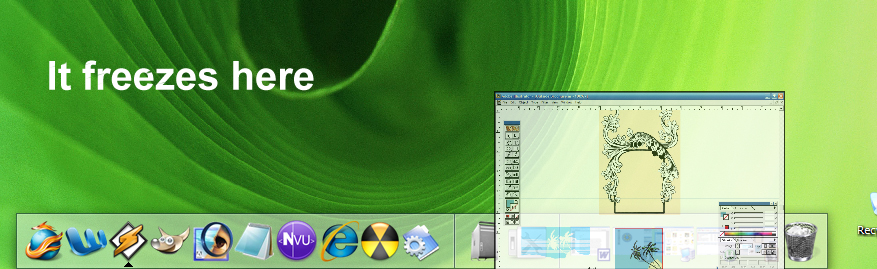
RKL->Settings->Behavior: Minimize to RK Launcher is being checked, right?
check to make sure that u have a separator between recycle.bin and the next item on the dock
cheers ...
Dell Inspiron 700m
Pm 1.6Ghz
1GB Ram
build in intel Graphic card w/ 64MB shared memory
when I minimize an application(e.g. Photoshop) then open a file(.psd). the application will crash easily when I normalize it from RK.
OS: Windows XP
PC: Intel® 4 CPU 3.00GHz
When you receive a new message from MSN Messenger, RK Launcher v0.4 do not notify at the dock. Is the same for every new window that appear minimized.
Hi,
I think RK laucher is the best dock out there.Better than ObjectDock or RocketDock.
But with one BIG BUG. It doesn't save my settings :-( Allways if i add into dock custom application shortcuts, configure appearance, icons, behaviour etc. and then exit dock and restart it, everything is lost. Usually dock displays only 3 or 4 broken icons with bad text (no central european languages support?) I there any way to bring it work ? Thanks..
windows xp, athlon3200+
as soon as i minimize a MSN CONVERSATION (not tha app) MSN process jump to 99% use and I cannot acces it through RK anymore....
alos pointed out in the forum problems with minimizing tabs in opera... maybe others too, the tabs are catch in RK, leaving a lot of icons in and causing restore problems... for those minimized tabs... (again not a problem with other docks)
you should also check out the "minimize to" behavior of other docks...
RK seems, to catch to many calls, for exemple when a app, is hidden to the tray, RK will minimize it in (for exemple ATITool, is minimized to tray on close, but RK will minimize it in when it should leave it, if I want it in RK, i will only minimize the app and not send it to tray, anyway this works fine with rocketdock and objectdock)
On the performance side RK is way above the competition, with every other docks i have slow down when dragging windows around, or when minimizing or restoring windows, or exiting fullscreen... with RK everything is super smooth, thats some good work.
So over all this IS the BEST dock with small bug to fix, so again, it is very good work !
First of all, I'd just like to say that tonight, just for the hell of it, I decided I would go around and give docks a shot as a windows customization option, and so I've definitely been "shopping around".
So I've been screwing around with all of the major ones -- Y'z dock, ObjectDock, RocketDock, and now RKLauncher, and I gotta compliment the author: RKlauncher is definitely, hands-down the best I've tried.
Less bloated than ObjectDock, and no nagging..
Better and more more features than Rocketdock, as well as smoother animating...
And, god rest its soul, of course trumps Y'z dock in modernization and polish.
That said, I do have an issue that I feel the need to point out, two questions to ask, and another issue to chime in on:
------
First, the issue... I'm a compulsive show-desktop wh0re. I'm obsessed with that little show desktop button in the windows taskbar quicklaunch. I'm usually multitasking with 6-10 windows open, and I just have this habit, and I like to think it's a good one, to hit that button every so often, just to clean up my peripheral workspace, and let me focus on just the window(s) I need.
But RK totally doesn't handle this right.
What it does, is, yes, all the windows minimize... but then only one icon is shown in the dock, that icon being the window that was previously the foreground app. So all the other windows end up "hidden" in oblivion somewhere... 'till you hit the dock icon for that one window again, which, strangely, ends up popping back up ALL the windows again, not just the window that was previously in the foreground!
Not only that, this causes some instability too, at least in build 275... after doing this a few times in a row, I've found RKlauncher will sometimes hang up and crash. :x Not cool.
If you want to test this, just add a dock icon with a target path of
to RKlauncher, open up some windows, and hit it. You'll see what I'm talking about.C:Documents and SettingsYOUR USERNAMEApplication DataMicrosoftInternet ExplorerQuick LaunchShow Desktop.scf
Alternatively, hit windowskey+D, which does the same thing ("minimize all open windows") and the same effect and corresponding issue will result.
----
Two, the questions.
How can I, or how does everyone else, handle MSN, and volume control? Especially MSN, and other IM programs, pose a problem. I added an icon with a shortcut to C:PROGRAM FILESMSN MESSENGERmsnmsgr.exe that runs as a same instance, and that works, but it's far from instant in popping up the window, it takes a few seconds, and definitely, a very roundabout solution. And as well, so far, it appears that when the taskbar is hidden, msn sign-in/message notifications don't pop up?
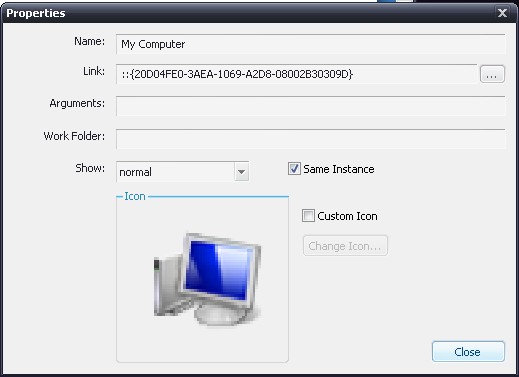
Second question, any way I can create an icon that opens up My Computer? Not the desktop, not My Documents.... just My Computer
RocketLaunch has an interesting solution to this, by the way, it uses a shortcut that points to "::{20D04FE0-3AEA-1069-A2D8-08002B30309D}" (no quotes) -- which, apparently, is some windows trigger or something for My Computer. Tried this in RK.. nada. So I'm not sure if you can 'use' that, but there's one solution I found, just for the hell of it... might help you.
----
Three, chiming in on a previously mentioned issue, as mentioned before, Firefox does not minimize to the dock in 0.40... But as mentioned, once RK launch is upgraded to build 275, Firefox minimizes fine, so this issue is definitely already fixed.
Second question, any way I can create an icon that opens up My Computer? Not the desktop, not My Documents.... just My ComputerRocketLaunch has an interesting solution to this, by the way, it uses a shortcut that points to "::{20D04FE0-3AEA-1069-A2D8-08002B30309D}" (no quotes) -- which, apparently, is some windows trigger or something for My Computer. Tried this in RK.. nada. So I'm not sure if you can 'use' that, but there's one solution I found, just for the hell of it... might help you.
I've been using that link since I started using RK, it works perfect.
Hi,
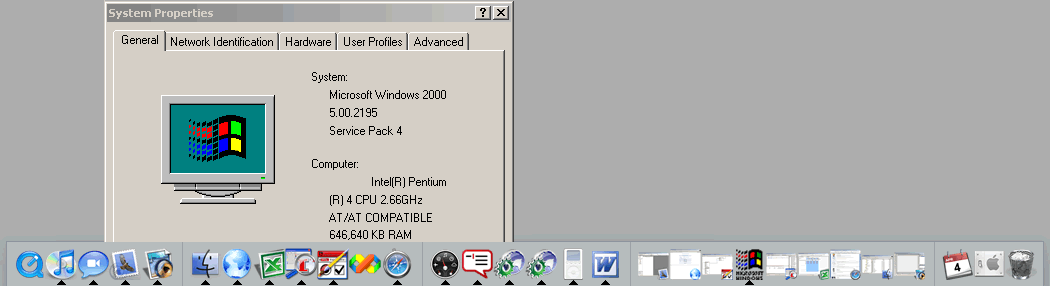
I'm using build .282 and I've found a weird issue. So far it seems to happen whenever I spent a "long time" (one or two hours) away from the PC (and I return, of course).
I have a some-what heavy(?) loaded bar, as you see in the screenshot. The issue is that the bar gets really slow, it even hits heavily on the micro, but that's solved once I open the (RKL's) Settings window. Any ideas what is this happening? Any workarounds (more practical than the one described here)?
Win2K Professional SP4
Pentium 4 2.6 GHz
640MB RAM DDR PC3200
(See screenshot for more info)
@NC - actually that's a thread synchronization problem
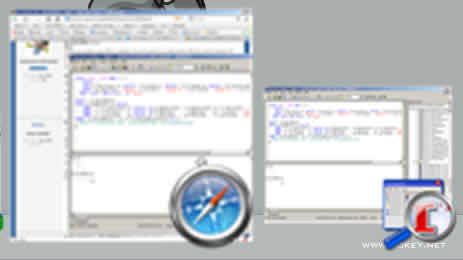
Is this also the same issue? The image below show what happens when I minimize an application that's not in the front (i.e. it's behind one or more windows, but the "minimize" button is visible). As you can see in the image below, the thumbnail includes those applications above the one I'm minimizing (in the image you can see it includes part of the app. right beside it). Sorry for the quality, that's all I could get from RKL at 255px/HQ.
—If you're curious, the app. at the left is Firefox and the one at the right is Query Analyzer.
Hi!
I found a bug (?): RKLauncher makes Sybase PowerDesigner crash on startup.
I don't know how could i help, how can i log the events on my computer to give useful data?
Thanks