RK Launcher v0.4 - BUG REPORTS

I found a minor incompatibility in ObjectDock Docklet hosting:

While a docklet is inside of any kind of call, e.g. like OnRightButtonClick(), the dock freezes.

Especially true for docklets that have a configuration dialog or self made context menu displaying.

Calls into docklets need to be on a different thread than the main user interface.

ObjectDock provides an API call to deliberately force locking:

DockletLockMouseEffect(HWND, BOOL);

This call locks and unlocks the user interface, otherwise any kind of CPU time consumed inside a docklet leaves the user interface undisturbed.

The YZ-Implementation does not show this behaviour, nor do the built-in shortcuts.

#360013

i have read the messages on this thread, and again along with most of them, i also am having a problem with the genie effect.

however, mine doesnt freeze the computer nor does it complain of a directx error. There is simply a microsoft error reporting dialogue, which says the following under technical information

i dont understand any of that garbage, but unlike previous posts with the error report, i do understand what caused it: minimising a window with the genie effect. Everything else works fine, my card is nVidia GeForce FX5200

e6bf_appcompat.txt

Attachment: e6bf_appcompat.txt

#360087

ok i installed the newest build and now the genie effect works fine, so does the mozilla app minimising.

ive gonna say this is the best dock ive ever used, i spent 20 mins just minimizing windows even if it was painfully slow!

edit: i did find 1 more bug however, removing all the dividers results in an inability to get to the docks settings, because if you rightclick it offers you the docklets settings not the docks. perhaps this can be solved by adding a settings context menu item when you rightclick an object on the dock?

#360317

ok i installed the newest build and now the genie effect works fine, so does the mozilla app minimising.

ive gonna say this is the best dock ive ever used, i spent 20 mins just minimizing windows even if it was painfully slow!

edit: i did find 1 more bug however, removing all the dividers results in an inability to get to the docks settings, because if you rightclick it offers you the docklets settings not the docks. perhaps this can be solved by adding a settings context menu item when you rightclick an object on the dock?

Their already is.

#360324

can you show me where, like using a screenshot because i cant see it :o

1 more bug:

rklauncher doesnt like people winkey+d'ing it, if you do that with open windows open and its minimize setting on, you have lost the window forever, since you cant see it in the dock and you cant alt+tab to it.

#360326

Now and again when i go to change an icon or something...RK just crashes..it happened twice in like 20 minutes and i just downloaded it...whats wrong here?

thnx

#361486

I like to put my dock at the same location where recent versions of Microsoft office like to add the language bar, which is the top-right, with a margin to allow interaction with windows control buttons (minimize, restore, close).

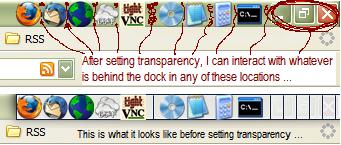
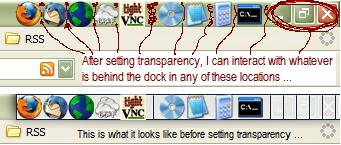
The only problem is that RKLauncher does not seem to support an actual margin, so I got the idea of putting in some separators and setting the bar to full transparency. On all computers I have tried this on, this achieves the desired look, but only on my laptop does it achieve the desired feel, where the transparent area of the dock is no longer interactive, and i can still click on the window control buttons.

To be clear, on my laptop, I am still able to interact with these buttons (when I set transparency, not when it is opaque) even though there is a transparent area containing 4-5 separators there. Not only that, but clicking on ANY transparent area of the dock actually gives focus to the window below the dock. I can even right click on the desktop if the mouse is not actually touching a dock icon. On any other computer, the transparent area behaves exactly as if it was not transparent.

One notable thing about the laptop is that I have a hacked uxtheme.dll to allow for usage of stylexp themes. Could this hacked dll also be providing me with the effect I desire?

The laptop is a Dell Inspiron 5000 with a PIII 650, 512 mb ram, 8 mb Rage mobility. A screenshot is included in the attachment.

post-43341-1141079113_thumb.jpg

untitled.JPG
untitled.JPG

#363546

When I close some applications (Skype) to the dock I can't restore it later. No matter if I click on the application icon at the dock or with right mouse button and then 'restore'. Do you know how to solve this issue?

#364080

Windows XP Professional x64

RKLauncher 0.4 beta

Most of the Windows are minimized to taskbar but not visible in the dock. Works with 32bit windows. Also Hide Taskbar feature doesn't work correctly in x64 windows. After it's hidden, it usually pops back when new program appears in the taskbar or taskbar tray.

#364445

I'm not sure if this is a bug or me being a pratt!

I'm running Exposure at start up. The icon keeping appearing on the dock. I've added to the exlusions list, both never show and minimize, but it keeps coming back. I can't even drag the icon off the dock without it coming back too. I've not locked the dock. I have ticked show new applications. Unticked minimized to RK.

I've reported the bug on the Exposure thread, but they don't think it's a bug with that.

Any advice will be great

Cheers

#364447

1. when using photoshop, if you minimize a file window inside photoshop it tries to place it in the launcher and crashes photoshop. Im using photoshop cs2.

2. MSN Messenger and AIM, when someone starts a conversation with you the the window never pops up or shows up in the launcher. The only way to know if you recieved an incoming message is if you have notifications on, and if you dont see the notification your screwed.

windows xp sp2 p4 2gb ram

#364934

HelP! I've lost the ability to rt click on the recycle bin on rk launcher. ???

#364998

Why rklauncher is staying on top of vlc in full screen video? I mean, if I use another player is not happening this (bsplayer, media player clasic).

Thanks!

Xp HE sp1, 3GHz, 1GB, RKlauncher 0.41 beta build 236

ps:

This is happening with all builds!

#365985

Not sure if we're supposed to post bugs on the .41 builds (236 specifically), but I've got one that's repeatable.

If I minimize a window...like Outlook Express or just an Explorer folder window, it goes to the dock and not the task bar. But if I move my mouse over the dock within a few seconds of minimizing the window - doesn't matter where on the dock, the minized window will also re-display on the taskbar....and the application or window will open if I click on either the taskbar entry or the minimized entry in RKlauncher. However, if I minimize the window and don't move my mouse over the dock for a minute or so, then mouse over the dock, the minimized window will stay only on RKlauncher and not put an entry on the taskbar.

I hope that made sense....it's very repeatable for me, but I haven't timed the delay you have to wait before the window won't appear on the task bar.

#366194

If you read the Nightly Builds Thread http://www.aqua-soft.org/board/showthread.php?t=24982

it clearly says in red, do not post bug reports for nightly builds...

#366196

If you read the Nightly Builds Thread http://www.aqua-soft.org/board/showthread.php?t=24982

it clearly says in red, do not post bug reports for nightly builds...

Yeah...and if you've been around here for a while, you'd know that line was written back when the nightly builds were actually released nightly, not every three or four months. If folks don't report these, how is RK supposed to know they exist?

#366513

Thats right, I also have the same problem Halllf, sometimes windows just pop back up after being minimized to the dock

#366523

every time i try to use a theme i imported from Yz Dock, RK Launcher crashes... any solutions?

#366634

every time i try to use a theme i imported from Yz Dock, RK Launcher crashes... any solutions?

This may help a bit, an item list converter made by byan, http://www.aqua-soft.org/board/showpost.ph...20&postcount=14

#366647

even more bugs:

i use msn a lot, if someone initiates a conversation, a notifier pops up telling you someone has said something, and a window is supposed to open. RK launcher grabs this notifier and shoves it into the dock as a minimized window.

If click it (or even alt tab to the window) i find its minimized like rk does, and i cant get it back; unless i show the taskbar, rightclick the window, close it, then reopen through the main msn window. In either case, i end up missing whatever message i get.

#366698

I use MSN alot too but I never had that problem... could you make a video to show me what's wrong ?

#369361

Not ENTIRELY sure of the circumstances under which this happens, but I believe that when I open firefox from my windows taskbar, until I have minimized it then opened it from RKL, I can't copy and paste anything.

#369847

Apologize first, becoz I am too lazy to check the previous replies

And if I echo something reported already, forgive me.

Is that a bug that "When using y'z backgrounds, indicators just vanish."

It doesn't happen if I turn back to the default.

Can it be fixed?

#371858

radu i'd like to show you but i dont know any possible way to take a vid of my desk, even if i could just hold up a vid camera, u wouldnt see so much through the huge block of dead pixels on this comp.

plus i think you should note, i am on the latest beta build of windows live messenger, therefore it isnt actually msn msn, its wlm msn.

however since this is the way msn is going, im sure its a problem that needs fixing.

#372035

hum.. dunnow if this has been mentioned before...

when i minimize a msn messenger window without frame to the dock the cpu usage for msnmgr goes up to 40%

#372514