
[release] Firefox Pinstripe Theme

Ok, I have 2 problems. First, I don't have folder icons, all folders are still the globe icons (I'm using the latest updated classic.jar). What could be the problem here?

Also, I copied the contents of the download manager (mozapps folder in the .jar) from the original rip on the first page, and my download manager looks as below. Works fine, but the original progress bar isn't showing, the default windows theme progress bar is. Has anyone figured out whether we can use an animated gif as a progress bar? :blink:

post-1738-1076742693_thumb.jpg

ss.jpg
ss.jpg

#114105

Autumnmist and anyone else who gets that 'bizarre' error.

it only appears if your skin is set to classic.jar when you install the browser. to fix\ reinstall firefox normally then go download and switch to another skin. then install the firefoxmac classic.jar and switch back to it. everything should be fine then.

#114129

Another question, as I have b0se wonderfully soothing Opus OSX VS installed (now-lol), and have noticed that my BTF (Bookmark Toolbar Folders) text is 'very bold', even more bold then when I had PantherSnow installed (which has a bold font weight option)...

Where would I navigate to within the Pinstripe-Classic.jar to see if I could tune this down some...I would assume that the text is set to 'bold' by default, but the OSX VS dictates how will look...

Hope that this makes sense...

:rolleyes:

P.S. Peteross, nice tip man...thanks for sharing!

****Edit****

Ok, after examining the \browser\browser.css, I located these lines of code:

toolbarbutton.bookmark-item {

margin: 1px;

padding: 1px 0px 1px 0px;

min-width: 0;

max-width: 13em;

font-weight: bold;

color: #565656;

border: none !important;

}

I then replaced 'bold' with 'normal'--->font-weight and now my BTF text is better suited to blend with b0se's great OpusOSX... (Y)

#114147

@gahbmwM5

don´t know if we are talking about the same things here. anyway, thx for your help. here´s a pic of what i mean. the "flexible space" is in place, but after saying "ok", nothing is there. (see pic)

#114174

Originally posted by Max Power@Feb 14 2004, 07:11 AM

Also, I copied the contents of the download manager (mozapps folder in the .jar) from the original rip on the first page, and my download manager looks as below. Works fine, but the original progress bar isn't showing, the default windows theme progress bar is. Has anyone figured out whether we can use an animated gif as a progress bar? :blink:
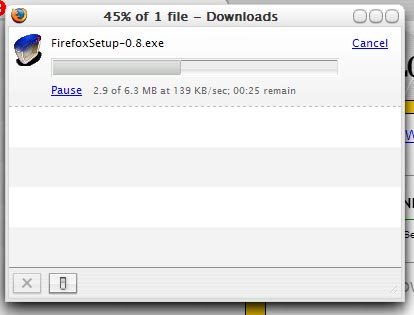
Nope the progress bar isn't working for me too, a solution would be nice!! :lol:

#114185

@Brainbug,

I see what you mean, if you try a Lynchknot AA 0.8 theme ie: Smog or Cryogenic, you see what happens when you utilize the 'flexible space' icon...

Now that I have a solution to my 'abnormal spacing' toolbar issue, I do not have the need to utilize the 'flexible space' icon in Pinstripe...

It seems the reason why myself and some other members were getting this effect was due to the 'trunk' builds of Firefox that we are using, as members @Mozillazine were reporting this 'abnormal spacing' between Toolbar icons on other themes too...

However, those using the official 0.8 Milestone (Branch) of Firefox, reported that the 'abnormal spacing' was not present...

This is what makes it so difficult for themers to update/keep up with the ever changing code of a Alpha/Beta browser...

#114210

these theme is looking VERY nice GREAT JOB ALL i would put everything u ned on the first page so others can get theme all at 1 time

#114233

This is strange. When Firefox is reloading a canceled download you'll get the animated bar, but when it's downloading you'll see the normal Windows bar :blink:

post-1379-1076776963_thumb.jpg

Untitled_1.jpg
Untitled_1.jpg

#114234

I have a problem with the lastest classic.jar...

I remplaced it and Firefox doesnt start anymore... Gives me an error message. :(

#114262

I had that too - I just changed back -_-

#114271

Originally posted by Impulfusion@Feb 15 2004, 03:07 AM

I have a problem with the lastest classic.jar...

I remplaced it and Firefox doesnt start anymore... Gives me an error message.  :(

Write this down: Always make backups. I think we all learned that lesson through experience. ;)

#114279

Originally posted by Myuu.EXE@Feb 14 2004, 06:51 PM

Write this down: Always make backups. I think we all learned that lesson through experience.  ;)

Yeah I made a backup, I have the old classic.jar now, I mean, the one that was before but stills, I dont have the new download manager... :(

#114297

Originally posted by Myuu.EXE@Feb 14 2004, 06:51 PM

Write this down: Always make backups. I think we all learned that lesson through experience.  ;)

yeah that was very usefull <_<

#114299

Originally posted by XP_2003@Feb 15 2004, 04:50 AM

yeah that was very usefull <_<

Excuse me for trying to give a little piece of healthy and necesary advice, Mr... :6

#114311

Okay... I installed compact menu, and Firefox went wierd and all...

I have a backup and all... but is there a reason for this??

#114314

Originally posted by Myuu.EXE@Feb 14 2004, 08:20 PM

Excuse me for trying to give a little piece of healthy and necesary advice, Mr...  :6

That's okay ;)

@ lildude3077

Did you FIRST install the compact menu, restarted Firefox, close Firefox and AFTER that replaced the classic.jar file?? If you didn't do it in that order that's the problem (I think).

#114321

Originally posted by XP_2003@Feb 15 2004, 06:10 AM

That's okay ;)

Don't push it. <_<

#114325

hey yo, come on. stop teh cat-fight. and if u wish to continue, there´s a pm-system.

back to track. maybe someone could clean this thread out with all the solved things deleted.

#114341

please step by step (i made what the tutorials said but) anyway if you can`t answer me the question well. so do not say anything. <_<

BTW. PM or whatever

look at this--->

post-3126-1076795705_thumb.jpg

Capture__14_17_02_25_.jpg

#114342

Originally posted by IngeneerMind@Feb 14 2004, 10:55 PM

please step by step  (i made what the tutorials said but) anyway  if you can`t answer me the question well. so do not say anything.  <_<

BTW. PM or whatever

look at this--->

Okay. I'm going to stay calm. I'm not going to shout. Much.

That is covered in step one. It's not hard. :rolleyes:

- Install CompactMenu.

- Open Customize toolbar window.

- Drag the File, Edit menu off.

- Close Customize menu.

#114354

Originally posted by IngeneerMind@Feb 14 2004, 09:55 PM

please step by step  (i made what the tutorials said but) anyway  if you can`t answer me the question well. so do not say anything.  <_<

BTW. PM or whatever

look at this--->

*calm* -_-

To add on to what es.xxi has said, install compact menu.

Restart firefox.

Customise toolbar.

Click and drag the compact menu to where you want it, the file, edit etc etc should be gone.

*calm* I'm still calm... -_-

#114357

But does anyone have a solution for the download bar using the animated gif instead of the default windows loadbar that comes with a theme? Really like to see that fixed. I know it's possible (see my screenshot on the other page) because Firefox does use a gif when it's reloading a aborted download.....

Edit: And is there a way to disable the "download complete" pop-up?? It's annoying!

#114369

Originally posted by XP_2003@Feb 14 2004, 10:44 PM

But does anyone have a solution for the download bar using the animated gif instead of the default windows loadbar that comes with a theme? Really like to see that fixed. I know it's possible (see my screenshot on the other page) because Firefox does use a gif when it's reloading a aborted download.....

Edit: And is there a way to disable the "download complete" pop-up?? It's annoying!

My download manager never shows animated gif progress bars before... is it supposed to? :blink:

#114372

Originally posted by silencedge@Feb 14 2004, 10:48 PM

My download manager never shows animated gif progress bars before... is it supposed to?  :blink:

Well I got a unfinished Pinstripe theme from the mozilla foroms with a more authentic download manager, so I replaced those files with the Pinstripe theme posted here.

#114376

I see... :lol:

Is this part of the plan for this modding here too? :naughty:

#114383