 Aqua-Soft Forums
[release] Firefox Pinstripe Theme
Originally posted by titoudoc@Feb 22 2004, 10:47 PMsorry, it's upload problem with my fai...
I've reupload the file...should be OK...
Thank you so much! The skin is brilliant, someone should post it on texturizer!
Yes it works, thank you!! Now to fix it with all the mods I have so far.
As far as publishing it goes, it's far from finished!!! Menu mostly.
And who? Permission? Who ???
Originally posted by MartinGy2k@Feb 22 2004, 10:59 PMYes it works, thank you!! Now to fix it with all the mods I have so far.
As far as publishing it goes, it's far from finished!!! Menu mostly.
Can I suggest making the ends of the address bar curve, like it does with the search field?
Anyway, here's another bug...There's a gap between the dropdown box and the address bar.
titoudoc -
That will be helpful to a lot of people. Did you implement all the various fixes since the most recent release? (Not a problem if you didn't, I can fix it myself, just checking).
Originally posted by titoudoc@Feb 22 2004, 02:47 PMsorry, it's upload problem with my fai...
I've reupload the file...should be OK...
Awesome, thanks titoudoc! (Y)
Great news for anyone who made changes and wants them in the new stand-alone file. Just completely replace the global and browser folders (if you made changes there) in the new jar file.
I just did it and now EXELLENT!!!
I'm back with the original Firefox classic.jar, and new PinStripes as an added theme!!!!
Here my modded version with the about box I made too.
Switch back to the original classic.jar and go get compact menu extention, and then install this the normal way. 
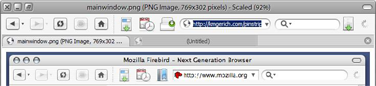
This screen doesn't show the tab icons changes.

no I've only implement the BookMark Menu Icon fix...
and of course repack the skin 
but I have ni idea of what the other fix are ?
but fell free to implement them
and when will we have a Safari Skin  (with the potential of Firefox, I'm sure we can make a great Safari Clone...I wonder why no one rush on this so far...)
After you install compact menu replace the compact.jar with this one
in Program Files\Mozilla Firefox\Crome if you want to use the button in my screenshot.
To have it all on one bar right click\customize and drag everything to the top bar. Then viewmenu\ uncheck nav bar.
Then checkmark bookmark toolbar. Then mod the hell out of it to suit your taste. Windows stores Pinstripe.jar in Docs and settings\...\aplication data(hidden)\Phoenix\...\...\crome when you install normally!!
I can't seem to get rid of the "go" text, next to the go icon...I don't have it set to display text either...
Thats because it's locared in one of the jars in the programfiles crome folder. I don't remember which but I'll look.
titoudoc: Lynchknot is updating his theme for firefox and them hopefully we will get Safari.
ok, couple little things w/ your theme Martin.. first, how do i change the lil orange thing in the addy menu back to the < that was in the other mods? 2) how do you change the icons for the sidebar bookmarks menu, right now they are showing all folders, and i want to have the globes for the websites and folders for the days. am pretty sure it was like that before i installed the new theme. lol and finally, where is the @ icon for the tabs, located in your pack? *wants to change it to a globe* i've looked all through it and can't seem to find it :-/
*is an idiot* forget about #1 & #3 lol
Uhh, all the stuff you were refering to was changed because they were bugs. The folders should look like folders, not globes...If you want all the "older" stuff, then stick with the version you had before.
Head...hurts...must...eat...need...rest...
yeah, you're right about the Folders thing.. that is how it is on the Mac.. now, as for the addy bar, that isn't.. but thats besides the point.. i wasn't saying they were bugs, i was asking how to change them in the packaged file.  i'm remaking the package for how "I" like, and was asking for some help on it
Originally posted by shad0w@Feb 23 2004, 12:46 AMI can't seem to get rid of the "go" text, next to the go icon...I don't have it set to display text either...
It's in en-US.jar. You need to change \locale\en-us\browser\browser.dtd:
<!ENTITY goButton.label "Go">
to
<!ENTITY goButton.label "">
Cheers.
hmm, my bookmarks don't show up on my bookmarks toolbar, is that a bug?
Originally posted by kyods@Feb 23 2004, 12:35 AMIt's in en-US.jar. You need to change \locale\en-us\browser\browser.dtd:
<!ENTITY goButton.label "Go">to
<!ENTITY goButton.label "">Cheers.
Thanks a bundle!
Aqua OSX: Not a bug I've experienced.
ok, i've got my package done, sans the bookmarks changes i wanted.., have bookmarks (GSF's folder and globe), gray globe tab icon, arrow down in the addy bar. if anyone wants it, i can send it to them.. *doesn't have hosting though* just msg me on AIM or one of the other chat programs

Originally posted by aqua_osx@Feb 23 2004, 01:40 AMhmm, my bookmarks don't show up on my bookmarks toolbar, is that a bug?
Have you put them in the "Bookmarks Toolbar Folder" (omitting the quotes)?
In my opinion, this theme is good to go..
An Yz Toolbar theme based on Pinstripe would be great, don't you think?
hmm, just use Goku's Y'z toolbar skin?
Originally posted by GSF@Feb 22 2004, 05:18 PMIn my opinion, this theme is good to go..
An Yz Toolbar theme based on Pinstripe would be great, don't you think?
http://www.aqua-soft.org/board/index.php?s...opic=12420&st=0
nevermind the bookmarks thing, it somehow fixed itself, weird