[release] Firefox Pinstripe Theme

shad0w: Until someone comes up with a better idea this is what I do.

In Program files (close Firefox first), rename classic.jar(pinstripe) to something else, and then rename the original classic.jar back to classic.jar. I have done this with no problems. I also did this to go download compact menu and it worked. I didn't download compact menu from the link in bookmarks though, I got it from the homepage link from below there. The homepage for compact menu says it's for Firefox and they have another for Firebird.

I don't know about the new tab thing. Mine works same as allways with great speed.

#117556

i think the last thing needing to be done is to change the classic.jar to pinstripe.jar - so it is a different skin, rather than a replacement for the default one.

once this is done, i think it should be added to front page news - i think this theme rocks!!! :D :rock: :canadian:

#117563

Originally posted by XJOSHATTACKX@Feb 19 2004, 12:43 AM

untitled.JPG

The globes should be folder and there's no seperator bars.

I guess this detail still needs to be sorted out ..

THEN it would be perfect :naughty:

#117597

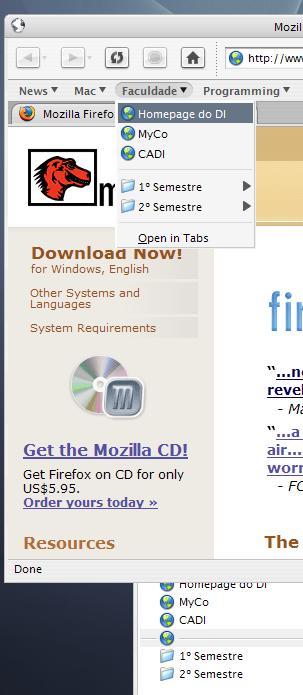
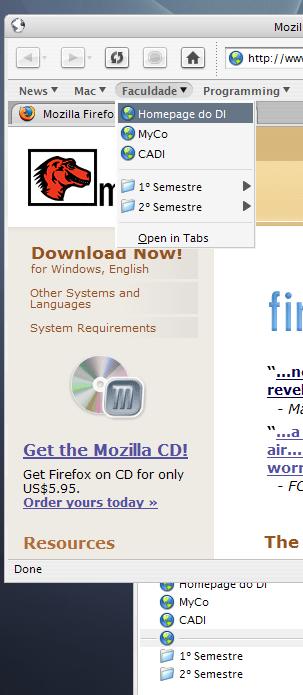
Well, instead of just ranting and waiting for things to appear done, I've fixed the bookmarks 'bug' myself. ;)

Well, the resolution is adding in the classic\skin\classic\browser\browser.css in the classic.jar the following:

.bookmark-item[container="true"] {
  list-style-image: url("chrome://browser/skin/bookmarks/bookmark-folder.png");
}

That sorted the problem out nicely.

-- Edit --

Also, I looked into the separator thingy, but it works nice to me.. no fixing needed.

PS: The window that is not focused is the bookmark manager

post-3937-1077393975_thumb.jpg

bookmarks_fixed.jpg
bookmarks_fixed.jpg

#117615

I don't seem to have a compact.jar in my c:/program files/mozilla firefox/chrome folder.. any suggestions on what i should do? :dunno:

#117636

Originally posted by GSF@Feb 21 2004, 02:06 PM

Well, instead of just ranting and waiting for things to appear done, I've fixed the bookmarks 'bug' myself. ;)

That was a big help! Thanks for the screenshot too. I never would have thought to put folders in the bookmarks toolbar folder.

I also changed the green globe (bookmark-item.png) to this: bookmark-item.png I changed my mind and decided to use this one 2bookmark-item.png. It is the one Iceman used in his system file for IE's default favicon, which happens to be same as bookmark-item in Firefox. The blue folder is already in the classic.jar file.

fox1.jpg

As you can see I replaced the shark pic for the bookmark button for compact menu. :canadian:

#117639

GSF: thanks for the bookmark folder fix!

eatnate: if you installed compact menu successfully, then it might be in your profile. check in %AppData%\Phoenix\Profiles\default\xxxxxxxx.slt\chrome\

#117640

I changed the bookmark icons myself as well, and here they are in case someone else is interested:

bookmark-item.png Link (bookmark-item.png)

bookmark-folder.png Folder (bookmark-folder.png)

Internet Explorer shows black areas in these PNG's but that's because IE is unable to show PNG's with transparency correctly... but then again, if you're reading this thread you don't need to mind that ;)

#117658

any idea where the file is located that you would need to replace to change the default tab icon, is? not the animated one.. the base for when a website doesn't have their own icon.

#117742

Hey guys, what program are you guys using to edit browser.css? I'm opening classic.jar in WinRAR (there is no edit option in WinRAR for .css files, only "view"), then opening browser.css in Front Page- this method is not working for me :-( How are you guys doing it?

#117746

i'm just using plain old notepad....lol but you can use Frontpage if you want.. it does just as good a job if not better. :)

#117748

Extract the jar with winrar and edit the files you want to. Then copy the file, open the jar with winrar and paste file from clipboard(in the winrer file menu). I found I needed to delete the css file in the jar instead of just overwritting it for some reason, didn't have to do that with other files. I use word pad to edit css xml etc. But FrontPage works too. If it wont save then check the properties for read only.

#117754

Just figured it out- I copied from the winRAR viewer, then pasted it into Notepad, then saved it as browser.css, then pasted it in to my open winRAR window. That did the trick ;-) Thanks

#117755

Originally posted by AoW777@Feb 21 2004, 08:32 PM

any idea where the file is located that you would need to replace to change the default tab icon, is?  not the animated one.. the base for when a website doesn't have their own icon.

classic\skin\classic\global\icons

It has 2, a normal and a gray.

#117763

ok thanks, i found that as well, lol so i've been trying to figure out where the code is that selects that, so i can change it to the grey version, can't find it yet though.. lol

#117765

*blinks* i just noticed something, since i did the icon switch for the bookmarks, the close button at the far right corner for tabs, is gone.. this happen to anyone else?

#117767

Originally posted by thefunky_monkey@Feb 21 2004, 06:24 PM

i think the last thing needing to be done is to change the classic.jar to pinstripe.jar - so it is a different skin, rather than a replacement for the default one.

once this is done, i think it should be added to front page news - i think this theme rocks!!!  :D  :rock:  :canadian:

I've tried changing the file names and it doesn't work...

Also, If you try to install an extention well using the pinestripe theme, firebird gets messed up.

#117987

Originally posted by XJOSHATTACKX@Feb 19 2004, 12:43 AM

untitled.JPG

The globes should be folder and there's no seperator bars.

is this bug corrected ?

#117988

Originally posted by Relativity_17@Feb 18 2004, 08:08 PM

Is anyone working on solving the little tab spacing bug, or has that been written off as "just gotta live with it"?

that´s an unfixebel bug, It´s on the mac firefox to!!

#118001

shad0w: to make this a stand alone theme simply change the file path in all files for every instance used and include the new name for every instance in the classic.jar folders.. Then rename classic.jar to the new name.

AoW777: I just used that @ pic I posted for both the green and the gray images, since it gets grayed out by javascript anyway. Works great to just rename your raplacment images same name as original ones and overwrite. That way you don't need to change the css or whatever.

Damn, I cant believe 5 people posted while I typed this. I guess all were about to post when I started.

titoudoc: If you look on my screenshot one page back you'll see I dont have that bug. Try switching to a Visualstyle that uses a white background for menus. The seperators just need to be a different color for the gray background.

No wait, I just have seperators in one place. Could be fixed in code I think.

The folder fix is back one or two pages.

#118006

Originally posted by MartinGy2k@Feb 22 2004, 06:42 PM

shad0w: to make this a stand alone theme simply change the file path in all files for every instance used and include the new name for every instance in the classic.jar folders.. Then rename classic.jar to the new name.

AoW777: I just used that @ pic I posted for both the green and the gray images, since it gets grayed out by javascript anyway. Works great to just rename your raplacment images same name as original ones and overwrite. That way you don't need to change the css or whatever.

Damn, I cant believe 5 people posted while I typed this. I guess all were about to post when I started.

titoudoc: If you look on my screenshot one page back you'll see I dont have that bug. Try switching to a Visualstyle that uses a white background for menus. The seperators just need to be a different color for the gray background.

No wait, I just have seperators in one place. Could be fixed in code I think.

The folder fix is back one or two pages.

but I use the same Vstyle than you...Panther by Kol...

#118042

Originally posted by GSF@Feb 21 2004, 08:06 PM-->
QUOTE(GSF @ Feb 21 2004, 08:06 PM)
Well, instead of just ranting and waiting for things to appear done, I've fixed the bookmarks 'bug' myself. ;)

Well, the resolution is adding in the classic\skin\classic\browser\browser.css in the classic.jar the following:

.bookmark-item[container="true"] {   list-style-image: url("chrome://browser/skin/bookmarks/bookmark-folder.png");<!--QuoteEBegin
[b]

That sorted the problem out nicely.

-- Edit --

Also, I looked into the separator thingy, but it works nice to me.. no fixing needed.

PS: The window that is not focused is the bookmark manager

ok, the trick works... :D

for those who don't wan to replace the classic.jar (default skin), I've packed the file in a true skin file....

here it goes

Right-Click to save...

#118066

Originally posted by titoudoc@Feb 22 2004, 01:25 PM

ok, the trick works... :D

for those who don't wan to replace the classic.jar (default skin), I've packed the file in a true skin file....

here it goes

Right-Click to save...

Thanks, but it doesn't work for me... :blink:

#118067

Originally posted by DrEaMs In DiGiTaL@Feb 22 2004, 09:31 PM

Thanks, but it doesn't work for me...  :blink:

Yeah, me neither...

Please I really want this to work...

EDIT: Hmm, I was picking apart the file and when I tried to extract "contents.rdf" in the main directory, I get a corrupt archive error...

#118069

titoudoc:

Yes the file is corrupt. Please put your good working file in a folder and zip or rar it.

#118086