[release] Nexplorer 1.7 Public Beta

I just stumbled across this thing while looking for some Maclike wallpaper for my machine here at work (I'm stuck on a windows machine here).

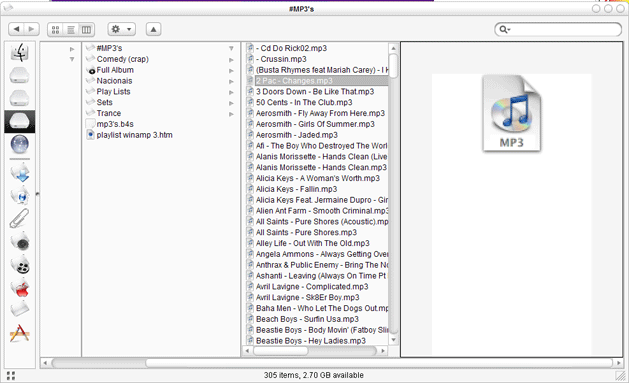
I downloaded Nexplorer and am greatly impressed (and thankful ... I so missed column browsing).

Which brings me to my question; Is there a command line switch that will force Nexplorer to open in column view?

(after reading through this thread and the 1.6 release thread) I didn't find an answer ... hope I didn't overlook it).

Thanks

#159591

@ Zundfolge - i don`t think it`s possible yet

@ vneuman - i`ll do the help file if u want. Just email me with what u want it to look like (simple text/HTML etc.) :)

Cheers

#159607

Originally posted by futb0l@May 10 2004, 12:52 PM

Is there a way to show hidden files?

i think it's like in explorer >>> folder options -_-;)

man i realy like it but it's kinda slo with the thumbail view on scooling...

could u make an option for a smaler thumbail?? like in looca??

also could u pat in the options menu a shourtcut for the folder options?? it's verry hard to get first on the CP and then to folder option. also it would be great if you could implement a "rename" thingie in the right click menu.

could u put an option to costomize the information showed in the 3painel view???

like for pictures i need to know the resolution... also could u make the icons in 3 painel view information to be at 128x128? :blink:

great app dude. keep it up ;)

#159610

I don't know if this has been addressed already, if so, just tell me and I'll edit this post. But when using a dark theme and having black backgrounds, when in column view, when you have an image, and it gives you a thumbnail and summary of it. It remains white while the rest of them finder is black. Do you think next release there would be a way for us to go in and change the color of the font for the summary, and that little aprt that remains white?

If needed my specs are

P4 3.2Ghz

1024MB DDR PC4000

160 GB S-ATA

60GB ATA133

Radeon 9800XT

Though I know it's not due to my PC, just giving specs, because thats what you wanted when adressing errors

#159668

Why on my nexplorer there isn't the info about the file, (shoudn't it be under the icon infos like name etc....??) Why doesn't show anything on my?

post-3010-1084221230_thumb.png

Untitled_1.gif
Untitled_1.gif

#159691

Originally posted by Kej0@May 10 2004, 08:02 PM

I don't know if this has been addressed already, if so, just tell me and I'll edit this post.  But when using a dark theme and having black backgrounds, when in column view, when you have an image, and it gives you a thumbnail and summary of it.  It remains white while the rest of them finder is black.  Do you think next release there would be a way for us to go in and change the color of the font for the summary, and that little aprt that remains white?

If needed my specs are

P4 3.2Ghz

1024MB DDR PC4000

160 GB S-ATA

60GB ATA133

Radeon 9800XT

Though I know it's not due to my PC, just giving specs, because thats what you wanted when adressing errors

I have the same problem with Shinobi Skin

#159707

Hi!

I figured it was time I jumped on the bandwagon and made a completely off-topic, unwanted, and ridiculously stupid post to the thread.

Gosh, now I feel like like one of the clan.

;)

P.S. good idea about the help file, but i hope it works. people seem to read forums before Help files...and both of which they tend to do VERY little of.

might i suggest you make is mandatory to read it upon install?

#159759

Originally posted by Duckie@May 10 2004, 11:08 PM

Hi!

I figured it was time I jumped on the bandwagon and made a completely off-topic, unwanted, and ridiculously stupid post to the thread.

Gosh, now I feel like like one of the clan.

;)

P.S. good idea about the help file, but i hope it works.  people seem to read forums before Help files...and both of which they tend to do VERY little of.

might i suggest you make is mandatory to read it upon install?

-_-

after reading this thread over again i got sick.

i now firmly stand behind my sig - People are stupid!

I`m going to ask Seph or Pe7er to clean this thread cause it looks like no one gives a **** about what vneuman asked to be posted in this thread :rant:

PS Not even 1000 help files will make pple less stupid <_<

#159784

Originally posted by Unbeliever@May 10 2004, 10:56 PM

-_-

after reading this thread over again i got sick.

i now firmly stand behind my sig - People are stupid!

I`m going to ask Seph or Pe7er to clean this thread cause it looks like no one gives a **** about what vneuman asked to be posted in this thread :rant:

PS Not even 1000 help files will make pple less stupid <_<

Yeah, i guess that if we are very rude and unpolite will help. :moon: (isn't it amazing that smilies have ass?)

#159903

Binary posted about this bug on Page 3 of this thread... I have a little more info to add about it. (This is the bug where the text in the preview pane in panel browsing mode is gobbledygook. Binary has a screenshot...)

Anyway, I didn't have this problem at first, but somewhere along the way, it seems to have popped up, and now I get it no matter what file type I'm previewing... It happens with ico, png, doc, txt, pdf, etc. Replacing the exe does not fix the problem.

vneumann - Hope you can track this down!

#159916

People, please calm down.

Of course I don't like people asking same questions over and over again but I don't mind it that much. You don't have to call names or insult others just for that.

What I hate most is the topic I started becomes a battle-ground .

Right now, I am reading all your posts and trying to fix problems. I just don't have time to reply to your questions. Keep posting errors and bugs but don't get pissed when your post is not replied to.

@Help file volunteers : Thanks a lot. I think we have to wait until the next update is done cause there will be quite a lot of changes .

@ Skinners : In the next update, the whole window will become skinnable including the caption bar and borders. It will become completely independent of msstyle or windowblinds (No more searching for matching themes). I will soon give you skin design guidelines and you will start to make skins.

#159961

:( there is no hidden files in nexplorer even though i tick the show hidden files option in folder option.

so is there another way?

#160041

Originally posted by am i cool?@May 11 2004, 10:21 AM

:( there is no hidden files in nexplorer even though i tick the show hidden files option in folder option.

so is there another way?

i don't think so >.:(

#160106

I have hidden files showing in my Nexplorer, it's annoying though. I don't know how to get rid of my hidden files

#160117

This is ironic... Some ppl trying to see, others trying the get rid of it.... lol...

#160120

Originally posted by vneumann@May 11 2004, 04:37 AM

@ Skinners : In the next update, the whole window will become skinnable including the caption bar and borders.  It will become completely independent of msstyle or windowblinds (No more searching for matching themes). I will soon give you skin design guidelines and you will start to make skins.

K, sounds good. I'll update mine as necessary to make them compliant. Sure others will to :)

Cat.

#160121

About showing hidden files, it's not implemented yet. If you can see them it's not normal. I will implement "show hidden file" option

#160174

Originally posted by vneumann@May 11 2004, 05:03 PM

About showing hidden files, it's not implemented yet.  If you can see them  it's not normal. I will implement "show hidden file" option

and da "rename" too? :blink:

#160176

Originally posted by static@May 11 2004, 05:08 PM

and da "rename" too? :blink:

You mean "rename" in general or "rename" in the context menu?

Right now, you can rename folders or files by pressing "F2" key

it will be added to the popup menu some time in the future.

#160177

Originally posted by static@May 11 2004, 05:08 PM

and da "rename" too? :blink:

Have you tried pressing F2?

EDIT: Ops... vneumann beated me on this one. :P

#160178

I didn't mean to sound rude or ignorant. I'd just gone through 6 posts (spread over here and aquaxp) that seemed to go completely ignored. Apart from this topic the rest still seemed to just be completely ignored and it is really getting to me.

Can't wait for next release, will start making skins once it's ready.

#160393

Originally posted by Acaeris@May 11 2004, 09:51 PM

I didn't mean to sound rude or ignorant. I'd just gone through 6 posts (spread over here and aquaxp) that seemed to go completely ignored. Apart from this topic the rest still seemed to just be completely ignored and it is really getting to me.

Can't wait for next release, will start making skins once it's ready.

Hey, you don't have to sound like a software customer who is ranting at poor customer service. All of this is just for fun and I don't have obligation to reply to every post.

Sometimes I am not in the situation to write a post ( especially when I'm working) and when I get a chance to reply to other posts, your post is probably several pages back and I just forget about it. I don't ignore your posts on purpose.

About label question, I'm not sure adding more label option will be implemented in the next update. I am currently fixing other stuff and that's low priority.

#160397

Originally posted by vneumann@May 11 2004, 05:19 PM

You mean "rename" in general or "rename" in the context menu?

Right now, you can rename folders or files by pressing "F2" key

it will be added to the popup menu some time in the future.

then i right click on a file i use that , and i'm shure that many people there are using it da same as me -_-

well F2 isn't that bad ;)

#160421

Very impressive. I like.

#160426

Originally posted by vneumann@May 11 2004, 04:37 AM

@ Skinners : In the next update, the whole window will become skinnable including the caption bar and borders.  It will become completely independent of msstyle or windowblinds (No more searching for matching themes). I will soon give you skin design guidelines and you will start to make skins.

Yeahhhhhhhhh AMAZING !!!

keep it up dude !! your are amazing! !!!

this baby gonna be a beautyful app .. just beautyful :rock:

#160475