[release] Nexplorer 1.7 Public Beta

well i guess this is my error report. i dont have a C: drive so i had to go into the registry and change some things [ point to D: ]. that helped me a little,[ i never saw anything when i was in the thumbnail view, i only saw things in the text view...] but i still dont see any folders...etc

No pngs/thumbnails

Click

Transparency flaw:Click

-bunkka :canadian:

#161560

Last one for tonight:

and then I will stop filling up this thread.

Brushed Smooth ;)

http://www.aqua-soft.org/board/index.php?a...t=0#entry181467

#161566

vneuman is there a way to Stop the inactive transparency effect ?

i kind of hate it, too anoying ... :(

what about just use the same inactive effect itunes has ??? What do you think ? that Gonna be So SWEETtttttttttt !! ;)

:woot:

#161570

Originally posted by vneumann@May 14 2004, 12:47 AM

Strange... I did clean install on my computer and it works all right. And no CPU usage.

Is there anyone who had success installing it?

I have a success instalation. Now I have NeXplorer 1.8 on my machine.

Simply, I export the way "HKEY_CURRENT_USER\Software\NeXplorer1.5", I installed the upgrade to 1.8 and I reimported the saved registry key. It works.

Here is the screenshot

Thanks

#161573

wow, you evern implemented keyboard usage in this release! I love browsing 3 panel view using the arrow keys! Thanks.

#161577

Congratulations!! your app rulez!!

Just a liitle bug report...

If you drag a removable drive (such an external disk) to the left pannel, when the drive isn't connected and you click on it, it comes with an error and the annoying "window's error beep", and the drive's icon desapear from the panel. Moreover, if you have your drive connected and want to remove it (by remove safely Hardware) windows doesn't allow you because the drive seems o be in use (by the explorer). You have to close all instances of nexplorer to solve it.

This isn't a big bug. However I find it quite annoying (you know the error sound is really disgusting ;) ), and the need to close all nexplorer windows to remove it safely...

Excellent app anyway!!!

(Apologies for my bad english)

B.

EDIT. Found another tinny bug: the "upper button" mouse over effect becomes static once you pushed it. It remains "pressed" until you restart the explorer.

#161588

help me! :blink::(

cannot setup 1.8

#161600

First of, all kudos on the release. I am gonna be a ***** about the memory usage:

mem_usage.jpg

:blink:

Seriously, I did a clean install and run nExplorer. This is what I got. PC totally locks up. :( Consider this as a bug report btw.

#161602

search bar problem, 1.7beta and 1.8 are same.

#161605

Think you can release a version without an installer, for soem reason my MSI is fubared and im too lazy to reinstall XP. :canadian:

@AndreasV bahh get more RAM

edit: also think you can make a new thread for each release? weeding through a 13 page thread gets old realy quickly.

#161608

hmm 1.8 looks interesting, but I think I'll wait for a while before upgrading to anything other than 1.7 (wait for some of these new bugs reported to get fixed first) !

guess that means I'll be delaying updating any skins I have made too. (JetBlack)

Cat.

#161626

this version is unbelievable!!!

browsing is faster, i LOVE the new skinning options and serach works fantastic!

And adding keyboard support was a dream!!!

however i found few bugs.

1. The app remembers the size but not the position.

2. browsing with thumbnails is painfully slow, so much that it`s unsuable.

3. The skin doesn`t change untill you restart the app

More as i find out! :)

This app is improving sooo much it`s incredible!!!

Thanks Kevin!

#161630

nice...it is working prefectly on mine :D

#161643

Great releise thank you!!!

but please i like search when press enter key to search full drive. I dont like windows search. so meybe type letters no enter to search folder and press enter to search all drive.

also like iTunes have X to remove letters in search bar an meybe icon so I see search work and not hang.

also optin to no transparent when not use.

Can please make drag to work. I want drag icon from nexplorer to other nexplorer or windo or app.

Thank you again. You are Bestest (is correct word?) developer in world. (Y) (Y)

#161646

very nice new features! thanks for your work...

unfortunately i cant use it because the start up time is about 45-50 seconds on my PC (Pentium4 @ 1,7 ; 512 Ram; WinXP). I did make a clean install (saved the shortcuts as .reg and deleted all the related keys from registry and the folder from Program Files). I guess this start up time is not normal and also after i run Nexplorer it resets all the memory used by the processes in Task Manager (what i mean is that "Explorer.exe" (not nexplorer.exe) process usually uses around 25Mb or more memory but after i run Nexplorer it uses much less - 5 or 8 Mb) and all the programs get slower.

#161649

Everything looks to work to me but I have a problem, My Search bar has a grey thing in it, dunno how to fix it

Also the finder is amazing now but Im unhappy with a few things, I had my sounds set up to make sounds when I maximize, Minimize and Close, and now they dont play

By the way when I roll up, its slow as hell, and when I roll down its also slow down

#161665

There's a "little" problem for me.

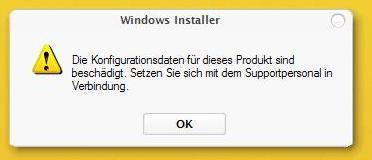
Every time i run the installer, i get this message "The konfiguration files for this product are damaged. ...". What da hell can be my problem? :(

I've a tried it with a fresh unzip and a restart of corse. But nothing helps!

Have someone had the same problem?

..Thanks

°°°ToNeR°°°

post-10542-1084537959_thumb.jpg

1.JPG
1.JPG

#161670

Originally posted by ToNeR@May 14 2004, 12:32 PM

There's a "little" problem for me.

Every time i run the installer, i get this message "The konfiguration files for this product are damaged. ...". What da hell can be my problem?  :(

I've a tried it with a fresh unzip and a restart of corse. But nothing helps!

Have someone had the same problem?

..Thanks

°°°ToNeR°°°

the same~ :(

#161677

This might be due to it using an older version of the nexplorer.msi installation package. The installer seems to be checking the registry for where to find it before using the one it comes with. In other words, it's trying to install bits of both and they are clashing and causing an error. Try searching your registry for all entries of nexplorer and removing them, then reinstalling.

#161683

Why don't we start a new thread for nexplorer 1.8 ...

after all this is a whole new release?

I am willing to sift through and write all known bugs.. put that as the first post so that we dont have so many repeats....

OKay I have finished a report of all known bugs.. here it is... read this first before you post a bug report.

Known issues:

1. Sometimes installing the upgrade fails. Backup nexplorer reg data

and your nexplorer directory, delete all related files and reinstall.

This should work

2. Skinning engine does not load new skins properly, you must restart

each time you load a new skin

3. rollup button is very slow

4.Title bar font is not the same as the other fonts.

5. If you click maximize when the skin is in away mode.. it will stay

transparent.

6. Search works only in folders. Use regular explorer search for

searching computer. Do not leave any text in the search bar or you

will not see any files when switching view.

7.Change the folder.ico located in the nexplorer directory to change folder icons

in the browser window

8.You may only have one splitter

9.Nexplorer does not remember last screen position.

10. Scrolling very quickly through a large folder may cause drawing to

lag behind.

11. If removable Drive is not present, the icon dissapears (if you supply

a non-default icon this will not happen)

12.Browsing with thumbnails is slow for some people.

#161685

1- the scroll is freezing all the time forme ,specially if i`m using a little nexplorer`s window.

BTW,. is it possible ????

can we have this (as a skin maybe ?) on the search BOX when we have the cursor on it ?

well the question is, is it possible right now or it is not ?

#161713

I have a skinning question. Is there any chance of having sub styles within each skin? So that I dont have to package up each skin as its own? Like milk chrome, milk, and chocolate? If not it is no problem. I would just like to include lots of variations.

hi vnuemann :bye:

#161725

Originally posted by Acaeris@May 14 2004, 02:52 PM

This might be due to it using an older version of the nexplorer.msi installation package. The installer seems to be checking the registry for where to find it before using the one it comes with. In other words, it's trying to install bits of both and they are clashing and causing an error. Try searching your registry for all entries of nexplorer and removing them, then reinstalling.

I've searched for any key witch has to do with NeXplorer. I've removed all the entries.. 3 times! Doesn't work!

I've tried it with reinstalling nex. 1.7 ...doesn't work.

I've tried it with upgrading nex 1.7 ...doesn't work

after uninstall nexplorer 1.7 and search+delate all entries

i've tried it with installing 1.8 alone ...doesn't work!

I've no idea what i shoud try next.. and ideas out there??

Perhaps a ziped version without installer?! :rolleyes:

..THANKS

ToNeR

#161790

hi this application is too cool but i have exactly the same font problem than ingeneerMan

#161793

maybe this fonts and labels issues we are having only happens cuz we use 128 X 128 icon format ???

what do you think vneuman ? :canadian:

#161807