[release] Nexplorer 1.7 Public Beta

indeed, great work Vneumann!

only problems i've had:

when viewing in three column mode, and expanding other folders, folder names that are long overflow past the arrows, and look messy.. maybe limiting the amount of the name shown and adding "..." would work, and look better

in the sidepanel, icons dont resize too well, im not sure if its just the icons im using - well, theyre 24x24 on the sidepanel? and the ones on the startmenu are 24x24, but the startmenu icons look much clearer

thats all,

Thanks for such a great application :)

#158091

[hint]

If you have trouble with InstallShield (who has not) have a look at:

Inno Setup

It's easier to get results than with the latter and produces smaller single exe setups.

[/hint]

Excellent work. WTL rocks.

#158094

1. Unbelievable! :rolleyes:

2. Unbelievable!! :rolleyes::rolleyes:

3. Unbelievable!!! :rolleyes::rolleyes::rolleyes:

Ok, and here a little Question

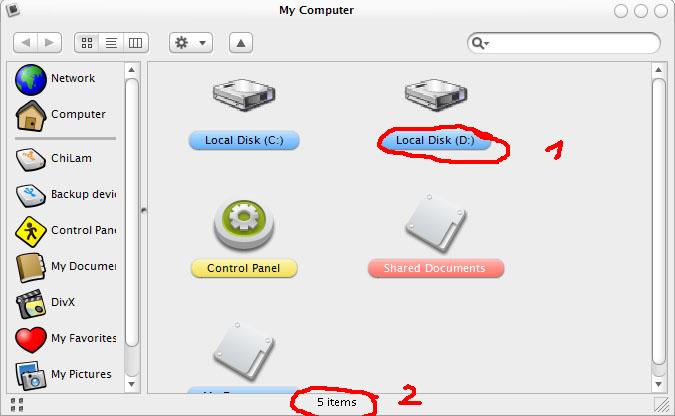
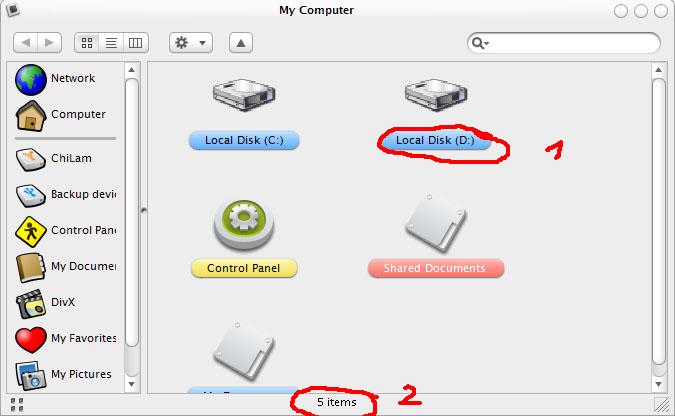
How to fix the font problem like in this screenshot? (1&2)

@Bezeitler: I still use the searchbar from your looca-milk 2.3 skin and it looks much better ;)

..and this wonderful app is a little slow while changing from one to another dir?!

But anyway, UNBELIEVABLE!!!

..Thanks

°°°ToNeR°°°

EDIT How to make Folders in the Icon-view clother together?! EDIT

[sorry for my horrible gramma]

post-10542-1083918707_thumb.jpg

nexplorer.jpg
nexplorer.jpg

#158095

Thank you Vneuman. Work great! Please show moving icon when Search so I know still working and not hang. Thank you. So Happy :D :woot:

#158097

love the program BUT it keep crashing on me lol when im seting up the shortcuts :rant: then i have to start all over :( other than that i havent really had a chance to use it

#158102

Originally posted by Pe7er@May 7 2004, 07:59 AM

This app is great, I'm already using it as an explorer replacement. It's really easy to do. In case if someone doesn't know here's a short tutorial: ....

Damn!!!! It runs for me too.

Thanx Pe7er and Vneuman

#158119

Originally posted by Pe7er@May 7 2004, 02:59 AM

This app is great, I'm already using it as an explorer replacement. It's really easy to do. In case if someone doesn't know here's a short tutorial:

Go to Control Panel > Folder Options > 3rd tab (filetypes)

Three first items on the list should be disk, folder and file folder. Open their properties ('advanced' button), then click 'new...'. Name your action whatever you like and in lower field enter something like this: x:\mypathtonexplorer\nexplorer.exe %1. This %1 is damn important. Click OK, then you can set it as default. It should work (well it does work for me ^_^)

Thank you vneumann!

WOW!

This is great...

very very nice.

Oh and as Per request I am starting work on some matching windowblinds skins. I am planning on modifying some existing skins. Hopefullly they will come out nicely and I will get permission to release them.

#158132

Originally posted by Pe7er@May 7 2004, 07:59 AM

Three first items on the list should be disk, folder and file folder. Open their properties ('advanced' button), then click 'new...'. Name your action whatever you like and in lower field enter something like this: x:\mypathtonexplorer\nexplorer.exe %1. This %1 is damn important. Click OK, then you can set it as default. It should work (well it does work for me ^_^)

Thank you vneumann!

Worked ok... just the path should be "c:/yourpath]nexplorer.exe" %1 between quotes... that´s because most ppl (and the installer) put NeXplorer on Program Files, that have a space. Better yet is just use the Browse to find the path. ;)

BTW... you´re the man to discover this one. A great trick, for a great app.

VNEUMMAN - About the milk skin... i´m using it (goes well with non brushed panther) and i got the bug too... at first the tool bar buttons are ok, but when you click first time on any browse option (Icons, Colluns or Details) the buttons get bigger a little desaligning on the botton line. Notting really that bad, but, if could be fixed, why not?

BTW... have i said anytime that this a @&*¨#¨@*&¨#*&%@ hell of an amazing piece of wonderfuly fantastica aplication? Better yet with Pe7er trick... bye bye Explorer!!!!

#158137

If anyone needs a Jetblack skin for this program I made one - its on my website in the downloads section.

NeXplorer JetBlack Skin Download Page

Cat.

#158142

Very nice Jetblack skin. :D

#158146

Originally posted by Pe7er@May 7 2004, 07:59 AM

This app is great, I'm already using it as an explorer replacement. It's really easy to do. In case if someone doesn't know here's a short tutorial:

Go to Control Panel > Folder Options > 3rd tab (filetypes)

Three first items on the list should be disk, folder and file folder. Open their properties ('advanced' button), then click 'new...'. Name your action whatever you like and in lower field enter something like this: x:\mypathtonexplorer\nexplorer.exe %1. This %1 is damn important. Click OK, then you can set it as default. It should work (well it does work for me ^_^)

Thank you vneumann!

Thats great, but everytime I click into a folder, it opens a new instance of NeXplorer D: instead of using the one already open (nvm Explorer does that too)

What we need now is the support of AveDesk and the Docks and we are done replacing the explorer

Also, Vneunman when a Search is under progress, the Search bar should have a Stop button like the Real Mac has (Looca does it too, iTunes too and such)

That would come an handy, the rest is perfect (Ah yes the Speed still needs some improving )

EDIT

I think startup speed should be improved too, and other Startup things like when I open Nexplorer it minimizes and opens again

:naughty:

#158148

Can ANYONE tell me how to change the icons shown in the preview shot ? Outlined in red - when adding certain folders or drives they appear with their original drive icons as used by shell32.dll - in other apps like Looca, you can change the icon.

So how is it done with this program please ?

Preview of where and what I mean :

preview_jetblack.png

#158161

TheCat2000... you have to read carefully the thread about NexPlorer 1.6 Beta ...

You have to drag n drop a PNG (or what format you want) icon on the one you wonna change...

Alx

#158164

Thanks. (sorry I didn't follow the thread you mentioned) Guess I SHOULD OF !! >.:rolleyes:

#158166

Nice work!!! :D

#158175

This app is great, I'm already using it as an explorer replacement. It's really easy to do. In case if someone doesn't know here's a short tutorial:

Go to Control Panel > Folder Options > 3rd tab (filetypes)

Three first items on the list should be disk, folder and file folder. Open their properties ('advanced' button), then click 'new...'. Name your action whatever you like and in lower field enter something like this: x:\mypathtonexplorer\nexplorer.exe %1. This %1 is damn important. Click OK, then you can set it as default. It should work (well it does work for me )

Thank you vneumann!

This is just great!!!!

how can I select the "Browse in same window" option?

#158179

Good News...

I fixed my tiskin... no more darkening buttons. Get it it the skins forum. I am going to upload it now. ;)

I changed the forward/backward buttons as well as the options and up button. I also fixed a bug with the background.

Here is what it looks like now:

#158180

Originally posted by bzeitler@May 7 2004, 01:44 PM

Good News...

I fixed my tiskin... no more darkening buttons.  Get it it the skins forum.  I am going to upload it now.  ;)

I changed the forward/backward buttons as well as the options and up button.  I also fixed a bug with the background.

Here is what it looks like now:

About the milk skin problem,

you have to match height of view1.png, view2.png and view3.png

I found that view1.png is 24 px high with extra blank space and others are 22 px high

After I remove the extra space it works just fine

#158189

Originally posted by vneumann@May 7 2004, 09:36 AM

About the milk skin problem,

you have to match height of view1.png, view2.png and view3.png

I found that view1.png is 24 px high with extra blank space and others are 22 px high

After I remove the extra space it works just fine

yeah I noticed that too... I thought that I fixed it but it was still buggy. I probably didnt though. I will check. Thanks vnuemann.

#158191

i think this is a bug of the app, not the skins...

when i start the app, the search bar looks fine, but if i change the skin, the search bar becomes distorted. if i do anything like resize the window or change the skin, it becomes normal again.

#158196

Vneunman, you are the best !!!

keep up this amazing Work dude !!!!!!!!!!

and btw. the only problem i have is when you launch the app. it just start blinking and so on, and then it just rezise itself in the ugliest way possible.

{ wish }

i hope this baby, someday maybe , can have a skin engine so i will never change my beloved Panther visual style, and i`ll have this app with a brushed skin everywhere. :)

and Can you add DRAG and DROP to the tool bar ?????????

PLEASE this will be the most amazing app ever done in this site Forever if you do it !!!

post-3126-1083942152_thumb.jpg

Capture07_05_2004_11.11.50_a.m..jpg

#158200

Originally posted by bzeitler@May 7 2004, 12:13 AM

use png's

They will look great.

How can I change the icons on the side panel so they use png instead of ico?

#158201

Originally posted by AthleticTrainer1981@May 7 2004, 03:09 PM

How can I change the icons on the side panel so they use png instead of ico?

To change the ICO ou PNG of the shortcut on the side bar, just drag a .ICO file or .PNG file from the main window to the shortcut (over the shortcut you wanna change) and BINGO!

#158202

@vneumann: I haven't tested the new version yet, but when using the older version I noticed that the labels used are used the same as AveDesks ones (same ini files). Is it possible to have Nexplorer check the folders in the labels directory for these ini's so that the user can add more labels as opposed to replace the old ones?

#158207

I have this bug also and i am sorry if somebody already posted this

When you choose View mode on right click to get the thumbnail view ,the folder get chopped up from the top.

check out the scree shot

here

#158209