Winamp CD Case (shows cover in a CD jewel case)

New beta 9 build (19 Jun 2005):

- Show song rating along with title

- Rate song (context menu - mouse right click case/cover area or system tray icon)

- some improvements

http://www.closetosoftware.com/wccb9.zip

Don't uninstall beta 8! If you need it get it here: http://fileforum.betanews.com/detail/Winam...se/1109367710/1

;)

#294083

thanks so much for the rating addition ..i asked for this feature loooooooong ago ...im excited to see that its finally here ! :)

EDIT: one thing that annoys me is that the case minimizes when i minimize winamp ..how do i stop this ????

thanks in advance carlos :P

#294153

Go to "Options>Player" and uncheck "Follow player window state".

An "Exit when Winamp is ended" (as it was before) will be added soon...

#294159

Aworldapart,

New build with "exit" and "window state" features apart.

Please test it!

http://www.closetosoftware.com/wccb9.zip

#294173

thanks alot ..will do! :P

#294302

New beta 9 build (21 Jun 2005):

- Options>Notifier>Size: notifier has two possible sizes now: "Case size" (same width of the case - default) and "Twice of case size" (double of the case size).

- some bugs fixed and improvements

http://www.closetosoftware.com/wccb9.zip

Don't uninstall beta 8. Just copy the new "CD Case.exe" to WCC's folder.

;)

#294696

New beta 9 build (23 Jun 2005):

- Skin Manager>Zoom: notifier zoom added

- Options>Notifier text added

- Options>General: data base location added

In resume:

Now WCC will track (experimental) the song's rating, play count and last played date.

So the rating feature will work not only in Winamp 5.04+ with ML but also in Winamp Lite (or without ML) and with another players (e.g. foobar2000).

However, WCC will still check the Winamp ML rating.

In addition, WCC has a better Notifier text now. The following fields are available to compose line 1 and 2 of the notifier: title, artist, track, album, genre, rating, playcount, lastplayed (Options>Notifier text).

The %title%... tags are used to easily compose a line.

Let's test then!! :)

http://www.closetosoftware.com/wccb9.zip

Don't uninstall beta 8. Just copy the new "CD Case.exe" to WCC's folder.

#295263

New beta 9 build (24 Jun 2005):

- Drop image (jpg) over case/cover area to set the image as the song's cover.

- some improvements

- bugs fixed

http://www.closetosoftware.com/wccb9.zip

Don't uninstall beta 8. Just copy the new "CD Case.exe" to WCC's folder.

#295567

Just wanted to drop a line and say thank you for the recent builds. I still have focus problems with my one computer (my favorite & main PC) whereas my laptop has no problems, I even uninstalled the previous installation of WCC and installed with the latest full release and then applied the incremental builds to no avail! Was wondering if maybe a clean install using the most recent full release with then adding to the builds does something? I even unloaded all non-system running processes, after a reboot and tested it out... still no go with the focus to front after pausing. I get tooltips to pop up indicating volume, but no ability to bring WCC to Focus and to Front.

Additionally, sometimes when I rightclick WCC to view a cover after being downloaded, nothing comes up. Although I have not tested if this has been fixed in the last 2 builds.

Also I have a feature request: Could you please add the ability to offset the notifier when positioned on top and on the bottom, similar to how you give the ability for adjustment when on the left or right? (for instance, I could have the notifier be on top, left justified to the left border of the skin.)

Regards,

Leon

#295611

firecracker6,

1. I don't think a clean install will help, but... Who knows?! I'd like to suggest you to use the hotkey feature (Ctrl+F11 by default) with "Toggle on top" checked (Options>General). Just put WCC on top then put it back to a normal level (just using the hotkey). Then try to hover your mouse over WCC.

In addition, I have uploaded a new build that make the "foreground" call in a different way. Maybe it can help you. Please test it: http://www.closetosoftware.com/wccb9.zip

2. View cover after download: can you test the new build?Tthen if it does not work please tell me the "Read cover" method you've selected (Options>Read cover).

3.As soon as possible!

Thank you for your feedback!

#295693

Carlospr,

I'd like to suggest you to use the hotkey feature (Ctrl+F11 by default) with "Toggle on top" checked (Options>General). Just put WCC on top then put it back to a normal level (just using the hotkey). Then try to hover your mouse over WCC.
sorry, doesn't work still...

observations on new build:

1) Coverart not showing image when there are jpgs in the folder (with settings configure thus:

Selected Settings:


Artist - Album.jpg

- folder.jpg

-Alternative cover

-Covers' folder

- ID3v2 tag

- Any image

..and..

-*front*.jpg)

2) tooltips no longer appear over wcc covercase. No toolip volume indicator, no nothing..

3) YzShadow goes nuts... taking the CPU for a spin and shadows take anywhere from 2~10 seconds to load meanwhile stalling the context menu to load.

4) And some of the button's caption text is missing such as [Cancel] etc.. (edit: this may be due to the VS tho..)

post-20869-1119668506_thumb.jpg

There are JPGs in this folder yet, no coverart found.JPG

#295705

firecracker6,

1) Thanks! This bug you've found was introduced, in fact, in beta 8. Fixed now!

2) Fixed!

3) I'm not sure if WCC has something to do with it. The case and notifier are not "normal" windows (they are kind of tooltip style).

4) maybe VS indeed...

New build: http://www.closetosoftware.com/wccb9.zip

#295803

3) I'm not sure if WCC has something to do with it. The case and notifier are not "normal" windows (they are kind of tooltip style).
i donno... yzshadow issues could have been associated with the other bugs.. but all it took was me swapping out the previous build to fix the system stalls and, a restore of the june24th build to bring back the yzshadow/system hang.

I will try out the new build now and perhaps it'll all be good.

[EDIT] YzShadow issue is gone! Everything is playing nicely. :)

[EDIT2]:

I'd like to suggest you to use the hotkey feature (Ctrl+F11 by default) with "Toggle on top" checked (Options>General). Just put WCC on top then put it back to a normal level (just using the hotkey). Then try to hover your mouse over WCC.
sorry, still does not work with this build... The only way i can give focus to wcc is by clicking on it somewhere first... even giving focus to the desktop first then trying to hover over wcc and change the volume does nothing. The volume tooltip does popup tho....

[EDIT3]: I believe the lost text on the options window was indeed due to the skin. So all's well there.

[EDIT4]: At first I wasn't sure about this but now i have had 2 instances... I discovered that sometimes, when I right click -> "open folder," the music file is not selected when the folder opens. I cannot figure out a pattern to report though... i suspect maybe:

1) file path too long?

2) unaccounted for characters in file path?

here are two examples that will not return the file selected:

****

J:MusicRootMozart - & ClassicalMozart-Complete Symphonies-Hogwood(29 Dic) [128kbps]Symphony No.29, K201-02.mp3

J:MusicRootcoldplayColdplay Collection (3 Albums, 2 B-Sides, 10 Singles and EPs)B Sides, acoustic & raresColdplay - Clocks (Acoustic).mp3

****

[EDIT5]: In addition, when "EDIT4" happens, wcc does not display coverart when there is coverart to be displayed.

Thanks for trying out a new method to give wcc focus.. it didn't work on the 24th build but i could understand that as there were other issues. I really appreciate your efforts not to give up on that feature (not working in my instance.) *crosses fingers* maybe this new build?

regards,

fc

#295861

fc,

The main issue with the "J:MusicRootMozart - & ClassicalMozart-Complete Symphonies-Hogwood(29 Dic) [128kbps]Symphony No.29, K201-02.mp3" filename is the comma (","). The API used to open Explorer uses a comma as a delimiter (internal process). So if a path has a comma I can't use the API to automatically select the file, just open Explorer...

WCC should show the cover anyway. I'll make some tests using a path like yours... [Edited] I've made some tests using comma and some long paths and all went fine...

By the way, did you test the speech application?

#295940

By the way, did you test the speech application?
oh, yeah... i downloaded the microsoft dlls etc.. and it read just fine :) I know it was just a proof-of-concept app and quite early.. but is there any way to fade the music down while the track is being read, then fade back in full volume... if, perhaps, holding back the next track a few seconds while the track info is read (during the silent pause) would not be possible. I also downloaded and installed the various voice packs but could not find settings in the control panel to make use of them.. i thought maybe they are provided as useable components in developer's apps.. could you make use of them from your program, such as give the user the ability to select the voice? speech speed etc.. (i found the three default voices in the control panel... sam etc..) Your program, if i remembered correctly, did not match the voice selected, i think... i could be wrong though...

I just tested out another thing that might help in the cover not showing issue:

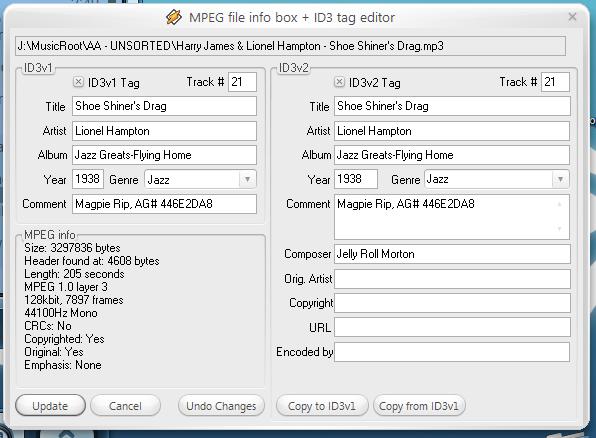
I had winamp and wcc playing a song. It did not have the right cover so i did a cover search for: "J:MusicRootAA - UNSORTEDHarry James & Lionel Hampton - Shoe Shiner's Drag.mp3" (the song that was playing) by double clicking on wcc bringing up the "Search cover" dialogue.. in it was already populated: "Lionel Hampton Jazz Greats-Flying Home" however, that returned no results, so i double clicked again, changed the search to "Lionel Hampton Jazz Greats" and that returned a cover. I accepted the cover. and hit the << button on the wcc cover. Winamp returned to the previous track and when i clicked >> the song returned to the original one, but the cover that i just downloaded did not appear. It did not take as the album cover.

EDIT: p.s. thanks for clarifying the file not selected when viewing folder anamoly.. i can live with the comma limitation as it can now be addressed if need be (remove commas from the path ;) good deal)

#295961

fc,

Is "Lionel Hampton Jazz Greats-Flying Home" the album name (from ID3 tag)?

Since WCC made the download, which name WCC used to save the downloaded cover?

Do you know how to use Mp3DirectCut? http://fileforum.betanews.com/detail/mp3Di...ut/1010041409/1

So you could cut this song and let just the last 3 or 2 seconds of it. You could send it to me by email and I'll be able to see what's going wrong...

Note: copy this song to another folder then cut it... Just to avoid mistakes...

My email: support@closetosoftware.com

#296017

I am on my way out the door, but i wanted to give you something... here is the image file name that was downloaded with wcc... "Lionel Hampton - Jazz Greats-Flying Home.jpg" the file resides in the wcc "covers" folder.

i have included the id3 info for this song. When i return i'll try to get you the 3 or 2 second clip.

post-20869-1119813664_thumb.jpg

idtag.JPG
idtag.JPG

#296052

Firecracker6..................nice work...damn this girl is a beta tester for everything!!!

Nate Dogg

#296092

fc,

I've added your tags to a file but all went fine...

I'll wait the file...

#296112

my dear natedogg.... I'm still a guy ;) Thanks tho, for the recognition ..lol

@Carlospr, just sent you the file clip.

EDIT: had a question, when the first search for an album cover returns nothing, and you have to modify the name a bit to get wcc to find the right cover on a new search, does it complicate things that the downloaded cover is saved under the search text, and there is a difference between the song's file name and the cover's file name?

Would it help to save the downloaded cover's file name to the same as the original song's file name (regardless of what text string was used for the search,) possibly helping to preserve the two's association?

#296126

New beta 9 build (26 Jun 2005)

What's new so far:

Mouse hover (back again)

New tooltip (will show current volume / mouse wheel...)

Notifier can be placed at left or right of the case too (Options>Notifier)

When mouse is hovered over WCC it will get focus

Now you can set a custom "Covers' folder" (Options>Read cover")

"Options>Player": "Follow player window state" added

Rate song (context menu)

Read and set Winamp song rating

Own data base for rating, play count and last played date

Skin Manager>Zoom: notifier zoom added

Options: "Notifier text" tab added

Options>Notifier text> customize notifier text with fields (%title%...)

Options>General: data base location added

Drop image (jpg) over case/cover area to set the image as the song's cover

This build:

Options>Notifier text> %newline% field added

Skin Manager>Text: "Don't wrap text" improved (multi line ready)

Skin Manager>Text: "Hide notifier image"

Skin Manager>Text: Right alignment added

Options: "Skin Manager" button added

Skin Manager: "Options" button added

http://www.closetosoftware.com/wccb9.zip

Don't uninstall beta 8. Just copy the new "CD Case.exe" to WCC's folder.

;)

#296132

Carlos.....quick question....any idea why when I open WCC the first time the cd case itself flashes on the desktop and then goes away so then I have to open WCC a second time and then it will stay on the desktop like it's supposed to but this happens everytime...not a big deal but just the first time I've run into such an odd quirk such as this.............any feedback from you or Firecracker Girl (beta Tester Of the Universe) would be much appreciated!!!

Thanks,

Nate Dogg

#297420

natedogg... Once again, I am a guy!! But if this concept is indeed familiar to you and you still wish to call me "Firecracker Girl," I don't really care ..lol My girlfriend may get confused though.

To try to answer your question, check your settings... maybe you have checked certain options that lend themselves to that behavior such as..

Follow player window state & winamp loads mimized? Did you check your taskmanager to see if 2 instances of WCC are running after you have to launch WCC the second time? Do you have "only one instance" checked? Perhaps you could post a ScreenShot of your Options.

When I load WCC I also experience WCC loading, then disappearing, but it always is momentary, and winamp eventually comes up, and WCC reappears.

Hopefully we can figure out what the problem is ;)

#297432

Please, import the following registry key, zip it and send me:

HKEY_CURRENT_USERSoftwareWinamp CD CaseOptions

#297477

Hey guys!

I'm not sure if any one has seen this but i was searching deviant art for some winamp skins and found these great winamp cd skins (i haven't tried installing them yet, so if anyone has any trouble let us know):

http://www.deviantart.com/deviation/18362272/

http://www.deviantart.com/deviation/18348064/

http://www.deviantart.com/deviation/17977173/

enjoy! :)

#299193