 Aqua-Soft Forums
To easily do a search cover just double click the case or cover area.
Winamp CD Case (shows cover in a CD jewel case)
Is there any way you could make the "search for album covers" option more accessible to the user such as, place an invisible button on the case/cover area? I apologize if this has already been addressed, I have yet to have a chance to test out the new build.regards
I hope Carlos answered your question Firecracker6......................by the way you have to be the ***hottest*** member that Aqua-Soft has....................(sorry but sometimes I say whatever is on the tip of my tongue.....he he he)!
Nate Dogg 
lol... it seems i've been known to scare people as well...by the way
regards tho :cool:
thanks for the info by the way... i'm off to try it out now.
update (5minutes later): works ..nice!
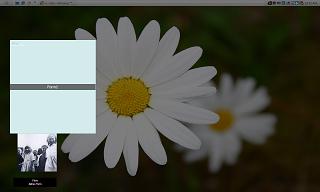
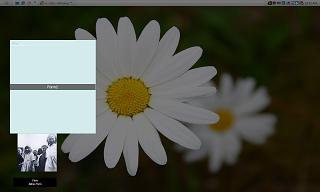
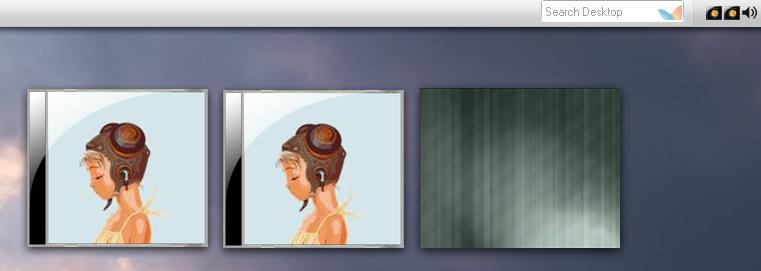
Have a bug tho... It seems to behave badly with TopDesk v1.3.2(an expose'esque app for winXP) as you can see from the attached screenshots.. (please note that the expose screenshot indicates a "Form1" for the 'window' that is captured related to WinampCDCase.
& attempting to disable the notifier box all together by choosing to "always hide" under the options provided, did not seem to have an effect..
Any possibility for compatibility? *crosses fingers*
ps.. a humble request... could you add an option to "randomly search again..." on double click ..or something in that line?

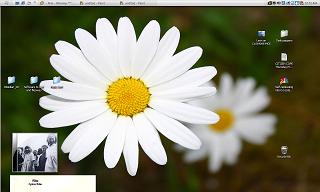
screenshot in expose mode... (Sorry, wouldnt let me upload more than 1 ss in last post.)
Edit (minutes later): Just updated to WCCBeta6build22 (17 May 2005,) and it seems the Form1 window is no more, and instead, a nice windowss representing the cdcover is exposed and restored. Very nice. However, the notifier still fluctuates between the notifier (all normal) and that washed out/strayed pane from the first ss. I'll test it out some more and report.
Thanks again.
check out
firecracker6,
I've installed TopDesk and I've made some code adjustmentes and I think WCC works better now with TopDesk.
Please test it:
http://www.closetosoftware.com/wcctheme2.zip
NOTE: just unzip and copy to your WCC's folder!
came home, tried the update out...
1) indeed works nicer with topdesk 
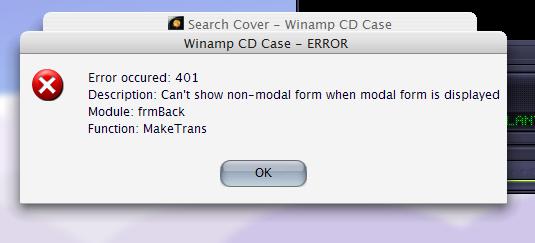
2) Crashes with these error dialogues when case is double clicked... but only sometimes.
3) the notifier strobes uncontrollably (appears & disappears) when not set to 'always show'
Thanks for the progress!!


This has been just great. I've been hooked on winamp for many years and just can't use iTunes. I've been trying iTunes because of AveTunes skins that display CD art. Now I can come back to winamp.
Funny thing is that while I was messing with AveTunes I got into the remot contol aspect of this skin:
http://www.aqua-soft.org/board/showthread....hlight=avetunes
Anychance of the remote contols currently in the context menu comming to the GUI?
thanks again
Pairustwo
firecracker6 ,
I think the bug regarding the screenshot is fixed. Thank you for your feedback!
New build (26): search cover bug fixed (due to last build).
[Edited] - build 27 uploaded
WCC beta 6 build 30
This is probably the last build. If everything is fine it will be officially released next week.
http://www.closetosoftware.com/wcctheme2.zip
This is the changes log so far:
Options: Theme manager added
Case and Aero themes included
Options: Case: Zoom case and cover
Options: Case: Set cover position and size
Options: Cover: Read cover from: set read type and order
Options: Font: Adjust text position
Start Winamp when press Play
Context menu improved
Context menu added to case area
Invisible buttons improved (case and cover area)
Plugin won't start WCC if it's already running
ID3v2 cover bug (that was wasting system resources) partly fixed (some ID3v2 tags can cause the issue)
System tray tooltip bug fixed
Workaround regarding Exit Winamp feature
TopDesk and Entbloess compatibility
Some improvements
Small bugs fixed
Thanks for all your hard work Carlospr..
I will test this new version out when i return home, I have to say, it's getting harder and harder to find any anomalies lately  I do have some requests though before you finalize...
1) is there any way to give placement options for the label? Such as: (left-top, left-bottom, left-center, right-top,right-bottom, etc..)?
2) Could you add a usability feature like this:
Could you give the following options at the end of a search to:
1) Use this Image
2) Search again
3) Assign a custom image for this Song
4) Assign a custom image for this folder
Where 3&4 would provide an 'add' button and a managable .ini file for custom image assignments.
3) one other thing on my wish list would be the ability to drag an album cover onto the cd case, have a prompt window pop up:
1) Apply to this Song.
2) Apply to this Folder.
The image would then be copied to the song's folder, the name of the image would be changed accordingly.
I hope this is not asking for too much. Please tell me what you think.
Regards,
~fc
firecracker6,
1) I didn't spend so much time developing notifier or label features; you can only show it at top or bottom of the case; the label (title + artist) has a center or left margin; now you can adjust the label position to better fit the notifier. Anyway, nice suggestions.
2) Search feature: you can be prompted before a search and after that (so you can choose whether to keep or not the image). "Search again" is interesting but a lot of code changes will be required. Remember that if you set "Artist - Album.jpg" as a read cover method a downloaded cover will be saved following the same pattern (you can have one folder with lots of songs).
3) I will write in my to do list!
Thank you for your feedback!
replaced with the new .exe, when i double clicked "CD Case.exe," this happened.. (see screenshot)
Settings Chosen:
~ "Only one instance" is checked
~ "Start Winamp" is checked (Works)
~ "Start when winamp is started" is checked (hmm..)
Also, the notifier's text seems to shift, or sections go missing.. is this maybe because winamp's setup with scrolling titles on the taskbar?
Thanks for considering my requests. This is a great gift to the community!!

firecracker6,
1) The "only one instance" bug was fixed (the screenshot shows that you were running 2 instances); the Winamp plugin update will be available next week (as a part of the full setup);
2) In this build (31) WCC will read the ID3 tags directly from the file; the title or artist missing part is due the way WCC was reading the title (from Winamp, not from the file). This feature was planned to beta 7 but... Well, let's test it now!
Thanks again!
thats odd... see i overwrote the previous exe, then, without winamp running, and with no previous instance of WCC running, I double clicked on "CD Case.exe," that's when 2 instances sprung up. I just moved one CD Case off of the other to show, nicely, in the screenshot what had happened. Sorry I did not make that clear. Is this behavior not a glitch?
Settings Chosen:~ "Only one instance" is checked
~ "Start Winamp" is checked (Works)
~ "Start when winamp is started" is checked (hmm..)
I wondered if it hadn't to do with... i start wcc->wcc starts winamp -> winamp starts wcc...
too obvious?
edit: oh, another feature request... could you please add "open folder" (possibly even "open cover") as an invisible button on the CD Case? ohh this is soo exciting!! Possibly give focus to the file in the opened explorer window? I'm sorry, please tell me if I am out of line with my pace of suggestions/requests. 
For now is possible to run 2 instances or more.
Probably in your case (you're right): WCC started Winamp that started WCC (again).
The new version of WCC plugin won't start WCC if it is already running. If you want you can test the new plugin right now (close Winamp, unzip and copy it to WinampPlugins folder): http://www.closetosoftware.com/WCCStarter.zip
Anyway, the only one instance bug is fixed so Winamp won't start WCC again (if "Only one instance" is checked).
Dear beta testers,
About
~~~~~~~
Beta 6 Build 36 is a new major version of WCC.
Now all skins are stored in WCC's "Skins" folder.
Each subfolder is a skin and contains 4 png (case.png, notifier.png, nocover.png and searching.png) and 1 ini file (settings.ini).
The zip file includes 4 skins: Case, Aero, Milk and Glow:

Installation
~~~~~~~~~~~~~
1) Since there is no setup for now, install the full version of WCC beta 5. You can get it here: http://fileforum.betanews.com/detail/Winam...se/1109367710/1
2) Download beta 6 build 36: http://www.closetosoftware.com/wcctheme2.zip
3) Copy "CD Case.exe" to WCC's folder.
4) Copy "Skins" folder to WCC's folder.
Making a new skin
~~~~~~~~~~~~~~~~~~
1) create a new empty subfolder in WCC's "Skins" folder
2) copy your custom files to it. REMEMBER: your custom files MUST HAVE the following names (case.png, notifier.png, nocover.png and searching.png). If one of the files is missing WCC will take it from the "Case" subfolder.
3) Now start WCC then rigth click it and select "Skin Manager". Select your theme and then configure it. After set press "Apply" or "Ok" button. The "settings.ini" will be generated.
Now you can easily share your custom theme!
Contact
~~~~~~~~
I hope you enjoy!
Nice work Carlos. Only problem I have, is the notifier is not remembering the font size for artist and title. It keeps reverting the sizes back to 7. I tried editing the ini file, with no success.
Thanks ziptrx!
It's fixed.
Please delete the "Skins" folder and "CD Case.exe" and copy the new ones.
God damn Carlos..........I don't mean to ask you to babysit me but I just can't keep up with the "Jone's" so to speak....been out of town in Chicago (so I'm outta the loop).......WCC has been runnin' like a champ for me but I know that I have not d/l a recent version of it much less this Beta 6 Build 36 so if possible can you help point me in the right direction??? Thank you so much and I won't ask you to hold my hand when I go potty either............I PROMISE!!!
Nate Dogg
Hi natedogg,
Potty? You're really funny! 
The details about this new build are in post #120:
http://www.aqua-soft.org/board/showpost.ph...7&postcount=120
I hope you like!
Thanks again for all continuing improvements. You may remember me whining about wanting buttons added to the GUI. Well, I discovered the hot spots on the case and that the hotspots would scale with the size of the case. So I enlarged the canvas and added them. So this is not exactly creating my own skin but a mod of the base skin.

DoH!! I got the play button backwards.
pairustwo