 Aqua-Soft Forums
Anyone know......??
Finderbar Add-on For Windows Taskbar
Hi, i really like Finderbar, but well i speak Spanish (Español), and i can not trasnlate the finderbar's languaje.., Can you tell how to use "menu_editor", because always that i try to translate the menu, i make a mistake, & the bar does not work...
if you can put in spanish... it would be cool
Bueno ojala mi inglés sea bueno, pero en sí, mi problema es que cada vez que trato de poner el menu en español, modificandolo, me marca error y realmente no puedo..podrias poner un tutorial... acerca de como modificar el menu.
I get a problem with finder, see screenshot.
I turn off quick launch menu, but when finder loads up, it loads up with my quick launch menu underneath it and makes it looks vry badly.
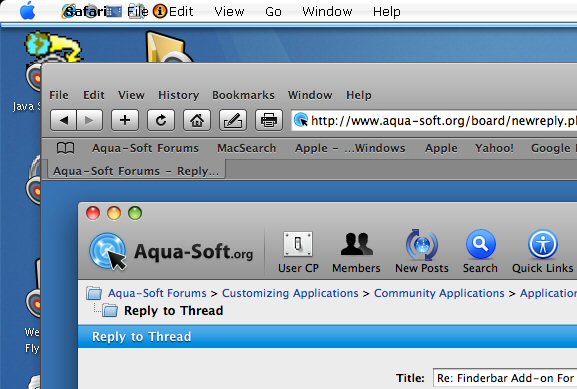

It doed a screenshot of your taskbar when you first start it. That will be used as a backgroung for the Finderbar. Go to the Finderbar folder, delete background.png and background_pressed.png and restart Finderbar.
Hello,
Please forgive my ignorance here as my entire extent of using a Mac was about 1 month when I owned a clamshell looking orange colored ibook I think it was called so...
When I turn on the Finderbar application my normal windows start menus disapears along with all the lists of software that I run on my computer.
How do I find the list of all the software like what is on my windows start menu when finderbar is running?
What do people do so they can still use their computers when finderbar is running?
I like the look of it, but it seems that maybe it's meant only to take screenshots with to show it how much it looks like a mac, because I can't seem to find my applications anywhere on the finderbar menus.
Please tell me how to access all my applications from my start menu when finderbar is running.
Much appreciate the time you spend to respond to help me.
Thank you,
U need to press the upper left corner ( as can be seen from ur screenshot ) to get ur normal
start-menu
However the whole point of finderbar is to give the mac experience so maybe u should
get urself acclimatised to using a dock like some of us who are hell-bent on mac emulation 
Thank you for explanation on how to get start menu to appear, somehow I missed seeing the finderbar help menu in the start menu but now I see it and I check it out with objectbar from stardock since the help menu mention it to see which is easier to operate and more mac like.
Thanks for reply.

Thanks for the great program...
However I have some questions...
1) How do you get the bottom panel to appear? I cant seem to find anything commands associated to it in the main folder...
2) the colour of the fonts for my finderbar tends to fade off towards the center of the screen... This doesn't happen when I move the taskbar to the bottom...
May I know how correct this and also how can I center the words vertically?
Thanks!


I have made the translation to Spanish. Just unzip the attached file to the "Languages" folder, then, select "Spanish" in the Language option.
I've just downloaded finderbar and whenever I open another application, the letters overlap (Please refer to the pic attached) I think it's really ugly. Can someone help me with this? Oh, and how do you change the font you are using?
Thanks in advance!


@danielkim95:
Did you close all applications before proceeding? I had the same problem and the solution was to close all applications (except finderbar of course) so that no app appears in the taskbar.
Once the taskbar has no apps to show, right click finderbar and select Skin it!
It worked for me.
Thanks, now it works! But how do you change the font? I tried "Skin it!" but all it does is a some spasming. O.o Then now my finderbar texts are all looking blurry...(image below) I really like this Finderbar and want to use this, but i have so many problems!
1. As shown in the attachment, it says "About Windows Live Messenger" instead of "About Finder"
2. the menu looks blur and the text looks blur too.
3. How do I change the font to "Finderbar"
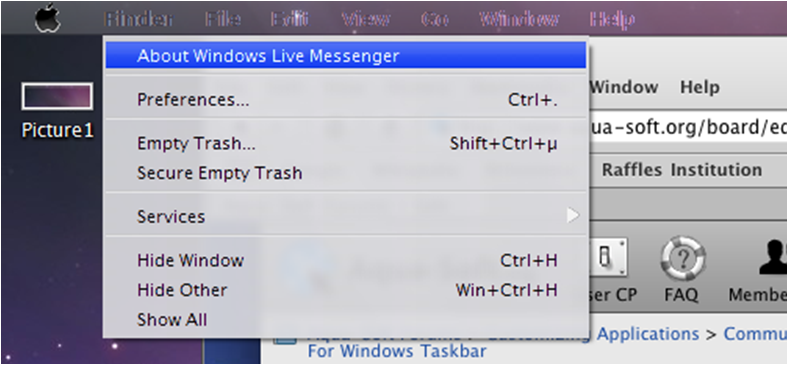
How do you add it to the startup menu? Thanks
I have been trying for a week and all I get are the same problems others have posted about. Maybe I'm stupid but I just don't get it. I would really love to use it and it looks miles better than Objectbar, but it is frustrating the hell out of me.
Can someone please do a write up on how to properly install it?
2. the menu looks blur and the text looks blur too.
Wow! I would call that: BLURRY!
I don't know if it's related, but try temporarily disabling ClearType, then skinning, then enabling ClearType again.
It's worked once. No more, apparently, it simply won't start up again. Sits there in task manager, but does nothing.
Did you try to redownload, reinstall like instructed on landvermesser page?
I use it since years and never had a problem.
I did not, but seeing as it worked the first run, I don't hold much hope.
is there any way to remove the apple menu so that i can keep my start menu?

Did you try right-clicking on FinderBar, then choosing 'Skin it!' ? (close all apps before doing that)
Yeah, I've tried it, but no cigar....
Any updates coming soon? It doesn't work really well with my OSX skins.
Hey this FinderBar rocks and I love it!!!
I only have 1 small problem which may be a stupid newbie question but here goes.... all my apps like Firefox etc when loaded show in the finder bar except Outlook 2003??? Is there a way to add it to the app so it shows it there? Only a small thing I know but would make my system complete 
cheers
Tony