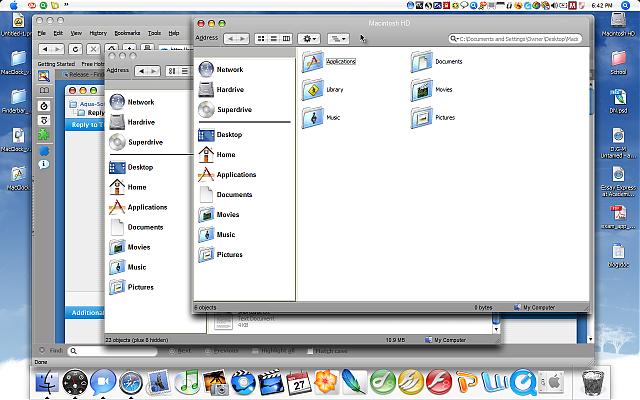
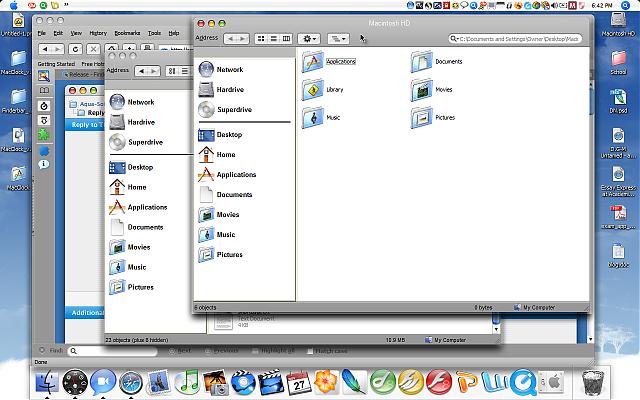
Finderbar Add-on For Windows Taskbar

double clicked the Finderbar application; it ran BUT it has a gray background; my start menu (apple) emblem disappears; words/texts are overlapping, etc.

The application can not finds paths to grafic files, may be you have the non standart characters (national symbols) in the path to the Finderbars main folder.

Or it may be, that the Finderbar can not make the screenshot. Check in the main folder - have you the file background.bmp? If not, make it with any grafic editor and restart Finderbar.

#425774

This is the best program to use to emulate the Mac menus. Thanks for this excellent work.

#426741

kooooooool!!!!!!!!!!!!!!!!

I only had a problem, I was able to see the buttons on taskbar, but i solved it with the faq

;) ty man! its very nice :)

#426777

Can someone explain how I can get Styler and FinderBar to work at the same time?

When Styler is running FinderBar shows a plain text bar covering the taskbar. When I close Styler, finderBar works fine.

I've search and read this full thread and apart from the window snap feature, and the "non standart characters (national symbols)" which I didn't understand, I can't get the 2 to run at the same time.

#430152

Strange... I'm running stylerTB and Finderbar for a long time now and never had a problem... Are you using styler as a VS manager too, or just for the toolbar? Maybe that causes problems?

#430155

No, not really.

I load and change VS via my desktop properties, but all the themes are in Styler too.

#430157

I tried to get the latest version of Finderbar, and it screwed up somehow...

I managed to delete all the files of Finderbar, but it still doesn't get rid of the hidden menus help!

post-56115-1164682796_thumb.jpg

Untitled-2.jpg
Untitled-2.jpg

#431537

Sorry, may be this is a question to Kabal, the author of another Finderbar - the sidebar for Windows Explorer...

#431691

Sorry, may be this is a question to Kabal, the author of another Finderbar - the sidebar for Windows Explorer...

Yeah, I think he's asking about a program called FindeXer. That's another thread, buddy.

#431726

I have these questions...

1. How do you exclude programs(let's say, Firefox's CTRL + T shortcut)?

2.When I select the apple icon, it does not highlight.

#433347

I have these questions...

1. How do you exclude programs(let's say, Firefox's CTRL + T shortcut)?

2.When I select the apple icon, it does not highlight.

1. Add the string MozillaUIWindowClass to the list of excluded classes in the file Finderbar.ini

ExcludedClasses=Photoshop,PSFloatC,MozillaUIWindowClass

If you want exclude the shortcut Ctrl+T only and set custom Finderbars command at this shortcut (block the shortcut of Firefox), type the character $ follow by the shortcut:

Item3Hotkey=$Ctrl+t

in the file menu.ini

2. may be you have bad screenshot bacground_pressed.bmp

make it manually or run menu item "Skin It!" repeatedly.

#433350

where can I find menu.ini, and how can I make it?

#433465

You find the file menu.ini in sub folder LanguagesEnglish

Read Help, use Menu_Editor.exe

And be creative! :)

#433466

How do I undock the bar? I can't seem to find anything...

What is Finderbar SE(found in the manual)?

#433601

How do I undock the bar? I can't seem to find anything...

What is Finderbar SE(found in the manual)?

The Finderbars window can not be undocked. It is always the child window of the taskbar.

Finderbar SE = Finderbar v.0.96 (for Windows 98 SE)

===========

Now for ALL:

I have the version 1.4 released, endly with preferences window. The "menu-3" bug is fixed too.

I think that is the end of "Project Finderbar" . May be I make some bug fixing, not more.

Thank you and sorry... :D

#433864

hey, i've looked everywhere for how to get this finderbar to work, and I can't find it. i downloaded it and everything seems fine, but for some reason when i open the file, it doesn't do anything. if you have a chance, would you mind telling me why this is, or pointing me in the direction of a forum or something where i can read about it?

much appreciated :)

#433950

date check:

your page says this:

"Version 1.4 (24. December 2006)"

today is the 16/12/2006...

well, is this maybe a x-mas gift to us?

:D

keep up the good work!

bug?

version 1.4 -> view -> customize toolbar.. ->

error failed attemt to launch program or document: action: menu_editor.exe . file not found. line# 1998 run, menu_editor.exe

and: why is a mspaint.exe in the finderbar directory?

---

edit: i've found the menu_editor.zip. why is this little prog. seperated from the main program?

#434195

well, is this maybe a x-mas gift to us?

Yes, it is a Christmas Edition!

:D

i've found the menu_editor.zip. why is this little prog. seperated from the main program?

If you can not start Finderbar by mistakes in menu.ini, you must have the possibility to edit this file separately.

and: why is a mspaint.exe in the finderbar directory?

If you have mspaint.exe in windows directory, you can delete the double in Finderbar folder. Not all peoples have it installed. The Finderbar uses it to save screenshots.

but for some reason when i open the file, it doesn't do anything.
In some windows configurations the program does not work and I do not know why. Sorry. Try to install the program on clear system.

#434251

I've downloaded v1.4 yesterday. Good job, but one spoon of tar in barrel of honey: there was not menu_editor in install-file. I was needed to use it from v.1.3 stable.

I used finderbar (from v.1.0.3 to 1.4), Stardock Objectbar and again Finderbar. IMHO the objectbar more exactly emulate activity of Mac menubar, but finderbar is more convenient for working in MS Windows environment - we shoud work on computer not only to admire;) Landvermesser, please, don't finish the project.

#434580

Is there anyway to link the File>New Finder Window to another program. I run Nexplorer and would like FinderBar to open that instead of Explorer if possible?

#434884

Is there anyway to link the File>New Finder Window to another program. I run Nexplorer and would like FinderBar to open that instead of Explorer if possible?

use menu_editor and edit your menu.ini.

instead of new finder window (explorer) choose custom program (I don't remember the exact name, cause I am sitting in front of a real mac right now).

in one of the ini-files you can type the path to your custom programs

like this:

custom program1 = C:program filesnexplorernexplorer.exe

custom program2 = C:program filesblaaablubb.bat

#434965

I'm currently running Finderbar v1.3 and would love to upgrade to v1.4. Is there a best way to upgrade so that you don't have to re-customize all the menus. I have them working for me very nicely already?

#435563

hey sorry if what i'm about to ask is a stupid question or is already answered in this thread.. i read about half of it.. i just downloaded the latest version and i have no idea how to work it

it looks great, hides the active applications, and has the "finder" menu in my taskbar... but that's the only menu it runs. when i run other programs their menu does not appear, it stays on finder. how do i make it display new menus?

thanks!

#436220

The Finderbar don't capture menus of active application, please use Object Bar for it.

#436304

Is the flickering just me or is it normal? Maybe it's because I'm using windowblinds

#436389