Finderbar Add-on For Windows Taskbar

Is it possible to create sub-menus?

Yes, it is possible. See in Help file:

To add the submenu to any menu item:

  • Create new menu after all other menus;
  • Set the name of new menu as name of the linked menu item;
  • Add { and } to the name of new menu;
  • Add desired items to the new menu;
  • Set the command "ShowSubMenu" to the linked menu item.

[Menu2]
Menu2Alias=Titler
Menu2Name=Menu2
ItemsCount=12
...
Item8Name=[color=Red]Services[/color]
Item8Command=ShowSubMenu
Item8Hotkey=None
...
[Menu11]
Menu11Alias={[color=Red]Services[/color]}
Menu11Name=Menu11
ItemsCount=12
Item1Name=[color=RoyalBlue]Finder[/color]
Item1Command=ShowSubMenu
Item1Hotkey=None
...
[Menu12]
Menu12Alias={[color=RoyalBlue]Finder[/color]}
Menu12Name=Menu12
ItemsCount=3
Item1Name=Open
Item1Command=Open
Item1Hotkey=None
...

If you have added new menu or have deleted menus (not separators/items), you must set so called "Hot Areas" on next tab.

#339022

Ahh, sorry, must have overlooked that :) Thanks.

#339141

Hi Landvermesser,

I have it all working now, i am not using the " finder" in the taskbar, cause is use styler,,:),

Though, the search is working , a little tweaking is appreciated, for instance where to search, it searches the whole harddisk, and not for the context in particular, like a word "tiger" will bring almost anything with " t " in it.

I hope this can be tweaked, also some context is appreciated when the search match returns, like alle .exe under a programs header and text under textfiles header i.e. ofcourse, i don't want you to overwork now, :)

Well by for now, maybe some other things, i will come across, i will post ,

Davin

#340093

Hi Davin,

try to use MacSearch http://www.aqua-soft.org/board/showthread.php?t=30573

but is search only filenames too.

#340293

Hi Landvermesser,

I tried it and it works great, though sometimes i get the old MacSearch(olderversion) too, i have to fiddle around with it to find out if there is something wrong with my setup, i'll keep you posted.

Thanks in advance for the great software, :)

Davin

#341563

To switch off the old MacSearch in the Finderbar set "None" to this command arn restart Finderbar:

[Menu10]

Menu10Alias=[search]

Menu10Name=Menu10

ItemsCount=1

Item1Name=Desktop Search

Item1Command=None

Item1Hotkey=None

ActiveArea10Begin=978

ActiveArea10End=1023

#341872

hi, i switched the taskbar from top to bottom and now the hot areas don't work anymore.

is there a way to make it work at the bottom? i can't find in edit mode.

thx in advance

#344490

Hi,

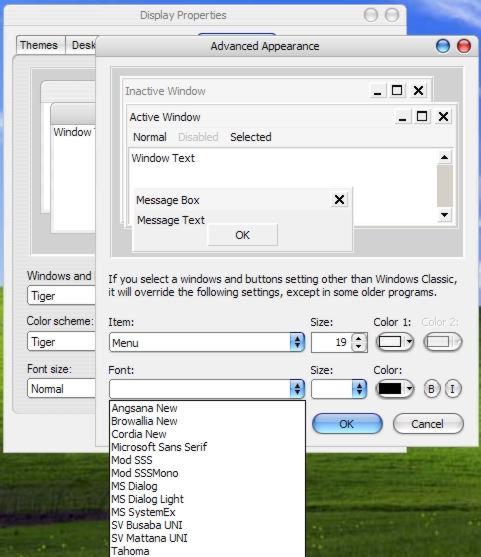
I am having problems setting the Finderbar font for the menu. When I do as instructed on the website, I cannot see the font in the dropdown box [see below]. However, the fonts are installed as I have used them in MS Word.

Can someone help please?

System: WinXP SP2 + all updates. P4 1.8GHz. 768MB RAM. ATI RAdeon 7000.

Thanks in advance.

------

This is going to sound a very dumb question, but I'll ask anyway [apologies].

When installing, version 1.0 is the installer. After that, do I need to add each update, i.e. 1.0.2 + 1.0.2a + 1.03, OR can I install from the installer, then simply update directly to 1.0.3?

Apologies again and thanks to anyone who can confirm.

//Posts Merged. Please don't double post. -NC

post-41063-1138191730_thumb.jpg

font.jpg
font.jpg

#353362

can I install from the installer, then simply update directly to 1.0.3?

Yes, you can.

#353920

First, sorry for my very bad english . . .

Second thank's Landvermesser for your great program, i'm in love.

And one question I try to translate your app to my language (Spanish, México) an i'ts possible in all things, but i have one problem my Folder naming "Archivo Edición Ver Ir Ventana Ayuda" is not displaying correctly. I think that is a ptoblem whit windows, is not showing all letters in my task bar. I try to do more short, "Archivo Edición Ver Ir Ventana Ayuda", and it's a solution, but don't like, looks uggly, Dont you Think? See an attach image.

Anny suggestion . . . ?

folders2bn.jpg

taskbar16qc.jpg

#364304

Make TWO toolbars: First - "Archivo Edición Ver" and second - "Ir Ventana Ayuda". Then place it correctly.

:)

#364417

I've been having this problem for a long time and have no idea how to fix it. My Titler toolbar has everything set right, but the icon isn't invisible. I don't have any idea why, but it is super annoying to have to deal with. Any suggestions?

Edit: Nevermind, i just redownloaded the thing. Somehow my shortcut was corrupted a while ago. Go figure.

#364801

I've been having this problem for a long time and have no idea how to fix it. My Titler toolbar has everything set right, but the icon isn't invisible. I don't have any idea why, but it is super annoying to have to deal with. Any suggestions?

Try this: exit Finderbar, delete the file Programm.lnk in the folder Titler, create in this folder the new link file to the file Transparent_Menus.exe, rename it to Programm.lnk. It file must be visible on Titler toolbar without any icon. If it is so, start Finderbar. If not - wait the next release of Finderbar, it will be soon.

#364804

One more quick question--is there a way to make the Titler bar longer? It seems like the titles of some programs get cut off, and I would prefer to see it all or at least have like "..." at the end or something. Thanks!

#364956

Make TWO toolbars: First - "Archivo Edición Ver" and second - "Ir Ventana Ayuda". Then place it correctly.

:)

Tank's Now shown me all Menus,

I cant' wait for the next release.

#364967

One more quick question--is there a way to make the Titler bar longer? It seems like the titles of some programs get cut off, and I would prefer to see it all or at least have like "..." at the end or something. Thanks!

Set in Finderbar_Engine.ini

[Titler]
UseTitler=1
TitlersLength=[COLOR=Red][B]25[/B][/COLOR]

and the length of the Titler will be equal 25 characters.

#365912

I was just trying this program out.

its very very good!!

installing was ok,

but I find it impossible to setup, i don't want any silly menus there just for show, i want the useful stuff, and i know it can be done.. like having custom apps lunch under the apple menu.. it just gets too complicated, i don't even know where to start.

i think there needs to be a new tutorial for the menu editor.

can anyone do this?

#369398

Hey man thanks for this nice program!

Though I have one problem, i installed the two Finderbar fonts and did like you said, changing the "display>appearance>advanced>menu" font into Finderbar. But as you can see on my screenshot, the menu is fine with the proper mac symbols and all, but the taskbar in itself is not changing at all, it is still small fonts.

So do you or anyone know how to change the font on the taskbar? (and if i have to hack my VS, what line to change etc).

Thanks in advance for the help!

http://membres.lycos.fr/vivelesviets/Sans titre 3.jpg

#371205

Please read this thread, here is the info how to change the Taskbars font in msstyle file.

#373260

nice program, however, after i installed the finderbar i cannot access my taskbar icons in the dock items...... please help me.........

#373313

If you mean your Quick Launch items, find Quick Launch shortcuts in c:Document and Settinds%YourName%Application DataMicrosoftInternet ExplorerQuick Launch and copy all to the folder "QuickLaunch" in the main Finderbar's folder. Set in the file Finderbar_Engine.ini:

[QuickLaunch]

UseCustomFolder=1

CustomFolder=QuickLaunch

#374648

i'll try. Very nice.

#374659

after using finder bar, mac search and mac clock , task bar clock is messed up,

any help !!!!!!

post-45178-1144086539_thumb.jpg

untitled.JPG
untitled.JPG

#375599

i have an idea for the bandwidth and broken link problem. Just set up an account with DeviantART. That way you don't have to worry about bandwidth problems or host problems.

And will the final version be skinnable?

#375656

after using finder bar, mac search and mac clock , task bar clock is messed up, any help !!!!!!

The solution is here

Just set up an account with DeviantART. That way you don't have to worry about bandwidth problems or host problems.

I move my site to googlepages.com -- will be soon.

And will the final version be skinnable?

It will be so skinnable as MacClock -- bar background, custom font in the menu bar, but drop down menus will be system with Finderbar.ttf

#375797