 Aqua-Soft Forums
It is quasi normal, I have flickering at my bureau-PC and have not at my home-PC. It is video driver problem. Try to experiment with video options, "write combining" and video speeding, other DirectX version, OpenGL or so on.
Finderbar Add-on For Windows Taskbar
Really Nice. I'm useing it on my laptop right now. Do you know how your bar compares in memory usage compared to object bar?
On my laptop the Finderbars memory usage is 16 Mb. It is not small, but I have no idea how to minimize it. And I have not free time to experiments. But with 1 Gb RAM... Hmm...
Landvermesser....Congrats on building the best Mac simulation program. I have a quick question...
What's the best way to move from v1.3 to v1.4. I have customized my menu to my liking in v1.3 and wish not to start all over.
Thanks in advance.
The best way... OK... So, please save all changed files (titler.txt, menu.ini, Finderbar.ini and all manual added images, icons and so on) in save place. Better install Finderbar 1.4 in the new folder. Start new Finderbar and be sure that it work. Than replace new files (as above) with old customized versions. Reload Finderbar. That is all. 
Of course, you can manually add the new command "SetPreferences" to the desired place in menus (by editing menu.ini)
I can't seem to get this to work properly. The Menu Items aren't big enough or spaced out enough. I have to click after the last option to activate what's supposed to be the Second menu. Here's a link to a screenshot.
http://img472.imageshack.us/img472/3213/finderbar7vq.jpg

I looked through the config files, but couldn't find how to change it.
Note, that Finderbar don't works with WindowBlinds.
bah, You should work on that. It should work with windowblinds.
Maybe you should help him out on that.
lol, you say that like I would know how.
bah, You should work on that. It should work with windowblinds.
Sorry, it is my mistake, the Finderbar works with WindowBlinds fine. See the attachment.
I can't seem to get this to work properly.
May be you use OLD version of Finderbar with "hot areas"? The current version is 1.4.1. Please update your files.
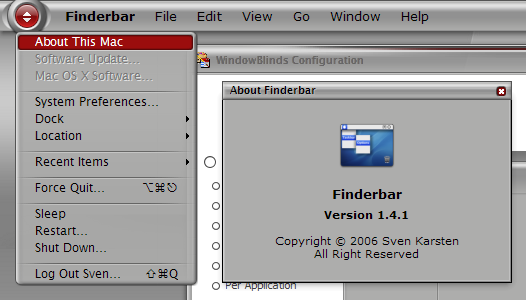

Do you plan to capture the active windows menu in further version of your bar? And how is the development status?
it's actually quite buggy 
Do you mean version 1.4.1? Because this version doesn't capture any system menu..
it's actually quite buggy
:-) may be u can help us all out by being specific of what part of finderbar is being buggy.
it is good for users like myself to watch out as well, since i m been happy with this cool app for a long time - using it under xp and now under vista as well
cheers ...
it's actually quite buggy
Please report bugs in this topic. Thank you.
To all:
The Finderbar not captured any applications menu and will be not.
:confused:
Please use McBar or ObjectBar to have it.
I have another question. Apparently whenever I open finderbar(and maclock also) nothing seems to appear, and that if I select it in RK dock(with show new items enabled), an error comes up with a message "Can not extract:" in the title and the name of the file in the main(e.g. Finderbar.ini). Why is it like that? Any ideas?
EDIT: Problem fixed. I checked the readme in the version 3 help file. It seems that TrayServer somehow adapted to Objectbar's options.
I have a problem with Finderbar. The attached image should explain all. I use a Norwegian version of Windows XP Pro, on the download page it says somthing about an "AU3_Spy.exe" file, but I don't know it this can solve the problem, and anyway, I didn't find this file.
Hope someone can help me!


I have a problem with Finderbar. The attached image should explain all. I use a Norwegian version of Windows XP Pro, on the download page it says somthing about an "AU3_Spy.exe" file, but I don't know it this can solve the problem, and anyway, I didn't find this file.Hope someone can help me!
I have the same problem here, windows xp sp2 brazilian version ... and I didn't find this AU3_Spy.exe too.
I have the same problem here, windows xp sp2 brazilian version ... and I didn't find this AU3_Spy.exe too.
Sorry, I have forget to put this file into package. Here is it (see attach)
Sorry, I have forget to put this file into package. Here is it (see attach)
Thanks, it works now.
Sorry, I have forget to put this file into package. Here is it (see attach)
I did what you say in your homepage faqs... using AU3_Spy.exe to show me the taskbar name and editing the .ini file, but unhappyly I still have the same problem of Sigurd, it's all in the attached image... or I'm still doing something wrong ? Thanks !
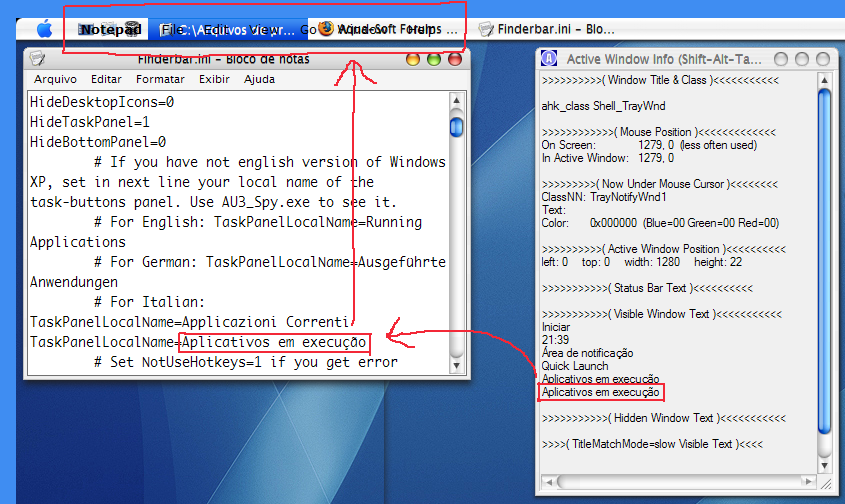
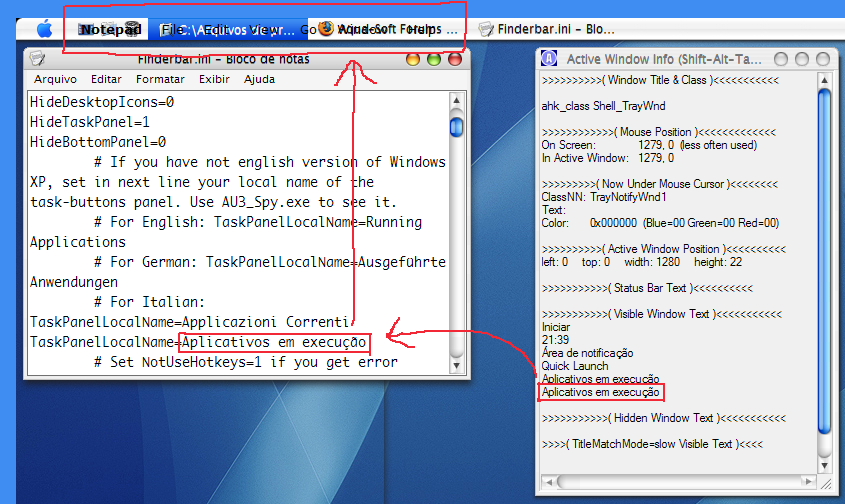
I did what you say in your homepage faqs... using AU3_Spy.exe to show me the taskbar name and editing the .ini file, but unhappyly I still have the same problem of Sigurd, it's all in the attached image... or I'm still doing something wrong ? Thanks !
hmmm.... No, it is all right... may be Finderbar not full support non standard national letters? It is not full Unicode app. Sorry my question, is it not simply captured old background? If not, try to workaround it: Make the task panel less long as main Finderbar window (or make main window longer, see in ini file), simply add new empty panel left of Finderbar (without showing of panel name), now the task panel will be always below main Finderbars window, than make two screenshots with "Skin it!" feature and then manually edit both PNGs - remove task panel. Not elegant, I know, but...
hmmm.... No, it is all right... may be Finderbar not full support non standard national letters? It is not full Unicode app. Sorry my question, is it not simply captured old background? If not, try to workaround it: Make the task panel less long as main Finderbar window (or make main window longer, see in ini file), simply add new empty panel left of Finderbar (without showing of panel name), now the task panel will be always below main Finderbars window, than make two screenshots with "Skin it!" feature and then manually edit both PNGs - remove task panel. Not elegant, I know, but...
Thanks !!! Now it's working !!!
I have a question about MacSearch, but I'll post in the appropriate thread.
Thanks again !!!
The version 1.5 is ready to download. Some new commands are added. Now you have access to menus of target window and be able to code plug-ins (test phase)
Help and Menu Editor are updated too.
Welcome. 8-)