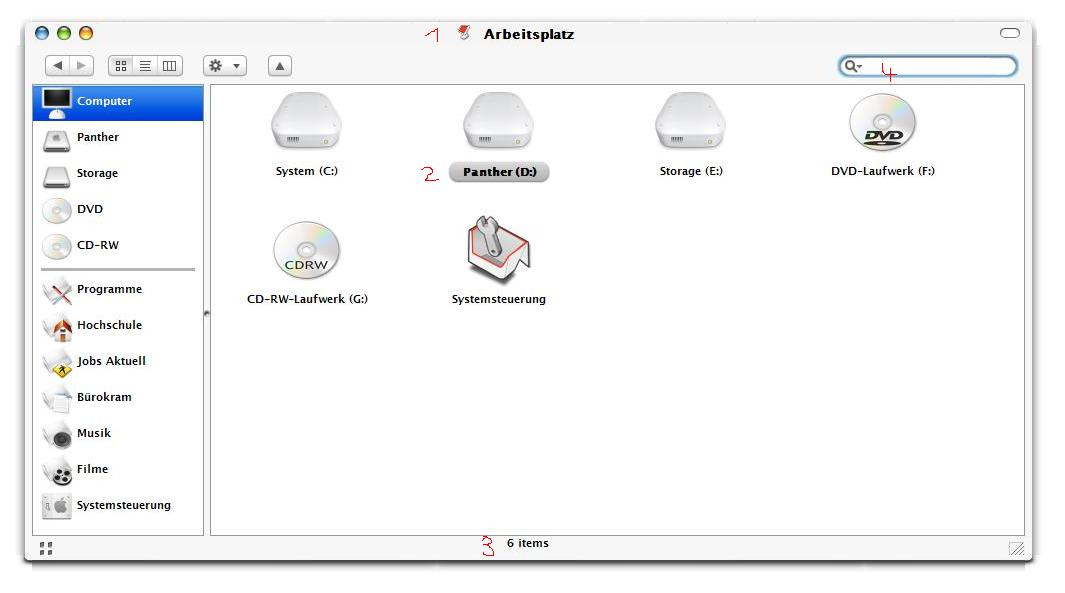
[release] Nexplorer 1.85 Beta

Great!

And without installer! Ähm, i mean.. i like the idea of an installer but it doesn't work for me last time. :(

..The .ini thing is easy to edit.. much better then registry. Thanks for that.

but i've a view problems..

1. Font is to BIG for me?! I'm using Lucida Grande (8pt) (not the LucidaGrande thing)

2. My known font problem whitch doesn't exist for me in 1.7! (every time the same font!)

3. Is the status text a very little to high or should it be like that?

4. The cursor don't blink for me! (I've the updated files)

..but i have to say THANKS again for such a grat application! (Y)

..Cheers

Toner

post-10542-1084865911_thumb.jpg

1.JPG
1.JPG

#163797

just to clear things up for those pple who still didn`t figure out how to install 1.85

If you have NexPlorer installed in C:\Program files the line in the reg file should be:

"C:\\Program Files\\Nexplorer\\"

Edit the reg file in Notepad, save it and run it. No more white squares ;)

#163808

Originally posted by vneumann@May 18 2004, 04:04 AM

Right now, the app has features that are not supported by Window 2000. 

If I remove those features (they are not very important), it would run in windows 2k

But I don't know when I release windows 2k version. Sorry

I don't know about that. Maybe it's better to set up a website for NeXplorer with your skin packs and help contents.  Do you know a good hosting service?

this weekend i can make a website for nexplorer. and i can host you site. like some 5-10 megs -_- no bandwith limitation :naughty:

#163813

9. You can change the icon size of the browser (but it changes shell icon size too)

How EXACTLY ??

#163837

options - skin - icon size?! there you can edit your favourite icon-size!

or what do you mean with EXACTLY? :blink:

#163840

options>choose skin>icons size box in the lower right corner ;)

#163842

Excellent app!

A few tips from a Mac user:

Pressing the right button (rectangular) on the top right of the title bar, should change the brushed 3 view (new) panther finder, into a plain white old one.

I.e. it becomes just a titlebar with large icons in the window below it. No menu items, (hell no menu bar), no common tasks style left side, just 2 or three large Icons, i.e. Hard disk, applications, etc. Looks kind of nice actually, minimalistic, just a titlebar with a window with 2 or 3 large icons in it.

(perhaps for XP, you could somehow implement the "views" functionality (Large Icons, Small Icons, List Details, Thumbnails, if you know what I mean), on a RIGHT click to the empty window. So windows users could change icon sizes.

Now it would change when you RIGHT click on an icon (not on an empty part of the window), and give you the standard file menu, i.e. "Open, Open with, Rename, delete, properties, etc)

Pressing the right button (rectangular) on the top right of the title bar again, reverts back to the new fancy 3 view brushed Panther finder.

But in a smooth kind of fade.

Launching the finder for the first time it also fades in.

Apart from that it is awesome! Great job.

#163843

Originally posted by Unbeliever@May 18 2004, 11:48 AM

options>choose skin>icons size box in the lower right corner ;)

Thanks :)

#163847

i replicated the "no window, shows in taskbar" bug!

it happens when u close NexPlorer when it`s minimized to taskbar via right click>close.

After u do that it will always open in taskbar but no window. as a temporary fix run NexPlorer, go to TaskManager, right click on the it in the applications view (it will usually display as home (as its default starting folder))and choose maximize, (it will strech the app to full screen) and then resize it.

Hope this helps Kevin ;)

#163849

This app is coming along very nice. It will soon be a definate replacement for explorer.

a few coments...

1. I too have the problem with scrolling the windo and it sudenly disapears. I know how to fix it after it happens, but this can get a little annoying.

2. I really liked the skinning engine from the 1.7 realease better than the 1.8, and 1.85. I would like to use my own title bar skin, so it matches my theme, and since I use windowblinds, I am used to just double clicking on my title bar to make it shade up and down. I really wish you would go back to the old skinning engine. Also when you darg the window, you see flashing gaps where the skin titlebar seperates from the rest of the app.

3. Another thing about the new skinning, the shadows are not neaded since a good majority of us here use YzShadow. In the new version when you maximize the NeXplorer window, it doesn't cover the screen completele because of the shadows.

4. When I am in my "My Documents" folder, which I renamed "Home", I only see "Hom" in the titlebar. I am not the first one to report this, as someone did in the last release. That is the only folder that seems to do that.

5. Althow opening an using the app is much faster, closing it is a little slower. Not major, but I notice.

Other than all of that, I am very exited about this project, and feel that it will soon become "THE TOP FINDER CLONE!" Keep up the great work.

-----------------------------------------------------------------

System Specs

P4 Mobile

1 Gig DDR Ram

nvidia GeForce 4 64Mb

60 Gig 7200 rpm hdd

#163869

Originally posted by neosublime@May 18 2004, 02:58 PM

This app is coming along very nice. It will soon be a definate replacement for explorer.

a few coments...

1. I too have the problem with scrolling the windo and it sudenly disapears. I know how to fix it after it happens, but this can get a little annoying.

only few people have this skin bug now i think the problem come from the skin engine in nexplorer 1.8 and next

#163872

From a skinners standpoint, the new skining engine is incredible. It allows me to create any skin that I want without it depending up on a visual style or wb theme to match. A perfect case in point is the siro and paper and plastic skins that I will be releasing soon. They look incredible and there is no visual style port that would match. As far as the shadows, that is a skinners option. If you want them without it would not be a problem to make 2 versions of the skins. One with the drop shadow and one without. and as far as double clicking the title bar for a full roll up, perhaps this could be implemented by vnuemman then leaving the regular roll up function for the pill button (rolling just the title bar which I had grown to love). Just my thoughts... Very good version by the way, It is way faster than the previous one. Vnuemman I have started work on a website with my skins, a help page, faq and complete skinning instructions. Only two hours left in my school year and then I am free for the summer!

keep up the great work

bzeitler

#163873

Originally posted by vneumann@May 17 2004, 11:32 PM

It may look simple when you think of a feature at user's standpoint but sometimes it takes programmers several hours of coding. --Sigh--

Absolutely. Absolutely. I think you are a genius with what you have done with this. I remember not too long ago people were griping and complaining about, when are we going to get paned browsing...blah blah, and here it is, almost perfectly replicated yet such a trickle of adulation. No, this incredible app isn't perfect, but my god, we are getting this for free, out of the kindness of a madly obsessed programmer's heart, thank the gods in their heavens. Three cheers to vneumann!! Thank you, thank you, thank you. With all its current problems I think this thing is bloody brilliant. And I still say this thing has less bugs than exlporer.

now a bug report:

:lol:

#163875

one more small bug.... Just like the "Home" bug in the titlebar that displays "Hom", when I browse to "C:\windows\Web", I see "We" in the titlebar. It's just wierd. I think you made an app with A.I. and it does what it want's...(can I teach it tricks too?" :D )

#163929

great work dude (Y)

#164054

This version is just amazing... i guess no other dev. has gone so far in Finder Clone. Really amazing what you have done for this comunit... thanks for sharing with us your talent,.

#164132

Vnuemman, the seach edit color option is still not working. It always stays the default white. Could you fix it when you get a chance ;)

#164148

1.86 will be up soon. It's just a bug fix version.

Vnuemman, the seach edit color option is still not working. It always stays the default white. Could you fix it when you get a chance

Ok, I am working on it

#164163

Actually, Even better than coloring options would be if the search edit was just transparent instead of white by default. THen you wouldnt need the coloring options.

BTW

I have finished updateing tibook. I am uploading the zip now.

#164226

Originally posted by bzeitler@May 19 2004, 03:17 AM

Actually, Even better than coloring options would be if the search edit was just transparent instead of white by default.  THen you wouldnt need the coloring options.

BTW

I have finished updateing tibook.  I am uploading the zip now.

It's hard to make an old edit control to be transparent. I fixed the background color and it works in my computer but not 100% sure.

Let me know if it works for you.

#164269

NeXplorer 1.86 is out.

This is just a bug fix version of 1.85

- The most annoying "disappear" bug is gone. It was due to some strange behavior of mouse event handlers. If it happens again, let me know as soon as you see it.

- Now you can set the fonts for the caption bar and the status bar separately from the main window font. The font information is stored in skin.ini

- You can change the size of the search bar.

- Tooltip bug is also gone. It never shows a tooltip so no disappearing icons.

- Alt-arrow keys work ( back, forward, up)

and some more ....

INSTALLER is back cause a lot of people had problems editing and installing a .reg file last time.

To install, just hit the installer . You don't have to remove the previous version but you'd better not overwrite it. You'd want to keep the old nexplorer.ini and replace the new one to keep your shortcut settings.

There may be no more update for a while due to personal reason.

When you request a feature, please check if it is in the real finder.

The goal of this project is making a finder clone running in windows not making a finder-explorer hybrid. I think explorer-like right click menu is enough for that.

Ultimately, the option menu and context menu will be skinned to look like those in the panther finder and the program menu for objectbar will be added.

Any bug reports are welcome but please be specific about the problem.

Just saying that something doesn't work hardly helps.

NeXplorer 1.86 Installer

#164274

I am getting some bugs with the status bar. On my brushed skin it shows this:

Is this because you changed the status bar?

#164286

Originally posted by bzeitler@May 19 2004, 06:34 AM

I am getting some bugs with the status bar.  On my brushed skin it shows this:

Beat me to it, lol. I do like this version overall, though, it seems to run much smoother then previous ones. Thanks!

#164288

This is so cool, excellent work Vneumann!

Is there anyway that I can set Nexplorer as my default explorer?? :)

#164290

I am also getting a problem with the default skin, the glyphs look compress and squished.

Very sorry to annoy you with this problem.

Thank you for listening

-Jimmy S

#164350