[release] Nexplorer 1.85 Beta

Originally posted by vneumann@May 18 2004, 02:53 AM

Yeah, "desktop" folder is weird.  It is supposed to be at the top of the directory structure but also resides in the usr's home directory.

I have to treat the desktop folder differently but didn't do it due to laziness.

don't know is this easy for you?

I think searching the subfolder is a great function.

but it'll make it more complicate to find files sometimes.

cause we don't need to search the subfolder all the time.

maybe there can have an option to chose searhing subfolder or not will be more functional??

just a suggestion :P

thanks again^^

#163360

Originally posted by AndreasV@May 17 2004, 07:14 PM

Kudos to you Kevin. It's really stable and unlike the previous versions, doesn't use 400MB of virtual RAM. (Y)

Thanks a lot

Yeah I forgot one line of "delete" and it caused all those leaks. :(

I have to move on to "managed extension C++"

#163362

Originally posted by thy@May 17 2004, 07:15 PM

don't know is this easy for you?

I think searching the subfolder is a great function.

but it'll make it more complicate to find files sometimes.

cause we don't need to search the subfolder all the time.

maybe there can have an option to chose searhing subfolder or not will be more functional??

just a suggestion :P

thanks again^^

As I said before, search function is still experimental and based on what I have heard from Mac users and some rough guess.

Hope a mac user can shed a light on real search function.

#163363

That fixed my Speed problems awwsome work, and my skin problems, my longhorn skin fits nicly and no glitches!!

-bolero

#163369

Originally posted by bolero@May 17 2004, 07:32 PM

That fixed my Speed problems awwsome work, and my skin problems, my longhorn skin fits nicly and no glitches!!

-bolero

Glad to hear that. Are you going to release the skin?

#163370

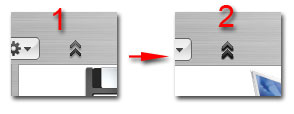
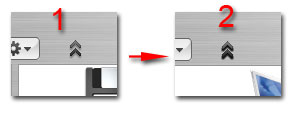
ok~^^got it!!

a super small bug....dosen't mater if it's not fix... :P

see the attach image..

pic1 is when the button haven't click

pic2 is after click it ...but it stuck like that forever untill you restart Nexplorer..

post-1070-1084822445_thumb.jpg

dd.jpg
dd.jpg

#163371

I have to move on to "managed extension C++"

Don't do it! Use smartpointers! check out the boost library, especially boost::smartpointer.

#163372

Originally posted by Felix@May 17 2004, 01:35 PM

Nice I like this version but there is a small problem.... the Preferences button doesnt work, soo we cant add Labels, Change font or whatever we want to do. It just gets on the Pressed state and thats it

I'm sorry to inform you, but I am also experiencing this problem.

It may be due to I forgot to edit the reg file before executing it. I went into regedit and manually updated the reg file.

#163380

Of course! i have converted my longhorn skin for all the Ave skin engine apps. .Avepreview, Ave Fontbook, and now Nexplorer!!

trust me, this skin looks very nice, when i complete it for your application!

-bolero

#163383

great job....you have three pane browsing....which makes it my favorite (along with any number of other things)...are the scroll bars in the 3 pane browsing going to be abel to be skinned as well? or is that left to windowblinds or styleXP....?

#163389

Perfec for me now. I love search function. Thank you great vneumann!!!!

#163395

I have a few comments, suggestions and bugs to say report:

First of all great work, the skins change perfectly when you change them in the prefernces, control panel works, I love that you have implemented real "Zoom"

it's getting very close to perfect now.

Now for the ideas, questions bugs etc.

First of all I noticed that you have something that the ave apps don't and they hav something that you don't, Nexplorer has a Horizontal Minimum and Ave Apps have a vertical limit, if you two worked together you could work this out.

Also I was wondering why you decided to make the whole window go up rather than just the "toolbar" as the toolbar is what really scrolls up when you press that button on a Mac and it takes less time to happen on Nexplorer as well.

Also I found out that if you name a folder something Weird like AW9 Nexplorer doesn't like that and just displays A.

Also I noticed that if a file and a folder or files of the same name but different type, if one of them has a colour label put on them, the other one will have exactly the same one, I was wondering if a work around could be made to fix this by working on extension as well as name.

Thank you and will keep exploring, sorry if any of these issues have been brought up already just wanted to have a little say.

Sorry if I have offended or hurt anyone as that was not my intention.

-Jimmy S

#163397

Excellent!

Each release just gets better and better.

Only complaints;

1. I'd rather not apply a skin ... previous versions just used whatever theme I had applied to Windows.

2. I'd like to be able to shut off the drop shadow ... I use Y'z Shadow and would like to keep my shadows consistant.

Keep up the good work!

#163402

you cant please everyone... what visual style do you use and I will make a skin for it...

#163437

First of all excellent work, keep it up, because in my opinion this is most usable Finder clone ever made (especially the search function). I have not used explorer since I have downloaded ver. 1.7:-)

I am no mac user or programmer, so I can't post you any screenshot of the searching Finder, but Finder webpage has a fairly good description of what the search does:

"Searching for files and folders is faster and more straightforward in Mac OS X Panther. Similar to how searching works in iTunes and Mail, you see results as you type and refine search terms. And you can specify search locations through a convenient popup menu which lets you choose “Everywhere,” “Local Disks,” “Home” or “Selection.”

As it refers to iTunes's search function, that gives us non-mac users a fairly good hint. However iTunes (and I guess OSX) has its own file handling/indexing method so I guess NeXplorer will always have its limitations as far as speed of searching.

Maybe you could add the drop down menu that NeX 1.7 had and put there the windows equivalents of “Everywhere,” “Local Disks,” “Home” and “Selection.”

I can say, that I am pretty impressed and content with the search function as it is right now, because it works perfectly.

(Sorry, if you have already found that description at apple.com)

Thx for the great app!

#163442

i wil also be making skins :D i have alot of nice ones i will port over from the other ave engines to this, i got Longhorn figured out, i just needed 1.85 to fix stuff, and now i can finish skinning longhorn theme without a problem!

-bolero

#163443

>.<

Oups ! I've got a problem with the new release (the big white square thing) :

Screenshot

I tend to believe the issue is coming from my OS : server 2003, but I might be wrong because almost anything I have been using from XP to server has been working, except this release of Nexplorer...

Does anybody know where the solution is ???

;);)

#163453

i think a visual style based on luna would be cool

#163459

Originally posted by freyr@May 17 2004, 09:26 PM

>.<

Oups ! I've got a problem with the new release (the big white square thing) :

Screenshot

I tend to believe the issue is coming from my OS : server 2003, but I might be wrong because almost anything I have been using from XP to server has been working, except this release of Nexplorer...

Does anybody know where the solution is ???

;)  ;)

i have da same in my xp sp1 >.:(

#163466

Read the first page guys, it must be installed at C: or else you must modify the registry and add the double \\

#163468

Originally posted by static@May 17 2004, 04:42 PM

i have da same in my xp sp1 >.:(

Static, you must edit the reg file before executing it.

Right-click the reg file and select edit.

Then where it says "C:\\nextplorer\\" type the location of YOUR nexplorer location.

Example:

"D:\Applications\NeXplorer\\"

It must end in a double "\"

I hope this helps.

#163469

Originally posted by thy@May 17 2004, 02:34 PM

ok~^^got it!!

a super small bug....dosen't mater if it's not fix... :P

see the attach image..

pic1 is when the button haven't click

pic2 is after click it ...but it stuck like that forever untill you restart Nexplorer..

it is the png... I have a fix for this... I will post it along with my skins tonight...

#163471

Originally posted by XJOSHATTACKX@May 17 2004, 09:47 PM

Static, you must edit the reg file before executing it.

Right-click the reg file and select edit.

Then where it says "C:\\nextplorer\\" type the location of YOUR nexplorer location.

Example:

"D:\Applications\NeXplorer\\"

It must end in a double "\"

I hope this helps.

I just did exactly this and i'm still getting the white box :cry:

#163498

Originally posted by Arodweb@May 17 2004, 10:22 PM

I just did exactly this and i'm still getting the white box  :cry:

Ok, I uploaded a hacked version which will open a message box showing the working directory when it starts up. Anybody who just gets white box after following the instruction should run this and tell me what it says.

By the way, are you using windows XP?

Hacked Version

#163529

i´m somewhat confused....

I´ll install nexplorer to C:\Program Files\Nexplorer... how should be my register file??

"C:\\program files\nexplorer\\"

"C:\program files\nexplorer\\"

or

"C:\\Program files\\Nexplorer\\"

I CAN´T LIVE WITHOUT NEXPLORER ANYMORE!!!

#163536