 Aqua-Soft Forums
I already switched to RK Launcher from YZ dock. I love the lock feature more than anything. No longer do I accidentally remove shortcuts from the dock. That alone warranted the switch.
RK Launcher 0.3 - FEATURE REQUESTS
I already switched to RK Launcher from YZ dock. I love the lock feature more than anything. No longer do I accidentally remove shortcuts from the dock. That alone warranted the switch.
I'm close to going off Yz...but not yet....need to be able to drop files onto dock objects (recycle bin, aplication icons, (folders - but that would be a plus over Yz)). And being able to hold the mouse button down on a folder object to get a menu of it's contents. Those are the only functionality items I can think of that keep me from jumping ship...
What is margin hotspot? I cant figure out what it does?What I would like most of all is, if a window is maximized and always on top is not enabled and the dock is behind the window. If i place my mouse at the complete top where the dock is, the dock would appear in front of the window on top.
margin hot spots has not worked until the nightly build 127 So until today it has not worked. It allows you to have auto hide and always on top off, and then if yo uhave window that's covering up the launcher it will pop up on top. So yea, pretty much what you described. Grab build 127 in the nightly thread.
just an idea, if it hasent already been mentioned, is to have alt + tab function. so if u have somthing minamized and u press alt tab the minamized apps magnafi as you press tab. another is to have the option to show all open apps in the launcher.
thx for the great dock rk!!
i still don't understand. what is margin hotspots? i can't see the diffrence when enabled or disabled.
i still don't understand. what is margin hotspots? i can't see the diffrence when enabled or disabled.
The margin Hotspot does this: when you open any application in full screen, the dock (...sorry, launcher) goes hidden under it, right? If you move your mouse cursor to the edge of the screen where you have the dock, the dock pops up, overlaping the application. That way you don't have to minimise the app to have acces to RK Launcher. 
If you disable margin hotspot option, the launcher will not pop up.
It is not related to always on top/automatically hide options.
I have a little request.
Is it possible the adjust the smoothness when magnifying (like the Y'z dock does).
maybe my computer is a little too old(AMD1.4G, 512MB SDRAM), mine magnify very slow........
I actually have to wait it to grow up.||_||
besides this........everything is perfect for me||_||
can't imagin how great it can be in the future.
thanks for your hard work:-)!!!!!
....need to be able to drop files onto dock objects (recycle bin, aplication icons, (folders - but that would be a plus over Yz)).And being able to hold the mouse button down on a folder object to get a menu of it's contents. Those are the only functionality items I can think of that keep me from jumping ship...
Totally agree on those requests.
another feature request: well sometimes applications cause a minimzed window to start flashing or play a certain sound file, just like when someone types an instant message in a minimized conversation window in MSN Messenger. However, when a conversation window is minimized to RK Launcher, then I don't hear a sound or see any of the effects. If you can add that, it'd be very nice 
One thing I would like to see is the capability to change the icon size independently from the background size. Which was a feature in SkinaDock http://www.ittpoi.com/skinadock/ This will allow to make different types of backgrounds that would accomodate icons differenty by changing icons sizes...
I want an option that we could split RKLauncher in 2.
1; applications dock &
2; minimized windows dock.
and we could set the position of each dock independently.
and i want RKlauncher remember my custom icons for apps that i don't keep in the dock.
another request. having the same icon for the same filetype when dragged to the dock like videos, or documents.
would somebody take the time to make a complete list of requests from the requests posted ?
an excel file would be even greater. thank you.
not sure if it was requested yet but the possiblity to add multiples of the same docklet would be good..
as for some things you might need to be able to do this..
sysstats and kkmenu and such..
im sure this has been requested, but , ill just do it again...a way to minimize only certain aspects of a program
ie Instant message windows, but not the buddy list....one window of firefox or IE, but not all of them
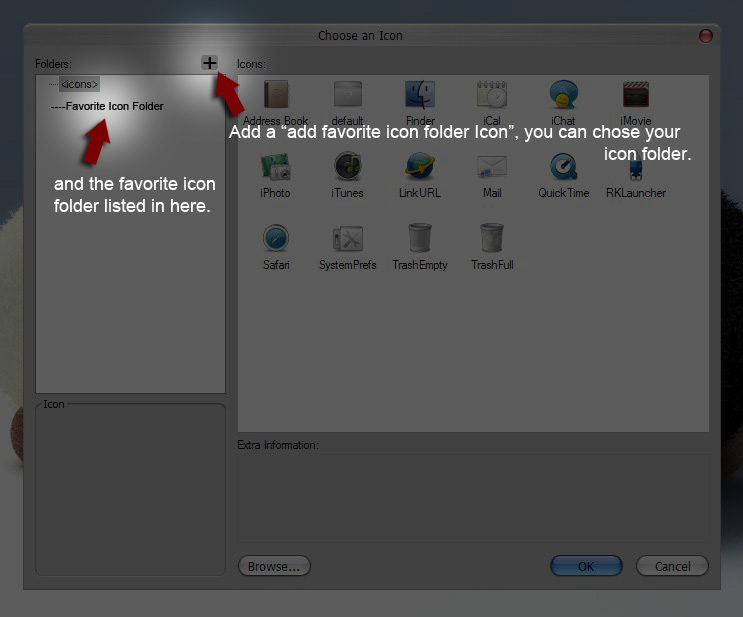
how about a "favorite Icon folder" in the icon panel??
please look at the attatch image~and you'll see what I mean:)
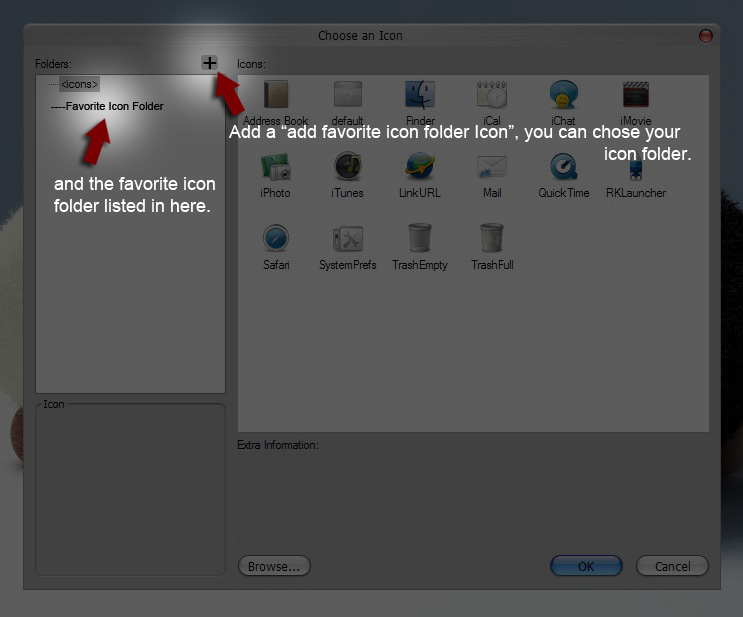
would somebody take the time to make a complete list of requests from the requests posted ?an excel file would be even greater. thank you.
Considering Radu's request, I want to know if somebody made or is going to make the list, otherwise I plan to do it myself.
Answer only if you made or intend to make the list, please. And quickly, please!
I think there should be an option to choose between indicator and poof included with the theme (conf file) or some other indicator and poof. This shouldn't take much time to implement.
1. I think it's good that "Hotspot for dock showing up when the mouse goes to margin" is into option menu because when I play game or any other fullscreen software I don't want to appear the dock. Or autodetect fullscreen.
2. Winamp don't minimize with EQ, Library and Playlist together. I need Minimize exclusions.
3. Contextual menus
4. drag&drop files into items (folders and softwares items)
what do you mean by contextual menus ?
@raduking: I think he means menus that have options based on whether the application is open already or not (Like XP's window grouping system)
what do you mean by contextual menus ?
he means; we can right click the icon of running apps and get a popup menu that list every window instance for that particular app, so we can switch among them, and other menu items, like close, hide, tile, minimize etc along with ofcourse keep it in dock, never show, etc etc
hey. i got a cool idea. is it possible to enable negative dock size levels? so instead of a bump, we can have a valley or opposite of a dock. i tried it. i can't do that. i don't think it's important, but fun to do that's all.
Hi,
My post is actually not a feature requests, but as I see some new feature in rklauncher which I think can improve, so I post here.
The hide taskbar option is good, it let u to hide the taskbar and dont bother the screen (rklauncher virtually do the job for taskbar except the system tray area), but it u maximize a window, you will see that a blank space still appear in the originial position of taskbar. if you think that blank space is not kind of eyecandy, i would recommend you to try togglebar
http://www.dockex.com/index.php?pageId=doc...age=0&dkview=35
once u run it, the taskbar hided, when u max a windows, you will no longer see any blank strip out there.
just my 2 cents
Cheers,
jake
(Ps: if someone could provide some way to just let me to access the system tray area, then I can really throw the windows default taskbar away in daily use.  )
)
i have a request! When a lot of icons are in the dock (for exemple when you have various windows minimized) the icons that are at the top sides (right & left) don't appears at screen, they keep out of screen. This can be resolved if the dock could displace left-right (like the original Mac Dock), then we can navigate the complete dock, no matter what long is.
Thanks for your work Raduking, this is the greatest dock i've ever seen.
Saludos.