 Aqua-Soft Forums
has anyone gotten this to work with the latest Miranda 0.4
iChat bubbles in Miranda!
Can some one help me I'm a t my wits end with this.
I have the latest version of all and can't figure it out. I have Tabsrmm and ieview installed in the plug ins folder, and have set the used external CSS to the ichat.css and the template based HTML builder to ichat.html.
but no bubles
All you do is set the Template Library to the .ivt file. Just that... nothing else.
how can i make the Pirture (look here: http://www.aqua-soft.org/board/showpost.ph...81&postcount=13) ?
i only see the box with the text but not the avatar picture.
I'll try to put it in Miranda 0.4
Just started to play with Miranda today (well actually yesterday morning),but.........
WHERE - IN THE NAME OF ZEUS'ES B...WHOLE ARE THE ORIGINAL FILES FROM PE9ER ???? :-((
I've just gone through all the 23 pages and NO, literally NONE LINK worsk anymore.
Maybe somebody be so kind and uploads them back for us again.
BIG THANKS IN ADVANCE.
My god, this is confusing. I seem to do everything correctly, and NONE of the themes I try ever work. I don't get it.
My god, this is confusing. I seem to do everything correctly, and NONE of the themes I try ever work. I don't get it.
That's cause you didn't:
go to message window in options, last tab, and click "activate support......."
Sorry guys, no possibility to get file was because of my "DL manager" - got the css file and playing now :-)
Wow,
Now it is something completely different :cool: than the simple look :slant:

Thanks guys for this great input !!!
@ Pe9er: Brawo, wielkie dzięki za Twoją pracę !!!
That's cause you didn't:go to message window in options, last tab, and click "activate support......."

that option isn't there.
I thought it was obvious but I guess not, just click Use IEView as default message log
OMG it's so easy
Can someone help me? I've got this so far [attached] but whenever i send a message or change an option, the pureplastics stuff disappears into a sea of grey. I can still send and receive messages, but I can't see them unless I reopen the window...
What the hell is going on?
[Edit] Nevermind, it was smileyadd.. I thought IEView and SmileyAdd worked together on new versions... but now I have no smilies... where can I grab some asl files for ieview?
Also, how do I change the text formatting that gets typed in the message box? It's fixed in Lucida Grande, at size three billion...
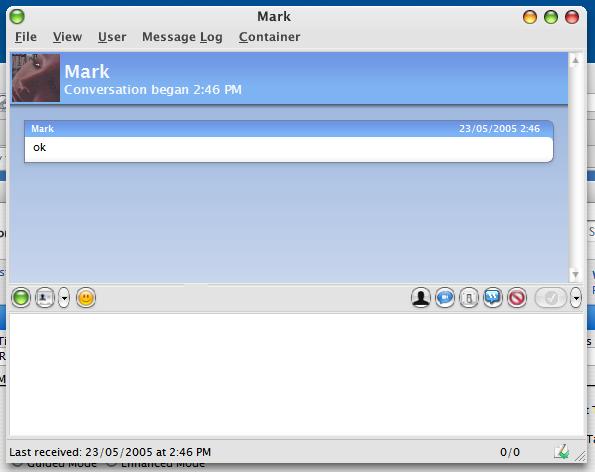
@Jim_Phelps what visual style are you using on the screenshot on the first page?
@Jim_Phelps what visual style are you using on the screenshot on the first page?
Reluna
- The message you have entered is too short. Please lengthen your message to at least 10 characters.
What do you mean its too short?
What do you mean its too short?
I said the theme was Reluna, but just saying that was too short so I just copied the stupid nag message to lengthen my post.....
oh ok sorry about that and thanks
hi guys. I see i have applied the same skin than cleanup. But i have few problems.
I can't see my avatar, and the name of my friend,on the right.

Is there someone, who can help me pliz?
You cant see the name of your friend on the right because it's the way I did it, you can only see your name.
For the iChat template, how do I resize the avatars?
Thanks
EDIT: Nevermind, I figured it out.
You cant see the name of your friend on the right because it's the way I did it, you can only see your name.
I was talking about near to the avatar. On the blue topbar, i can't see my avatar, and it's wroten %namein% on the right.
Me aggain with a Miranda Problem :-)
I don´t know how to get Ie view to work. I putted the ie view.dl in the plugins folder.
Then I opened options--> Ieview plugin and loaded a temlate, but nothing changed :-(
Ok tx but he wrote:
Go to options and you should see the structure has changed. Open the tree Message sessions - Message window - Message Log - Check "Activate support for external log.
But in my menu there is no "Activate support for external log" point
read everything!!!, the text has changed or use the search here in a-s