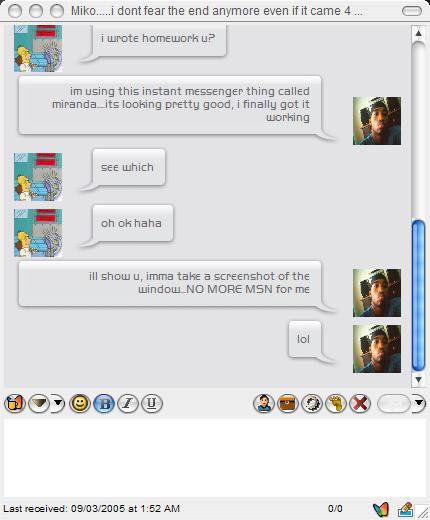
iChat bubbles in Miranda!

@Meat

I got a question like this earlier. It turned out i was just making things worse :P

Everything works fine now just follow the instructions layed out here. Have the updated versions of all the required components. Then just add 56 x 56 jpgs of your buddies icons (or any image for that matter ) to your avatars folder. Then go to the toolbar in the message window and click the avatar options button (picture shows a mans from the torso up!) , then click "load a local picture as avatar" .

that should be it man! you'll see a picture whenever your buddies IM you. That simple.

hope that helps ..later man :)

Actually, I'm talking about setting up avatars for the people that I'm chatting with.

So far I know you have to name the .jpg files in css/avatars exactly like the name of the person you're chatting with, but you also have to edit a .css file and noone has fessed up to the actual edit other than having something to do with %name%.jpg. Which, I understand to a degree, but what to change and where, specifically, I dont know.

Anyone wanna throw me a bone? :)

meat

#261373

Pe8er I got your latest css and it seems to be running ok. One question, is it supposed to auto load the users avatar in like MSN for example? Because I just see the ones you supplied. I thought maybe it would detect a users avatar and load it. It did for some of the templates in the Miranda site.

#261382

Actually, I'm talking about setting up avatars for the people that I'm chatting with.

So far I know you have to name the .jpg files in css/avatars exactly like the name of the person you're chatting with, but you also have to edit a .css file and noone has fessed up to the actual edit other than having something to do with %name%.jpg. Which, I understand to a degree, but what to change and where, specifically, I dont know.

Anyone wanna throw me a bone? :)

meat

@meat

I'm talking bout the same thing man. Just follow what i said, load the avatar and youll get different icons for your buddies in the chat window just as pe8er has it. It was never made clear throughout this thread, but i got help from one of the full members such as yourself, and it works perfectly. You will get avatars for the people you are chatting with. Let us know if something goes wrong, but that should do it.

aworldapart

#261459

@downsouth: the newest code supports autoloading MSN avatars. It's just not released yet, we have to fix avatar bug (thanks Prism!) and we'll release it ASAP!

#261488

@Pe8er: no probs... :cool: glad to help where i can... ;)

#261560

Why does this happen when I try to do live avator setting?

untitled8un1.th.jpg

#261870

AIM on Miranda doesn't support avatars since it's not on the OSCAR protocol. I think that X means you're missing the default image in the folder.

#261930

No there is the default image, i did everything correctly.

#261935

Then did you upgrade you IEView? I remember suggesting that to you earlier but you never replied...

#261937

Oh yeah, I did, that's why I posted again. I updated both IEView & TabsRMM plugins.

#261943

OMG! am i the only one this doesnt work for or what? I installed and enabled everything, followed the read me's in the zips and user comments on here....and all i get it a BLANK window, not even the toolbar works for me.

So...who wants to guideme step by step? any takers? :D

#262664

Make sure you install the newest version of TabsRMsg plugin, the newest IEview plugin, and download a css and html style that you like.

Go to IEView Plugin section in options, check "Use external CSS file" and locate the css file included in your style.

Go to the "Templates" tab in IEView Plugin section, and check "use template based html builder" below it, locate your html file by clicking "files of type..."---->"All types"

Go to "Message Window" section in options, "message log" tab, and check "activate support for external log"

Go to "General" tab and check "enable event API"

If I'm not mistaken, that is all. Enjoy.

#262669

Go to "Message Window" section in options, "message log" tab, and check "activate support for external log"

Go to "General" tab and check "enable event API"

If I'm not mistaken, that is all. Enjoy.

Ok, im with you up till here...there are none of these options in that window on the left.... :confused:

is that even possible, im using miranda 0.4RC

#262672

I downloaded everything I was susposed to I still can not see any kind of bubbles like above dont know whats wrong. Are there some more settings that need to be done?

#262680

Okay u know what...I've given up on this thing...I even tried the guide on neowin which showed pics of the screens, and would u believe that this thing is still all F@#%!d :mad:

post-19423-1110322470_thumb.jpg

SS03082005174645.jpg

#262732

It's not Miranda fault, just read the README of each plugin, and usually you get the gray background when you have smileyadd runing or you enabled message grouping and the template you are trying doesnt support it.

#262752

You can try it on the newest version of Miranda, or you could contact me.

#262789

just made a discovery I used a template but its called flat? I was able to see flat desgin. now with pm2k5 it has an html file, css files and icons I know what do do with the css file but what do I use for the template box area right now I have no images in the box but I see words I renamed the html file to the extension ivt I will post an image. Finally got my contact list look ok.s

screen shot grrrr ;)

I give up to wish some one could send there settings already done and I can just add my account and be done with it.

#262807

I initially had problems getting Pe8er mod to work. But then I renamed the pm2k5.html to .ivt and loaded it and it worked. not sure if that will help you at all.

#262817

its not reconizing the bubbles or something I renamed the hmtl file as well and thats what im getting as well and the avatar not showing. Do I need to edit the html file first or something? where should the bubbles png be at ive put them every where. the default one that says flat works no avatar though

#262823

Did you created a folder and put everything from the zip there?

Did you disabled message grouping?

You should have something like:

m12gv.png

m26lq.png

#262830

i just extracted it and put it in miranda florder css where should be i see your using tab css file i thought the turtial said use pm2k5 css file

#262834

No Im not using that, the boxes are unchecked and that's the way it should be just extract the zip (all files) to, example:

C:Program FilesMiranda IMIE-templatesBubbles

then go to the templates tab and select pm2k5.htm

Be sure to uncheck message grouping.

#262838

wooohoooo....FINALLY! I got it working :D

But it still looks a little messed up, whats up with the icons???

post-19423-1110351407_thumb.jpg

SS03092005015345.jpg

#262851

Icons (avatars) are resized by Internet Explorer, which can't do it in the right way. You can't help it.

BTW we'll be updating everything soon, sorry for making you wait.

#262855