 Aqua-Soft Forums
[preview] Nexplorer (color Label, Multi Panel )
Originally posted by vneumann@Apr 29 2004, 10:22 AM?? Which text you mean?
I think it may be a font problem. Did you delete Lucida grande font ?
ah.. it was a font problem... I am on a laptop at school that did not have the font. I am not on my home computer...
Originally posted by Autumnmist@Apr 29 2004, 03:30 PM1) When in panel browsing mode and browsing a directory full of PNGs, the first one clicked on (with mouse) shows up as a preview. If the keyboard arrow keys are then used to browse up and down through the list of PNGs, the preview does not refresh. This applies to previews in general for all file types.
2) The icon for Excel doesn't show in the preview in panel browsing mode. PDFs, Word docs, txt, mp3s, all work fine....
I forgot about keyboard ... Am I stupid or what? I will fix it soon.
The excel stuff is not my bug actually. It's M$'s bug. (not really a bug just version mismatch)
What happnes there is actually OS tries to make a thumbnail for .doc, .xls , .ppt
files but fails with .doc and .xls . I think the preview engine of XP is older than
the office you have.
It wokrs for powerpoint and some doc files only so I turned off the preview for .doc . I will turn off the preview for .xls too.
simply put...amazing... 
i forgot to mention it kevin, but the start up flicker is still there.
do u want me to mail u or PM u with the next bug report?
Originally posted by Unbeliever@Apr 29 2004, 11:06 AMi forgot to mention it kevin, but the start up flicker is still there.
do u want me to mail u or PM u with the next bug report?
start up flicker is gone for me. Are you sure you are using the new version?
Program doesn't fully change skins until it is exited then restarted. (Kinda looks like Firefox -- half changeover only)
vneumann - do you prefer bug reports within one post that we keep editing or by email or PM or just keeping posting new ones here?
Edit: Also, this isn't really a big problem, but when you drag a folder to the sidebar and get the popup for the name to give it, it's automatically put in lowercase even if the original folder is uppercase. (Not hard to fix, haha, just mentioning this).
When folders are dragged to the sidebar, even though the little marking line shows where they should be inserted in the list, they are automatically added to the bottom of the sidebar items.
Originally posted by Autumnmist@Apr 29 2004, 11:17 AMProgram doesn't fully change skins until it is exited then restarted. (Kinda looks like Firefox -- half changeover only)
vneumann - do you prefer bug reports within one post that we keep editing or by email or PM or just keeping posting new ones here?
skin fully changes upon resize. but yeah it is a bug.
The command line options works perfectly. So you can start nexplorer in any location! I know this isnt a bug.. but I just wanted to add a little praise amongst the bugs.
"c:\nexplorer\nexplorer.exe" c:\program files
ur right bz >.<
but what i meant is that the window opens in the lover right corner of the screen before it opens in the last saved position. u can see it but it happens very fast.
also does anyone else have the same problem with icon spaces?
it`s still huge >.<
another fresh bug. after u start it it takes 3-4 secs for it to appear in the taskbar even though it`s running.
also when starting, everything is black around the icons in the home folder.
I have to head out for a while and can't reply to you
@Unbeliever, Autumnist, bzeitler :
Please send bug reports to my email address.
@ All the other beta testers ,
I will give you the links after I fix up some problems.
The skinning of the window will be done by AVe skinning engine in the future.You know how talented AV is so you can expect very realistic mac skin llike in
AveText and AvePreview.
And we will be able to share skin between AveApps and Nexplorer.
He is busy at the moment so please wait a while.
It might take some time more, because today, I crashed my knee while playing a game of soccer with me buddies. It feels pretty bad, I can't hardly walk or sit without having pain (and it sucks even more, 'cause I was on a roll, 4 goals out of 4 chances >.
I wouldnt mind testing it  , i've never been a beta tester before
Thanks
Looks awesome vneumann.
Bye
Sky
P.S. My e-mail is: tristram.davies@ntlworld.com
@ vneumann: Hello, I'm a great admirer of your app, but I want to be brief (edit: sorry not so brief afterall  ) so as not to take away from your time:
I have a requested feature that means a lot to me and would make your Nexplorer app simply the best!
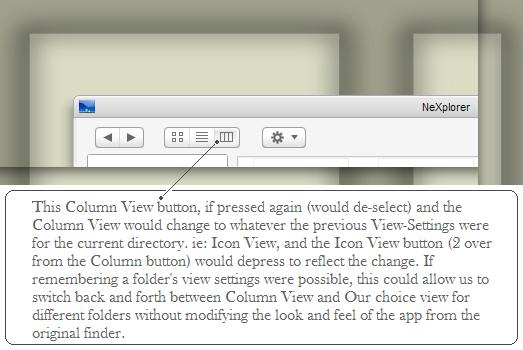
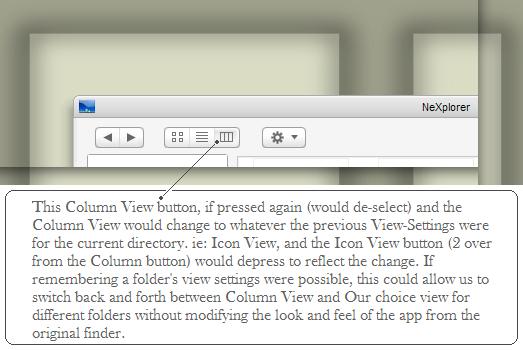
Could you please implement a way for each directory to remember it's view state from what was selected the previous round? such as when traversing through Nexplorer and i pause in "My Pictures" Directory and select: "thumbnails" then click the "My Documents" link and select "details" then hit the "Back" button, that the "My Pictures" Directory would display in "thumbnails" view still. Then, When I close Nexplorer and open it up again. then go to "My Computer"->"C:\"->"Documents and Settings"->"me"->"My Documents" that it would remember that i had last viewed this directory in "Details" view?
(Sorry for that terribly long sentence) ..
lastly, I wished not to simply pose a request without atleast trying to offer some further thought into the logistics of such a request, so, i humbly wrote up some considerations which came to mind: 
Difficulties I foresee and design considerations for implementation:
~ I don’t know if a directory’s “view” selection could be stored in a hidden .ini file (or something similar) in each directory which could be queried upon traversal to display in the desired view? Yet still not tax speed noticeably. Could it be done? This would be such a lovely feature and one that even native explorer can barely get right.
~ When in Column View ( or Panel View) needing to come up with a schema as to which level has "focus" when switching "views" via the buttons on the toolbar. (ie: the furthest column on the right has focus and when you wish to disable the "Column View" will you:
1) have to choose one of the View buttons and commit to a view at that time, or
2) can you simply "un-check" the "Column View" Selection and have it go to the directory's previous View State, and simply default to "icon" view or "detail" view if the view had previously not changed. ( I would prefer this option *crosses fingers*
~ perhaps this feature could be an optional one, for folks to turn on if they like the "View State Remembering" feature for directories. and for folks to turn off for those who like speed in their app.
~ Being able to implement this feature yet keep at a minimum the cost to the performance of the app as it changes directories and seeks to remember it's previous View state.
Thanks in advance for your consideration and attention to this long message. I hope it is not too difficult or greedy a request. :cry: I am rooting for you app to join the ranks of the *live not withouts* like our beloved Yz-apps and iex2's and others..
regards,
firecracker (one of those noobs thrown in for statistical good measure  )
)
oh, and i have read this thread thoroughly (and tried to find all threads relating to Nexplorer, in addition, i have been using each released beta of Nexplorer as they're released) I apologize though, if I have missed this subject being addressed before
Originally posted by AndreasV@Apr 29 2004, 12:53 PMIt might take some time more, because today, I crashed my knee while playing a game of soccer with me buddies. It feels pretty bad, I can't hardly walk or sit without having pain (and it sucks even more, 'cause I was on a roll, 4 goals out of 4 chances >.
you might want to talk to TomLapp Andreas...he seems to know what he's doing
@ also, hope your knee feels better
@ firecracker: First, HI :bye: , but I don't think the mac finder works that way..... 
Originally posted by firecracker@Apr 29 2004, 11:27 PMfirecracker (one of those noobs thrown in for statistical good measure
thanks for the warm welcome
@ mephisto: i suppose your right, that wouldn't be the way the mac finder works.. but i think it could possibly introduce a more effective or intuitive means of organizing and restoring views. Who knows, this may be an opportunity to take the initiative on an innovative little trick. what do you think?
anyways.. i understand if most feel this app should stick to it's "pure" roots... I just thought that perhaps we could have it both ways... something of an enhansed feature.. yet not visibly intrusive.
for instance:
when going from "Column View" (or "Panel View") back to another view such as: "thumbnail" or "icon" or "details", the user could do it the usual way: by clicking on one of the other "View" buttons..
or..
they could click once more on the "Column View" button and it would un-indent or loose-focus. The view would then change back to the directory's last remembered view-setting such as "thumbnail" and the thumbnail toolbar button would then gain-focus or indent keeping everything properly associated. So in effect, the "Column View" toolbar button would act as a toggle button. I suppose this may be a difficult or improbable feature to implement in this manner but what do you folks think?
Originally posted by AndreasV@Apr 29 2004, 05:53 PMIt might take some time more, because today, I crashed my knee while playing a game of soccer with me buddies. It feels pretty bad, I can't hardly walk or sit without having pain (and it sucks even more, 'cause I was on a roll, 4 goals out of 4 chances >.
I'm sorry to hear that you're hurt.
I hope you get better soon.
You don't have to feel pressure about the skinning engine.
I will relsease my app without your engine this time and probably help you
porting it to C++ after that.
Take care.
@ All the beta testers,
Some bugs were found in the new beta and they have to be fixed.
The thing is , I don't have time to do that right now.
You will get your beta probably tomorrow. Sorry
Originally posted by vneumann@Apr 30 2004, 11:00 AM@ All the beta testers,
Some bugs were found in the new beta and they have to be fixed.
The thing is , I don't have time to do that right now.
You will get your beta probably tomorrow. Sorry
no prob mate
i hope the bug reports helped
by the way that new avatar is hilarious
First... Welcome FireCracker.
I like his ideas... i´m too, think this way... i like the Mac looks, but, if with the looks we can improve funcionality a little (or a lot of... based on the tallent of many programers here)why don´t ?? I always tought this way... every extra option on a app, studit as it may be, will be cool for someone, so, why not put in?? (I know... sometimes puting an extra option could be a programmers pain on the ar$e... but, if is something easy to do, i guess can´t hurt anyone to have this option.
Congrats VNeumman, your app really is very cool, and you´re very tallented as a programmer... i hope seeing your app working soon, but, take your time, don´t rush, and try to eat and sleep, at least a little... 
Originally posted by Unbeliever@Apr 29 2004, 11:23 AMur right bz >.<
but what i meant is that the window opens in the lover right corner of the screen before it opens in the last saved position. u can see it but it happens very fast.
also does anyone else have the same problem with icon spaces?
it`s still huge >.<
another fresh bug. after u start it it takes 3-4 secs for it to appear in the taskbar even though it`s running.
also when starting, everything is black around the icons in the home folder.
Interesting,
On my unmodded labtop, the app opens with absolutely no flickering. But on my computer at home, the app does as you say, flickers for like a tenth of a second as it starts.
There are gonna be some goods skins for this baby!
something ive been working on for the release:
Originally posted by bzeitler@May 1 2004, 06:20 AMsomething ive been working on for the release:
Damn! That's bootyful.
-nando