[preview] Nexplorer (color Label, Multi Panel )

Originally posted by hax0r_foX@Apr 26 2004, 08:18 PM

HELP!!!!!!URGENT!!!!!!

I need a milk skin. I have teh old one but, the names of everything are all wrong and i dunno what should be named what, If someone has the old version and an example of the new skins, could someone make it?

look at this!

converted my milk looca skin to nexplore :D

pm me and I will send it to you... (the skin) not the app!!!

oh, and by the way... you are lucky to even have it! I would hardly call it urgent.

those of you who are waiting... it is awesome!!!!!! ;)

#151127

this is a big step in the finder emulation. congratulations.

so far, I think it needs a horizontal scroll bar in the panel view, so you can go back easely, and the ability to drag and drop things into the different panels while you are browsing.

something wird happend when I Double click the folders, horizontal black bars in the background.

#151130

this looks great, it will wipe out the others if they dont catch up ;) , this just looks amazing...

id love and be happy ot beta test it for you :D , all my infi is in my sig :D

this looks very promising :)

#151132

NeXplorer wants me to insert a disk into drive D before I can use it (getting the old never-disappearing Windows Cancel/Try Again/Continue dialog). I don't have my D drive as a shortcut in the sidebar, but the shortcut to the D drive does exist in the HOME directory. Is there any way around this?

Supporting icons and proper transparency would be really nice. I have to go through and convert all the icons that I want in my sidebar to PNG first. Not really that hard but if icon support can be added without significant speed impact, that might be something to consider?

#151134

no reason to ever close it!

virtually no memory usage when minimized!

#151138

Look here

#151142

Originally posted by sMACkingMACs@Apr 26 2004, 11:23 PM

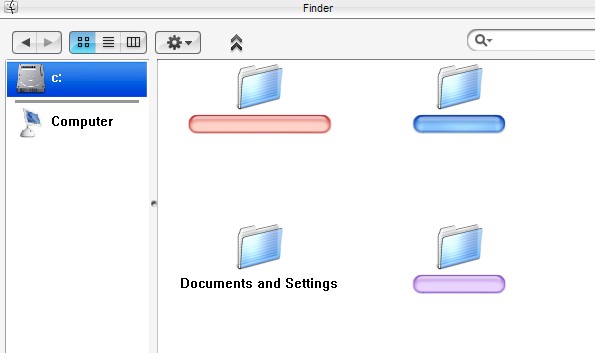
Color label cover word/title of folder.

like picture.

post-10041-1083049533_thumb.jpg

Bug.jpg
Bug.jpg

#151212

as promised i have put this wonderApp through my well known bug test ;)

For a beta version this is incredible! 3 panel browsing is a dream, fast as hell, app is very stable (not a single crash!) but as expected there are some bugs ;)

Here are the findings:

1. Mem usage - around 5.9mb, can rise up to 14 but when minimized it seems to "flush" the cashe (falls to 200-500kb) and when restored it uses just 2-3mb

2. CPU is 0% most of the time, 45-50% when browsing large folders (like sys32), can go up to 99% when scrolling through large folders and it takes some time to stop scrlling

3. Handles count is around 100 but rises very,very slowly

4. VM size is around 7.9mb (usually from 6-10)

5. Flickering and a black, fat line when browsing folders

6. Resize dot is not centered

7. when using 3 panel browsing the first level folder can dissapear sometimes

8. No thumbnail for image files

9. There is a little arrow appearing when selecting shortcuts in left panel (see screenshots bellow)

10. Labels can act funny, going to wide or too fat, not able to use iChat lebels (even after adding the text.ini file in the ichat label folders)

11. Space between icons is way too big

12. Once the app was all shrunk (i could see just the caption bar and the status bar but it resized fine)

13. I know i`m nitpicking but the cursor doesn`t change to the "resize" one when you point it to the resize arrow in the status bar (it can be confusing)

14. When resizing the left panel, when u make it dissapear it can`t be dragged back, it returns only when u restart NextPlorer

Suggestions:

1. How about adding extra options when right click a shortcut in the left panel (Paste, Change image (i know about drag-n-drop, but this wouldn`t hurt ;) )

2. Add an option to add extra separators and to remove them (maybe on right click?)

3. Add label option on right click (like in real panther), it`s a bit wierd the way it is now

4. Change from "Kind" to "type". I don`t know if you did this on purpose(is this how it is in Panther?) but it`s confusing

5. 3 Panel browsing in unimaginably great! Only 2 minor suggestions - add more than 8 levels (i think 15 would be more than enough) and add support for alpha channels in the preview panel

6. Add keyboard support ( i think this is cruciall for a great program like this)

7. An option to be skinned independantly (like AveApps) would be fantastic (i don`t know if Ave gave u the GUI engine yet, he`s not online so i could ask him :P )

2.jpg

Snap3.jpg

Image1.jpg

#151229

ok here I am again, this App is amazing, most of Bugs have already been reported.... Only have suggestions

-=Bugs=-

1. When we dont click in a folder but yes in a free space (White space) NeXplorer redirects us to the Desktop O_o

2. When copying files to a new directory, the progress bar is colored (Never happened before, and its not from my skin, it looked nice because it was smooth)

3. After copying the files to a new directory, they keep flashing, and the green and yellow things keep happearing.

-=Suggestions=-

1. Fix the jaggyness of Icons in the Sidebar (Works fine if the Icons on the Sidebar is PNG's)

2. Make the Sidebar resizing more smoother

3. ObjectBar Compability for applying Labels and such (Tricky one :P)

4. 1:1 Brushed Skin

5. Ability to add and Remove Seperators

6. Customizable Items in Toolbar

7. Add more panels in The Panel View (Its not 3 Panel view dammit :6)

8. Icons and PNG's when being previwed in Panel view should be previewed in their original size, icons are displayed in 16x16 in the Current Panel View Preview

9. Selecting the Label should be trough Right Click and not trough the Preferences button.

Thats all great app, If I find a new bug ill post it here

#151272

I could never find out how to add shortcuts to the side bar :P

Suggestions...

what everyone said -_-

#151282

For example, you want to have a Shortcut to Program files, go to C:/ Directory and Pick the Program Files folder and drop it in the Sidebar, rename it and you are done, if you want to set it with another icon, just drop the icon you want into the shortcut

Simple as that :)

Simple question from my Side now...... Where the heck is the Rename option in the Right Click menu??

#151288

Hey, I just decided to make it a PUBLIC beta since beta testers said that

at least it doesn't crash so often.

I just got rid of the annoying color flicker and am working on other minor problems.

It will be open to public soon.

Should I make a new thread in the [release] forum ?

#151295

Enhanced, just click and drag and drop folders from C:\ or whereve onto the sidebar. It's actually that simple

#151296

Originally posted by vneumann@Apr 27 2004, 08:09 AM

Hey, I just decided to make it a PUBLIC beta since beta testers said that

at least it doesn't crash so often.

I just got rid of the annoying color flicker and am working on other minor problems.

It will be open to public soon.

Should I make a new thread in the [release] forum ?

I think people would love a public beta... you might want to tag it as a

[release] NeXplorer version# beta

You might want to try listing known bugs first, then putting the download link below that to try to make sure there aren't many reports of the same known issue.

Did you manage to fix the folder click-load flicker as well?

#151298

f**k 3 painel view :woot: man i need to try it before the public release :naughty: and make some skins for it!! :naughty:

#151302

Oh yeah, that's right! I tried copying the old Milk skin folder into the new version's skins directory the using the skin, but it totally didn't work. I'm assuming some of the metrics and skinning changed, but you might want to warn people.

#151303

Originally posted by Autumnmist@Apr 27 2004, 12:13 PM

Did you manage to fix the folder click-load flicker as well?

I think we are talking about the same thing.

Do you mean orange/ green/ brown thingy that appears momentarily

when you open a new folder ?

If it's that, it is fixed already. I'm working on icon spacing and other stuff.

#151304

Originally posted by static@Apr 27 2004, 07:19 AM

f**k 3 painel view :woot: man i need to try it before the public release :naughty: and make some skins for it!! :naughty:

All of my looca skins will be converted to nexplorer. I will do this after the beta release... I have already converted milk and I will send it to bicet if he would like to host it...

Up Next:

Simplex

Icandy

Tiskin

Tibook

Digital Cream

good grey

alluminum alloy

neos

shinobi

#151310

Originally posted by bzeitler@Apr 27 2004, 12:53 PM

get my milk nexplorer skin here:

http://www.aqua-soft.org/board/index.php?act=ST&f=51&t=15258

Your skin looks awesome!

Can I include it in the public release?

#151316

Originally posted by vneumann@Apr 27 2004, 07:55 AM

Your skin looks awesome!

Can I include it in the public release?

sure can!

Do you guys think it would be nice if I included a set of png's to be used for the shortcuts... (you just have to drop them onto your shortcuts!) That way you would have snowe png's for example to use with your milk skin.

I do have permission of course.

#151317

2 more things:

- change the fonts

- a minimum must be set, and a arrow appear when some of the toolbar items dissapear, like felix 8 does.

#151320

Originally posted by mephisto@Apr 27 2004, 01:05 PM

2 more things:

- change the fonts

- a minimum most be set, and a arrow when some of the toolbar items dissapear, like felix 8  does.

A user will be able to select his/her own font in the public release.

I don't quite understand your second point. Sorry.

#151321

I'll post a screenshoot.......

#151322

Guys,

In the current beta version, I used Snow e finder icon for the program icon.

I think it might cause some problems if it is released to public with that icon

cause I didn't get the permission from the author.

As you know, I'm a really bad designer so it would be really helpful if someone

can design a nice logo/icon for the nexplorer.

#151326