
FindeXer

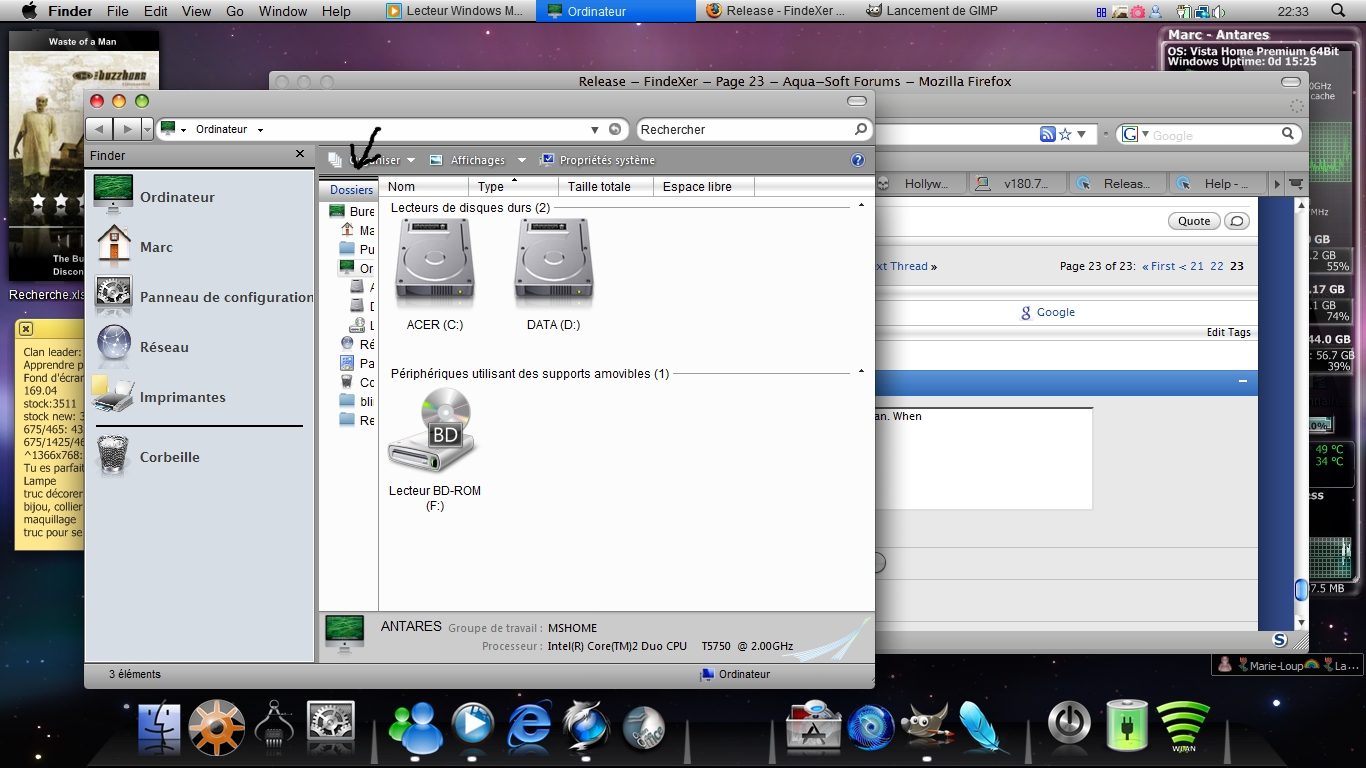
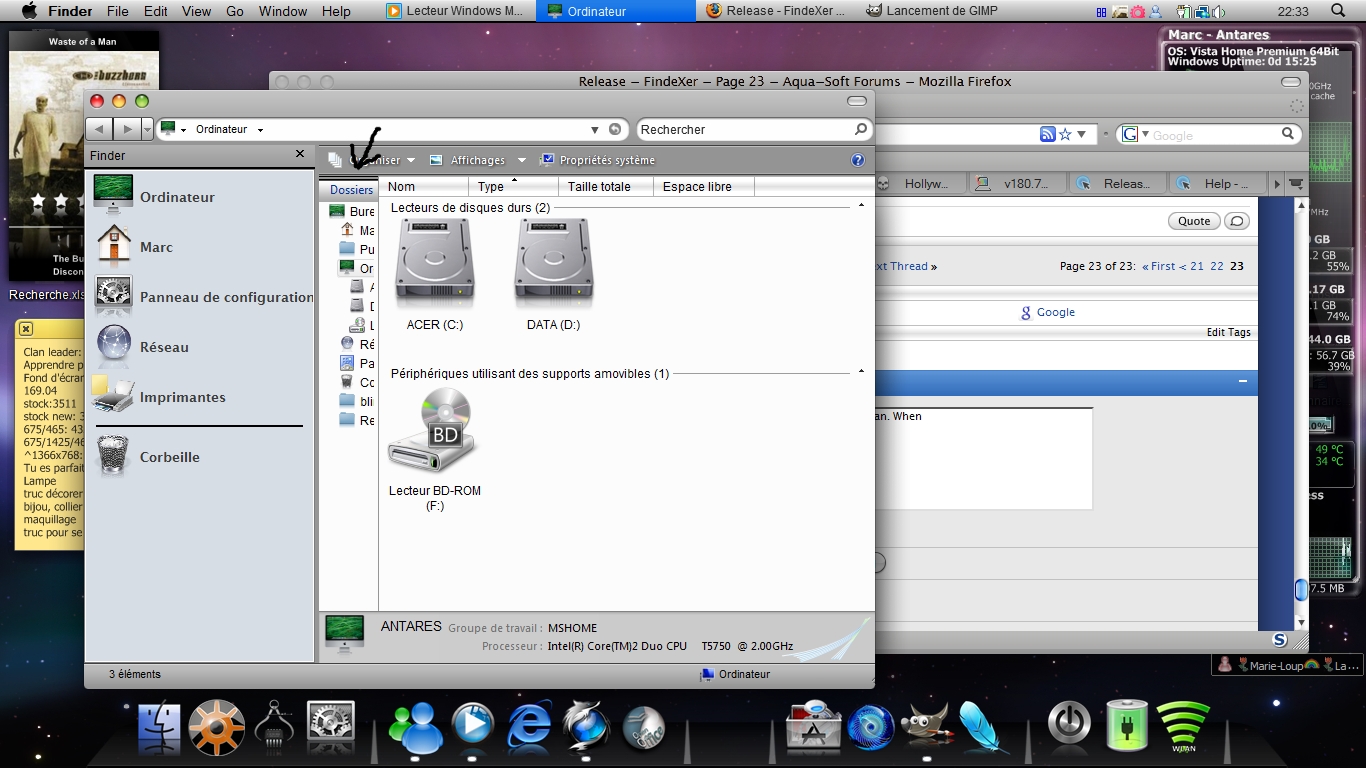
I may have a hint for your default view problem. I'll try to explain the best I can. When I put the little separation bar (the one at the right of the tree view), there's a little space left that I can't hide. It seems to be te same size of the word "dossier", folder in english. Maybe the name size has something to do with that minimum view size. Here's a screen shot to better explain what my limited language can't:
post-87516-1228361894_thumb.jpg

Dossier.jpg
Dossier.jpg

#516612

matmat, do you want to get rid of that tree view?

all you need to do is go to Organize > Layout > Navigation Pane.

this should remove ti.

Hope thats what you where after, if it wasnt, sorry.

#516614

It does remove it, but not for the first windows, when I open it. It disapears when I open the next folder

#516644

i now know what you mean. i was having the same problem just before.

your launching it from a dock right?

try changing the docks path.

#516646

yes thanks for the good job alianyn where open in the same windows .... but if i open a folder inside for exemple my documents it open a new windows ... someone is having the same problem???

edit: if i do right click and "open" in the folder it opens in the same window ... double click and open a new window :/ strange

thanks

#516655

@tyblos, I am not sure what you are saying.

Do you mean that when you double-click on a folder inside "Documents" (in explorer, not FindeXer!) it opens in a new window?

if that is the case:

1. does it happen only in "Documents"?

2. does it happen for every subfolder you have there?

3. does it happen even if FindeXer is uninstalled?

if the answers are no, yes and yes - then you either have your explorer windows set to open in a new process/window (Tools->Folder Options->"open each folder in the same window" should be marked) or you have Explore as your default folder action (There were a couple of message back about how to change that).

If that is not the case, please provide some more information (like a screenshot or a small vid of what is going on, and the answers to the questions)...

g'luck ;)

#516658

@tyblos, I am not sure what you are saying.

Do you mean that when you double-click on a folder inside "Documents" (in explorer, not FindeXer!) it opens in a new window?

if that is the case:

1. does it happen only in "Documents"?

2. does it happen for every subfolder you have there?

3. does it happen even if FindeXer is uninstalled?

if the answers are no, yes and yes - then you either have your explorer windows set to open in a new process/window (Tools->Folder Options->"open each folder in the same window" should be marked) or you have Explore as your default folder action (There were a couple of message back about how to change that).

If that is not the case, please provide some more information (like a screenshot or a small vid of what is going on, and the answers to the questions)...

g'luck ;)

1. no .... in most of the folders only dont do that in C:

2. yes

3. yes

but its strange this dont append when i dont have installed the findexer

#516661

@tyblos - this has NOTHING to do with FindeXer. it's probably because of one of the registry/explorer settings changes you attempted.

did you try both solutions i suggested in my previous post?

#516668

@tyblos - this has NOTHING to do with FindeXer. it's probably because of one of the registry/explorer settings changes you attempted.

did you try both solutions i suggested in my previous post?

e disable findexer ... and still opening a new window... but in folder options e have enable the option "open folder in the same window" and still opening a new windows then e change to "use classic folders of windows then aply ... after i change to "show pre visualizations and filters and now with the Findexer off dont open every folder in a new window.... but i try turn ON findeXer and it ruturns to show any folder in a new window

cumps

#516671

i now know what you mean. i was having the same problem just before.

your launching it from a dock right?

try changing the docks path.

No, it's from the win+e command.

#516718

No, it's from the win+e command.

Ohh, yeah sorry i missed the post where you said that. Just trying it now and i have the same problem. i dont know how to fix that sorry.

#516720

Hi, when running explorer.exe (from Start, Run...), or when pressing Win+E you'll get the folders side panel so it hides FindeXer :(

But you can learn to live with it :) I never run explorer by itself (mostly I type the folder name instead) and don't use Win+E.

#516725

i find my problem if i hide the panel in the image the folders will open in a new window

1125737809.jpg

#516742

Hi alianyn, it's been awhile since I've posted here; welcome back and it's great to see your app being actively developed on again :)

I was wondering if anyone could help me with this. Or if alianyn could weigh in...

I currently use QTTabbar http://qttabbar.wikidot.com/ it's become indispensable to me. And both Findexer and QTTabbar seem to co-exist happily enough. However, there is just one thing that I find missing: The ability to "Control+Left Click" a shortcut in the findexer bar to launch the item in a new tab, instead of overtaking the existing window. I was wondering if there is a trick to allow for the following:

20081205findexerjb4.jpg

If currently not possible, alianyn, would it be terribly difficult to add this functionality? Thanks in advance for considering this :)

P.S. I forgot to mention that "Ctrl+Left Clicking" in Explorer or Rocketdock or other launchers currently opens the shortcut in a New Tab as it is.. this would just bring consistency to the workflow. ^^

EDIT: Forgive me.. I made a mistake >;)

#516758

i find my problem if i hide the panel in the image the folders will open in a new window

1125737809.jpg

Read a bit before posting, the post before you was already talking of that issue. So far, there's no solution.

I also have a request for a future update. Would it be possible to diseable findexer for specific folder? For exemple, the configuration panel.

#516794

@firecracker: what address bar are you using? THat's not qtaddress bar right?

#516800

Read:

I currently use QTTabbar http://qttabbar.wikidot.com/

#516805

@firecracker: what ADDRESS BAR are you using? THat's not qtaddress bar right?

Meaning that thing that says Desktop > My Computer

#516806

@ Skrell, get it here: http://minimalist.com/software/ExplorerBreadcrumbs/

It's fast & stable, just not the best at integrating visually with UI themes.

#516808

I may have a hint for your default view problem. I'll try to explain the best I can. When I put the little separation bar (the one at the right of the tree view), there's a little space left that I can't hide. It seems to be te same size of the word "dossier", folder in english. Maybe the name size has something to do with that minimum view size. Here's a screen shot to better explain what my limited language can't:

Does someone have an idea to make that bar diseapear with the win+e command?

#517575

Just a simple request. Is there anyway a skin could be made so the finder bar could be made semi transparent? That'd be nice.

#517841

wrong thread buddy...

#517842

My bad, sorry for my ignorance. Lurk Moar I suppose. I'm new.

#517844

@scissorhands7:

http://www.aqua-soft.org/board/showthread.php?t=18983 :)

(just wanting to help)

#518007

HELP !!!

I'am LOST FindeXer from the Menu : View->Explorer Bar->FindeXer.

I tried follow installer instruction but the FindeXer Menu not came back :(

Please HELP

TIA

#519678