
FindeXer

About the program: it lists a tree with dlls, and it tells you which ones are missing (icon shown in red, or a question mark, or something like that) (I have very volatile memory... and forgot where did I put my alzehimer pills...)

Did you run register.bat from a command line?

#516432

About the program: it lists a tree with dlls, and it tells you which ones are missing (icon shown in red, or a question mark, or something like that) (I have very volatile memory... and forgot where did I put my alzehimer pills...)

Did you run register.bat from a command line?

no ... just double click on it

#516434

Try this:

Get into a command line and type:

c:

cd ProgramasFindeXer

Register

I had problem when double-clicking instead of running with command line, but can't remember what was the problem.

Edit:

I forgot you have Vista. Maybe you'll need to type cd "Program FilesFindeXer" instead. Not sure.

#516436

Do you know how to change the default opening settig for a .bat file in vista? I accidentaly switched it to notepad and now I must open a cmd window before I open a .bat file.

Also, I have the same problem as some people have regarding the shortcuts opening in a new windows. The reg file you cited doesn't appear on my computer

#516437

Try this:

Get into a command line and type:

c:

cd ProgramasFindeXer

Register

I had problem when double-clicking instead of running with command line, but can't remember what was the problem.

Edit:

I forgot you have Vista. Maybe you'll need to type cd "Program FilesFindeXer" instead. Not sure.

i have done that ... see the screen if work whell

1374534990.jpg

#516438

@tyblos, first of all - in the future, if you post a message in another language than english, provide a translation for that message, no one can provide help for a problem they do not understand.

now, if your problem is with the register/unregister files please try the ones attached to this message. in explorer go to FindeXer folder, replace the register/unregister files with the ones attached. then, right-click on the register file and choose "run as administrator".

let me know if that solution works for you, I have replaced the batch files in the master download on my site as well...

BTW: @matonga, kudos and thanks for being so active with problem resolving in this thread. two thumbs up! :)

FindeXer Reg Files.zip

Attachment: FindeXer Reg Files.zip

#516464

alianyn sorry about that i will try to translate it .... but im not excelent with english but i will try.... :)

about the problem i replace the files and i do what you say to do ... but still a problem

but i solve it just put the FindeXer.dll in Systeam32 and voula ... now whow i know Findexer is working????

thanks

#516472

but i solve it just put the FindeXer.dll in Systeam32 and voula ... now whow i know Findexer is working????

Logout and login again.

Or better yet, restart the computer.

Then choose View, Explorer bar, Findexer (or something like that).

#516480

Hola, he usado desde hace mucho, este pequeño gran programa que es muy útil.

Tengo instalado FindeXer (con el programa win+e) en mi casa en una pc con win xp sp2 y funciona sin problemas, las ventanas se abrían en las misma ventana donde se daba el click.

pero, hasta que instalé el encarta 2008 y dejó de abrir las carpetas en la misma ventana.

Logre restaurar el sistema y todo volvió a la normalidad, así que ahora prefiero no instalar el Encarta a que se vuelvan a abrir las carpetas en tora ventana.

Hoy he tratado de instalar FindeXer en el trabajo y he notado que están en una nueva versión, que reconoce las lectoras d eCD, y se puede expulsar tambien (Ahora ya no funciona, no lo había probado probado con mi ipod =( ), pero no abren las carpetas en la misma ventan.

Hay manera de solucionar esto?

Tiene que ver con alguna actualziación del .Net Framework?

He escrito esto en español, porque inglés no se mucho. He notado que bajo tu nick dice Argentina, así que pienso que no será problema que me entiendas.

Saludos desde Perú.

#516482

@keoshix:

No hay problema, pero en realidad yo soy solo un usuario de FindeXer y no sé cómo solucionar el problema de las carpetas. Interesante saber que Encarta 2008 produce ese efecto en Windows XP.

Fijate si tu versión funciona bien en el trabajo (es decir, la que tienes instalada, no la nueva). Copia directamente FindeXer.dll a un pendrive o envíate un mail al trabajo, y desde allí lo instalas como harías con el nuevo. Probablemente tengas que usar el modo a prueba de fallos o algo similar, si ya lo habías instalado antes, para poder actualizarlo.

Estaría francamente buenísimo si pudieras hacer esto:

- Exportar todo tu registro: ejecutas el "Editor del Registro" (regedit.exe), seleccionas Archivo > Exportar, activas "Todos" en "Intervalo de exportación", pones "Archivos de Registro de Win9X/NT4 (REGEDIT4)" en "Tipo" y lo guardas como "antes-de-encarta2008.reg" o algo que se entienda que es antes de instalar Encarta.

- Realizas un punto de restauración, si no tienes uno conveniente.

- Instalas Encarta 2008.

- Ahora pruebas a abrir las carpetas desde FindeXer. Si tiene este nuevo problema -seguro que reaparece- realizas los mismos pasos que te expliqué en "Exportar todo tu registro", esta vez lo guardas como "despues-de-encarta2008.reg"

Esto podría ayudar a solucionar tu problema, ya se ha posteado antes y parece que otras personas también lo tienen.

Una vez que tengas ambos archivos .reg, los metes a ambos en un .zip con WinZip (si puedes usar WinRAR, metelo en un .rar a compresión máxima y activa la opción "crear achivo sólido"), y lo subes acá como adjunto o bien lo subes a RapidShare o donde lo creas más conveniente.

Esto ayudaría bastante, especialmente porque mucha gente o ya tiene el problema de antemano o no lo tuvo nunca, en cambio vos sólo lo tenés después de instalar Encarta, así que sos la persona justa para hacer este tipo de pruebas.

Una vez que hayas exportado tu registro por segunda vez, ya puedes recuperar el punto de restauración.

Ah, el "registro de Windows" es donde los programas de Windows guardan su configuración (aquellos que no usan archivos .ini), nada que ver con el registro del número de serie de Windows ;)

aquasoft-separator.png

Translation of keoshix's post

keoshix is a long time user of FindeXer.

He had an older version of FindeXer working without problems, in Windows XP SP2. Then he installed Encarta 2008 and folders started opening in separated folders. I -Matonga- have seen this problem posted in previous posts, no idea about it's solution.

He says he applied a system restore point to before the Encarta installation, and it worked fine again. He has decided to not install Encarta as he prefers FindeXer over Encarta :D

He tried to install last version of FindeXer at work and had same problem about folders opening in separate windows.

#516487

I don't know if it can help but I had that problem of folders opening in new windows. It was after installing a program like xtra windows stability. What it did was it modified a key in the registry that made every instance of explorer.exe run as a separate process: that way if one instance craches, the others will be running fine and windows itslef won't crash. However that tweak is apparently not compatible with findexer. It seems logical ; every time you click on a folder link in explorer, windows will launch a new instance of explorer to display the content of that folder.

Hope my explanations helped.

#516488

outcome 1270095330.jpg

yes when you click open a new window

cumps

#516489

chatpristi, you're right! I successfully reproduced it in my computer :) (I have never had this problem, but when you mentioned about separate explorer processes, I knew what I had to do, and I was able to reproduce the bug.

Everyone having problem with FindeXer opening items in separate windows, try this patch:

http://www.matiasmoreno.com.ar/FindeXer-Separate Window-Patch.reg://http://www.matiasmoreno.com.ar/Find...indow-Patch.reg://http://www.matiasmoreno.com.ar/Find...indow-Patch.reg

Instructions:

1. Download the patch (.reg file). If you can't download, right click the file and select Save As...

2. Double click the patch.

3. It will display some dialog, click yes.

4. Log out and then in again, or better yet restart your computer.

Instrucciones:

1. Descarga el parche (archivo .reg). Si te muestra en vez de descargar, haz click derecho y selecciona Guardar como...

2. Haz doble-click en el archivo descargado.

3. Si muestra un diálogo de confirmación, selecciona Sí.

4. Cierra sesión y vuelve a iniciar sesión, o mejor aún simplemente reinicia tu computadora.

Hope this helps.

#516492

chatpristi, you're right! I successfully reproduced it in my computer :) (I have never had this problem, but when you mentioned about separate explorer processes, I knew what I had to do, and I was able to reproduce the bug.

Everyone having problem with FindeXer opening items in separate windows, try this patch:

http://www.matiasmoreno.com.ar/FindeXer-Separate Window-Patch.reg://http://www.matiasmoreno.com.ar/Find...indow-Patch.reg://http://www.matiasmoreno.com.ar/Find...indow-Patch.reg

Instructions:

1. Download the patch (.reg file). If you can't download, right click the file and select Save As...

2. Double click the patch.

3. It will display some dialog, click yes.

4. Log out and then in again, or better yet restart your computer.

Instrucciones:

1. Descarga el parche (archivo .reg). Si te muestra en vez de descargar, haz click derecho y selecciona Guardar como...

2. Haz doble-click en el archivo descargado.

3. Si muestra un diálogo de confirmación, selecciona Sí.

4. Cierra sesión y vuelve a iniciar sesión, o mejor aún simplemente reinicia tu computadora.

Hope this helps.

nope with me( windows Vista) still opening a new window

when this dont open a new window i will be greatfull

thanks

#516494

The setting was already at 0 on my computer, vista too. Good idea tought

#516500

The setting was already at 0 on my computer, vista too. Good idea tought

but the .reg from matonga work with you??

cumps

#516502

The reg will change a setting to 0, but I looked at mine before using it and it was already at 0. He done this because he thought that your and maybe mine would be at 1

#516514

funciona!!!!!!!!!!!

Gracias Matías, te pasaste!

#516537

funciona!!!!!!!!!!!

Gracias Matías, te pasaste!

i want it too :( but for windows Vista .. if this open in the same window will be legendary
#516538

For those with Vista:

Sorry I forgot to mention my patch only solves problem with XP version of Windows.

Don't know for Vista.

#516542

Una maravilla este programa!, ya me funciona todo bien.

Lo mejor es poder ver mi iPod cada vez que lo conecto y con un clic llegar a donde quiero =)

Gracias... Totales!

(Me salió muy Soda Stereo, jeje)

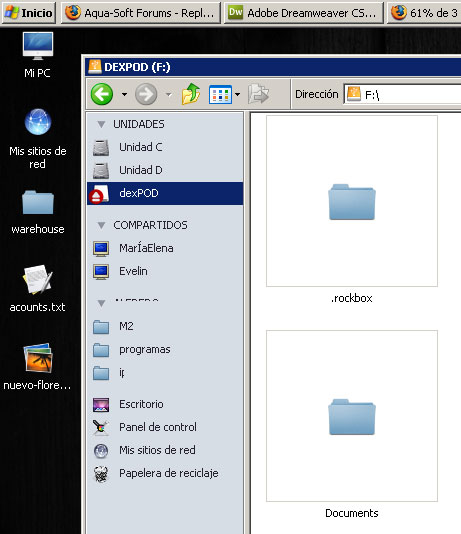
adjunto como me quedó, está con el theme clásico de windows (como me gusta), como que aún no encuentro un theme de Leopard que se adecúe perfectamente a XP.

post-91878-1228315820_thumb.jpg

findeXer.jpg
findeXer.jpg

#516548

matonga if you want i can give some VIsta info for you to try a patch :)

damn no one have vista and know to make a patch like matonga for vista???

#516552

Hi guys,

I have a new version for you, which fixes the open in same window functionality for vista users (it might also work for some xp users with broken registry). There is also a matching x64 version available for download.

Thanks goes to Andreas (AVE) for pointing me in the right direction. I was looking for a registry hack, but if you are interested in the details you can read on the blog what i ended up doing (basically if the object is browsable we browse to it, and if not we use default action).

Enjoy, I hope this improves functionality for all you Vista and x64 users... ;)

btw, in case it's not obvious - the update is on the first page/post.

#516597

Thanks, windows now open in the same window. I think you said you had no beta tester in vista 64bit. Just ask me if you want me to test something

#516604

Thanks alianyn, windows now open in same window for me too. Great job. Keep up the good work.

#516609