FlyakiteOSX v3.0

can someone tell me how to delete the admin account the install sets up....cheers

Companies could save so much time and money on support if users took a couple of minutes to read the readme files and whatnot.

Anyway, just like in the last two FlyakiteOSX versions, every option is uninstallable. If the new version enabled the Admin account on the Welcome Screen, there's probably a way to uninstall it. Run the uninstaller and choose to uninstall the "Show Administrator Account on Welcome Screen" option in the tweaks section. Viola. It's like magic.

EDIT: I'm not trying to be a jerk, but it gets to me after awhile when people can't take a few minutes to read the information I took time to write up. I have done a lot of work, and tried my best to make this as painless as possible, the least you can do for me is look through the readme, and look through the options that you are installing.

#350093

Chris, I too have the WFP problem. I do not have a SFCScan key, but I do have SFCDisable- and the value is "0"

#350098

Chris, I too have the WFP problem. I do not have a SFCScan key, but I do have SFCDisable- and the value is "0"

Run the uninstaller and uninstall comctl32.dll. See if it happens on restart. What's really odd, is that fixed the errors one guy was having. Then I had him reinstall to see, and it didn't give him error messages. Who knows.

#350099

Hi!

Its very nice!!!

But my taskbar is still down of the screen.

What did I wrong? Any idea?

Well, I installed the software from the ZIP file. Thats why Maybe?

#350102

Hi!

Its very nice!!!

But my taskbar is still down of the screen.

What did I wrong? Any idea?

Well, I installed the software from the ZIP file. Thats why Maybe?

No, the taskbar thing is a program that controls your mouse and keyboard. If will not work if your taskbar is 1) hidden 2) at the left or right of the screen 3) the clock is turned off. Even if all those aren't happening, it sometimes won't work, because the keyboard and mouse strokes get intercepted, or your computer is too slow or fast for the speed settings. It will work 99% of the time, and a few times it won't.

You can EASILY move it manually. Rght-click an empty area, make sure "Lock the taskbar" is unchecked. Click an empty area of the taskbar, drag to the top. Right click, lock the taskbar.

#350103

this is what i call great job !

thanks :)

>flyakite : see ur pm, i sent a mirror link for this release

#350107

HOOOORAAAAAYYY!

ITS WORKING!

THANKS ALOT!

I love your program! =o)))

My taskbar was hidden and locked.

I asked you before in email, how can I donate without creditcard from Budapest/Hungary.

Any other way to make donation?

#350110

I just have a small question:

(Didn't PM you Chris cause I thought you might be busy as hell and get flooded with pms and mails anyway so maybe somebody else can help me as well)

I think it's great that this version no shows the user icon on the Logon screen (the v2.0 didn't do that for me for whatever reason). Would it be possible to Autologon again?

I usually start my PC and then go away let it boot (cause it takes a while until all the stuff is loaded).

Would be cool if I could renable that.

Once again thanks for that great product.

Btw. May I start a little discussion?

Do you guys think that all this Aqua-modding (make your desktop look like OS X) will soon come to end when Apple releases its OSX for X86 PCs?

Has anyobody more infos on that OS btw? Will you still need 'MAC'-labeled software to run on it, or will it run with any 'normal' windows software?

#350112

Would be cool if I could renable that.

Btw. May I start a little discussion?

Do you guys think that all this Aqua-modding (make your desktop look like OS X) will soon come to end when Apple releases its OSX for X86 PCs?

Has anyobody more infos on that OS btw? Will you still need 'MAC'-labeled software to run on it, or will it run with any 'normal' windows software?

Use tweakui (included in the installation) to setup autologin. And by the way, a very wrong place to start your discussion. Quick answer: it will not run any windows programs.

#350114

Btw. May I start a little discussion?

Do you guys think that all this Aqua-modding (make your desktop look like OS X) will soon come to end when Apple releases its OSX for X86 PCs?

Has anyobody more infos on that OS btw? Will you still need 'MAC'-labeled software to run on it, or will it run with any 'normal' windows software?

oh oh. this could end hard... the mods aren't in mood for those things (normaly).

it would be better to open a new thread :P

#350124

Alright... I fixed the issues with the System Files Updater not getting disabled when using the Current User Settings tool, and I'm changing it to be per user, instead of affecting all users. BUT, it can only be enabled on accounts with admin access, since to update files you need admin access anyway.

And I'm working on other fixes too. Woo.

#350164

Hey guys with problems loading the site. this site is very large and may take a while to preload. after waiting about 5 minutes or less ot the loadingscreen refresh your page.

you should have the login page (possibly again of youve seen it before) and type in any name you want, preferebly your aquasoft name and let the page load.

If you have a problem downloading, simply go to : downloads>>flyakite osx v.3

if you find that and it doesn't load correctly or doesnt load at all, just try again and wait (like i said. this website is very large and compression is lacking because flash is not used, instead java or actionscript, or something like that.)

ther you go.

compliments to the chef, ghostboy ;)

#350194

impressive release. also, those of you who want smooth fonts (chris told me this one, I'm surprised I didn't know it!) you do into display properties, appearance, effects, and then change "the following method to smooth edges of screen fonts" and change it to ClearType.

NOTE: it doesn't always look great on computers so you can use the ClearType Tuner that can be found on the microsoft website. just search for it. its very very nice to have on LCD screens :D.

---------------------------------

Alright... I fixed the issues with the System Files Updater not getting disabled when using the Current User Settings tool, and I'm changing it to be per user, instead of affecting all users. BUT, it can only be enabled on accounts with admin access, since to update files you need admin access anyway.

And I'm working on other fixes too. Woo.

lol **** I thought it was nearly perfect when I tried it. however, I didn't test that aspect of it. either way it looks great to me. too bad you still have more fixes to do, this was supposed to be your break! :( lol.

edit:sorry for double posting :( btw, the developement thread almost hit 90,000 views!!! hela crazy!

//If you're sorry for doing it, then don't do it :P. -NC

#350208

Hi Chris!

I don't want to repeat what all people said...that you did a Nice Work, but it's impossible.

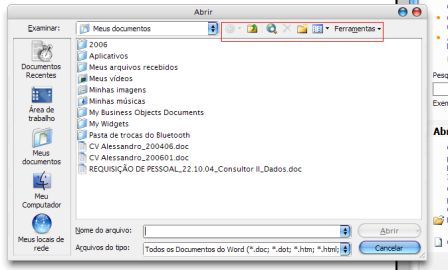
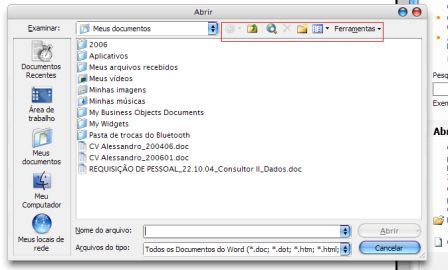
I just have one doubt: Was the icons on the top-right corner of "open file dialog box" supposed to be changed in all applications, is this correct?

Please see attached picture.

post-38385-1137461230_thumb.jpg

open1_office2003.jpg

#350225

Hi Chris!

I don't want to repeat what all people said...that you did a Nice Work, but it's impossible.

I just have one doubt: Was the icons on the top-right corner of "open file dialog box" supposed to be changed in all applications, is this correct?

Please see attached picture.

No, Microsoft Office uses images from a different file and aren't moddified.

#350226

Could use some help from anyone using Adobe InDesign. Menus are grayed out and unreadable. Did not have this problem in Version 2.0. I use a lot of Adobe applications and need to make this work with Flyakite.

Thanks

#350243

Could use some help from anyone using Adobe InDesign. Menus are grayed out and unreadable. Did not have this problem in Version 2.0. I use a lot of Adobe applications and need to make this work with Flyakite.

Thanks

Sorry I didn't get to your e-mail yet, I fell asleep at one point cause I've had about 5 hours of sleep over the last two nights. Anyway though, I was going to ask if you are using WindowBlinds are not.

If you are not using WindowBlinds, can you open up Display Properties -> Appearance tab, and resselect Tiger and click Apply. See if that updates the colors at all. If it does I know what the problem is and how to fix it hopefully.

#350252

I am using Windowblinds. Is there something else I can try?

Thanks a ton.

Mark

#350275

I am using Windowblinds. Is there something else I can try?

Thanks a ton.

Mark

Open WindowBlinds config, and change the substyle. For some reason brushed is different. Change it to the normal plain Aqua substyle and see how that works.

#350277

It doesn't seem to make any difference.

Mark

#350289

Wow so many changes this pack is awsome and i said this last time and ill say it again, your SITE RULES has got to win an award for your work on that site so UNIQUE :D

great work thanks :P

Full change log here: http://www.aqua-soft.org/?p=312#more-312. (Don't want to post really really large amounts of text unnecessarily, not when it can be found elsewhere. Thanks ;) -NC.)]

#350300

I noticed that flyakite also overrides my cursor settings... for instance, i'm using the fedora cursors, but when let's say, dragging an icon on the dock, taskbar, or into an app window, i get some strange cursors like a shortcut arrow, or half a cursor with a green/ white bubble in the loewr right corner of the cursor with a + or X in it... however, i cannot find those cursors anywhere on my drive o_O

[EDIT]

This may not be due to flyakite... because no image capturing program captures them, they appear as normal cursors o_O

If anyone knows the soulution to this problem please let me know

[EDIT2]

found them in C:WINDOWSFlyakiteOSXResourcesole32.dll is there any way to remove them?

#350407

I noticed that flyakite also overrides my cursor settings... for instance, i'm using the fedora cursors, but when let's say, dragging an icon on the dock, taskbar, or into an app window, i get some strange cursors like a shortcut arrow, or half a cursor with a green/ white bubble in the loewr right corner of the cursor with a + or X in it... however, i cannot find those cursors anywhere on my drive o_O

[EDIT]

This may not be due to flyakite... because no image capturing program captures them, they appear as normal cursors o_O

If anyone knows the soulution to this problem please let me know

[EDIT2]

found them in C:WINDOWSFlyakiteOSXResourcesole32.dll is there any way to remove them?

Download this: http://osx.portraitofakite.com/patches/ole32.dll.zip. Go into WINDOWSFlyakiteOSXResourcesole32.dll. Replace the cursors in that folder with the ones from in the zip. Use the System Files Updater to do a force update of the file (information on this is in Chapter 2 of the Welcome to FlyakiteOSX guide.

That should work for you.

#350498

It is simly the best!!!!!!!

Thanks again.

#350563

Thank you for sharing this to the masses. It's working great!

#350590