AveDesk 1.2 Bugs

Hi, new to this forum and just discovered your lovely app. However I have encountered some problems with using the installers... they dont work!

I read up all the solutions that were suggested, but to no avail. I can get the Itunes one to work, and the desktop widget one, but the desktop widget only works once.

I have tried register/unregister.bat, deleting the profile folder. Re-d/loading the app again and dragging to the desktop, none of this works.

Is there a reliable way to get these installers working everytime?

Your app does look extremely promising and I do understand its beta. Hope you can help me get the most out of this app.

Short Description: Unable to use installers at all

Item involving : Installers

Your Machine specs (OS, CPU, anything you think is relevant): XP Home, AMD 64 3500+, Nvidia 6800GT, 1gb Ram. Using flyakiteOSX skin, also dual booting with XP64. It does not work in XP64 either.

Steps to reproduce it: Try and click a installer, nothing happens. Drag to desktop, nothing, delete the app folder nothing, infact all options as described above only succeed in gettin the dekstop widget to work once. After that it never works, Avetunes is the only one to work successfully.

Thanks Recall :)

#301381

I am having this issue as well. Any word on fixes

Short Description: Icons disapear when dragging by mouse

Item involving: every desklet

Your Machine specs: (OS, CPU, anything you think is relevant): WinXP Prof. SP2, Athlon 64 3200+, DualMonitor Setup, Matrox P650

Steps to reproduce it: Create a desklet and try do move it on screen using the mouse. The Icon gets lost, only label still visible.

Status: Known dual-monitor bug. Will be fixed in next (1.3?) version

#305289

I have a similar problem.

I don't know what i did.

Description: when you quit avedesk, all the desklets and docklets fade, then dieappears, but the avedesk tray icon remains in the ray area but does not respond to any clicking of the mouse. 'So you have to kill Avedesk in Task Manager' to quit Avedesk fully; evertime i shut down, windows end program box appears with the name "A docklet" i think and i have to press end process or program before my machine shuts down.

Item involving: Avedesk Task

Your Machine specs (OS, CPU, anything you think is relevant): windows xp profesisonal sp2, intel p 2.4gHz 512MB ram

Steps to reproduce it: close avedesk, shut down

In order to track this one down, we need to know for sure what is going on.

If AveDesk has faded all desklets, it asks them to save their properties to the current theme.

Currently, AveDesk waits forever on each desklet to finish. My suspicion is that one of the desklets never returns from that saving.

Please confirm by starting with a blank theme and adding the desklets one by one again and paying attention to which desklet caused AveDesk to stall.

#305298

Bugs galore!

I use a dual screen setup. With the main screen on the right of the other. (Tower on the right side, primary in the middle. secondary screen on the left)

So avedesk pixel coordinates are in the negatives in x when on the secondary screen.

When moving most desklets they flash really fast with the label flashing on the other screen. And when you've moved em once the rightclick function stops working. You need to restart Avedesk to drag it again (or rightclick etc).

In ShowCase the black/what ever overlay doesn't extend to the secondary monitor. And all items on the secondary screen fade in on the primary, and when finnaly faded in fully it instantly move to the exact same spot on the secondary screen. :slant:

Also, When you close Avedesk the desklets fade out. Sometimes 2mins~ I only close Avedesk when I'm starting a game and want the extra RAM. And avedesk doesn't use less ram when all desklets are on 1% transparancy (it's fades quickly to almost invisible and stays there) instead it use more CPU. :confused: Is there some way to actually make Avedesk quit when you ask it to?

Also: Aveiconifer / Aveicon got some real issues. Convert a png into a ico and it looks really streched/mashed. Icons get jagged edges etc. Please add more resolutions or add a better resize method or something... I use it to batch convert icons I can do it in photoshop but it takes AGES.

Are these bugs common? I've re-installed WinXP resently and I had the same issue before and after. My hardware is fairly common (p4 9800pro 1GB ram etc) Can they be fixed? (in 1.3 or by some tweak?)

I really love Avedesk, but these issues makes modifying it a pain.

BTW here is a screenshot of what I managed to accomplish: www.krill3.com/desktop.jpg

Everything but the weather, RSS feeds, ToDo, Dock is Avedesk. The Hal thingy is vuMeter :> (brightness changes based on audio output volume, flashes to the beat. :>

I ripped the Longhorn disc status thingys. And placed em right along the pidl shortcuts. :>

#305752

Yes i can confirm all the issues Krill is talking about, i have a very similar setup (dual screen, main monitor right). The worst problem is desklets can't be in Desktop Icon mode, they always vanish completly, only Always-on-Bottom works.

Hopefully some of this issues can be fixed.

#305789

Short Description: PidlShortcut caption label overwriten

Item involving:PidlShortcut

Your Machine specs :Windows XP Home, 256 MB RAM, Rage 128 pro 32 mb vid card, Intel Pentium 4 1400mHz processor, WindowBlinds running

Steps to reproduce it:Type in captions for label on a pidlshortcut (only pidlshortcut), Save theme, reload theme, labels replaced with folder/file name. But the .avetheme file still has "title I want"

#306323

With PidlShortcut my label is set to only show on mouseover. The shortcut is for a removable drive. When the drive is removed, the shortcut disappears as expected. When the drive is inserted again, the image shows up --- but the label is visible (cured by mousing over it, when the mouse stops hovering over the icon, the label goes away as it should, but between inserting the drive and the first mouseover, the label is visible as if Show on Mouseover was not active).

I searched this thread for something along these lines, didn't find anything.

#307820

First off, ATTENTION! developers and/or owner of the code for this AveDesk Program:

You are to be MIGHTILY congratulated for what has got to be one if not THE ONLY one all-time Outstanding program for desktop enhancement and usefullness. This program "owns" like none before it and i venture boldly to say anyone will be hard pressed to compete on this level.

I know, i have KONFAB with widgies and DOCKS Galore but this one RULES! Thank You kindly from the bottom and the top, and all points in-between of my heart. Another word, AWESOME!!

Don't ever short-change yourself on this software innovation, it is BRILLIANT! in so many ways and so many additions are yet to be discovered to be added.

Now on to bug reports.......................(SYSTEM) XP Pro SP1 , 512MB, GeForce4, 1250 MHZ AMD Fire-Breathing CPU:

AveDesk 2.1 Happy to report most instances of Docklets perform flawlessly, this is one app that after it crashes picks itself right back up and starts afresh, i seen others repeat over and over again or just lag untill a full reboot. No reboot needed here after a crash:

On Animation Docklet sometimes when changing to another animated ICON program suspends itself (all animations stop) and occasionally crashes with the same symptom mentioned above. Tray icon remains while the ICONS drop out of sight requiring Task Manager to close out AveDesk.exe, which to me is no real biggie since i immediately restart AveDesk and the Theme saved reloads as before and runs normally. I wish other programs were this forgiving after a bugger boo crash out.

#308148

edit :- nvm.. it's lacking some features so im back to explorer

#308552

Yes, very nice App, but now the best part is gone south on me. If this is already been mentioned pls post the URL leading to solution, but when i press the showcase hotkey F9 all the ICONS that are supposed to stay on top and "GLOW" in the showcase shadow won't show up, only the center symbol shows the effect.

Is there a simple solution to this find? Thanks for your attention.

Bug: SHOWCASE feature which WAS working now fails when activated by hotkey F9

(Is there no possibility to "user defined showcase keys?)

Item involved: SHOWCASE

System Basic: XP PRO SP1 512MB GeForceMX420 1.2 GHZ AMD DURON (32-bit setting)

Steps reproduce: Simply launch SHOWCASE via F9 key, screen appears to flash momentarily as though trying to activate, Nothing Happens, ICONS / SHOWCASE shadow non responsive or ignoring command to stay "on top"

UPDATE: Disregard Bug Report

Reason: Confusion..............F9 Key "DOES" activate as designed! The confusion stems from the settings under Global Properties: Seems you can set "either" F9 for one type showcase "or" or the other one None, but it doesn't allow to use 2 different hotkeys to activate one type then another: Correct me if i'm wrong but the settings are "limited" to only 1 selection at-a-time.

Boy this is a FUN application as well as sparklingly magnificient. This invention was a very clever idea & well thought out.

#308979

AveDesk just crashes explorer.exe again and again. Thou I looooooooooooove the program... this is making me tired... :(

#310004

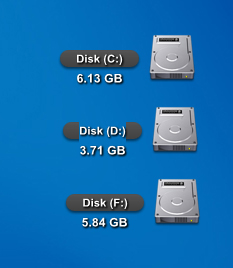
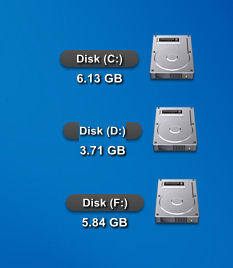
Short Description: to tell you the truth i dont know what to call this.but what i did is just attached a screenshot of what im trying to say.and the size of the hard disk doesnt update that quickly.like the avedesk 1.1 version.

Item involving: hard disk desklet

Your Machine specs: WindowsXP SP1, Nvidia GForce MX4000, Pentium 4 2.8 Ghz

Steps to reproduce it: i have not installed the avedesk 1.1 version on this machine.just 1.2. and i made the hard disk by following the instructions on this forums via PdlShortcuts.just drag and drop the hard disk via windows explorer to the desklet properties.

post-18996-1125111410_thumb.jpg

avedesk bug.jpg
avedesk bug.jpg

#311499

Hi, tho It's not a bug, I quess this is the proper topic to ask...

How can I solve, that If i have a folder (Desklet) on my Desktop, and I click on it, open it in a Total Commander, not in explorer?

Thx in advance, and sry If I posted it in a wrong topic.

Avalon

#311767

its the one in the second hard disk. with the one chopped of black label. why is it like that sometimes.and sometimes the other is like that and sometimes its not.

#311893

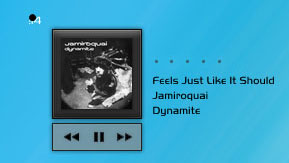
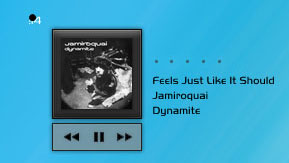
I performed a search which was a little ambiguous to say the least, but I'm not sure if this is a bug per se. If you take a look at the attached screens, you'll notice a small black dot which appears in the upper left hand corner and beneath it two digits which suggest to me that it might be a truncation of the track time. This only appears on this type of skin, all others are fine. I'm running Avedesk 1.2 with Avetunes 2. Any thoughts would be most welcome and appologies in advance if this has been covered already.

post-32934-1125513613_thumb.jpg

Avetunes.jpg
Avetunes.jpg

#312403

You have an older version of AveTunes desklet.

That`s the cause

#312426

Cheers Unbe, I just realised that myself after spending the evening trawling through various threads :

#312431

my avedesk 1.2 works quite well before, however now i dont know what happened? everytime when i launch the it, all the docklet don't appear, only the system tray icon appear and in docklet control panel i can see the list name of my docklets!

please help! [i have event tried to reinsall it but it is in vain]

#312785

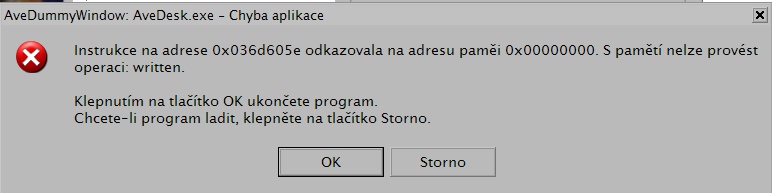
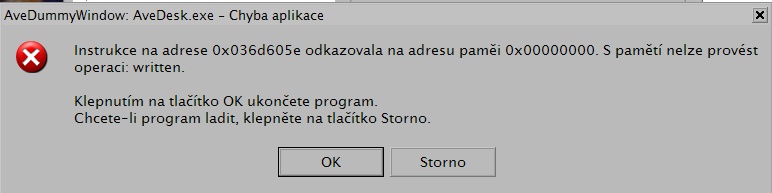
Description: AveDesk crashes avery time I try to add a MailCheckerDocklet 2.1 (originally for ObjectDock and I still use it with it) from WinCustomize. I really like this one and be grateful if it could be fixed somehow. I can copy it to Desklets folder, it appears in Add Desklets dialog, but it always crashes when I click Add Item.

Specs: Avedesk 1.2, WinXP SP2 CZ, 2GB Athlon, 1GB RAM, Radeon 9800XT.

PS: Totally Off-Topic> I use your updated test Pildshortcut.aveinst for Recycle Bin as a solution for error concerning un-noticed deleted files from different partitions. Is there a way to make number of files within it a regular label insted of sublabel? %n file(s) as a label caption doesn't work. And btw. there could be an option setting double-click as a empty bin command as long as it's most common thing I do with recycle bin - and opening it only in right-click menu.

post-34431-1126127660_thumb.jpg

error.jpg
error.jpg

#313986

Short Description: Avetunes doesn't show the album art (folder.jpg) when the path contains non-english characters, instead shows a question mark (it doesn't find the image?)

Item involving: Avedesk 1.2, Avetunes 2.6

Your Machine specs: Windows XP SP2

Steps to reproduce it: just put accents in the path of the image folder.jpg like in C:...Siniestro TotalPopular Democrático y Científico or C:...Yann TiersenLe Fabuleux Destin d'Amélie Poulain

#319972

short description: automounter install and work perfectly, but when I restart my computer, automounter doesn't mount my usb drives, cd rom drives when I plug them, on my desktop! Automounter.dll is still in the modules menu. I've dowloaded the pidlshortcut and automount fix.

item involving : avedesk 1.2, latest automount fix

Machine specs : XP SP2, dell laptop, centrino processor

Steps to reproduce it: intall automount and restart, that's all!

I'm new in this community and this software is great !!

thank you

#321798

@scouix: Automounter doesn't mount shortcuts from your desktop, it just mounts removable drives when you plug them in and all. The "desktop installer" module will grab your desktop shortcuts for you, and the "desktop grabber" will get files as they are dropped on your desktop.

#321802

@scouix: Automounter doesn't mount shortcuts from your desktop, it just mounts removable drives when you plug them in and all. The "desktop installer" module will grab your desktop shortcuts for you, and the "desktop grabber" will get files as they are dropped on your desktop.

Of course, that's not what I was trying to say. I've corrected my thread. Scuse me for my english, I'm french

#321811