AveDesk 1.2 Bugs

Short Description:Can't create Empty Shortcuts. attributes of older shortcuts get displayed. like if you add a PidlShortcut it gets created in the middle of my desktop with the MyComputer setting. Sysstats just overlaps the last icon i set on desktop with the same config instead of a blank icon. think it would be better if all new desklets got set to where it was stated in the default desklet properties.

Item involving:Sysstats, PidlShortcut

Your Machine specs (OS, CPU, anything you think is relevant): WinXP SP2 AXP 2000+ 1gig ddr ram.

Steps to reproduce it: create delete shortcuts. when shortcuts are created again old attributes are kept

Status: CONFIRMED, BUT IT WAS BY DESIGN. I GUESS IT WAS WRONG DESIGN :P

I posted once before aboutmy problem, and i haven't gotten a response, but im sure your busy with other things so no big deal.

But does anyone have a power meter desklet for sysStas 2.0 thats actually working in avedesk 1.2...mines is loaded in the control panel, however there's no image or text.....u cant even tell where it is on the desktop, even if f8 or f9 showcase was enabled

A little help, thanks

avedesk 1.2 messes up some sysstats config if you make a new config from scratch that might solve your problem.

#257247

i tried that numerous times, it still shows that the battery meter desklet is loaded in the control panel, and still no image

#257256

Short Description: Dragging CD shortcut on PidlShortcut:RecycleBin don't eject a disk.

Item involving: PidlShortcut

Your Machine specs: WinXP SP2, AveDesk 1.2

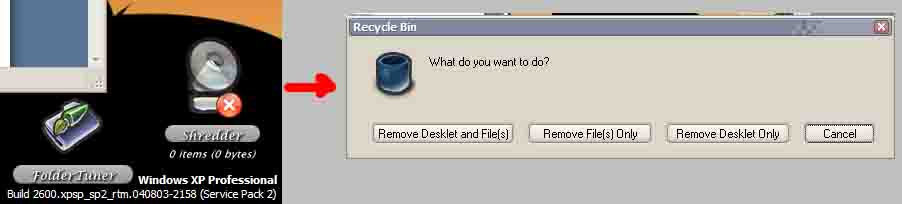
Steps to reproduce it: Drug CD shortcut desklet onto RecycleBin desklet. It asks to delete files/desklet or do Cancel. Thats all. RecycleBin icon do not change to eject sign.

Edit:

Little addition. If i lock position of CD shortcut than i can't move it to RecycleBin :) even with Shift/Alt button pressed... How can i eject it if i lock position?
No idea, does work OK here

OK. Let me explain in pictures :)

Press "Shift" -> Drag CD shortcut onto Recycle Bin descklet (PidlShortcut) [see left side of attached image] -> release mouse button [see right side of image] -> dialog appears but no option to eject.

PS sorry for image quality - size limit ;)

PPS oh! and "eject" image appears after i set "custom images" on icon tab

post-3404-1109058268_thumb.jpg

ave12.jpg
ave12.jpg

#257262

Bug 1:

Short description: Folder Caption changes with the folder's name

Item involving: Folder desklet

Your Machine specs: XPSP1

Steps to reproduce it:

Create a folder shorcut (Add/Folder/Add Item. Properties/Folder [Apply]).

Change the folder caption (Appearance/Caption [Apply]).

Save Theme.

Exit AveDesk 1.2

Run AveDesk 1.2

The caption backs to the folder's name.

Solution: Go to the [Desklet Properties] of that folder -> Click on the [Label Format] tab -> uncheck the [Automatically set the mainlabel to the name of the file the desklet...] -> Hit [Apply]

-cherrysoul

#257273

Not really sure where to post this at, but any word from judge on the SysStats 2.5 ??? Just curious.

Sorry if this is placed in the incorrect forum.

#257333

I'm not at my machine (I had to shut it down last night due to severe thunderstorms), so here's the best I can describe.

My issues deal with Pidl, since that's the only desklet I was using when I found these issues.

For the most part, I want to see if anyone else has had these issues, but I will reinstall AveDesk when I turn my computer on again.

I don't know how helpful this will be without a reinstall and further testing, but I just wanted to bring it up just in case.

Bug 1:

Short description: Ave Desk lost all desklets from the screen and control panel. Reloading saved themes did not resolve the issue. It's almost as if the data within the saved themes was wiped out somehow.

Item involving: Pidl

Your Machine specs: XPSP2, AMD Athlon 850, 512 MB PC133

Steps to reproduce it: Not sure, I was moving regular icons on the desktop when it happened.

Bug 2:

Short description: Browse button does not work when setting shortcut in Pidl properties. Screen focus changes, but browse window does not appear.

Item involving: Pidl

Steps to reproduce it: Go to tab where you set up the shortcut path and click on browse button.

edit* oops, I just noticed a previous post that mentioned this issue. sorry for repeating one that has already been addressed.

Bug 3:

Short description: I created a shortcut for a removable drive, but removed the desklet. I added a new shortcut, but instead of creating a blank shortcut with no settings, it just recreated the last item I had deleted.

This was also the case for creating new entries after keeping a shortcut. At first, it created a blank shortcut as it should but after a while it would just create a duplicate of the last shortcut created. I think it worked fine with internal hard drives, but the issue was when I started creating shortcuts for removable drives.

Item involving: Pidl

#257341

Umm... they back.

Short description: I can't unmount USB disk (not flash-drive) by standart "Safely remove USB..." if Pidl shortcut points to that disk.

Item involving: PidlShortcut

Steps to reproduce: Mount external usb disk (not flash). Setup a PidlShortcut for that disk with "xGb of yGb free" sublabel. After shortcut show you size etc. try standart windows "Safely remove..." feature. It says

---------------------------

Problem Ejecting USB Mass Storage Device

---------------------------

The device 'Generic volume' cannot be stopped right now. Try stopping the device again later.

---------------------------

OK

---------------------------

Status: INVESTIGATING, need to get an external USB disk somewhere

#257350

Solution: Go to the [Desklet Properties] of that folder -> Click on the [Label Format] tab -> uncheck the [Automatically set the mainlabel to the name of the file the desklet...] -> Hit [Apply]

-cherrysoul

Damn... I feel like an idiot... haha

#257352

bug1:

short: the aveinstall files seem to do nothing. I drag them to the desklet control panel a little window pops up showing what they are but nothing is added to the add desklet menu. Avetunes was the only one that has worked for me so far.

item involving: aveinstall files

bug2:

short: pidlshortcut will not allow me to select a drive it just asks me to insert a disk.

item involving: pidlshortcut

#257378

@buddyd16

Some of the docklets are not "real" docklets, as in you can't add them to your desktop, they just do some things automatically for you (and they will be visible in the "Modules" menu).

For example, the "AutoMounter.aveinst" will install a module that will create a desklet when a drive is first mounted, the "DesktopGrabber.aveinst" will install a module that will create any new desktop shortcut into a desklet, and so on (they all create a PIDL desklet).

Only the "AveTunes.aveinst" is a "real" desklet (as in it can really be created).

Hope this helps.

#257386

Short description : bug with Avetunes

Item involved : latest avetunes with Autoinstall

Step to reproduce : run Avetunes with skin Hybrid tiger v2 (I do not if it is related to the skin). increasing/decreasing the volume will increase/decrease the tunes read duration. Doing nothing, the tunes length stays at zero.

EDIT : the bug does not appear if Avefocus (built in) is enabled.

No idea what you mean with 'tunes read duration'

I was talking about the "elapsed time counter".

The bug is gone today. I do not know what went wrong and why it is ok now.

#257389

bug1:

short: the aveinstall files seem to do nothing. I drag them to the desklet control panel a little window pops up showing what they are but nothing is added to the add desklet menu. Avetunes was the only one that has worked for me so far.

item involving: aveinstall files

bug2:

short: pidlshortcut will not allow me to select a drive it just asks me to insert a disk.

item involving: pidlshortcut

open pidlshortcut desklet properties.

goto shortcut window

open my computer

drag the drive of your choice to shortcut window.

#257419

OK. Let me explain in pictures :)

Press "Shift" -> Drag CD shortcut onto Recycle Bin descklet (PidlShortcut) [see left side of attached image] -> release mouse button [see right side of image] -> dialog appears but no option to eject.

PS sorry for image quality - size limit ;)

PPS oh! and "eject" image appears after i set "custom images" on icon tab

I also had this problem as well.

I fixed it by using an older RecycleBin desklet.

On another note, not really a bug:

when you lock a desklet's position, could be any desklet, you cannot drag item out from the desklet (e.g. Icondrop deslet - drop images onto, unable to drag converted item out).

This feature works fine so long as the desklet is not locked.

Status: CONFIRMED, good catch

#257432

Too bad. It worked like a charm last night. I was able to plug and remove USB key and CD just for fun as many times as I wanted.

Bug 1:

Short description: The Browse Button in the path selection does not open any dialog. Other dialog do respond (like the "Start in")

Item involving: tested in PdiShortcut

Your Machine specs: XPSP2, Intel 3GHZ, 1024MB. AVe 1.2 with all patches

Steps to reproduce it: Select any desklet property and click on Browse

Answer: clear the path in the editbox next to the button first

Bug 2:

Short description: Avedesk lose all trace of removable media.

Item involving: Pdishortcut

Steps to reproduce it: Select any removable media (I tried with a USB key and a CD). Create a shortcut to that storage. Remove the storage. The icon fades out (no problem). The shortcut disappears from the list.

Status: BY DESIGN

Bug 3:

Short description: Avedesk lose all trace of removable media and crashes explorer.exe.

Item involving: Pdishortcut

Steps to reproduce it: Select any removable media (I tried with a USB key and a CD). Create a shortcut to that storage. Remove the storage. Explorer.exe crash (and restart) or start to lag and slow down dramatically.

Status: Can't reproduce it

EDit : as for now, I have a version fully working with only automount installed. I'll stay with that crossing my fingers it stays stable.

#257447

@ wazoo

if you delete the text in the shortcut section then click browse it will work.

now for my bug..

Short description: The ShowCase feature doesnt show the desklets on my desktop.. if im in a window, say excel doing my work and i press F9 showcase will show up but wont present any of my desklets, just the avedesk logo. this was working until i unticked animation and changed the colour of it to white.

Item involving: ShowCase

Your Machine specs: 3ghz, 512mb ram SP2 XP Pro

Steps to reproduce it: global settings, showcase, untick animate and change colour to white. press f9 and nothing appears.

it may be that restarting wil fix this problem but restarting the application itself doesnt seem to help. i cant restart my work machine atm because i have too many things on the go. if its fixed tomorrow i will report back :)

#257525

some of the following might already be mentioned by others

Machine specs: A64 3000+ 512mb ram Windows XP SP2 nvidia geforce 2 mx400 newest drivers and directx9c

-----------------------------------------------

Item involving: ftp desklet

clicking "images > skin choosing mode" kills only Images tab, but not Progress tab, and spawns Skin tab, so you can click on "skin choosing mode" in Progress tab. then, clicking "Skin > skin editing mode" spawns new Images and Progress tabs... you can conclude what happens next,or see what i did in "ftp desklet.bmp" :)

Steps to reproduce it: see above, and see image in zip file

Status: CONFIRMED

-----------------------------------------------

Item involving: showcase

when assigned Pause|Break key for a Showcase shortcut key, it works, but text field (where you hit a key you want) stays empty, like no name was predefined to show for this key.

seems like Alt + somekey combination doesn't work

it would be good option to use shortcuts in WinKey + somekey for showcase

when using showcase for the first time in one session ("showing all desklets" mode), all desklets are darkened - desklet that have label on mouseover become bright as they should be when i run mouse over them, and those that have no label become bright when clicked. on next showcase use they're all ok.. until restarting avedesk

Steps to reproduce it: see above

Status: Confirmed and already mentioned

-----------------------------------------------

Item involving: PIDLShortcut

browse button for a target in pidlshortcut desklet doesn't work (dialog doesn't show up) until a valid target is manually writen, then it works fine.

Steps to reproduce it: see above

-----------------------------------------------

Item involving: FTP desklet

assigned font color in notes desklet is like mirrored, see picture "color mirror.bmp"

Steps to reproduce it: see picture in zip

Status: CONFIRMED, oops

-----------------------------------------------

Item involving: desktop grabber

desktop grabber doesn't work well at all, eg. when renaming a file, old desklet stays (and becomes unusable), and new one for renamed file shows up. or, when doing right click on desktop > new > bitmap image, because the file's size is 0 bytes, there is nothing to use as thumbnail, and instead of appropriate desklet, a my computer desklet shows up.

confusing thing: i uninstalled desktopgrabber module, and later, when i renamed a file on a desktop, avedesk just closed itself, but that file was not in use of some desklet at the moment, but was used some time before i uninstalled and removed the shortcut desklet to that file which was made by desktopgrabber

Steps to reproduce it: see above

Hmmm

-----------------------------------------------

Item involving: maybe avedesk in general

many bugs with desklet positioning (desklet is in position, and when i turn off sublabel, it moves itself, but when i turn sublabel back on, it doesn't move back on previous position)

snap to grid sometime messes up, and works fine only for X axis, but is not precise on vertical axis, and i can move desklets in small increments, although my grid size is 128x128. this happened twice to me.. after some time it 'regenerates' and works fine.

Steps to reproduce it: hard to tell :) things like this happen to me only

Maybe you have a dual-monitor setup?

-----------------------------------------------

Item involving: maybe avedesk in general

i have also noticed that after some time Modules menu becomes disabled, like i have no modules installed, but i have

Steps to reproduce it: go and see from time to time :)

Status: confirmed

-----------------------------------------------

Item involving: maybe avedesk in general

it seems like top-down labeling method doesn't work for me.. i tried many combinations of label positions and default windows' fonts

Steps to reproduce it: try

Status: confirmed

-----------------------------------------------

Item involving: PIDLShortcut

when using "Set image" in apperance tab, assigned icon in "Icon" tab overrides this newly defined image..

Steps to reproduce it: try

Not a bug

-----------------------------------------------

Item involving: PIDLShortcut

i was playing with cd-drive desklets with inserting virtual cds, and, when i hold shift while disc is being inserted and read, there is sublabel bug (as in picture label_bugs.bmp), and after few more tries, new desklet for the same drive came out of nowhere, and when i tried to remove it, it chrashed the whole computer, and i had to do the hard-restart.

anyway, i tried it again, and it happened again, but it didn't chrash the computer, only avedesk.

next few times it worked the same, but without any chrashing at all... sometimes it spawns two desklets one over another so i have three of them :), and sometimes desklets just show up and hide again, although disc is in drive.

i think it was because of autoloader module, when i uninstalled it, the problem was gone. but...

the sublabel bug appears with real cd-s too, even with no shift held!

and because the ejecting and inserting of virtual cds is performed too fast, it messes up something (maybe because of fading that takes more time than it takes to eject a virtual cd and insert another, that's just my idea that has some logics), the drive desklet shows up and fades, just as if the virtual cd was inserted and then ejected, but actually it should be oposite.

of course, if i eject cd and wait second or two and manually insert another vcd, everything is ok. but that's not the way it should be done ;)

Steps to reproduce it: hmm

-----------------------------------------------

Item involving: don't know really :)

Desklets Control Panel somehow became always on top :) after closing control panel and opening it again, it was as i remember it (not always on top). i think this was bug in Windows

Steps to reproduce it: only i manage to do these things

-----------------------------------------------

and the most interesting to me: see "color mirror.bmp" in attached zip file

avebugspack01.zip

Attachment: avebugspack01.zip

#257530

@ wazoo

if you delete the text in the shortcut section then click browse it will work.

now for my bug..

Short description: The ShowCase feature doesnt show the desklets on my desktop.. if im in a window, say excel doing my work and i press F9 showcase will show up but wont present any of my desklets, just the avedesk logo. this was working until i unticked animation and changed the colour of it to white.

Item involving: ShowCase

Your Machine specs: 3ghz, 512mb ram SP2 XP Pro

Steps to reproduce it: global settings, showcase, untick animate and change colour to white. press f9 and nothing appears.

it may be that restarting wil fix this problem but restarting the application itself doesnt seem to help. i cant restart my work machine atm because i have too many things on the go. if its fixed tomorrow i will report back :)

i`m guessing u haven`t set the desklets to "Showcase" in desklet properties>appereance>style?

#257531

Short Description:

Using IconPackager, wrong icon appearing for drive shortcuts ( i.e. Hardrive, CD-Rom, Network Drive, etc). The Recycle Bin and My Computer pull the correct icons.

Item involving:

PidlShortcut

Your Machine specs (OS, CPU, anything you think is relevant):

WinXP, Intel P4 3.0GHz (Prescott Core), 1GHz Ram

Steps to reproduce it:

Created a PidlShorcut and drop/dragged from Windows Explorer.

#257552

Short Description:

Setting Desklets position always on bottom set them on bottom (so behind any window), but associated labels are still visible (and on top of any window). Others position settings seem to work.

Item involving:

PidlShortcut

Your Machine specs (OS, CPU, anything you think is relevant):

WinXP, Intel P4 3.0GHz , 1GHz Ram

Steps to reproduce it:

Created a PidlShorcut and try.

#257716

Short Description:

Setting Desklets position always on bottom set them on bottom (so behind any window), but associated labels are still visible (and on top of any window). Others position settings seem to work.

Item involving:

PidlShortcut

Your Machine specs (OS, CPU, anything you think is relevant):

WinXP, Intel P4 3.0GHz , 1GHz Ram

Steps to reproduce it:

Created a PidlShorcut and try.

I use PIdlShortcut to create a recycle bin and have it set to always on bottom. When I drag a window over the desklet the window covers the icon, label, and sublabel. Am I not doing something right as suggested by your bug to try to replicate it?

#257839

2 or 3 bugs found

Short description:

Each time you edit a Note, the window to edit the Note become smaller and smaller.

Item involving:

Note desklet

Your Machine specs (OS, CPU, anything you think is relevant):

WinXPSP1, Intel Pm 1.6GHz , 512MB Ram

Steps to reproduce it:

Create a new Note desklet. Then edit it many times.

----------------------------------------------------------------

Short description:

When showcase for all the elements is activated, the Note desklet and the AveTune desklet are highlightened only 1 sec.

Item involving:

Note desklet, AveTune, Showcase

Your Machine specs (OS, CPU, anything you think is relevant):

WinXPSP1, Intel Pm 1.6GHz , 512MB Ram

Steps to reproduce it:

create an iTunes and a Note desklet. Active showCase for all.

----------------------------------------------------------------

Not sure if it's a bug or a feature. Nowaday, here it is :

Short description:

The text of the notes are theme-dependants. If you save a theme, then edit the note and load the previous theme, all the modifications you made are lost. Personally, I don't think a to-do Note for exemple should be saved with the theme. But I guess it could be kinda difficult to change the way a note is saved without re-write a big part of the code...

Item involving:

Note desklet, themes

Your Machine specs (OS, CPU, anything you think is relevant):

WinXPSP1, Intel Pm 1.6GHz , 512MB Ram

#257966

Short Description

PidlShortcut remembers the last setting used (even if erased), and if it was removable, autounmonter removes it.

Item Involved

PidlShortcut + Autounmonter

Machine Specs

P4 2.2Ghz, 512MB RAM, 40GB HDD, WinXP SP2, Laptop.

Steps to reproduce

1) Create a PidlShortcut, set it to a removable drive

2) Erase that PidlShortcut

3) Load Autounmonter

4) Try creating another PidlShortcut

Dunno if its just me, or wut?

Cheers people, oh and andreasv, thnx!!!

Edit

I "uninstalled" autounmonter, and still, it doesn't work... The only way to get around this, is adding My Computer, or Trash.

Status: CONFIRMED, and answered 4 times now :P

#258071

@D14852001neko: AveDesk 1.2 saves the last removed desklets in %APPDATA%/AveDesk/Defaults and will use the settings of the last removed desklet for every newly added 'unskinned' desklet. Try to clear the %APPDATA%/AveDesk/Defaults

#258159

Short Description: PIDL shortcut can't launch an Excel document

Item involving: PIDL shortcut and/or DesktopGrabber

Your Machine specs (OS, CPU, anything you think is relevant):

Steps to reproduce it: Create a PIDL shortcut pointing to an excel document, or use desktopgrabber to convert an excel document that has been dragged to the desktop into a desklet. click on the desklet. I get the following error: "C:Documents and SettingskmccormiMy DocumentsTo Do.xls - The parameter is incorrect." I don't know if there is anything specific I need to enter into the parameter field for the desklet, but I didn't think a simple excel document would require one ... a desklet linking to a word document opens the file up in Word without problem.

Status: can't reproduce it

--------------------------

Short Description: DesktopInstaller doesn't work

Item involving: DesktopInstaller

Your Machine specs (OS, CPU, anything you think is relevant):

Steps to reproduce it: The first time I clicked on desktopinstaller.aveinst it asked me if I wanted to convert all desktop icons to desklets, to which I answered "yes." After then uninstalling and reinstalling the module several times, I never again got this dialogue, and thus was never again able to convert icons already on my desktop into desklets.

Status: delete the .metadata files in %APPDATA%/AveDesk/

#258434

This isn't strictly an Avedesk bug but I could use some help;

I have a problem where i have 3 USB devices which are plugged in or switched off at different times. (Ipod, USB drive etc). Windows adds them to 'my computer' in the order they're plugged in which plays hell with the drive letter; thus a named drive desklet might not open up the right USB device. Can i get round this somehow? Perhaps with Windows settings?

#258445