AveDesk 1.2 Bugs

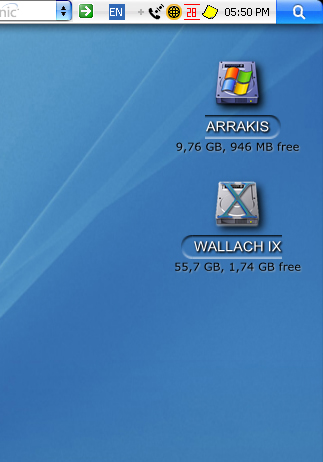
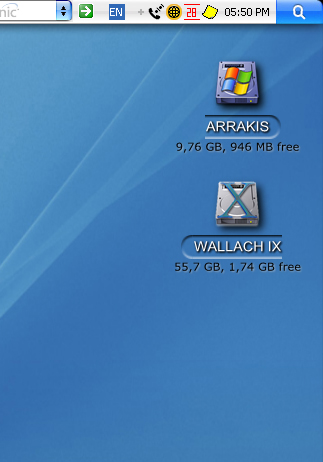
Short Description: Desktop label backgrounds get cut off randomly on load or when unhiding in the case of the DVD/CD-R. Here's a snapshot:

avedesklabelsproblem7iu.png

Primarily happens with the DVD/CD-R icon and icons placed close to the screen edge it seems. Hardly a serious problem, but it is midly annoying all the same.

Item Envolving: Pidl

Machine Specs: PII 450, 256 MB, 32 MB vram ATI Xpert 128 (yeah yeah, I know it's a pile, but it was free and I'm a hippie, whatcha gonna do?), set to 1024x768 32 bit, WinXP SP2, Windowblinds v4.5.1, ObjectDock v1.1, ClearType enabled (just throwing useless facts at you now, as I had this same problem under Win2k, without ClearType). And no, I'm not running any other graphical apps (ie: WindowFX) that could be mucking it up either..

How to repeat: Run with my crappy video card? Hurm.. :P

Any help is appreciated, but I expect no miracles. And Andreas, thanks so much for your wonderful program and all the work you and everyone else has put into it.. come the day I'm not such a broke hippie and they credit gods deem to give me plastic again, I'll be damn glad to send you some cash for all aforementioned hard work. :)

#276702

I can confirm this. After I open the desklet control panel (right-click > desklet properties) and close it with OK, everything is back to normal.

post-19766-1114422134_thumb.jpg

Label AveDesk.jpg
Label AveDesk.jpg

#276704

Hello people. I'm sorry in advance if anybody have posted about this bug before, because i've gone through the thread and was unable to find any bugs similar to what i have...

BUG: Showcase doesn't work out of a sudden. A slight shadow of it could be seen on the rightmost side of the monitor. Seems like showcase is out-of-screen. All windows also dissappear and seem to be pulled to this out-of-screen area. When i click on the slight shadow of showcase, the desktop returns to normal.

It has been working fine before (yesterday even). Strange. Don't even have a multimonitor setup.

ITEM INVOLVED: Showcase.

SYSTEM: Fujitsu Laptop (C2220), WinXP Home SP2, P4 2.2GHz, 512MB RAM (64MB Shared with Radeon IGP onboard), FlyakiteOSX 2.0, Rainmeter 0.12, Finderbar (by Landvermasser) beta 2, Entbloess 2.7.2, RKLauncher 0.3 beta.

STEPS TO REPLICATE ERROR: I really don't know what caused it to happen. Right now, it happens by just activating showcase (F11).

Any ideas? I have reinstalled AveDesk1.2 but the same thing happens.

#280736

a) try to disable Entbloess and see if it still happens

B) updated any drivers maybe?

#280824

Yeah it had to do with entbloess... A key conflict between entbloess show desktop and showcase (silly me... :confused: ). Sorry for troubling you. Problem fixed.

#280898

Hey Ave, has there been any changes or fixes to the last Avedesk release or all these bugs were merely handling errors...

#280903

Some bugs are fixed internally, some aren't yet. - but real life (uni, work, home) is priority number 1 for me currently. A man's gotta eat.

#280907

edited: ups, wrong thread.

Please read on, there is nothing to see here :)

#281145

Short Description: Avedesk crashes when playing AAC from iPod Photo via iTunes

Item involving: ituneswidget.dll (as the windows error report implies that causes the crash)

Machine specs: Athlon XP 2500 512 WindowsXP Sp2

Steps to reproduce it: When trying to play an AAC on iPod Photo via iTunes avedesk crashes.

(all my ACC files have album art)

Desklets running on avedesk

-Avetunes Widget: Bernice

-PidlShortcuts

-Systats 2.5

-shutdown

-vuMeter

I know this had been reported by duyvan82 i just want to give details on mine, because it is crashing on me too.

#282576

This is more of a AveTunes bug but...

When I right click the AveTunes widget to change libraries and I select one, a Control Panel, remove desktlet, or widget properties window shows up, and i can't change playlists.

any help?

#282664

Hmm... my Japanese characters (Unicode.. i think) are showing up as ??? in the desklet properties dialog... It was working fine before... but now... Is it a bug with AveDesk, or is my Windows screwed up (again)?

First I'm sorry if anyone has reported this bug... if it IS a bug with AveDesk... If its not, what is wrong?

BUG: Japanese Unicode characters stop working suddenly in Desklet Properties dialog (Shows up as ???).

ITEM INVOLVED: Desklet Properties dialog? The characters show up fine on the Desklets itself.

SYSTEM: Fujitsu Laptop (C2220), WinXP Home SP2, P4 2.2GHz, 512MB RAM (64MB Shared with Radeon IGP onboard), FlyakiteOSX 2.0, Rainmeter 0.12, Finderbar (by Landvermasser) beta 2, Entbloess 2.7.2, RKLauncher 0.3 beta.

STEPS TO REPLICATE: No idea....

edit: sounds like kyods had the same problem a few pages back... but this time, one PDILshortcut label output was affected --> my shortcut to my removable drive... the Japanese characters i used there all turned into ???... As i couldn't safely remove it with a desklet present, i've removed it anyway... not really a problem, probably just a bug to report... :)

#287282

Okay... Wasn't really a problem with AveDesk... It was Vanim... More specifically, the halo effect, i think....

PS... (Darn... keep on calling out false bug reports... Am i cursed or sumthin...)

#287307

I've got a new one...

BUG: Shortcut in start menu points to C:Program FilesAveDeskMyProg.exe after installation from installer in AveDesk 1.2 Package listing.

ITEM INVOLVED: Start menu shortcut

SYSTEM: Hardware N/A, both on XP and Win2K3 EE(trial)

STEPS TO REPLICATE: Download and run AveDesk 1.2 installer from AveDesk 1.2 Package Listing thread.

I've been playing around with the Win2K3 Enterprise Edition trial and between going back and forth between that and XP, I've setup AveDesk again a couple of times.

A simple problem to fix, but a bug nonetheless...

#288491

Whooooooooooooops, good catch Zxian :)

#288494

Hehe... so minor... :P

#288575

A have an interesting bug at hand.

When AveDesk 1.2 is loaded, any item I drop or remove from the desktop automatically triggers the floppy drive to search for something. What it is? I don't know but what I do know is that this is one annoying little bug. Love the software though!!! That is why I've lived with the bug up to now but thought it would be beneficial to share it with everyone.

#288805

Short Description: AveDesk crashed after i'd created a folder and changed it name(during some dir check, i guess)

Sys info: Win xp sp1, amd 64

Reproduce:

1. Had 3 pidlschortcuts running with 1 drive, 2 folder info's.

2. Were to download a file.

3. Changed drive via browse - cd spinning.

4. Created folder and changed its name.

5. Exe crash :(

The folder, in which I created a new one, were one of the pidlshortcuts.

I dunno, what the reason are for sure, but I guess it could have something to do with cd spinning and reaching some sort of file time out with the folder creation, I dunno :)

#290467

Hi, I'm not sure if this one has been posted before.

When I change the event for the speak effect to "double-click (launch)" and save the theme it does changes to "mouse-over" again each time when AveDesk is restarted.

The "clicking mode" is set to "desklets respond to double-clicks" in global settings.

#294012

when explorer chrashes avedesk disappears, but stays in tray without possibility to open it again.

So you have to kill Avedesk in Task Manager before starting it again ... -_-

#295779

^^Known bug...Ave was thinking about implementing some type of detection system so when explorer.exe crashes, AD quits, but I haven't heard anything about it in a while^^

-NC

#295850

Hi Ave,

Sorry if this has already been asked...I looked around....but with no success

Description:

*External Hard Drive cannot be unmounted by Shift+ dragging to dock's trash.

* When External Hard Drive is disconnected it still shows on the desktop.

* When I connect External HD it doesn't show up until I go into settings and untick then tick "hide desklet when drive is not mounted"

Item involving: Avedesk, Automounter?

Your Machine specs (OS, CPU, anything you think is relevant): WinXP SP1, Pentium 4, 256Mb ram, 40Gb external Fat32 Hard Drive.

Steps to reproduce it: Install Avedesk 1.2 by extracting into program files (fresh install)>add desklets for various drives including external HD> tick box that states '"hide desklet when drive is not mounted"> connect/disconnect drive.

Interesting notes- All drives(eg- CD drive) mount/unmount succesfully except this drive...its stubborn and just sits there...

*EDIT; when I drag the desklet drive to the trash I get this error message; "cannot delete file; cannot read from source file or disk"

#295950

Short Description: Upon opening AveDesk I get: "AveDesk.exe has encountered a problem and needs to close. We are sorry for the inconvenience. (Debug/Send Error Report/Don't Send)" All of the desklets appear, but my weather app is not shown and my notes app has one note that I deleted and one new note missing. The desklets work until I hit any of the buttons (Debug/Send Error Report/Don't Send) then the program closes.

Item involving: sysstatscom.dll

Your Machine specs (OS, CPU, anything you think is relevant): Windows XP Pro SP2, Intel Pentium M, 2.00 GHZ, 1.00 GB RAM, 20.2 GB free on HD

Steps to reproduce it: Every time I open the program it happens. I have tried restarting the computer, to no avail.

#298824

Sysstats problem, probably due to an old version..

#298842

Found and installed the newest version of sysstats, that takes care of the bug. Had problems with the weather widget, but I just downloaded and reinstalled it.

Thanks for the help.

#298862

when explorer chrashes avedesk disappears, but stays in tray without possibility to open it again.

So you have to kill Avedesk in Task Manager before starting it again ... -_-

I have a similar problem.

I don't know what i did.

Description: when you quit avedesk, all the desklets and docklets fade, then dieappears, but the avedesk tray icon remains in the ray area but does not respond to any clicking of the mouse. 'So you have to kill Avedesk in Task Manager' to quit Avedesk fully; evertime i shut down, windows end program box appears with the name "A docklet" i think and i have to press end process or program before my machine shuts down.

Item involving: Avedesk Task

Your Machine specs (OS, CPU, anything you think is relevant): windows xp profesisonal sp2, intel p 2.4gHz 512MB ram

Steps to reproduce it: close avedesk, shut down

#300379