 Aqua-Soft Forums
Hey, Flyakite, got one queston, (great pack, btw) The "uninstaller"..is it a true uninstaller or is it going to attempt a system restore back to the day I installed the pack?
preesh..
meat
Hey, Flyakite, got one queston, (great pack, btw) The "uninstaller"..is it a true uninstaller or is it going to attempt a system restore back to the day I installed the pack?
preesh..
meat
Hey, Flyakite, got one queston, (great pack, btw) The "uninstaller"..is it a true uninstaller or is it going to attempt a system restore back to the day I installed the pack?
preesh..
meat
Well it uninstalls the files back to the minute before you installed the pack, but it doesn't use system restore to do it, it actually uninstalls the files and replaces them with the original files, the opposite of the install process.
Flyakite,
First of all I want to thank you for this highly anticipated release. I have some suggestions and problems, hope you can help me out.
(I'm using a non-English Windows XP and I replace my system files with "extract files only" + "Batchmod")
Problems:
1) Resources in xpsp2res.dll is successfully modified by using BATCHMOD and replaced into C:WindowsSystem32, but my Scurity Center screen doesn't look 100% like yours. Please refer to your screenshot.
- The Scurity Center icon (shield) on the top blue pane is not replaced
- The Resource icon on the left hand side is not replaced
- The FireWall icon, the Automatic Updates icon, and the Virus Protection icon is not replaced. And there are no OSX traffic lights on the right. However, those three icons below Manage security settings for: is replaced.
I wonder if there are any more files needs to be modified to achieve the look in your screenshot? (It's so beautiful  )
)
2) I'm having the "shell32.dll allocation problem" after I replaced the shell32.dll. I can't run some application's installers, and I noticed some people have problem running calc.com after replacing the shell32.dll. It's having a conflict with user32.dll or something like that (I didn't replace my user32.dll.) Do you have any solution or suggestions on this matter?
3) What do I need to do with my non-English user32.dll to remove those little dot connected squares around bottons or tabs?
4) I don't know why but I just can't have my srchui.dll (or srchasst.dll I forgot the exact name) modified & replaced.
5) After I modified & replaced the quicktime.cpl icon, it stop working anymore. Which means if I double-click the Quick Time icon in Control Panel, nothing happens.
6) Please tell me which dll/exe stores the icon for .mht/.mhtml extensions.
Suggestions:
1) Maybe it's about time to replace all the iMac G4 icons with iMac G5s (the one you use for the Display Property in Control Panel.) I did it myself and it looks great.
2) Have a look at your Help & Support Center, the upper toolbar, you can move the monitor icon in the toolbar.bmp 1 pixel right to make the buoy botton look better.
Well I guess that's it for now, any help is appreciated. Again, what you have done is really amazing, THANK YOU!
-cherrysoul
Okay let's start at the beginning here.
1) Unfortunately someone at Microsoft decided not to make all of the images in the Security Center icons. The images that didn't get replaced are PNG resources, something BatchMod is not designed to extract and replace (don't ask why, I didn't design it). What you can do is open up my xpsp2res.dll in Restorator, and drag and drop the PNG folder onto your desktop. Then open up your xpsp2res.dll file and drag and drop the PNG folder from the desktop, onto the folder listed on the left hand side of Restorator. (If you open a file in Restorator, you'll understand what I'm talking about)
2) I have a feeling the allocation problem is something related to BatchMod, as so far no one has had that problem doing a normal install of FlyakiteSP2, even on non-english systems. In FlyakiteSP2 there is no user32.dll file included, so BatchMod or my installer never touched that file. So honestly, I'm not sure what the "true" solution is here.
3) So far I haven't found a way to remove the dots in SP2. I did it to the user32.dll in SP1, and had no problems. However the one in SP2 doesn't like being modded at all, not even if I just try to replace an icon. I've tried every method possible and after modding, on restart I get blue screened to death. So that's why that file was left out of FlyakiteSP2. It's a risky file to touch and I don't want to take the risk.
4) srchui.dll might not be in BatchMod's database, so it won't modify and replace it. Once again I recommend using Restorator. Open up your srchui.dll file in Restorator, along with my moddified file. Drag only the ICO, BMP, and AVI resources from the moddified file to the new file. Save, and use Replacer to replace it on your system. Or do it manually if you know how.
5) This is a problem I cannot fix. I know that happens, no matter what. I have tried moddifying the quicktime.cpl file with every resource editor imaginable and no matter what it doesn't work after it's moddified. But CPL files can be replaced without needing to be renamed or restarted. You can just copy the backup quicktime.cpl file from WINDOWS_BACKUP (folder is hidden) to system32 and it will work again.
6) Honestly I'm not sure as to that one, as I've never even heard of .mhtml extensions. I think normally though the icons are in mshtml.dll if I remember correctly. I can't remember all 120+ files I normally modify off hand, lol.
As for Suggestions:
1) I might replace all with the G5 iMacs, we'll see. Some of them I like the old G4 versions just because of the design of the machine and the perspective. I don't necessarily use the new hardware for an icon just because it's new, I try to go with what looks good in relation to what the icon should be and in relation to the other icons.
2) I'll look at that and probably do that. Thanks for the suggestion
If you have any other questions or don't understand something I just said, contact me through e-mail or IM, I'll help in any way possible.
mr. kite:
i've been so, so happy with the sp2 version. just a quick comment: i am truly amazed at your willingness to keep on top of these posts and respond to every comment, question and suggestion individually. besides doing a great job on FaK2, your customer service skills are exemplory (even though you wanted to slap orange27!!)
can't wait to see what you've got up your sleeve next.
Hey thanks shmengie.
In terms of what I'm working on at the moment. Well I'm working on FlyakiteSP1 v7.0. But in addition to that I'm also going to be putting together some tutorials on how to mod system files, how to create an installer (not quite as complex as mine), as well as a few other things like putting together a comprehensive list of every system file modded in my installer, as well as to where each one goes, and whether or not it exists in dllcache and servicepackfiles/i386.
So hopefully there'll be some extra stuff coming out that will be of use to some people
the word fak2 shoulden't be appropiate for the program. even though it's the most logical accronym for it. pronounce it. really sounds like it's really foul. never mind. yea. all hail to chris kite!
so exactally are you working on? features like sp2? squishing the bugs?
functionality? improved visual candy? for me the 6.0 program's pefrect except for some little bugs like comctl32. i just use the original one. it's a surprise that i can still do my homework, surf the internet, and do everything even if it's still modded with your files.
Okay, I am officially done with FlyakiteSP2 v1.0
I am not posting any important info about the release here, all of that information can be viewed at the website.
Enjoy everyone!
Finaly,Thanx, wondering if there is a simplized chinese version.
"So many shellpacks, flyakite is the best. changing my OS to English, So many thanx to flyakite"
HOLY ****!!! DUDE THIS RELEASE IS AWESOME!!!I LOVE YA MAN!!! it's really great man!
Yeah, I second that  I installed your pack via Batchmod. Works flawlessly. Also thanks for reg tweaks, pretty nice collection you got there
I have an idea: reg tweaks that change icons associated to most popular filetypes (jpg, avi, mp3, etc) to mac ones (located in some specified folder). That would be cool for people who have problems with apps taking over associations....just a thought
Pe8er, you're crazy, like a mind-reader or something:).
I thought of that idea almost a month ago when I was trying to fall asleep, and I wrote it down on my to-do list. I was wondering if I should make a new thread suggesting it as a request, but I realize this is the perfect place to ask!
So, flyakite, will you do it? I've changed a few of the filetype icons from the Folders Dialog, and I can tell you it makes a Humongous difference.
Looking forward to SP1 7.0, and thanking you for all the work you've done with this!
-NC
P.S: For those of you who don't believe me about thinking of the reg tweak idea first, tough. Here it is directly quoted from my to-do list, though:
-Create a filetype icon changing mod- .use a reg file
That's pretty official evidence there nightcrawler
I'll definitely incorporate something like that for the next release of SP1 as well as future releases of SP2. In fact, as well as writing up some nice tutorials for the site, I'm going to have a section for extras and stuff like that which will include zips of those registry tweaks I already have, and I'll add the new stuff. I'll have a utility that will allow you to easily copy all regularly moddified system files to a folder you choose so that you don't have to go searching through the system for everything.
And Pe8er, I have a TON more registry tweaks that are non-aqua related that I use in my unattended cd. I might put those up on the site as well, some are pretty useful. One of them disables the annoying warning you get when trying to run a file downloaded from the internet saying it may be unsafe or whatever. So there's lots more extra stuff on the way.
Hey chris
I found another problem I'm having.
Actually, I've found two. The first one involves the wireless screen you see in the picture (all black, etc). The next thing, is if you notice, the window does not have the close/minimize/maximize buttons on it, and most windows like it do not. the only ones that do are regular applications, like internet explorer, windows explorer, itunes, etc... anyway, any help would be great. Thanks again!

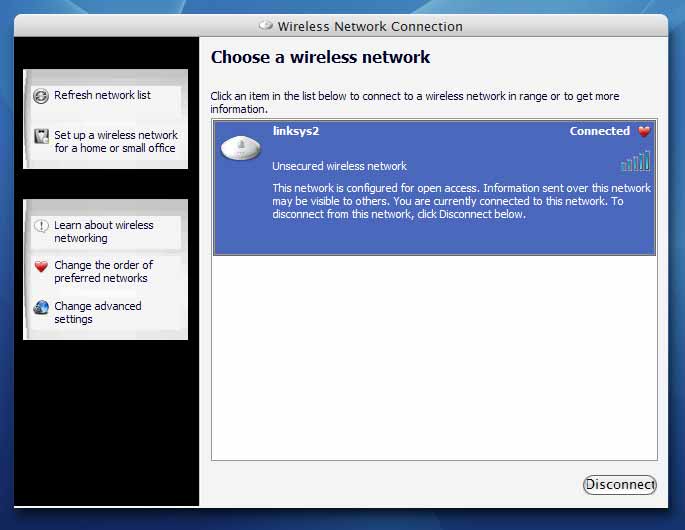
I finally got to downloading & installing Flyakite SP2. I must say I find it amazing that the icons in this set seem of even higher quality than the previous one, which already was excellent. I am very pleased and impressed, thanks flyakite
I installed it wit no problems. Tight work.
i had to uninstall sp1 version 6, because it screwed up my media player, and gave me the blue screen of death for the first time in 3 years!
so i dunno if i should get sp2, if this pack is going to do the same thing as the previous version...have you worked all the bugs out that were in 6.0? cause the 5.1 of sp1 was perfect! and the 6.0 version crashed my comp, so is this new sp2 version all fixed?
~Connor
Yeah unfortunately there was a bug with the DLL uninstall code. Everything has been fixed in FlyakiteSP2 v1.0 though, I made sure of it.
That's why I pulled download for FlyakiteSP1 v6.0 for now, while I work on 7.0. So that I can bring that version up to the quality this version is.
If you're hesitant about downloading Service Pack 2 you can wait for v7.0 which shouldn't be too far away.
why do the tables in firefox become 100% when this installed, when its uninstalled it doesn't happen. I've gotten this effect on two computers now.
My guess is, yet again, the Mac Shell Dialogs registry tweak. Something I will never include in the installer ever again.
The Mac Shell Dialogs tweak makes the system use Lucida Grande as the shell font. This is not the font items that visual styles mess with. This is the actual font used inside of pop-up dialogs and other dialogs of the like. The font shown in tab dialogs (not on the tabs, that's controlled by visual styles, but in the dialog the tab displays).
Just run the uninstaller and choose only to uninstall that registry tweak.
Hey Chris,
Once again my friend, your dedicated work on these SP2 sysfiles is always appreciated...Believe it or not, I have gone back almost entirely to WinXP sysfiles, with Longhorn icons, ect., lol!
I do keep (2) shell32.dll, one strictely WinXP default (with a couple lite tweaks ie: folders #4, & #5 in Icon Group, and a msgina.dll tweak... and a shell32.dll (mac tweaks)...
With my P3 laptop with 320 MB sdram (maxed), it does run better performance wise with mainly WinXP sysfiles...lol, but we have discussed this before in length...
Hope to catch up with you on IM in the near future, and that all is well!
Thanks A Lot Flyakite Great Work once Again  . Btw could you tell me what .cpl file the Portable media player icon in control panel is? For some reason that's the only thing taht didn't get skinned, i assumed that i must have installed it after the installation of flyakite sp2. Thanks
The Portable Media Players control panel icon is actually controlled by Audiodev.dll, and is only part of Windows Media Player 10.
O.k thanks, so where can i get this audiodev.dll file from in order to replace??
Well the most obvious idea would have been to use the Search feature in XP to search your system for Audiodev.dll, but just to let you know, it's in WINDOWSsystem32.
Sorry but i am fairly new to modding, so if i sound like i'm a ****ee it's probably cos i am , i found the audiodev.dll file but what to do with it now, please help! Also Flyakite don't know if you know but if you delete a program folder in the start menu, it says, "Make The Phone Number Change Permanent" , is that a bug and if so are there any fixes for this?
Thank-You Thank-You

