 Aqua-Soft Forums
Well, ok...i registered devmgr.dll and everything was fine again.
[release] FlyakiteSP2 v1.0
Yes, yes it does work on XP Home Sp2. Soon, however, there will be a release that works on all (NT) version of Windows.
-NC
P.S: Welcome to the community!
Soon?~~
I need to wait until december 31st...?!
Are you serious? That's what...all of two weeks? Besides, Sp2 should work more then fine for you in the meantime.
-NC
First, I would like to thank you Chris for creating a program that is as cool as this one. I have installed Flyakite SP2 v1.0 using both WindowBlinds v4.4 and StyleXP v2.16. From my experience, majority of the visual errors that people are experiencing with or without the MacFont Registry Tweak are with WindowBlinds v4.4. I haven't had any visual errors with StyleXP v2.16. This program is the best!! I do have a couple of questions though.
1) Is there any other skinning program that will work just as well as StyleXP with Flyakite SP2 but also give the min/max/close buttons on the left as well as the roll button like WindowBlinds does?
2) Has anyone gotten their Firefox v1.0 to look like Safari with all of the updated extensions and mods that provided with SafariFox? Or should I even be using SafariFox to help change it over?
3) I don't like Stardocks invasion of advertisement for each of it's products whenever you install one of it's programs, but I want to have a Dock to make my PC look more like a MAC. Any suggestions for an Dock other than ObjectDock? Any suggestions for a Bar other than Object Bar?
4) Is there any way to make your Windows Explorer Shell look like a Mac Finder Shell?
Once again, Chris, thank you for all of your hard work. And thank you all in advance for any help that can be offered.
3) I don't like Stardocks invasion of advertisement for each of it's products whenever you install one of it's programs, but I want to have a Dock to make my PC look more like a MAC. Any suggestions for an Dock other than ObjectDock? Any suggestions for a Bar other than Object Bar?
The dock that mimics the best the MacOSX dock is yzdock.
Unfortunately, it's not distributed anymore. However, you may be lucky and by searching well, you may be able to find it 
Otherwise, another dock is actually under construction,. it's called RKdock and i think it will kick ass.
So stay tuned!
The dock that mimics the best the MacOSX dock is yzdock.Unfortunately, it's not distributed anymore. However, you may be lucky and by searching well, you may be able to find it
Otherwise, another dock is actually under construction,. it's called RKdock and i think it will kick ass.
So stay tuned!
Thank you BondJames. I will begin the hunt for yzdock. :-)
Otherwise, another dock is actually under construction,. it's called RKdock and i think it will kick ass.So stay tuned!
funny, i also recommended keeping an eye on rkdock to someone today. i can't find the freakin' thread, though...
funny, i also recommended keeping an eye on rkdock to someone today. i can't find the freakin' thread, though...
Is that one better than YzDock? The only version of yzdock I found was v0.83, stated as a beta on the site I downloaded it from? Should I use rkdock since it's constantly being worked on and will have updates?
v0.83 is the latest (and last) version available. it's the one i use. rkdock is only in beta, but worth keeping an eye on, as it looks like it may end up being the king-daddy of dock apps.
5 offtopic posts in a row. Please talk about flyakite's work here, not yzdock.
5 offtopic posts in a row. Please talk about flyakite's work here, not yzdock.
Sorry Chris. It wasn't my intention to take us off the topic of your program. I'll search the forum for my answers.
I have a couple of more questions, both seeming to be related to the other. I have two additional accounts on my computer that are used by both my wife and my son. I have configured my account with StyleXP since it seems to be the only program that allows you completely mimic all of Chris' screenshots. When I log onto my wife's account, I see all of the system changes done by FlyakiteSP2, but I don't have the sound or the logon/logoff system changes. I know that I have to change her theme over to the Tiger theme in order for her to get the rest of the appearance, but she still keeps the same XP system sounds, logon/logoff, and start menu. I've also found that if you switch from the default Tiger theme that's installed when you install FlyakiteSP2 you loose the sounds and mouse affects. It's only replaced when you reinstall FlyakiteSP2 all over again, which then defaults you back to the default Tiger theme. My questions would be as follows:
1) How do I get my other two accounts to be exactly like my account without having to run the installer over again on each account?
2) How do I change themes without losing the sounds and logon/logoff screens? I think this even occurred when switching to the Panther theme that ships with FlyakiteSP2.
I've searched throughout this thread and haven't come across this issue. Btw, I decided to use Stardock's ObjectBar and ObjectDock, both of which I'm currently trying to figure out how to configure it to match FlyakiteSP2. I would love to use WindowBlinds to get the left max/min/close buttons and the rollup effect, but it doesn't work to well with FlyakiteSP2, either messing up the logon/logoff/shutdown screens or pink borders, halfway matching what was posted in the screenshots. Now, I'm fairly new to skinning/morphing, so maybe I'm missing something or messing something up, but Chris has made this so easy with FlyakiteSP2, so I know it has to be something bigger than me being a complete idiot.
Thanks in advance for any help from anyone.
Okay. After careful consideration and thought, I decided that if I'm going to try and emulate a Mac using Chris' FlyakiteSP2, then I'm going to figure out how to make WindowBlinds work on it to get as close to a Mac emulation as possible, i.e. close/min/max buttons on the left, window rollup, etc. I followed the first rule of thumb that I've seen throughout all of the posts, SEARCH, SEARCH, and SEARCH! After looking for an entire day and this morning, I finally have Chris' FlyakiteSP2 v1.0 running on WindowBlinds 4.4 without any issues and nearly matching the screenshots using FlyakiteSP2 alone or with either the uxtheme.dll hack or StyleXP, with the exception of the Logoff and Shutdown Buttons. I have also fixed the Add/Remove Programs opening maxed horizontally as well as any search buttons or fields in Firefox v1.0 being a mile long. I have the following people to thank for this:
- el hefe (reshack wbconfig.exe from MS Sans Serif to MS Shell Dlg)
- True (Suggesting to install Soulless fonts to fix Control Panel horizontal max)
- Duckie (Suggesting to replace corrupted Soulless Fonts and providing the site for it - found by Google Search
 - and providing Adobe Type Font Manager for hacking your fonts on the fly)
I'm not going to say it was easy, because I spent a good hour hacking both the registry with the Mac Reghack provided by Chris, and hacking the Fonts, swapping out all Window Fonts for it's Mac Counterparts and then switching back to the Window Fonts that were already there keeping only the ones I didn't originally have. So now, I'm a very happy camper.
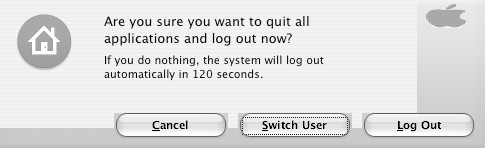
I wish I could match the Logoff and Shutdown dialog boxes - I don't have a website so please see attached files. I'm still looking for the answer to Multi-User systems and how to apply everything across the board to everyone. Also, how to switch styles without losing the sounds, icons, and mouse appearance and having to reinstall to get it all back, which removes the skin. Thank you all once again for your fixes.
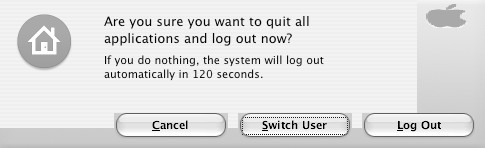
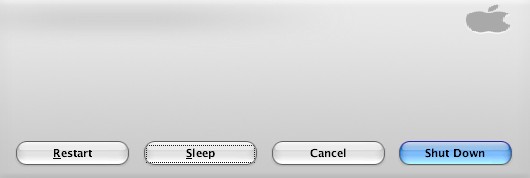

First of all the Firefox fields being a mile long are due to one thing and one thing only:
The Mac Shell Dialogs registry tweak. Don't worry about what it does, it's not important. Uninstall it from the uninstaller (yes you can select it by itself), and that should also fix your logoff dialog. It will not fix the shutdown dialog because you are using WindowBlinds, and I don't want to explain why it does what it does. So unless you stop using WindowBlinds your shutdown is just always going to look like that, unless you restore your msgina.dll file.
As for Multi-Users, you basically have to apply everything to each user. For instance, sound and cursor settings are stored in the registry in HKEY_CURRENT_USER. When applying stuff to the registry the only user available is the current one, so with things like cursors and sounds which are stored per user and not system wide, you have to redo the changes for every account.
However there's no reason to reinstall anything. The cursor scheme shows up in Mouse Properties in control panel and the sound scheme shows up in Sound and Audio Devices in control panel. Just select the scheme and apply.
As for the icons, if you switch users and they appear XP, it's because the system is pulling the old icon from it's icon cache database, even though the file on the system has a changed icon. All you need to fix this is rebuild the cache using everyone's favorite tool, TweakUI. Run TweakUI, select Repair on the left, then click "Rebuild Icons - Repair Now".
First of all the Firefox fields being a mile long are due to one thing and one thing only:
The Mac Shell Dialogs registry tweak. Don't worry about what it does, it's not important. Uninstall it from the uninstaller (yes you can select it by itself), and that should also fix your logoff dialog. It will not fix the shutdown dialog because you are using WindowBlinds, and I don't want to explain why it does what it does. So unless you stop using WindowBlinds your shutdown is just always going to look like that, unless you restore your msgina.dll file.
As for Multi-Users, you basically have to apply everything to each user. For instance, sound and cursor settings are stored in the registry in HKEY_CURRENT_USER. When applying stuff to the registry the only user available is the current one, so with things like cursors and sounds which are stored per user and not system wide, you have to redo the changes for every account.
However there's no reason to reinstall anything. The cursor scheme shows up in Mouse Properties in control panel and the sound scheme shows up in Sound and Audio Devices in control panel. Just select the scheme and apply.
As for the icons, if you switch users and they appear XP, it's because the system is pulling the old icon from it's icon cache database, even though the file on the system has a changed icon. All you need to fix this is rebuild the cache using everyone's favorite tool, TweakUI. Run TweakUI, select Repair on the left, then click "Rebuild Icons - Repair Now".
Wow! I got a response from the man! Woohoo! Anyway, the logoff thing is cool, it's just boxy around the buttons. Other than that, it's just fine. I have removed the Mac Registry Tweak, which helped with the Firefox box, but only after fixing the fonts with Soulless fonts downloaded from Duckie's site. I can live with the Shutdown box because it's not distorted. I just doesn't match your screenshots, which is cool. Thanks for everything Chris!! You're the man and get my vote for Aqua Release of the Year.
as chris is currently updating the flyakite page, can anyone point me to a mirror? (i'm in vegas for a coupla days and wanna hook my brother up.)
merry xmas!
nvm. thx osx-e!
as chris is currently updating the flyakite page, can anyone point me to a mirror? (i'm in vegas for a coupla days and wanna hook my brother up.)
merry xmas!
nvm. thx osx-e!
Here you go:
http://osx.portraitofakite.com/flyakitesp2/download.htm
Merry Christmas!!
tthx. ( i guess i should have been more clear when i edited my post. i found it at osx-e.com.) but again, thx and merry xmas!
I love this program but I have a small problem. After I installed it, Firefox doesn't display text boxes properly. Do you know how I can fix this?
look up about 5 posts...
I feel like an idiot. I should have checked the posts above but for some reason my head is not present.
Thanx
chris you nice
For some reason it says "bandwidth limit exceeded" on the page. Possibly because of all of the people downloading it. Can someone send it to me or post a link of another mirror? my e-mail: personal.raincloud@gmail.com. Thanks!