CheckMail Docklet for ObjectDock

He Fedro, it's me again.

Thanks for this really great plugin! I've tested the applet many days and had no crashes, etc. But I have one problem.

The plugin doesn't show me the correct number of new mails in my account (IMAP). That means: I have my mails checked with outlook, the plugin shows 0 (new) mails in my inbox. But once I receive a new mail, the applet shows the number of all mails in my inbox - I have the "only show unseen mails" checked.

Could this be a problem of the provider or of the flags?

Thank you, Maestro

#514072

I have seen some weird behaviors with the IMAP UNSEEN flags too, sometimes after closing the email app (thus count goes to 0 again) I get a count that does not really resembles the real unseen mail count... but after a while (a few check nows separated by 5 minutes or so) the count finally shows the correct number... it seems to me to be a server issue where the number of mails is being flagged at certain time spans.

On the other hand, if the docklet is not able to find the UNSEEN parameter it would fall back to RECENT. Then again, since UNSEEN is not a mandatory parameter it might be that under some circimstances the IMAP server is not retrieving that value.

What you cuould do is to download the command line utility I posted before and when you get another unusual mail count, run it and PM me the output, this way I may understand what is happening with your server and the docklet.

He Fedro, it's me again.

Thanks for this really great plugin! I've tested the applet many days and had no crashes, etc. But I have one problem.

The plugin doesn't show me the correct number of new mails in my account (IMAP). That means: I have my mails checked with outlook, the plugin shows 0 (new) mails in my inbox. But once I receive a new mail, the applet shows the number of all mails in my inbox - I have the "only show unseen mails" checked.

Could this be a problem of the provider or of the flags?

Thank you, Maestro
#514150

Love this! Thx very much :)

#514209

BRILLIANT!!!!

Just wanted to say well done. I have been looking for something like this forever and finally it's here!!!

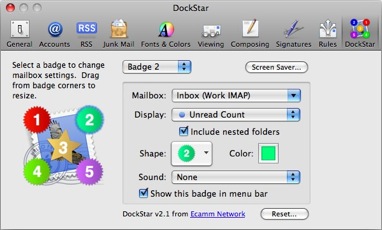
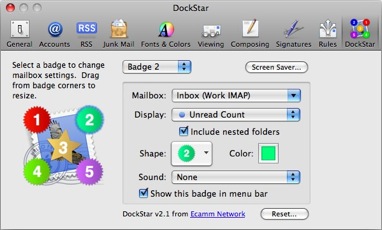
There is only one thing I could add as a feature. Apple's dockstar widget allows you to have more than one indicator on the icon, if you have more than one email account (see link). Similar function to your cycling through as far as I can understand, just that you can see them all at once rather than flicking through. But I love this as it is too, that's the only thing I could think of. I think you have been incredibly generous with all the modifications you have made to it so far with everyone's requests - so you can totally ignore my suggestions as I'm sure that you have a million more!!!

Thanks again - it's brilliant.

http://images.apple.com/downloads/dashboar...80102152638.jpg

post-84029-1226644809_thumb.jpg

dockstarwidget_20080102152638.jpg

#514488

Well... this seems to be something useful... maybe I will take the time to implement it... thanks for the suggestion.

BRILLIANT!!!!

Just wanted to say well done. I have been looking for something like this forever and finally it's here!!!

There is only one thing I could add as a feature. Apple's dockstar widget allows you to have more than one indicator on the icon, if you have more than one email account (see link). Similar function to your cycling through as far as I can understand, just that you can see them all at once rather than flicking through. But I love this as it is too, that's the only thing I could think of. I think you have been incredibly generous with all the modifications you have made to it so far with everyone's requests - so you can totally ignore my suggestions as I'm sure that you have a million more!!!

Thanks again - it's brilliant.

http://images.apple.com/downloads/dashboar...80102152638.jpg

#514489

IMAP not working right?

I use a great free imap server called hmail server; I am getting really incorrect unread mail counts. I took a look at the IMAP spec and some other things and came to following conclusions:

According to the SPEC, the UNSEEN return value for response to SELECT INBOX is the uid of the first unseen mail item in the selected folder, this the is the value I am seeing presented as my unread count.

This means it is NOT the count of unseen items. Anyway since it works for many people I am guessing many servers incorrectly use the UNSEEN flag to indicate a count?

Anyways if you are intersted in debug to increase your server support base, I'd be happy to set you up with a temporary account.

Other then this, this is an awesome docklet!

Thanks, Josh

#515030

Oh... thanks... I am not an expert in IMAP, so I may have got it wrong... as you say, many servers seems to implement it some other way.

If you would like to set up an account for me I would be able to take a look at the actual response sent from your server...

Thanks.

IMAP not working right?

I use a great free imap server called hmail server; I am getting really incorrect unread mail counts. I took a look at the IMAP spec and some other things and came to following conclusions:

According to the SPEC, the UNSEEN return value for response to SELECT INBOX is the uid of the first unseen mail item in the selected folder, this the is the value I am seeing presented as my unread count.

This means it is NOT the count of unseen items. Anyway since it works for many people I am guessing many servers incorrectly use the UNSEEN flag to indicate a count?

Anyways if you are intersted in debug to increase your server support base, I'd be happy to set you up with a temporary account.

Other then this, this is an awesome docklet!

Thanks, Josh

#515040

fedroponce can you plz

add support to HTTP check to hotmail and yahoo for no pay accounts

sorry for my bad English

#515117

I have updated the docklet to (hopefully) fix some issues with IMAP accounts no reporting the correct UNSEEN mail count. Latest release is v.0.1.0.9a

#515140

I have not been able to locate information on the specifics for Hotmail & Yahoo via HTTP.

fedroponce can you plz

add support to HTTP check to hotmail and yahoo for no pay accounts

sorry for my bad English

#515141

The latest version works with hmail server now. Thanks for the hard work, awesome docklet!

#515266

The latest version works with hmail server now. Thanks for the hard work, awesome docklet!

Can I ask what settings you have got to get it to work for hotmail? Assuming that's what hmail is? Cheers

#515274

Unfortunately the Docklet does not support hotmail HTTP access (yet), if you have IMAP access to your hotmail account (which I believe is now almost a paid service globally) you may configure it as a regular IMAP account, and it will work.

Can I ask what settings you have got to get it to work for hotmail? Assuming that's what hmail is? Cheers

If you happen to know any widget/docklet based way to access a hotmail account drop me a line and I will look at it (It does not matter if it is a yahoo widget or a vista gadget) I can take a look at any script based approach to understand how to implement it on my docklet. I have done some googling but never found any.

#515280

Thanks Fedropance, that's what I thought, just assumed that "hmail" was hotmail and I got excited!

Keep up the awesome work!

#515285

A few updates today (v.0.1.0.9b):

+ I have integrated the accounts context menu with the general context menu of the docklet. After some thought it seemed to me that this way is easier and more natural.

+ You may trigger a "Check Mail Now" action by left-click and hold for a couple of secs.

+ Whenever you manually lauch a mail app (by selecting it from the menu or clicking on the docklet) the accounts will be checked again, this way, the mail counts will be updated to reflect a current count.

#515456

+ You may trigger a "Check Mail Now" action by left-click and hold for a couple of secs.

+ Whenever you manually lauch a mail app (by selecting it from the menu or clicking on the docklet) the accounts will be checked again, this way, the mail counts will be updated to reflect a current count.

Cool, i was going to ask this last one feature.

The new checkmail now trigger its pretty cool too!

Thanks for the update :D

#515466

great dockelt!

thanks.

#515468

is it possible to define which application (e.g. outlook) is started when the docklet is clicked?

btw: with the new version i have some problems. objectdock is aborting and i get the following error:

AppName: objectdock.exe AppVer: 1.9.0.535 ModName: checkmaildocklet.dll

ModVer: 0.1.0.9 Offset: 0001480d

this happens only when i configure a second account to be checked...

#515470

Could you please give more details... account types, settings used both in general settings & account settings.

btw: with the new version i have some problems. objectdock is aborting and i get the following error:

AppName: objectdock.exe AppVer: 1.9.0.535 ModName: checkmaildocklet.dll

ModVer: 0.1.0.9 Offset: 0001480d

this happens only when i configure a second account to be checked...

#515504

You may configure a "global" application at the general settings window or/and a per account application at that account settings window.

is it possible to define which application (e.g. outlook) is started when the docklet is clicked?

#515505

ok, i just tested the old version from wincustomize...

it happen with that version too!

the details are:

- one imap account, show unseen/recent, without ssl - use port 143, checking INBOX

- one pop3 account, port 110, without ssl

what more do you need to know?

#515507

You may configure a "global" application at the general settings window or/and a per account application at that account settings window.

you mean the program which is run when new mails are received?

#515509

Indeed yourself

you mean the program which is run when new mails are received?

#515510

Could you do a little test? Check both accounts separately... (check the "Do not check this account" checkbox for either one and then do a CheckMail Now... then uncheck it for one account and check it for the other... this way the docklet will only check one account at a time.. thus letting me know if the problem is related to a particular type of account or the fact of checking multiple accounts.

Personally in my setup I have configured 6 accounts (but they all are IMAP) and have not received such error.

ok, i just tested the old version from wincustomize...

it happen with that version too!

the details are:

- one imap account, show unseen/recent, without ssl - use port 143, checking INBOX

- one pop3 account, port 110, without ssl

what more do you need to know?

#515511

fedroponce I was wondering if this might help you with Hotmail...

http://sourceforge.net/project/showfiles.php?group_id=49973

and for Yahoo!...

http://sourceforge.net/project/showfiles.php?group_id=52835

#515549